Apply Different Color Schemes To Webpages & Elements [Firefox]

Color Transform is a simple Firefox add-on that enables you to apply multiple colors schemes and transforms to webpages according to your preference. For instance, you might want to reduce the brightness of a page, invert its lighting, change its color scheme or more. These changes can either be applied for reading or printing purposes. After you’ve installed Color Transform, a toolbar is added right next to the address bar which provides access to multiple color schemes and transformations. The add-on includes 12 color schemes, such as White on black, Green on green, Pink on purple, Cyan on blue and so on. Moreover, you will be able to apply 16 different color transforms, which include increasing or decreasing the contrast, decreasing lighting, inverting color hue, decreasing or increasing saturation options and more. Read More

Safe Makes SSL & Extended SSL Connections More Visible In Firefox

Firefox browser displays an HTTPS protocol in the address bar for websites, but sometimes we tend to ignore this indicator. For such situations, Safe is a Firefox add-on can be quite useful, as it makes SSL and extended SSL connections more visible in the browser. After you’ve installed the extension, it adds a green or blue border around the page, which indicates that the connection to the site is secure. The tabs are also colored along with the border (which might cause some problem in viewing the tab titles), and those with a blue border sport an SSL connection, whereas the green border indicates an extended SSL connection. Users who find the border quite thick can change its thickness from the add-on's options. Read More

X-notifier: Receive Desktop Notifications For Gmail, Hotmail & Yahoo!

X-notifier lite is a Firefox add-on that lets you keep track of Gmail, Hotmail and Yahoo! email messages by letting you access multiple accounts through a compact pop-up and displaying desktop notifications. Users can customize the add-on and set a time interval for checking the emails and displaying notifications. The add-on automatically detects logged in accounts and displays the count for the total number of unread emails on the button in the toolbar. Read on past the break for details and screenshots. Read More

Collusion: Visualize Online Tracking & Cookies In Real Time [Firefox]

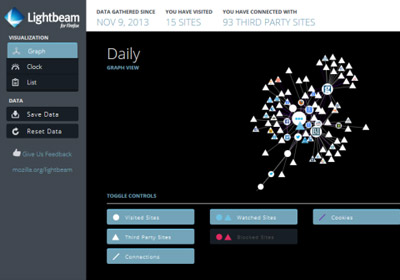
If you’ve enabled cookies on your browser, the online activity undertaken is usually sent from websites to third-party tracking websites. This creates a network of company-tracker linked list, which can be used to construct your long-term usage history. Although this is a major privacy concern by some, Collusion, an experimental Firefox add-on, lets you access this information for better and safer activity. Moreover, understanding the concept of intricate dependencies within websites has been simplified by the user-friendly animated layout coupled with relevant information displayed on the sidebar. Using this add-on, you can easily identify websites using third-party cookies, to track your activity while monitoring a spider-web of data dependencies, which motivates you to further pursue your online interests. Read More

Disable Theater Mode On Facebook & Get The Old Photo Viewer [Firefox]

Facebook has been cause for problems for a lot of people; whether it is because they’ve accidently shared an embarrassing photo with everyone in their friends’ list or because they wrote a status update when actually they were trying to send a private message. This all has nothing to do with how Facebook works and more to do with how people you use it but sometimes, Facebook itself does annoy a user. The majority of annoyances stem from Facebook making changes to its interface or it introducing new features without giving users an option to opt out of it. One of the more unwelcome features that Facebook introduced was the image viewer that displays images in theater mode. Some Facebook users are not really happy with the new Theatre Mode for viewing photos. This feature displays photos with a black background, similar to a slide show. So, if you don’t like it and want to browse photos the old way, then FB PhotoTheater Killer, a Firefox add-on powered by a Greasemonkey user script, disables the theatre effect of Facebook photos and albums. This handy add-on prevents opening of photos in the theatre mode and takes you back to the old style. Read More

DevSearch: Search For Programming Technologies & Frameworks [Firefox]

DevSearch is an add-in for Firefox that provides numerous search features to make your web search easier. The add-in is specially designed for web developers, and gives programming technologies and frameworks-related search results from multiple popular websites. Apart from providing specified type of search results, it comes with a Magic Copy feature to quickly search highlighted word on the page. Moreover, it includes General, People and Technology search categories. Each category has different levels, such as level one, two and three etc., to help you customize the search results. Read More

Janus: View Likes/Dislikes Under YouTube Video Thumbnails [Firefox]

Browsing YouTube can be quite entertaining, but sometimes you get to a point where you start coming across ridiculous videos, even though they have high view counts. This means that a view count can be quite misleading and you shouldn’t really judge a YouTube video based on that alone. Previously, we covered a Chrome extension called YouTube Ratings Preview, that displayed a like bar on YouTube video thumbnails. Janus is s similar Firefox add-on that adds a like/dislike bar under YouTube video thumbnails in both featured videos, search results and related videos. This like/dislike bar allows you to decide whether or not to watch a particular video. Read More

Use The Inspector Tool To Remove Page Elements In Websites [Firefox]

There are quite a few add-ons out there that let you remove and edit page content before you print it, but most of them are either too complicated or come with too many options. Remove Temporarily is a simple, but handy Firefox add-on that adds a Remove Element button to the inspect element toolbar. This button conveniently allows you to remove parts of a webpage of your own choice. Remove Temporarily can be used to remove parts or items on webpages before printing or for reading purposes. It helps you get rid of all the unwanted content, such as advertisements, sidebars and more. Moreover, the page goes back to its original form once you reload it. After installing the add-on, simply right-click an page element that you want to remove and select Inspect Element option from the right-click context menu. As you do this, the inspector tool will appear at the bottom of the page with the Remove Element button. Click this and you're good to go! Read More

Easy Read Hides Links On Wikipedia & Improves Readability [Firefox]

Links in articles on Wikipedia are a great source for building knowledge, but while you're reading an article, they can often distract you and make it difficult to focus on the actual content. Easy Read, a Firefox add-on, solves this problem and makes it easier to read Wikipedia articles by hiding links. Hiding the links makes it easier to focus on the content and avoid distractions. Users can easily show/hide links by clicking the button in the status bar, clicking the Show/Hide option the right-click context menu, or by using the Ctrl+Shift+Q hot key combination. Another great feature about the add-on is that, users can click hidden links when they want to find out details about a certain term or keyword. Read More

Tranquility: Clutter-Free Online Reading With Custom Font & Size [Firefox]

Tranquility, a Firefox add-on, improves the readability of online articles by removing unnecessary elements on a webpage, providing a simple and tranquil reading experience. Similar functionality is also available through iReader, an add-on we recently covered. Tranquility attempts to solve the same problem but uses a simpler approach with richer options that focus less on sharing and more on improving readability. . While reading online articles, either click the button in the toolbar or use the Ctrl+Alt+T combination as a keyboard shortcut to make the current web-page readable. A Tranquility! option is also added to the Tools category in the menu bar. You can use any of these options to toggle the reader on and off. Read More

Quickly Preview Bookmarks Before You Open Them [Firefox]

Often, while browsing the web, we tend to quickly bookmark several webpages, without giving them detailed, meaningful names. Although they are saved with the name of the page title, if you revisit them after a long time, you might forget what the topic was about, whether you bookmarked a page so you could read it later or because you actually found it to be useful. Organized bookmarking can save a lot of time and effort, unorganized bookmarks, on the other hand, can be a complete disaster. Bookmarks Preview, a Firefox add-on, can be of great help for people who regularly bookmark loads of webpages without saving them to well organized folders or for people who don’t clean their bookmarks regularly. It allows you to preview your bookmarks before you open them, so if you don’t recall what a particular webpage was about, perhaps seeing the site again will remind you. Clicking the preview does nothing and you will still have to click the actual link in the bookmarks menu to open the site. The preview of the saved webpage is generated live, i.e., it is not a cached screenshot captured when you first bookmarked the page. Read More

iReader: Read Articles In A Clean, Clutter Free Layout [Firefox]

iReader, a Firefox add-on, allows you to view news stories and articles in a clean and clutter-free interface. It strips out all the extra content, such as ads and sidebars, and displays the article in a neat layout with a toolbar that comes with multiple options, such as zoom in and out, print, emailing, sharing and more. In addition to that, it supports multi-page news articles as well. iReader works automatically, and as soon as you land on a webpage that displays an article, iReader icon appears right in the URL bar. Simply click this or use the hotkey to open the article in iReader. The add-on can be useful for people who want to read articles without any distractions. Read More

Addon Manager Fix: Quickly Access Your Installed Add-Ons [Firefox]

There are thousands of add-ons available for Firefox, and if you regularly need to manage your installed add-ons or plugins, then Addon Manager Fix can be of great help. It works by modifying the appearance of Firefox’s Add-on page, and reduces the height of all the items, which makes it easier to view more items at a glance, without having to scroll down the page. The default page displays the menu to the left and the installed items on the right. The add-on listing uses quite a bit of space, making it difficult to find add-ons. This simple tool solves the problem and lets you manage add-ons in a more effective manner. Read More

Super Start: Speed Dial & To-Do List For Firefox New Tab/Homepage

If you really like the speed dial feature of Chrome but favor Firefox as your primary browser, then you’ll love Super Smart. This Firefox add-on adds a speed dial feature to Firefox, and provides users with visual bookmarks, giving them the ability to quickly open frequently visited websites with ease. It also comes with a simple to-do list that acts like a reminder, so you never forget your important tasks. With Super Start, you can quickly add your favorite webpages to your start screen, and open them with only a click. Also, the page is fully customizable; you can add up to 170 websites to the speed dial, add notes, change the background color or simply set your favorite image as the background. Read More

easyMath: Enter Mathematical Symbols On Any Website [Firefox]

Have you ever had the need to enter a mathematical symbol on a website when browsing the web? Perhaps some obscure Captcha required you to enter a lesser used symbol at some time or perhaps you work with online word processors and/or apps that do not have an option for adding any of these characters. If so, easyMath is a Firefox add-on that displays additional mathematical characters in a sidebar. It displays mathematical symbols that are in most popular fonts, allowing you to use these symbols from the sidebar on almost any website, without any problem. Once you’ve installed the extension, you can conveniently open the easyMath toolbar by pressing Ctrl+m combination, or click View > Sidebar > easyMath. Read More

FindList: Dropdown List For Firefox Find-In-Page With History Feature

Firefox's word search function can search one word after another, without keeping a history of the previously entered words. This means when you're searching multiple webpages or websites, you have to enter the same search words over and over again. Not only can this be tiring, but also a time consuming process. FindList, a Firefox add-on, turns the find box to a drop-down history list, and saves the last 50 searches on a web page. So, while browsing the web, you can simply access and select words from this drop-down list. In addition to that, the number of entries can easily be changed from the FindList Preferences. Read More

Stop YouTube Videos From Automatically Playing When Launched [Firefox]

Sometimes, when you open a bunch of YouTube videos, all of them start playing at the same time. This can be quite annoying, as you individually have to pause or close each video. YouTube AutoPlay Stopper, a Firefox add-on, solves this very common problem that many users face, and stops YouTube videos from auto-playing. The great thing about the add-on, is that it works automatically, and you don’t have to do anything once you’ve installed it. Every time you open a new YouTube video, it won't auto-play; instead, a Click To Play button will be added to the video, which you can then click to watch the video. Also, in playlist mode, the next video auto-plays once the current video ends. YouTube AutoPlay Stopper even works for these playlist videos, and stops the next video from auto playing, even when YouTube's Autoplay option is enabled. Read More

Google Redesigned For Gmail, Google Reader, Calendar & Docs [Firefox]

Do you find Google Reader’s or Gmail’s interface dull and boring? Google Redesigned, a Firefox add-on, completely redesigns the look and feel of popular Google services, such as Gmail, Google Reader, Google Calendar and more. Google Redesigned loads and manages several CSS style sheets that change the appearance of these popular services. Once the add-on is installed, you will be able to toggle Google redesign for independent services by accessing the add-on button in the toolbar. The new interface is slick, and allows you to browse Google services in a more effective manner. Read More

Access History, Bookmarks & Search Suggestions From Firefox Omnibar

Omnibar Plus, a Firefox add-on, adds extra functionality to the Firefox Omnibar by organizing links from history, bookmarks and search suggestions. Bookmarks & History links are grouped together, whereas Omnibar search suggestions can be found in a different group. Omnibar Plus also requires another add-on, Omnibar, as a prerequisite. You can also quickly search and switch between different search engines using the shortcut search operator. Hitting F6 focuses the location bar, and a middle click on the search engine opens its homepage. The drop down list is compact, and different styles can be applied to it. Settings and features can be changed from  Omnibar Plus options. Read More

Tab Sidebar Reloaded: Preview & Access History For Open Tabs [Firefox]

Managing and sifting through multiple open tabs while researching a topic can be a difficult and a cumbersome task. Tab Sidebar Reloaded, a Firefox add-on, provides users with a sidebar in the browser that acts as the main tab bar, but with added features. With it, you can get a preview of tabs that gets continuously updated, so you don’t have to visit such tabs over and over again. Another very useful feature is that, every tab comes with history, reload and stop options, which conveniently allow you to navigate between multiple open tabs. The tab preview is automatically refreshed whenever the page changes, and you can also hide the main tab bar when the sidebar is open. The options allow you to display the sidebar on the right, left, top and bottom of the page. Tab Sidebar Reloaded enhances your web browsing experience by quickly letting you switch and manage tabs. Read More