Drippler Brings Its Gadget-Specific News App To The iPhone

A couple of my friends have been anxiously awaiting the release of Galaxy S4 ever since Samsung announced the end of April as the ATA for the flagship device's release. We are sure there are a lot of similar people who are looking for the latest information on their favorite gadgets, games or apps. You can get a general idea of the latest happenings related to any device by going through a few blogs or news sites, but there are easier ways of doing the same. Back in 2011, we covered a web service by the name of Drippler, which is a one-stop-shop for all the reviews and news stories on gadgets. The concept is similar to that of The Register app, albeit just a bit less generic. Drippler has had a presence in the Google Play Store for quite a while, and it has now arrived for iOS as well. Let's take a look at it after the jump! Read More

Get Windows 7 Gadgets On Windows 8 Desktop With Gadgetarian

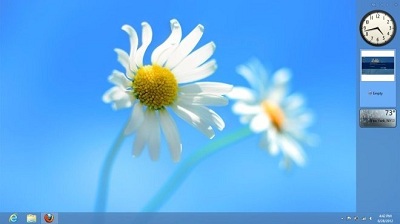
Although Windows Vista was a major flop, the desktop sidebar feature that Microsoft introduced in the OS was really fascinating. This sidebar allowed users to place several useful gadgets in it,  such as calendar, clock, CPU and network monitor, photo slideshow, search, RSS feeds etc. that provided them with quick access to information as well as many tasks. Windows 7 also came with desktop gadget support, and Microsoft took it one step further by removing the constraint added by the sidebar. With Windows 8 though, Microsoft decided to totally remove this feature, which is a serious turn off for those of us who liked having them on our desktop. If you want to bring desktop gadgets back to Windows 8, Gadgetarian might be a decent solution. It works in a slightly different manner than 8GadgetPack, but the purpose is the same. It provides you with 14 different desktop widgets, and you can even download more of them from the developer's website. Read More

SnapGadgets Is A Great Desktop Gadgets Alternative For Windows 8 & RT

Remember those sidebar gadgets Microsoft debuted in Windows Vista and then later reintroduced in Windows 7 as desktop gadgets? Unfortunately, the company had a change of mind and decided to remove them entirely from Windows 8, disappointing a lot of users. Although the Redmond conglomerate hasn't given any clear explanation regarding their removal, it is safe to assume that the desktop gadgets were removed because they weren't going to sit nicely with the Modern UI. Today, we found a handsome Windows 8 / RT Modern UI app that (kind of) brings back those missing gadgets. Labeled SnapGadgets, this light, miniscule Windows Store app comes packed with calendar, calculator, sticky notes and time gadgets that can be viewed alongside your desktop by snapping the app to the right or left of the screen. Read More

Bring Back Desktop Gadgets In Windows 8

Since the release of the Developer Preview of Windows 8, we have been covering both useful tools, as well as tips and tricks for Windows 8, quite extensively here at AddictiveTips. Among the many previously discussed additions, subtractions, and changes in Windows 8 compared to the former versions of Windows operating system, one feature that Microsoft has decided to drop in Windows 8 is the availability of Gadgets. Gadgets are useful for a lot of functions, such as keeping an eye on the weather, your new emails, or the current CPU and memory usage of your computer. I am personally a fan of Windows gadgets, and the lack of gadgets in Windows 8 is certainly something that will be greatly missed. If you open the Desktop Gadgets gallery on the Windows website, a notice put up by Microsoft says that Gadgets are no longer available. However, if you have some favorite gadgets that you would like to use even after upgrading to Windows 8, we found a third party application that allows you to do exactly that. 8GadgetPack is a tool for Windows 8 that installs the Gadget application from Windows 7 onto your Windows 8 machine. It has a built-in collection of Gadgets, and also lets you add and use more gadgets from your personal collection. Read More

Official Newegg App For WP7: Get Exclusive Deals, Place & Track Orders

The popularity of online shopping is continuously on the rise these days, but you still have to make sure that the online store you are visiting to make purchases is a reliable one and won't mess with your credit card info. Also, people prefer shopping at a store that offers nice variety and good prices. Newegg.com has been a pretty reliable and popular shopping source for people wanting to purchase electronic items and gadgets online. On the Newegg retail store, you can get things like computers, mobile phones, software and just about any geeky stuff you can think of. Although it is pretty convenient to order things on the service’s website, if you own a Windows Phone 7 device, you can now order Newegg items with greater ease, track shipping progress of each order and get exclusive deals on a variety of products with the official Newegg app for the platform. Read More

Decide.com For iPhone Tells You The Right Time To Buy A Gadget

Gone are the days when kids were satisfied in getting stuffed toys and little airplanes as their Christmas gifts. In the modern age, smartphones and gadgets are most in demand. As the holiday season approaches, and with Black Friday just around the corner, the Decide.com app might be just what you need on your iOS device right now. The web service isn't new, but seeing the iPhone app makes us realize that it should have had an app long ago, as you can carry it with you on your iPad or iPhone while shopping in the electronics market. This app lets users scan barcodes of electronic gadgets, and then gives them advice on whether they should buy the gadget right now or wait for the price to drop. Read More

G+7 Displays Google+ Messages Feed On Your Windows 7 Desktop

G+7 is a Windows 7 gadget to provide constant updates from your  Google+ Stream. It allows enlarging a particular story from a Google Plus feed in order to view it in a large pop-up window for better visibility. G+7 can be a useful gadget for Google Plus users who may wish to keep track of their stream updates to identify and open only important stories, without having to periodically visit Google Plus by using a browser. Read More

StandAlone Gadgets Pack Brings Stylish Gadgets To Windows 7 Desktop

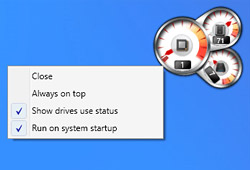
Windows gadgets provides an interesting way of keeping an eye on important updates and system tasks such as news, weather, time, RSS feeds, battery power, CPU utilization, etc and/or launching applications. Other than the Windows 7 default gadgets, people like using third-party gadgets as well. But what about a complete gadgets pack? StandAlone Gadgets Pack is a Windows 7 gadget pack with a large number of stylish and useful widgets for your desktop. The available gadgets provide weather updates, network bandwidth usage stats, Gmail mail count, battery power, folder shortcuts, Google News updates, date/time display and system resource usage details. Read More

Mail Preview Gadget Is Desktop Email Notifier With Windows Phone 7 UI

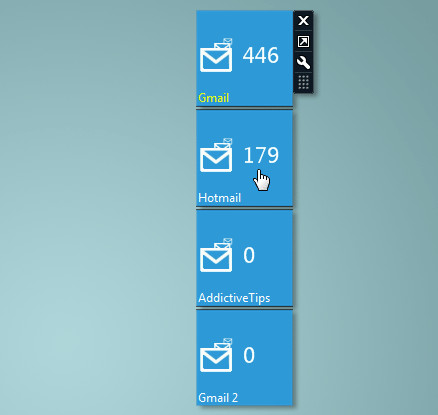
Mail Preview Gadget is a dynamic desktop gadget for Windows 7 and Windows Vista which brings Windows Phone 7 (WP7) user interface to your desktop. The gadget allows you to add as many email services supporting IMAP and POP3 protocols as you want, including both Gmail and Hotmail. Mail Preview gadget is an improved version of basic email gadget with lightweight animations to give users a feel of Windows Phone 7 interface. Apart from WP 7 like design, the 3 different layouts can give additional information, including total emails and total unread messages for configured email accounts. You have option to choose how many mails accounts are to be shown on desktop, with different refresh time interval, starting from 1 min to 60 minutes. Read More

System Uptime Full Gadget Shows Windows 7/Vista Uptime Comparison

'System Uptime' refers to the time during which a system is working without failure and has had zero downtimes. Over a period of time, a system can end up slowing down or breaking down due to excessive usage. One way of checking the current uptime of the system is through the Performance tab of the task manager and via the command prompt as explained in our post here. However, one might need more information to get a better comparison of system performance by checking the uptime from numerous intervals. System Uptime Full is a Windows Gadget that displays the system uptime from the time of system installation, current uptime and uptime of the last time the system was used. Read More

Metro Home Is Windows Phone 7 Metro UI Gadget For Desktop

A while back we reviewed the visually appealing HTC Home widget, this time we have an even better and more attractive weather and clock gadget by the same developer called Metro Home. It comes with a Windows Phone 7 Metro user interface that displays current and four day weather forecast , as well as time, date display and a picture slideshow. Metro Home has more enhanced options than HTC Home and the default Windows 7 weather gadget with the utility of viewing temperate in both Fahrenheit and Celsius formats. Read More

MaxMax Limits Fullscreen / Maximized Window To User Defined Area

MaxMax is one awesome system tray tool which can limit any maximized window to user defined area. Many users tend to keep their Windows 7 gadgets or notes always on top but it can be a nuisance when windows are maximized. The always on top gadgets, notes, or applications can prevent users from working with the maximized window. Read More

Disable User Installed Gadgets In Windows 7

Windows 7 offers a variety of useful gadgets but user can install additional gadgets as well. By default, the user installed gadgets are enabled in Windows 7  but you can easily change the settings and can prevent all users from being able to install a gadget too. You will need to make a little change in the group policies, go through the following simple steps to achieve this. Read More

Remove ‘Gadgets’ From Windows 7 Desktop Right-Click Context Menu

A few weeks back when I installed Windows 7, everything looked great, until I right-clicked the desktop. I always tend to keep my context menu clean and clutter-free. Since I am not a big fan of fancy Windows Gadget, removing it from the desktop right-click context menu makes sense.

Note: Before making changes to the registry, make sure you have backed up your Windows Registry, to learn how to backup, click here.

Read More

Save Clipboard Content With Clipboarder Windows 7/Vista Sidebar Gadget

Clipboarder is a simple Windows Sidebar gadget that saves all clipboard history. You can view and access these saved clipboards with few simple hotkeys. All type of clipboards are supported, text, images, and files. They are displayed as a Preview in the sidebar. Apart from it’s simplicity, it also supports drag & drop functionality which makes it more easy to use. Just Install this gadget and it will load up in your Windows Sidebar. Now Copy anything and it will automatically appear in this gadget. The default hotkeys for switching between clipboards are:
  • Win + V (Previous Clipboard)
  • Win + C (Next Clipboard)
Read More

How To Add Your Favorite Google Desktop Gadgets To The Left Sidebar Of Your Gmail Account

Yesterday, I wrote a post titled How To Add Google Docs And Google Calendar In Your Gmail Account. Today I am going to teach you ways of adding your favorite Google Gadget in your Gmail Account. The process is tricky but fairly easy.

The title of this post could be confusing for some but this is how it works,

  • All Gadgets that are available for Google Desktop are given in iGoogle Content Directory.
  • Almost all Google Gadgets(that end with .xml url) can be added in the left sidebar of your Gmail account.
Read More