Capture Screenshots, Edit Images & Share Them Online With PicPick

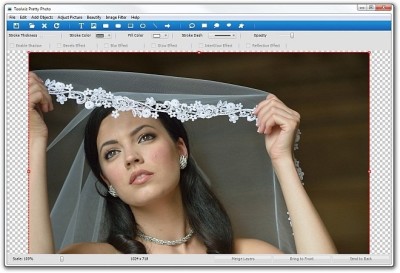
Screenshot tools are available in tens of numbers around the internet, but only a few of them actually worth giving a try (not bashing the rest of them in anyway, however). PicPick is a feature-rich, desktop image manipulation tool to capture screenshot, edit images, share them via Facebook, Twitter, email, ImageShack, Min.us and upload them to an FTP server. It contains some complimentary image editing tools such as a CorelDraw style color picker, screen pixel ruler, magnifier, protractor, crosshair and more. You can use PicPick to instantly transform your desktop into a whiteboard and use it for drawing anything on it in a selected color. It can also send edited images to MS Office programs such as MS Word, Excel and PowerPoint. Read More

Leaf Restores Photos To Normal On Selective Areas After Adding Effects

Many of us like tweaking our pictures every now and then by adding effects to them. Some of the most commonly used effects which are available with image editing applications include Sepia, Greyscale and Negative. While these effects can be easily applied to images, it can be hard to colorize only a selected area where effects like Sepia, Grayscale or Negative have already been applied. Leaf is an image editing application which lets you colorize only selected parts of an image with a Sepia, Greyscale or Negative effect. The first part of the process includes selecting a preferred effect followed by dragging the image over the interface. Unlike most image editing applications, Leaf allows you to first add the selected effect to the image and then to remove it from selected areas of the image. Your transformed images can be saved in PNG, GIF, JPG and BMP and PDF format. Read More

Create Cross-Stitch Image Designs From Your Photos With CStitch

Cross-stitch is a tiled, raster-like pattern which is used to give images a counted-thread embroidery look. Such patterns can be hard to create using common image editing applications and require cross-stitch design image editors for easy transformation of common photos to a cross-stitch format. CStitch is an open source tool like Scheme Maker, which can creates cross stitch patterns from images and provide the option to select the number of colors and stranded thread to edit virtually any part of the image squares. It allows creating embroidery based designs to and from many image formats, such as BMP, GIF, PBM, PGM, PNG, TIFF, XBM and XPM, as well as a PDF file. when creating a cross stitch desgin for a selected image, you are provided with a side by side comparison of the two images, showing you the before and after effect of the picture that is to be tweaked. Read More

TiltShiftGenerator – Add Professional Tilt Shift Effects To Any Photo

There are multiple online and desktop image editors available for free but they support mostly common effects like adding sepia, emboss or sketch effects to an image. TiltShiftGenerator is a desktop application that lets you add the hard-to-come-by tilt shift effect to any photo. The app lets you add both a radial and linear tilt to an image, lets you control the degree of the tilt, place the central point of the tilt anywhere on the image, adjust the level of vignette and increase or decrease image brightness, contrast and saturation. All images are saved as JPEG. Read More

ObscuraCam For Android Detects Faces In Photos & Conceals Them

The photography genre of Android apps is vast enough to offer you almost every type of flavor. There are simple photo snapping apps, countless photo editing monsters, apps that bring all the snazzy and exotic filters and effects to the table, alternatives to your Android's stock gallery, and whatnot. Then there are a few candidates that offer some weird, yet fun-filled, options, such as presenting you with a photobooth like interface, let you swap your face with some other person in the photo, and let you transform your photos in any way you like. Now, should you feel like getting your hands on an app that lets you distort a specific portion (specifically face) of an image, we have got a very handy solution for you. Better yet, if the app could automatically detect unwanted faces in the image, your task of hiding those faces would become all the more easier.  ObscuraCam is a free, handy tool for Android that uses facial recognition to detect faces within snapped/imported photos, lets you conceal them with any of the four available obscuring effects (Redact, Pixelate, Background Pixelate, Masking) and share the results with your friends. Effectively, ObscuraCam resembles Privacy Camera for Android but with slightly enhanced interface a few additional features (for instance, the face identification and image sharing features). Join us after the break for more. Read More

12 Features Of Picasa That You Probably Don’t Know About

We have noticed that due to the recent colossal influx of cloud based apps in software arena, many image editors and viewers are either totally drifting away from the core image organizing and editing features which a common user likes to see, or have started capitalizing on everything, from online image sharing to social media components integration with long winded configuration process to go around with. That’s the reason why so many eminent image viewers and editors are being cascaded down the popularity graph. So, what makes an image editing software stand out from the rest? I am not an advocate of outright simplicity but when it comes to choosing a good software which while offering all important features to catch up with fast track online image sharing blaze, also provides features to enhance image viewing and editing experience, only one springs readily to my mind, and that is, Picasa. Whether you want to brush up on your image editing skills, share photos with your friends and family, or simply like to enjoy an awesome image viewer on your desktop with web sync, Picasa is arguably the most viable option you can opt in for. In this post, we will try to delve deep into its most underrated features. Read More

Grab And Edit Images Directly From The Web With Pixlr Editor

Photoshop is a terrific image editor, the only slight shortcoming with it is that it runs on your desktop and you can’t always take your desktop with you everywhere. The portable version or the online version gives you more freedom though but features in the online version are limited. Online image editors may not give you all the powerful Photoshop features, but they’re a great way to edit images in your browser when you don’t really need the high end Photoshop ones or you just need to fix some images fast. Pixlr is an online image editor that drills down many high end functions for easier editing right in your browser. Read More

Snapshoter Is Screenshot Clipboard Manager And Editor

We love to try screenshot taking tools which offer a seamless way to capture whole and specific screen area with a feature-rich screenshot editor. In the past, we have featured many screen capturing tools, having a whole lot of different features to capture screen areas and then to edit them. Shotty and Greenshot are already our favorite tools, but unfortunately, they both lack a much needed feature – screenshot clipboard history to automatically cycle through captured images (and use them in a required sequence). Snapshoter is a portable screen capture tool which offers all the essential screen capture features with an option to save them in unlimited screenshot stack. It provides the utility of saving as many screenshots as you want in a list which can be pasted with either a simple drag and drop or by using default Paste hotkey combination; Ctrl + V. Read More

Create Art Or Edit Images On The Go With Fresco For Android

Fresco, to be precise is the art of painting on fresh wet plaster. Developed by XDA-Developers forum member seanw.org, Fresco is one of those rare graphics app that let you create little pieces of art on the go and provides you with some quite useful options and features. Now before you get confused with this app being just an image editor, it’s more than that actually. Freehand drawing on touchscreens just got better and I dare say it can be really addictive once you get the hang of it. Read on for screenshots, features and more! Read More

Amazifier – Edit And Retouch Photos & Upload Them To Facebook, Flickr, Picasa

We at AddictiveTips, love to try newly developed image editors and have already covered many in the past, Zoner Photo Studio, Kestral GX, Adobe Project Rome, and SunlitGreen PhotoEdior, to name a few. Whenever we come across one freshly baked image editor with some unique features, we can not wait to test it out for you. Amazifier Lite claims to be one easy to use image editor with many features to edit and re-touch photos. You can directly import pictures from Picasa, Fickr and Facebook, edit them and upload them to any of supported online services. The interface is designed to keep things simple and self-explanatory with all basic editing and re-touching tools, which one might need while tweaking photos. On the main interface, you can either initiate web search for images, login to Facebook to fetch image gallery, import pictures from Fickr and Picasa or browse through local folders to select an image archive for editing purposes. Read More

XnConvert – Apply Effects And Convert Image File Formats

XnConvert is a portable application designed by developers of famous XnView Shell Extension – which brings XnView image editing capabilities in Windows context menu. XnConvert provides image editing tools to let user change, edit, and apply effects over images without putting much effort. Unlike other image editing tools, the application is backed by many pre-defined actions for applying Image, Map and Filter related effects over selected images. Compared with XnView Shell Extension, it encompasses a great deal of interesting effects and options which are bundled into respective action categories. Furthermore, it not only enables user to apply effects but let them change Output formats as well. While you can change the output file naming convention, image type can also be specified to always convert those images over which you’ve applied effects for better image quality result. Read More

Kestrel GX – Image Management Software With Multiple Editing Tools

Kestrel GX is a free image management application which combines both advanced image editing and photo organizer. You will find almost all the contemporary editing tools for setting image levels, colors, saturation with options to watermark image, reduce red-eye effect, and to adjust image sharpness. Adding more, it supports more than 20 image formats, including, PNG, JPG, WBMP, PS, PDF, DCX, BMP, PSD and many other digital camera supported RAW formats. Along with managing image repository, it offers blazing fast search speed by using multiple search criteria and meta information like, EXIF,IPTC, and GPS. Although the application mainly offers image database management, it comes with an image editor as well with extensive feature set while supporting other professional image manipulation suites including Paint Shop Pro and Photoshop. The application is also accompanied with basic selection tools to let users select and edit an image in a required shape. The image database allows anyone to keep their image catalog organized without having to specify image folders over and over again. Read More

Give Your Pictures Artistic Flair With Dydelf

Programs like Photoshop and Lightroom can do amazing things for you in terms of color corrections and adding artistic effects. But when it comes to beginners who are just looking to tweak their photos, its hard to find open, simple and easy to use software. Dydelf is a tool which will help you add artistic effects to your photos in just a few clicks. The techniques used by this application will allow you to perform digital processing on any image and transform it completely into an outlined graphic with an added artistic flair. Read More

Adobe’s Project Rome Is A Powerful Content Editing Platform (Free For Now)

Project Rome is one of the latest offerings from Adobe. It is an all-in-one content creation and editing platform devised with both novice and experienced users in mind, and offers an interface that lets one inject the dynamism of multimedia and animations in every day projects, be it a brochure, greeting card, or something as diverse as a website. Read More

fixPicture – Online Image Resizer And Converter For Digital Camera Owners

fixPicture is an image editing application for quickly resizing, adding effects, and converting your photos online. It is developed for digital camera owners who want to quickly retouch their photos while on the go. It comes with two versions: light-weight and flash-based image editor with subtle differences. The light-version is HTML based, facilitating users with slow internet connections, whereas flash-version is rich in features, offering a great number of effects along with basic image editing tools. Read More

Image Analyzer: Enhance And Retouch Photos Without Using Photoshop

Image Analyzer carries wide range of advanced features, options and tools which will greatly assist user to analyze different parameters of images. It is geared towards users who loves to analyze and enhance images either for fun or for professional use. According to the developer, “The program contains both most image enhancement features found in conventional image editors plus a number of advanced features not even available in professional photo suites”. In short, it allows you to enhance photos without needing to have Photoshop installed. Read More

SunlitGreen PhotoEditor Brings Multi-Channel Graph Level Curve And Layer Support

Previously we covered bunch of awesome image editing tools some of which are; Thumba, which is Silverlight based online editing tool, Imagina-uses 3D technology to revamp your images and finally Pixelitor, which offers layers support. SunlitGreen PhotoEdit is a portable photo editor, comes with editing tools and options which are necessary for advance image editing. The application is light on resources but the significant part is that it offers a fast image processing speed and can apply transformations over an hefty image in short period of time. Read More

Edit Images Directly On Webpage With GooEdit

Editing online images generally requires you to download them to your PC first, and then edit them using an image editor. But what if you could edit images directly on the webpage you saw them? Wouldn’t that save some time and effort? GooEdit, an extension for Google Chrome, offers just that. It’s a powerful, yet simple image editor that lets users edit images online. Read More