Quickly Switch, Backup & Restore Windows WiFi Network Profiles, IP & DNS Settings

When reinstalling Windows or upgrading to a new PC, we usually have to set up everything from scratch. We reinstall apps, re-download important files, and reconfigure several settings here and there. This includes credentials for wireless network profiles and configuring your network settings, such as the static IP and DNS that you want to use. If you’re a network administrator who is required to configure network profiles on multiple PCs and on a regular basis, such a task could take a bulk of your day's time. Network Profiles Utility can really save the day in such situations. Designed as a portable application, Network Profiles Utility can easily import and export wireless connection profiles as well as IP and DNS settings among multiple Windows machines. Read More

eToolz Brings The Most Useful Network & Web Tools Under One Hood

Do you hate using multiple network tools for performing required tasks, including domain lookup, resolve DNS, ping domain, trace route and more? eToolz is a light-weight, portable application suite that includes a total of 10 most useful network utilities, enabling you to perform numerous network-specific operations from one window. The application has been specifically built to help network administrators diagnose and resolve a wide range of network-related issues. While the application comes packed with superior-alternatives to various Windows command line utilities, including Tracert, Ping etc, it hosts a number of web-related tools as well, that allow you to view page rank of any website, view domain whois information, verify email address, extract and view HTTP header info from given URL, and connect to internet time servers. Read More

Perform IP Address Calculations With Gip IP Address Calculator

Gip is an open source Linux calculator for system and network administrators for performing IP address calculations, e.g., an administrator who may require finding out the IP prefix length, subnets, etc. To calculate IP address related information, simply type the IP, subnet mask and prefix length. Furthermore, Gip can split subnets using a given IP subnet mask, and perform other necessary calculations for converting IP address ranges. Read More

Surf Anonymous Free: Hide Online Credentials To Protect Privacy

Using anonymous surfing by concealing your actual credentials is a much safer way to browse the internet, rather than using your actual information. This is because, phishing websites and hackers attempt to log IP addresses for malicious purposes, as certain spyware applications and harmful codes require personal IP addresses to initiate attacks. Similarly, hackers try to use IP information in order to obtain home addresses, credit card information, social security numbers and bank account credentials. For this reason, using an anonymous proxy can trick such malicious sources by providing them with alternative, dummy credentials. Surf Anonymous Free is an application that adds a browser extension (on installed browsers) to provide you with alternative credentials. Moreover, it also provides a US-based IP, which enables non US users to access location restricted websites. While another application, Tunnel Bear, provides similar functionality, unlike Surf Anonymous Free, it restricted by bandwidth limitations. Read More

BlueLife Hosts Editor: Get IP Addresses Of Domains & Block Or Activate Them

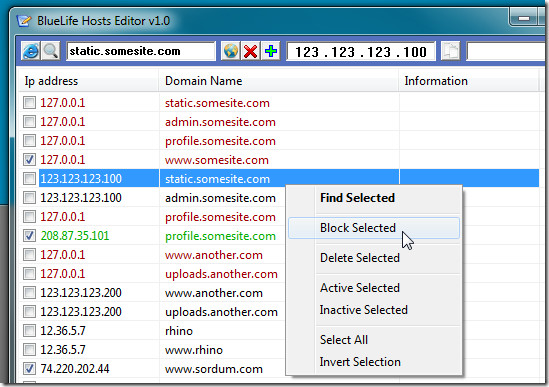
Windows hosts file managers are developed to create, edit & manage hosts file and also to switch between multiple hosts files without requiring you to manually overwrite existing hosts file. You may, for instance, want to use different hosts file for home and office network in order to block certain web portals and map frequently visited domains with their IPs to boost the access speed. In such a case, customizing hosts file for home and office network is not a good idea. So, what you probably need is a hosts manager like BlueLife Hosts Editor to efficiently manage and edit hosts files. Unlike previously featured Hosts File Management, it offers a wide range of features to create new hosts files, update existing one, flush DNS cache, search domain names, get IP address for specified domains, block domains, backup and restore hosts files (created/modified in one session), and toggle mapped locations On/Off. Read More

HostsEditor: Quickly Toggle Mapped Domains On/Off In Windows Hosts

Windows Hosts file is used to map domain names with their IP addresses to instantly access the most frequently visited websites, network locations and also to block potentially harmful remote locations. Hosts file works just like your ISP provided DNS server. The only difference is that Hosts file lets you create list of domain names and make amendments to mapped locations. The hosts file can be easily edited using any text editor but Windows doesn’t provide any tool to manage the mapped domain names. For instance, it requires you to manually enter the domains, modify the IPs, etc. Moreover, users often find it hard to quickly toggle mapped locations On or Off. HostsEditor is an application to add new nodes to hosts file without having to manually edit them. Read More

Redirect To Web Server Using Fixed URL Without Requiring Static IP Address

It can cost an awful amount of money to rent a static IP from your local ISP to ensure that it does not rotate periodically. The alternative to static IP means that one would have to deploy a mechanism through which the changes in IP address assigned to your web server (via the ISP’s DHCP server) can be adjusted. This is one amongst the reasons why URL redirection applications are used. URLRedirector is a URL redirector, designed to help you cope with the changing IP of your computer (as assigned by your ISP). This application is developed for those who are hosting their own websites and would like to ensure that their web server has a static IP address. It provides the option for managing the IP addresses assigned by your ISP and allows fixing the URL of your website, even when the IP address of your web server may be constantly changing. Read More

Monitor Incoming And Outgoing Network Traffic With IP Traffic Spy

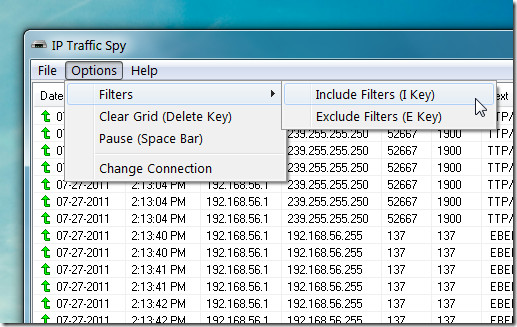
IP Traffic Spy is an open source application which displays the incoming and outgoing data from your network connection to help you determine the level of your network security. For each data packet, it's source and destination IP address is provided, along with the local / remote ports and text content. It also has a filtering option to keep a tab of specific IP’s only. This might be handy for monitoring incoming traffic from specific sources, in order to identify connections which may be attempting to profile your browsing habits or trying to obtain user information. Such threats are often present from not just websites disseminating malware but also peer-peer connections, such as the ones established via a Torrent clients. Read More

CyberGhost VPN Allows Free, Anonymous Private Browsing [Privacy]

Using anonymous surfing by concealing your actual credentials is a much safer way to browse the Internet than to do otherwise. This is because harmful websites attempt to log IP addresses for malicious purposes. As certain spyware applications and harmful codes require personal IP addresses to initiate attacks. Similarly, hackers try to use IP information in order to obtain home addresses, credit card information, social security numbers and bank account credentials. Using an anonymous proxy tricks such malicious sources by providing them with alternative credentials, which protects your computer’s security from being compromised. Having a proxy also shelters from tracking agents that attempt to profile user activities. Read More

Get Graphical Ping Results For Multiple Hosts With GPING

Ping is a network administration utility, which is used to test the reachability of a hosts on an IP based network. It also measures the round trip time for messages sent from the originating host to a destination computer. GPING (Graphical Ping) is a portable network administrators utility which pings specified hosts and generates graphs for multiple host responses simultaneously. It periodically pings the added hosts over a user defined polling interval which helps to keep a regular check on the activity of servers, routers, client computers and the like. GPING is a GUI for the command prompt Ping command, with the option to ping multiple hosts simultaneously with graphical network data overview. It provides the option to monitor the default timeout, polling interval and round trip time for the selected hosts. A list of multiple hosts can also be imported to quickly load and monitor devices with the assigned host names. Read More

Angry IP Scanner – Scan And Identify Active Hosts On A Network

Angry IP Scanner is an open source and cross platform application, which enables scanning for functional hosts on a network. It allows scanning for a specific range of IPs to determine which IP addresses may be available for being assigned to other systems. You can also select a hostname to obtain more in-depth information about a specific device, such as the device’s name, ping response time, assigned IP address and ports. Angry IP Scanner has perhaps been made for angry network administrators who find it hard to determine free IP addressed on large networks, which may be assigned to computers or devices on networks running Windows, Mac and Linux machines. Read More

Cache DNS Results To Boost Internet Speed With DnsSpeeder

One way to boost internet speed is to use freely available open DNS services. You can switch between different DNS services other than provided by your ISP to check which service provides best results. If switching DNS services doesn’t help, you can try an application which attempts to cache DNS queries to mitigate the time required in looking up IPs of requested domains. DnsSpeeder is DNS proxy server which provides you with just that. It automates the whole process of storing DNS results on your local machine. Being a proxy server, it replaces your primary DNS server address to localhost. When DNS request is received from client, it looks up the IP addresses of the requested domain from local cache instead of fetching required info from your ISP to speed up internet access. In case, it fails to find the IP address of requested domain, it uses certain DNS services to return resolution results back to client. Read More

Ping Multiple Servers And Plot Ping Info On Graph With WinPing

Windows native network command - Ping is used to get information regarding the status of server and current response time. Since manually recording server uptime and response time is beyond possible, many network administrators look out for simple network ping utility to check both uptime and response time for connected clients, member servers, and main servers to keep all of them under observation. WinPing is a portable application which pings specified websites and plots the ping data on graph, so you can visually analyze the response time over the period of time. It provides a slew of options to configure ping loops, so that the web servers can be consistently checked for server down time. The inherent Auto-Save option will save you from multiple lines of ping information whilst allowing you to review ping information data values and analyze the ping information in real time on the graph. Read More

IP Seizer Prevents IP Conflict By Tracing Available IPs On A Network

System And Network Administrators who work on networks with hundreds of computers often find it difficult to trace the range of IP addresses currently in use. I have personally worked on such a network and despite the fact that we had VLANs (Virtual LANs) to ensure that the hundreds of connected systems were never short of an IP range, yet it was often difficult to track what IPs were in use. As the setup on that network was VOIP based, therefore if e.g. 20 computers were connected to a VLAN, there were 20 IPs reserved from the same range for SIP phones (connected to each computers). For example, if a computer had the IP 10.10.10.1, the SIP phone had the IP 10.10.10.2. This meant that many IP ranges were constantly in use. On such networks it is not always easy to keep a documentation of the active IPs. At the same time when a new IP is to be assigned, one might have to Ping several IPs or check them from a server, in order to determine available IPs. IP Seizer is a small tool that resolves this problem. It has a simple and comprehensive interface that allows quickly looking up active IPs from an entered IP range. This enables identifying the free IPs from a specified range. Read More

Convert And Check Standard IPv6 Formats With IPv6 Address Converter

Internet Protocol version 6 (IPv6) is a version of the Internet Protocol that is designed to be the successor of IPV4 addresses. As IPv4 addresses reach exhaustion, IPv6 will soon become a viable alternative. Previously we reviewed,  Bitcricket IP Subnet Calculator which provides easy IPv4 and IPv6 related calculations. However, it does not contain an option for converting between the many standard IPv6 formats for Internet Protocol Version 6 addresses. IPv6 Address Convertor is a simple tool that converts IPv6 addresses between the many standard forms. Read More

Free IP Switcher Can Switch Networks Settings Easily

For all computers that have a network adapter, Windows detects networks in range for that system and provides a list of all detected network(s) when it is connected to a wireless or wired network. Whenever users switch to different wireless networks, they require changing particular IP address, gateway, subnet mask, proxy server configurations, etc. This creates the problem of remembering TCP/IP settings of every network. With Free IP Switcher you can automatically change all network settings of your system, including, IP address, subnet mask, default gateway, DNS, Wins server, proxy settings and more. Read More

Hover IP Checks Ports, Routing Table, Monitor And Trace Routes

Recently we reviewed, Network Utilities, which is a GUI application for running network specific commands. HoverIP is a similar, yet more advanced application that enables users to obtain related network information. This includes MAC address, DHCP assigned IP, DNS, Default Gateway and IP Lease expiration time. Other tasks that can be performed with the help of HoverIP include nslookup, trace routes, port scanning,  pinging systems and and monitoring routes of a routing table. What makes HoverIP unique from others is the GUI based port scanning utility and routing table. A routing table is a set of rules, that is used to determine where data packets traveling over an Internet Protocol (IP) network will be directed. IP-enabled devices, such as routers and switches, use routing tables. Being able to add routes to monitor in a GUI (Graphical User Interface) is indeed quite convenient for system and network administrators. Read More

Advance IP Scanner Now Scans Multiple IP Ranges And Performs Wake-On-LAN Tasks

When network administrators are in a situation when they want to get an overview of all clients in order to view diverse information, such as, MAC address, server connection up time, shared resources, etc, scanning nodes connected over network for IPs comes handy. One important feature, system admins look for in IP tools, is Wake-On-LAN which is responsible for controlling different functions of clients from remote location, such as, system wake-up and shutdown. Advance IP Scanner, which has been famous among power users, now offers Wake-On-LAN feature along with many other improvements for accessing HTTPS, HTTP, FTP with option to view shared resources of connected systems in latest version – 2.0. Since it’s one of the best tool around that can quickly scan through the multiple IP ranges, you can view, list down and control all the connected systems.  Along with wide range of connections, it also enable users to scan systems for fetching full information about the network through ARP (Address Resolution Protocol). Read More

Find IP Location And Host Name With IP Locator

IP Locator is a straightforward desktop utility which is developed to easily track IP-specific information, including, name of IP location, exact location (with latitude and longitude values), and host (owner) name. The application also integrates Google Maps to view the IP location. Apart from this, IP Locator includes an option to retrieve IP related information from whois server while allowing user to check ISP of the defined IP address. Read More

Advantages Of Nslookup Command Line For Common Users

Windows command line utility is often neglected by many users, simply because they hardly know the about the slew of features it holds. Many useful applications operate directly from CMD and one of them is Nslookup. It is a network administration command-line tool used widely by system and network administrators. It is used for querying the Domain Name System (DNS) to obtain domain name or IP address mapping or for a specific DNS record. In this article we will explain the benefits that can be dervied by a common user from the nslookup command line. Read More