Favoriteer Is A Standalone, Lightweight RSS News Reader For Mac

Google Reader’s demise is almost on us, and yet I still instinctively visit the service every morning. A part of me thinks I should start getting used to something new, while the other part says I should enjoy using Google Reader while it is around. Google Reader itself reminds me occasionally that it will be gone forever on July 1, 2013, but I still haven’t decided what service I will turn to in the end. Feedly is looking the best at the moment. If you’re a Mac user still out on the hunt for something minimal to replace Google Reader with, Favoriteer is a another option. Available in the Mac App Store for free, the app is new and works independently of Google Reader. It’s a fairly basic RSS app that lets you subscribe to feeds individually, and you cannot import your feeds from an XML file, which can be a bummer for those migrating from Google Reader. Favoriteer runs in the Menu Bar and appears on your desktop as a floating window that  fades out when it isn't in focus, so that you can see the app behind it. Read More

SyndiFeed Is A Clutter-Free, Magazine-Style RSS Feed Reader

Google Reader is going down this July and it’s high time to abandon ship. But finding a seaworthy alternative is just as important if you want to keep up with all your favorite sites and blogs with as little shock of transition as possible. Among the many other excellent feed readers that’ll compete for your attention this summer, SyndiFeed definitely comes among the top. With the sleek, glossy looks of a magazine and the thoughtful, eye-pleasing format of a great website, SyndiFeed really deserves to be given consideration by those looking to switch, especially in this final month leading up to Google Reader’s demise. Read More

RSS Master Is An OS X Feed Reader With A Built-In Tabbed Browser

Google Reader’s retirement will not just impact those who used its web interface, but also the scores of apps that synced feeds using Google’s API, and everyone who used such an app. While the hunt for the best web alternative for Google Reader is still in progress, many users are also considering switching to a desktop alternative. Mac users can get RSS Master for free for a limited time in the Mac App Store. It syncs with Google Reader, but can also work independently of it. You can add feeds from a local file, Blogger, LiveJournal, Xanga, MSN Spaces, or a URL. You can import feeds from an XML file as well. RSS Master had its own built-in browser that allows you to open articles in different tabs. The app lets you share articles on Twitter, Buffer, Evernote, Instapaper, Facebook, Pocket and Delicious, and add them to Safari’s reading list. You can set RSS Master to open articles in your default browser instead of its own, customize the font, and choose how often the app will check for new items in your feeds. Feeds can be organized into folders and refreshed manually all at once. Read More

ModeFeed Is A Web-Based News Feed Reader That Focuses On Minimalism

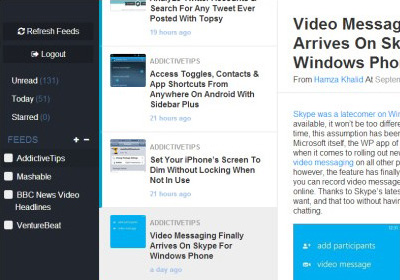
There’s been a lot of debate regarding Google Reader’s bitter demise lately. The 8 years old RSS reader, which most of us have admired for quite long, is coming to an end. While alternatives like Feedly have already taken up the gauntlet to provide a similar experience when Google Reader will no longer be around, having more options never hurts. ModeFeed is yet another Google Reader substitute that you might want to take for a spin. Even though it’s far from looking as good (if not better) as Google’s offering, this intuitive web app is worth giving a shot due to its minimalistic and simple UI that's designed to help you focus on the actual content rather than the UI itself. Lets see how it works. Read More

MultiPLX Is An Elegant, Pinterest-Like Web Based RSS Reader

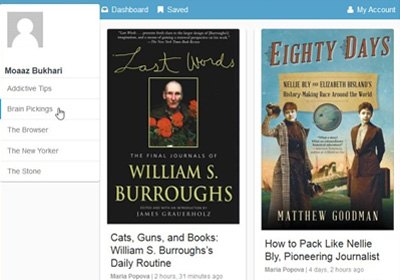
Feedly is emerging as the number one contender in the list of online RSS services that will likely replace Google Reader. Though with a few months still left until users have to make the final switch, there is time enough for it to be anyone’s game. MultiPLX is yet another RSS web app that works independently of Google. It will import your feeds from an XML/OPML file while retaining their folder structure. You can share an item across multiple social networks, star them, email a story, discover new feeds to follow, and easily organize your feeds. Of the many RSS services we reviewed in out list of Google Reader Alternatives, none allowed you to export your starred or shared items to a JSON file like Google does in Google Takeout. MultiPLX, however, provides the option to do so. It still lacks the ability to import the JSON file that you’ve exported from Google Reader. Read More

Get The Google Reader Look & Feel In Feedly For Chrome With This Theme

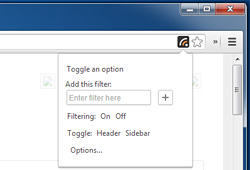
July is inching closer, and that means some of us will soon be faced with a tough decision: what service to use in Google Reader’s place? We have compiled a handy list that you can take a look at and find a suitable Google Reader alternative. By far, Feedly is one of the most preferred services of many Google Reader that they will be migrating to, and I’m personally inclined towards it myself since they've been proactive about filing the gap that Google Reader will leave behind, and because the interface is the best I've seen. For those who are planning on switching to the service, Feedly Reader is a Chrome extension that modifies Feedly so that its interface is more like Google Reader. The extension has no customization options and acts like another theme for Feedly. Read More

Reeder Bids Google Reader Farewell, Mac & iPad Apps Go Free

Although Google Reader still has a few months of life left in it, a mass exodus has already begun. People are switching to alternatives of the service, and have started discovering that the world won’t end on the 1st of July. If you are on iOS, apps like Rockmelt offer options that are certainly better than Reader itself in many ways, and it is nice to see that there are other conventional Reader alternatives available as well. Reeder is one of the most popular Google Reader clients available on iOS and Mac. Since it has, up till now, relied on Google Reader to function, its users feared the worst, and assumed that it will stop working as soon as Reader goes down. Fortunately, the Reeder team has refused to throw in the towel, and the service is expected to become independent of Google Reader before July 1. Not only that, the Mac and iPad clients of Reeder are now available for free! Read More

Auto-Detect & Add RSS Feeds From Websites To Protopage In Chrome

Google Reader wasn’t just a feed aggregator; it was a service that apps and feed burners integrated into their own products. You could add a feed to Reader in just two clicks and there was rarely a need to manually subscribe to links. There are now quite a few emerging services that can be viable Google Reader alternatives but it will take time for app developers to decide which one they want to favor. Till then, we might no longer be adding feeds with just two clicks. Protopage RSS Reader is a Chrome extension for the Protopage service that automatically detects and adds feeds to your Protopage account. The service provides you with feed widgets that can you can manage and read on your profile page on the service. Read More

QuiteRSS Is A Powerful, Multi-Tabbed RSS Reader For Windows & Linux

Google Reader’s inevitable demise that’s only a couple of months away now has sent many on a wild goose chase to seek an equally good service that matches the quality and simplicity of this leading RSS platform. Feedly, for instance, is being considered as the top contender right now that goes neck to neck with Google Reader, but that doesn't mean we don’t have any other option. Just a couple of weeks ago, Fatima compiled a list of some of the best Google Reader alternatives for Windows, Mac and Web around. And today, I’m adding another one to list called QuiteRSS. Let’s take a closer look. Read More

News Hub Adds A Simple RSS Feed Reader To The Chrome Toolbar

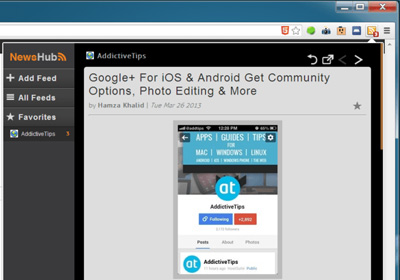
Google Reader’s demise is just a few months away and we’ve compiled a list of Google Reader alternatives for the Web, Windows, and Mac. Our web alternatives were all web services (like Google Reader was) but if you’re looking for a browser extension to replace the void Google Reader will leave in your life, News Hub is a Chrome extension with an elegant interface that's worth a try. The extension allows you to add feeds via RSS links or by search for them. The search feature isn't the best we've seen, but it can still help you find new news resources. News Hub works exclusively in a popup and lets you browser the list of new stories as well as read any one of them from the popup. News items can be marked as read/unread and opened in a new tab. Feeds cannot be imported from an XML file though, and they cannot be organized into folders either. Read More

Best Free Google Reader Alternatives For Web, Windows & Mac

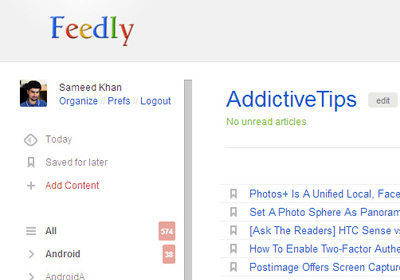
Google Reader will be gone soon and the faster you start looking for ways to move on, the better. It isn't going to be easy though; scores of developers have created apps or services that integrate and sync with Google Reader. The feature itself was not merely important, but rather considered by many to be an integral part of any worthwhile RSS reader. Times have changed though and with Reader soon to be no longer available, it’s time to consider alternatives. Understandably, Google Reader users might be looking for either a web service or a desktop app to fill the void, and we've compiled a list of free options for each platform: web, Windows, and Mac. Our Emphasis was on two key features - the app or service must be free, and it should be able to import from XML files since that is what you get when you backup your Google Reader subscriptions. With only two exceptions in our list that only partially meet these requirements, we’re hopeful you will find something that’s just right for you. Read More

Skimr Is A Bare-Bones RSS Feed Reader For Desktop & Mobile Web

RSS readers for your desktop computer aren't hard to find; we've covered a whole host of them for both Windows and OS X. We've also covered quite a few of them for reading feeds in your browser, but there isn't much out there to rival Google Reader. If, however, you’re in the market for a minimal RSS reader that won’t let you get caught up in the news feed, give Skimr a try. It’s an RSS reader with a simple, scaled-down interface that gives you a list of all recent news items with a snippet from each one, rather than providing you the preview of a news story or showing the whole story complete with images and videos. Think of it as a table of contents for the news that is posted to a website daily. It doesn't connect with your Google account, but you can add any website to it that you like, with a few popular tech websites already added by default but if you aren't a fan of tech news, you can replace them with your own favorite websites. Read More

Leaf Is A Sleek, Compact Google Reader Client For Mac OS X

Leaf is a brand new RSS reader app for Mac available in the Mac App Store for $3.99. It can connect with your Google account and import all your RSS feeds from Google Reader. The feeds can be viewed in a tiny window, and the news item can be opened in your browser or shared using one of the many sharing options supported by Mountain Lion. On the surface, Leaf boasts a beautiful UI for reading your RSS feeds while under the hood, it’s a reasonably good way to manage them as well. While it wouldn’t let you create new folders, it will import the ones you’ve created in Google Reader and allow you to move feeds between them. You can add additional feeds from within Leaf, and the app also gives you the option to set it as the default RSS reader. Read More

Skimn Is A Simple But Attractive RSS Feed Reader For Your iPad

With the advent of social media, RSS feeds have become significantly less relevant for the masses, but we've been seeing several smartphone apps and web services that have proved them to be still useful for a lot of us. Google Reader has become very user-friendly, and apps like Flipboard offer great RSS support as well. Skimn is the latest player to enter this arena. Designed for the iPad, this app lets users build their RSS feed collection from scratch, and offers some neat options to manage it. There is no need to manually subscribe to a feed by looking for the RSS button on its website; you can instead discover feeds by searching for a particular website or topic, right from the app itself. To help keep things manageable, you can easily create categories, and move feeds to any position in the list. Skimn supports gestures, has a night mode and facilitates users in keeping pace with all the latest news stories in the minimum possible time. Read More

Flow Reader Is A Gorgeous, Gesture-Rich Google Reader Client For Android

Google Play Store offers enough quality RSS readers and news apps to make the choice between them quite tough. Ranging from heavyweights like Flipboard and Google Currents to the likes of the official Google Reader Android app, there are plenty of options available that can help you keep up with the latest content from your RSS subscriptions. However, if you’re looking for a Google Reader alternative designed in compliance with the latest Android GUI guidelines and offering better control over syncing and caching of items, take a look at Flow Reader. Currently in beta, Flow Reader is an elegant, Holo-themed Google Reader client for Android offering certain features that are hard to find in most rival apps. Read More

Browse News & RSS Feeds The Simple Way With Minimal Reader For Android

The free version of Minimal Reader, which is available in the Google Play Store as a standalone, customizable widget, offers a convenient way of keeping a close tab on your Google Reader RSS feeds. The Pro (paid) version of the app is as good, simple and user-friendly a news reader as you can get on Android. Besides scrollable & resizable home screen widgets, the paid variant boasts a full-fledged Holo-themed RSS reader, the option to download entire content from your favorite feeds to access it in offline mode, personalize the app’s layout in multiple ways, read favorite articles in a built-in browser, specify custom refresh interval, pre-fetch entire feeds over Wi-Fi and lots more. Minimal Reader Pro costs a dollar in the Google Play Store, but the developer has decided to offer it for free for 10 days. If you’re still in search of a satisfactory news reader for your Android, now would be a good time to give this one a try. Read More

View The Latest World News From The Mac Menu Bar & Notification Center With News Loop

You’ve probably got a favorite RSS feed reader on your Mac that you, for one reason or the other, prefer over others. Some of you might still read feeds in your browser using Google Reader or other online feed reader, subscribing to and keeping up with each feed of interest one by one. For those who aren't interested in a particular niche not thoroughly covered by mainstream news sources usually prefer to skip the entire ordeal of looking for, subscribing to and manually checking each news source for updates. Such users have a bunch of solutions available for them in the market, one of which is News Loop for Mac, a free app that sits in the menu bar and displays updates from major news websites, such as Daily News, Huffington Post, Los Angeles Times, New York Post, USA Today and Washington Post. You can, of course, choose which of these sources appear in the updates displayed by the app. You can even have the app keep you apprised of new updates through Notification Center alerts. Read More

Cream: OS X RSS Reader With Instapaper, Pocket & Readability Support

RSS readers for Mac come in a lot of different shapes. Everything from your desktop background, to the Menu Bar or Notification Center in Mountain Lion can be used to monitor RSS feeds. If you still prefer to read feeds in a window, Cream is a Mac app, worth $4.99 in the Mac App Store, that is worth a try. At the core, Cream is a regular feed reader, but it comes with an extra filter that sorts items by your personal preference. As you read different items in your feed, Cream learns what you like and uses the stats to find other similar news items. Soon, the creaminess filter will be able to sort your feed to display items you are most likely to be interested in. Apart from this intelligent filter, the app has one of the best interfaces you will see on an RSS reader. Like many other RSS readers, it comes packed with a few sample feeds, but lets you choose whether you want to include them too or simply want to import feeds from your Google account, Safari or a file. Read More

Vienna: RSS Feed Reader With Integrated Browser & Social Sharing [Mac]

RSS feed readers aren't confined to just working in your web browser, and if you look at the feed reading apps available for Mac, you will find a lot of creative ways to follow a single or multiple RSS feeds. Vienna is a free RSS feed reader for Mac that imports feeds from your Google account, has a built in web browser (does not support Flash) and allows you to share items you find interesting on Buffer, Twitter, Evernote, Delicious and Facebook from within the app. Vienna is simple; there aren't a whole lot of features, but as far as RSS readers go, it works well and allows you to customize the appearance of text. Articles can be sorted by date, author or title. The built-in browser supports tabs and the app’s search feature supports Google Images, Twitter, Wikipedia and Google in addition to allowing you to search a single or all feeds. Read More

Voyage Displays RSS Feeds In A Scrollable 3D Space [Web]

We’ve covered many different types of RSS readers in the past, but Voyage stands out in the way it displays the feeds. It is a free online RSS reader that displays feeds as floating items in a 3D space, arranged along a timeline. Feeds are stacked in layers, newer items are bold and bright, whereas older feeds appear faded in the background. This forms a 3D effect as you you scroll through the news. Clicking an item brings it to the front and you can. You can use your arrow keys or the mouse wheel to go back in time and navigate feeds using the timeline. The slick 3D interface makes reading so much easier and lets you read your favorite stories in a whole new way. Read More