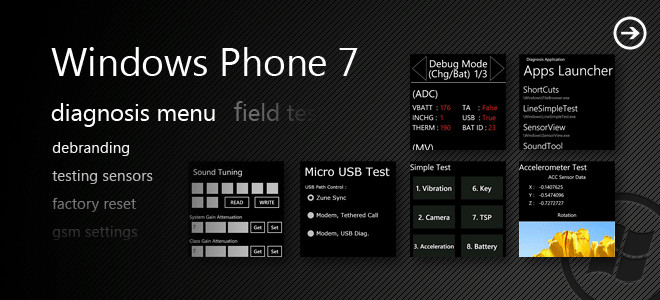
Receive Carrier Independent Windows Phone 7 Updates On Samsung Devices

Any operating system that is completely static can not survive for long in today’s world. Everything is changing constantly, along with the needs of customers and users . That is why new OS updates are the norm no matter what OS you are taking into consideration. Windows Phone 7 is no exception with updates getting rolled out on pretty regular basis. But with WP7 expanding across different carriers and mobile manufacturers, the whole process is getting a bit slow. This does not mean that it’s entirely Microsoft’s fault, in fact most of the times even when an update has been released by Windows, some carriers delay it for their users. But luckily, there is a way to remove this limitation. Read More

How To Prevent Relocking Of A Samsung Windows Phone 7 Device

If you are a developer or have been a user of Android in the past, then the term rooting, or unlocking a device must be familiar to you. Unlocking means that you have access to the hardware of your phone and the ability to tinker away with any hardware or software component you want. However in Windows Phone 7 unlocking is a completely different ball game. There is ChevronWP7 available for jailbreaking your phone, but it has issues like relocking of device after a while and also it does not work on more recent versions of WP7. Mostly, all Chevron unlocked devices lose their unlock as soon as Microsoft releases an update of Windows Phone. Fortunately if you are a Samsung user, there is a way to fix this. Following the easy steps outlined past the break, you will be able to permanently unlock your WP7, and won't have to worry about MS finding a fix for the current developer unlock. Read More

NoMoarPowah! – Alternate Charging Screen For Rooted Samsung Android Devices

It seems old Chainfire isn’t going to run out of original ideas any time soon. The veteran Android developer’s latest venture into the Android Market is as unique (both in name and functionality) as his other endeavors (such as Chainfire3D). The app is called NoMoarPowah! and its purpose is to replace the default charging screen of your Samsung device with a more practical one. That is, it replaces the graphic that appears while your phone is being charged while powered off with an interface that displays the current time and battery percentage, allows you to reboot your device with a single tap or set it to reboot once the battery is fully charged. And that’s not all. From within the app, you can customize the charging screen to wake your device at a time of your choice or, if the battery level is critically low, when said level reaches 15%. The app works only for selective Samsung Android Devices with root access. Read More

Install CM 7 Android Gingerbread On Galaxy S II [ROM Manager]

Finally there is some great news for Samsung Galaxy S II [S 2] owners as CyanogenMod 7 nightlies page is now live with custom ROMs available for download. Earlier we covered the same nightly build, but we aren’t sure if that 3rd party link will be up for long. But now Galaxy S II is officially onboard and you can easily update your phone to the latest CM 7.1 nightlies manually or through ROM Manager premium. In case you don’t know, CyanogenMod is a 3rd party Android AOSP based firmware intended for select Android devices to enhance and optimize user experience. CM is perhaps the most adapted custom ROM throughout the world because of it’s being “AOSP”, less bugs and rock-like stability.

Read More

Check The Exact Battery Level (As Percentage) On Your Samsung WP7

If you are travelling or are going to be away from a charging inlet for a while, then each minute of battery life becomes important. This problem has become even more crucial with the advent of smartphones, as they consume way too much battery as compared to older feature phones. Although the Windows Phone 7 battery indicator provides you with a rough estimate as to how much of the juice is left in your device, it can be misleading at times and a user can easily misjudge the time remaining before your phone turns off. However if you are a Samsung user, there is a simple solution to this. And that solution is the use of Diagnostic mode. Want to learn how to do this? Just read on. Read More

Install CyanogenMod 7 Official Nightly ROM On Galaxy S II [How To Guide]

Finally there is some great news for Samsung Galaxy S II owners as CyanogenMod team will start pushing CM 7.1.x Android 2.3.4 Gingerbread nightly ROMs soon. The announcement was highly appreciated as soon as it was made on twitter and some other portals by a vast majority of SGS II users. However, as Nightly builds are auto compiled and pushed to a specific web location, so it might take some time for this ROM to show up on your ROM Manager Premium.

Read More

Download And Install Google Videos App On Any Android Phone / Tab

Google Video app for Android is the new sensation for movie and video buffs as this application allows you to rent and watch movies right from the comfort of your Android device. Although many Android users have installed the app normally through Android Market, there are many unable to find the app. Even using Market Enabler wasn't useful in our case, so we decided to grab the ripped copy available at XDA to do the deed. Read More

Find Out The MAC Address Of Your Windows Phone 7 Device [Guide]

Media Access Control address, or MAC address as it is more commonly known as, is a way of authenticating if a device really belongs to a specific network or not. It also lets the network devices communicate with each other properly. It is your MAC address that tells your service provider if you are using a mobile device or a desktop and what sort of a device are you on. If you are a relatively advanced user then this can be pretty important for you. Unlike the previous versions of Windows for mobile phones, Windows Phone 7 lets you view your MAC address quite easily. Read More

Latest MIUI 1.7.8 Android 2.3.4 ROM Ported To Galaxy S II [WIP]

MIUI development started for Samsung Galaxy S II a week after it’s launch. However there weren’t many achievements that one could report. Lately MIUI Android team member Roniez is working on an Android 2.3.4 MIUI port for Samsung Galaxy S II. The port is in preliminary stages with very less working and most of it not responding. For those who don’t know, MIUI ROMs like CyanogenMod are third-party Android AOSP based firmware for optimizing user experience on select Android devices. MIUI carries striking resemblance to iOS but with far better features and functionalities. Read More

Test Drive Galaxy S II Interface [TouchWiz 4] On Nexus S 4G

In case you have Nexus S 4G and ere thinking to shift to Samsung Galaxy S II, then how about test driving the interface first ? Shiftr182, Senior XDA member, has managed to grab TouchWiz 4 from a custom ROM he was using on his Epic 4G and apparently the launcher works without flaw on Google Nexus S 4G. According to Shiftr, the launcher is fully functional without any glitches and allows you to test drive every aspect.

Read More

Dual Boot ROM Support Now Available For Samsung Epic 4G

Epic 4G fans, brace yourself, for the Dual Boot option has arrived on the scene! What does this mean? It means you can now have the option to boot into 2 different ROMs when booting up your device! Please don’t take it as an insult to your intellect, if you already knew that, not everyone’s a tech freak. That said, credit for making this possible goes to XDA-Developers forum member Rodderick who has also released an app called DualBoot Helper, to help you prepare your phone for flashing two ROMs.

Read More

CyanogenMod 7 Gingerbread Available For Samsung Fascinate [Test Build]

Although it’s been a while that CyanogenMod 7 got ported on Samsung Fascinate, but developers were facing a tough time perfecting the port. Couple of days back, 9th release of this port was made available for public consumption which boasted of all major functionalities working. In this release calls, SMS, 3G Data, GPS, Bluetooth, Wi-Fi, Camera, Camcorder, USB Mount [mass storage / SD Card] and Sensors are reportedly working fine. Due to the fact that continuous developer support is available for this port, MMS and radio death issues might get fixed in upcoming releases. In event of radio death, your phone will stop responding and you will need to pull out battery and then restart your device to make it functional again.

Read More

ClockWorkMod Recovery For Galaxy S i9003 SL Available For Download

Galaxy S i9003 SL is a Samsung Galaxy variant that wasn’t able to draw much of developer attention soon after its release. However some industrious developers are burning mid night oil to help i9003 owners which recently resulted in porting of fully functional ClockworkMod Recovery. The credit for this breakthrough goes to Skin1980 and according to him, the recovery is bug free and he is open to correct any issues that may follow. So far, this Beta ClockworkMod Recovery is available for XXKB3, KP9, DXKE1, KWKB5 and ZKXC1 Galaxy S i9003 firmware.

Read More

Install Galaxy Tab 10.1 Touchwiz ROM Port On Asus Eee Pad Transformer

The powerful Asus Transformer Honeycomb Tablet has just received the Samsung Galaxy Tab 10.1 TouchWiz UI. Is it another port like the the one we covered for the Acer Iconia whereby it received a complete port of the Galaxy Tab 10.1’s TouchWiz ROM? We cannot say at this point, but RootzWiki forum member r2doesinc has just released a ROM (which is in it’s primitive stage for now) sporting the Samsung TouchWiz UI. Read More

Virtuous Galaxy Tab 10.1 Honeycomb ROM Ported To Iconia A500 [Video Guide]

Finally there is some great news for Acer Iconia A500 tab owners as m-deejay has released Virtuous Galaxy Honeycomb Custom ROM for this device. It is quite interesting because this ROM is based on Samsung Galaxy Tab 10.1 Honeycomb firmware and is set to make your under dog Iconia to be a “real” Android Icon. The kernel deployed is Unity V4 that can overclock up to 1.6 Ghz along with enabling PS3 / NTFS / HFS / HFS + and Realtek USB Ethernet. Read More

One Click Unbrick For Samsung Phones Having Odin [Guide]

The falling sensation while you are half-asleep, the dead feeling in the pit of your stomach, the utter helplessness, these are all emotions you normally go through when you brick your expensive smartphone with your own hands. In addition to the substantial loss you suffer financially, problems like loss of important contacts and data also arise. Bricking of a device can occur for a number of reasons like flashing a new ROM or following some advanced procedure in the wrong way. If you own a Samsung device running odin, then you are lucky that there are methods to unbrick it (and that too pretty easy ones), like the one we discussed here. But sadly, if you are just a simple Android user and don’t know how to follow procedures that are too advanced, then a bricked device might be a huge problem for you. That's what this guide is here for. If you have a bricked Samsung phone running Odin, now you can fix it completely with a single click! Read More

How To Change Themes And Colours On Windows Phone 7 To Give It A New Look

Bored of having the same old color scheme on you WP7 device? Need a fresh look for your phone? It is sometimes impossible to get a theme that exactly matches your taste and requirements. The color might be just a bit too bright or the contrast might not be right. What you need is a way to customize your themes, font colors and other settings to make the appearance of your WP7 exactly the way you want it to be. This sort of customization can get pretty complicated in WP7, so here is an easy-to-follow guide for accomplishing this modification of your theme colors. Read More

CyanogenMod 7.1 Android Gingerbread ROM For Galaxy Spica i5700 Available

Samsung Galaxy Spica is a flagship Android device from Samsung that simply refuses to go out dated or die it’s technological death. One good thing about Android is it’s massive and consistent development support and Samdroid never deserted Spica like XDA and other famous Android forums. As we all know that CyanogenMod 7.1 is now in a release candidate stature with official support and availability for select Android devices. Nebkat at Samdroid forums has done the awesome job of porting CyanogenMod 7.1 Android 2.3.4 Gingerbread custom ROM on Samsung Galaxy Spica. So far 4 releases have been made available for general public consumption with each one carrying bug fixes and improved features based on rigorous testing and user feedback. This ROM can act as your Spica’s daily driver as there aren’t many bugs. Read More

Attach USB Host Dongle To Samsung Galaxy Tab 10.1 [DIY]

In case you own a Samsung Galaxy Tab 10.1 and consider yourself a die hard DIY fan, then there is something interesting to try your hands on. Pokey9000, Senior XDA member and Android developer, is out with his Do It Yourself instructions to make a USB Host Dongle for Galaxy Tab 10.1. By integrating a USB Host Dongle to your Galaxy Tab 10.1, you will be able to connect USB flash drive to your tab and handle it’s data from your tablet. In order to deply this mod, you will need to have some knowledge of basic electronics like soldering and reading resistor values. Read More