Any.DO For Android & iOS Gets New ‘Moment’ Feature & DashClock Support

Any.DO is a cross-platform to-do list and task management app for Android and iOS best known for its elegant interface, gesture-based controls and the ability to keep your tasks synced online. The app has just been updated in the Play Store as well as iTunes App Store with a brand new feature called Any.DO Moment – a personal virtual assistant of sorts that keeps you informed about your upcoming tasks for the day and lets you plan them accordingly. Once scheduled, the Moment feature will automatically notify you about your various tasks listed for the day through a beautifully designed, animated UI. Using various task management options at hand, you can then check out all the upcoming tasks in a chronological order, reschedule them for some other time of the day, mark them as done, postpone them to a user-specified time, or delete them from your to-do list altogether. Apart from the newly introduced Moment feature, the latest update also brings several other goodies and performance improvements to both the supported platforms. Details to follow. Read More

EasyTodo Is An Android To-Do App With Google Tasks Sync & Auto Task Creation

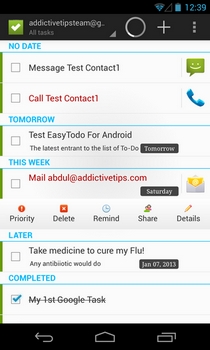
To-do list and task management apps – whether free or paid; minimalist or option-rich – are available by the dozens in the Play Store, and there are enough quality options to fit the task management and reminder needs of everyone. Amidst such a plethora of similar apps, it can sometimes prove tough to part the best from the rest. As is often the case, we keep a close eye on apps that offer something new and is worthy of recommending to our readers. One such app is EasyTodo that has just arrived in the Play Store. Barring a home screen widget, EasyTodo has almost all the features one would expect from a quality to-do list manager. From complete online syncing of your task lists with the cloud, to automatic contact and action suggestions for creating new tasks, EasyTodo has plenty of options for everyone. Read More

Rainlendar Is A Stylish, Customizable Calendar And To-Do List Manager

I have a very bad habit of forgetting important events and tasks. For this very reason, I keep a tab on my daily agenda using task managers and to-do list apps. I have used various web, desktop and smartphone apps, all of which have always come in handy to manage my tasks. If you’re in the hunt of finding an elegant yet easy to use task manager utility for Windows, take Rainlendar for a spin. It’s a calendar and tasks based utility that sits right on your desktop. This fully customizable calendar allows you to add widgets with changeable skins, mark events, create tasks, and get notified instantly whenever an event is near or a task is due. Since it can be started during system startup, you can take a peek at your schedule the moment you logon to Windows. Read More

WeekPlan.net: Create Daily To-Do Lists While Keeping Track Of Long-Term Plans [Chrome]

There are many task management tools available online, but most of them come with a lot of features and are too complicated. If you want something simple and don’t want to get loads of reminders, emails or notifications, then WeekPlan.net might be what you're looking for. The Chrome extension basically provides you with a weekly planner, where you can list down daily tasks that you need to accomplish for the week, and at the same time, define and keep an eye on your long-term goals. Read More

Tasks For Android: Holo-Themed To-Do List App With Google Tasks Sync

To-do list and task management apps for Android are available in abundance in the Google Play Store, however, not all support syncing with Google Tasks. Moreover, you’d be hard-pressed to find an app from said genre that sports an Ice Cream Sandwich-style (Holo) theme. Enter Tasks – the latest addition to Android to-do list managers that has both features. Other salient features of Tasks include support for creating multiple tasks lists with option to add various subtasks under each (referred to as indented tasks), option to supplement each task/subtask with brief text notes, easy assortment/swapping of tasks on list via drag-and-drop, status bar notifications for due tasks, smooth UI animations, option to set task reminders at defined time intervals, and last but not the least, a nifty widget that lets you view a preferred task list, add new tasks to it, and mark tasks as ‘complete’ right from the homescreen. Read More

Koalcat’s Clear Is A Clear For iPhone Look-Alike To-Do List App For Android

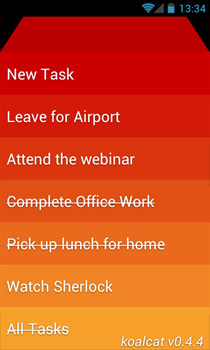
When it comes to finding easy-to-use and aesthetically rich to-do list managers for Android, rest assured that you’d be presented with more than adequate options in the Google Play Store. Previously reviewed to-do task management apps, such as Any.DO, Forget Me Not and Klick Todo, are just a few fine examples that instantly come to mind. While most of these apps are currently exclusively available in the Google Play Store, there are a few potential candidates present in Google’s nemesis, the iTunes App Store, too, that the users would love to get their hands on, like Clear for iPhone – a multi-gesture-based to-do list manager that lets users add, prioritize and mange their routine tasks via a visually appealing ‘heat map’ interface. If you (like me) are an admirer of said app and wish to get a taste of it on your Android device, then Koalcat’s Clear is probably your best bet, especially considering that the we have no word as to whether an official Android client of the Clear (for iPhone) app will ever be rolled. Whatever the case, one thing is for sure that with Koalcat’s Clear, you aren’t going to miss too many features that Clear for iPhone has to offer to iOS users. Read More

GobyNote: Virtual Wallet, To-Do List & Notes Manager For Android

There is no shortage of to-do list and task management apps in the Android Market, but few combine stylish looks with purposeful features like GobyNote. Developed by XDA member GobyLeung, GobyNote is a welcome addition to the list of to-do list management Android apps. Be it your personal diary, notes, checklists, important events, or anything that you simply can’t afford to forget, the app lets you maintain a detailed list of everything under separate personalized folders. For the security of your sensitive information (bank account numbers, SSNs, passwords and important documents), the app also offers a safety wallet with dual password protection support. That’s not all; GobyNote also sports a rich text editor, custom icons for folders, an emoticon library and checklist feature so that you can prepare and maintain your notes in a personalized manner. Event reminders, a detailed log of upcoming and overdue tasks, a nifty homescreen widget, and an extremely simple-to-use interface are the other prominent features of the app. Read More

PlanDroid: A Note Taking, To-Do List & Task Management App [Android]

PlanDroid is a multi-purpose Android app that comes with a built-in to-to list manager, calendar, task reminder and note editing tool to help you manage your routine tasks and notes from one place. Using the app, you can define various categories, and add all the relevant tasks under each category, complete with relevant priority levels, multiple reminders, notes, estimated completion time, and a brief description. Apart from exporting and importing the task list to and from local storage, you can also sync it with the app’s native calendar to get a comprehensive overview of your agenda for a particular day. In addition, the notes editor of the app provides you with commonly used text-editing tools (bold, italic, underline, highlight etc.) to help you prepare notes. That’s not all; the app offers extensive configuration for your reminders/alerts, and lets you tweak its homescreen according to your requirements. Read More

Create, Manage & Sync To-Do Lists On The Go With Any.DO [Android]

With so many various task management apps already present on the Android Market, each packed with some amazing goodies of its own, what features can a new entrant bring to the forefront to attract the users? Well, for one, better aesthetics, user-friendliness, home screen widgets, online synchronization of your tasks and may be, added customization. Any.DO is a free task management app for Android that serves complete justice to aforementioned criteria. The app lets you create, prioritize and share your to-do lists on the go and in fine style too. The task management proficiencies of Any.DO aside, it’s the visually appealing UI of the app that serves as one of its greatest strengths. It is clean, uncluttered and easy-on-the-eyes (very un-Android-like, to be honest). Read More

Create To-Do Lists & Set Task Priorities With Forget Me Not For Android

Looking for an easy-to-use and effective task management app for your Android? Maybe XDA-Developer’s member, Roshnal's Forget Me Not is what you need. Forget Me Not is a task management/ prioritization app for Android that lets you easily create quick to-do lists for multiple tasks, prioritize your tasks accordingly and easily mark them as ‘complete’ when they actually are. Read More

Task List Guru Is Complete Desktop To-Do List Software

In the past, we have covered a great number of task management applications, such as, TaskCoach, App For The Milk (a desktop application for famous Remember The Milk), PhiTodo, and Doit.im. Since almost every application claims to be distinctive and more productive than other, it seems that there is no limit on number of features which can be incorporated into a task management software. As we have seen a staggering number of task/to-do list managers, picking out one that perfectly matches with user needs is rather difficult. Today we have stumbled across another to-do list manager called Task List Guru. Beyond the obvious features of a to-do list manager, it encompasses one complete mechanism for project management, catering to priority customizations, independent note taking, task reminder with a buzz, and hierarchical task list with a huge list of different icons to visually differentiate all the listed tasks. Read More

Desktop Reminder: Free Task Planner Software [Windows]

Desktop Reminder is a free task planner for Windows that offers quick options to let users manage tasks and to-dos efficiently. You can use this application to keep track of missed, urgent and future tasks. Furthermore, reminders for events can be set several weeks or months prior to the event, just to ensure that you never miss an important task anymore. Read More