Get iOS 7 Control Center Toggles & In iOS 6 Notification Center

You might not agree with Jony Ive’s design choices for iOS 7, but there can be no denying the fact that in terms of features, the upcoming version of iOS is going to be the best yet. Things like AirDrop, Control Center and improved multitasking have the potential to improve an average user’s experience on an iPhone. Having said that, most Apple fans have to wait a few more months before they can get their hands on iOS 7 and until then, the jailbreak community is busy bringing different features of the update to older versions of iOS. We have already covered a theme that replicates the iOS 7 lock screen, and another one that modifies just about everything else to give you a taste of the update right now. When Control Center was first introduced, every Cydia user must have thought of SBSettings or NCSettings, and maybe that is why no developer has bothered with a full port of the feature to iOS 6. However, almost all the components of Control Center are available in the jailbreak store; you just have to know where to look. Read More

Use Mac OS X Dashboard Widgets On The Desktop With WidgetRunner

If you dismissed the Dashboard on your Mac because it was useless, annoying to have to shift to, or too much of a distraction that would take you away from your other work spaces, you also - perhaps inadvertently - stopped using widgets for the most part. There are some who argue that Widgets are useless, while others think they could just as easily have been apps and the whole ‘Dashboard’ been avoided altogether. WidgetRunner is a free Mac app that lets you run widgets, both stock and custom-installed, as apps on a regular desktop space. The widgets behave much as any other app window, though they do not appear as windows under their own name and have to be added by selecting WidgetRunner. Read More

Get Windows 7-Style CPU, RAM & Disk Stats Gadget In Windows 8

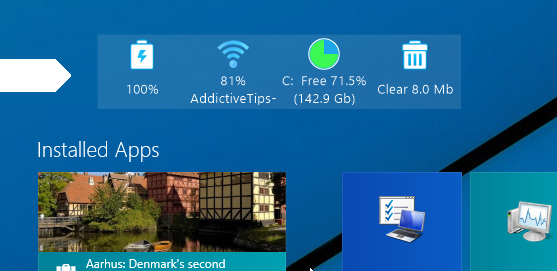
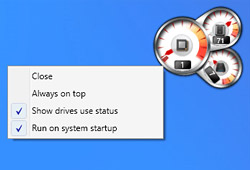
Windows 8 has had a penchant for being irritating, and for most of us, it began right there with the Start screen. But even if you don’t really mind it, you’re sure to have had felt a twinge of disappointment when you realized Windows 8 had no native support for gadgets and widgets; Microsoft retired the Windows Desktop Gadgets in late 2011, and hasn’t given a thought to reinstating them since. But that isn't the end of it. Ever feel like collecting them one by one again? We could start with the Windows 8 CPU Meter! Read More

Browse & Upload To Instagram From iPhone Home Screen With InstaVelox

As we predicted in our compilation of the best add-ons for Velox, the steady flow of the tweak’s amazingly useful widgets isn't looking to dry up any time soon. Velox offers a great way of controlling different iOS features from the SpringBoard, but it can also go beyond that and let you use almost entire apps without actually going away from your phone’s Home screen. These app-related Velox add-ons have managed to attract a lot of users and for that reason, the release of InstaVelox is pretty big news. This widget focuses on one of the most popular apps available in the App Store: Instagram. With InstaVelox, you get to access just about any part of your Instagram account right from the app’s icon. It is not even necessary that you use the account configured on the Instagram app itself, as InstaVelox works independently from that. You cannot upload new images using the widget, but everything else is possible with InstaVelox. Read More

Get A More Info-Laden Weather Widget In iPhone Notification Center

Much has been written and said about how useful jailbreaking iOS devices is, and even a bug in evasi0n is now turning out to be a blessing in disguise. Prior to the iOS 6 jailbreak, the stock Weather app was rarely discussed, since it always got the job done without exactly being brilliant. As soon as evasi0n caused the crashing issues for Weather, a flurry of tweaks and apps belonging to this genre started appearing all over the place. Recently, Yahoo! released a weather app of its own, heating up the competitive air even further. Having said that, it’s not like there weren't any good weather apps around for iOS prior to evasi0n. Weather Underground is a pretty good example of an excellent weather app for iPhone, but it has a shortcoming that puts it at a disadvantage when pitted against the stock Weather app. No third-party app in iOS can have a NC widget of its own, which means that you have no choice but to launch the app if you want to see what the current temperature and other conditions are. Not anymore! WeatherUnderground For Notification Center might only be a third-party widget, but it has all the information you are ever likely to want in the NC. Read More

Velox Adds Widgets & Notification Popups To iPhone App Icons [Review]

Remember MusicWidget (Velox style), the tweak we covered almost a month ago? As mentioned in that review, Velox was always meant to be the real deal, with MusicWidget providing just a tantalizing glimpse of things to come. Well, the wait is finally over, and Velox has finally been made available to the jailbreak community, in what might prove to be a bigger release than even MessageBox. Velox is one of the very few tweaks that has the potential to revolutionize the way people use iOS. There are plenty of widgets already available in Cydia, but Velox provides the neatest way to access the most useful options related to any iPhone app on the go. You can send messages, check your Facebook feeds, manage notifications and control music without opening any app at all! Read More

biteSMS For iPhone Updated With A New Quick Compose NC Widget & More

Whenever I jailbreak an iPhone, biteSMS is among the first Cydia apps I download. It offers so much in terms of convenience that once you get used to biteSMS, it becomes nearly impossible to go back to the stock Messages app in iOS. Having said that, some other tweaks in the jailbreak store have recently starting coming up with decent alternatives to the features available in biteSMS. Fortunately, the team behind biteSMS isn’t resting on its laurels, and are always looking to make the famous app even better than it already is. Quick Compose is the feature of biteSMS that has managed to attract most fans to the app, and with the app’s latest update, it has become even better! In addition to a plethora of performance improvements and bug fixes, the beta version of biteSMS 7.6 also comes with a brand new Notification Center widget. This widget provides shortcuts that can be used to quickly get in touch with your favorite contacts. Read More

Identify Songs With SoundHound, Shazam & More From Android Lock Screen

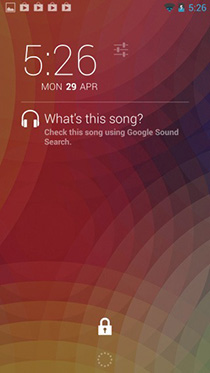
No mobile platform beats Android when it comes to customization; you can tweak every single bit of the operating system – from replacing the home screen interface or the look of your lock screen to flashing entirely different ROM, it gives users complete flexibility and control over their devices. In the 4.2 Jelly Bean update back in November last year, Google unleashed another great feature by allowing users to customize the lock screen of their Android device with various widgets. This feature further extended Androids customization abilities and apps like DashClock quickly emerged in the Google Play Store to take it to the next level. In case you don't already know about DashClock, it’s an awesome alternative to Android’s stock clock widget, but that's not all; it allows adding several extensions to it for all sorts of other information like weather, Feedly, calendar, Gmail and more. Today, we've got an amazing DashClock extension for you called Sound Search for DashClock  that brings Google’s ‘What’s this song?’ feature to the lock screen, with support for several other popular sound identification services as well. Read More

View Bandwidth, Memory & Storage Usage In iPhone Notification Center

Users of SBSettings might know that the tweak's drop-down window isn't just a place to access system toggles; it also shows some basic system stats pertaining to your iPhone. N Stats is a Notification Center widget that isn't based on some truly novel idea, but it shows a few very important pieces of system data in graphical form, which is something not many apps or tweaks can accomplish without consuming a lot of screen space. This NC add-on shows just three system stats, but the developer has made sure that the displayed entities are the most important ones for most users. Thanks to N Stats, jailbreak users can get an idea of their device’s current RAM, storage and internet connection state at a glance. The tweak isn't customizable, but this only adds to its appeal since everything is ready to go as soon as you install it. Read More

Customize iPhone Lock Screen & Add Live Widgets To It With LockHTML2

Widgets are certainly gaining popularity among iOS users. The Cydia store has a nice collection of interesting widgets for the Notification Center and SpringBoard. If you are a fan of making the lock screen more useful, there are tweaks like Dashboard X and LockHTML. Both of these tweaks have their shortcomings though; Dashboard X is a bit too complicated if you just want a simple widget on your iPhone’s lock screen, while LockHTML makes users do a lot of work in order to get the widgets configured properly. Fortunatel, the developer behind LockHTML has revamped the tweak, adding support for iOS 6 in the process. With LockHTML2, the wallpaper can be kept active in the widget’s background without having to go through a lot of hassle. The list of its customization options has lengthened considerably as well, making the tweak a lock screen customizer as well as a platform for widgets. Read More

Get A Gesture-Controlled Music Widget In iPhone Notification Center

With iOS 6, Apple proved that Notification Center widgets can come in handy for things other than just viewing information at a glance. The stock Share widget can let you post updates to your favorite social networks with ease, while users of jailbroken devices have access to a whole world of NC add-ons that can be used to do some truly useful stuff. NC widgets related to almost all areas of iOS have been released in the Cydia store, and music playback is no exception. Previously we covered Now Playing for NC - a Cydia tweak that can let users control their music using a couple of buttons placed inside a widget. NCMusicGestures does something similar, but uses gesture control for the purpose. You can scrobble your music to Twitter and Facebook, while changing a song takes merely a swipe. Read More

Get Lock Screen Widgets & Dynamic Wallpapers On Windows Phone 8

Lock screen widgets were available only for developer-unlocked devices in the days of WP7, but before releasing Windows Phone 8, Microsoft realized the true potential of an information-rich lock screen. WP8 supports automatically changing lock screen backgrounds, and widgets that shows real-time data. While there are a few very good apps that make your lock screen dynamic, not much work has been done on the widgets front. As has often been the case, the famed Windows Phone developer Jaxbot has come to the rescue. His newly released Lock Widgets app lets you set up a dynamic lock screen, and also offers real-time widgets for battery status and weather information. Thanks to this great app, users can set up dynamic wallpapers by using Bing or NASA images as sources. If you want to use the app only for its widgets, that can be done too. Read More

Add A Flip Clock Widget To The iPhone Notification Center

Flip clocks are pretty common on Android but for iOS devices (even jailbroken ones), these fancy time displays are still a bit of a novelty. The closest thing to an iPhone flip clock we have ever seen is iWidgets, which lets users add an HTML 5 time widget to their SpringBoard and lock screen. If you want a fully customizable flip clock widget though, your best bet is the newly released Flip Clock for Notification Center. The widget is capable of displaying time in the format of your choice as well as the the current date, and also lets you tinker with the color settings of the digits. The fact that you can use it with Dashboard X and other similar tweaks to place the flip clock on other areas of iOS makes the widget near-perfect. Read More

Create Notes, Reminders & Calendar Events From iOS NC & Lock Screen With Tap To Widgets

Notification Center widgets have been around on iDevices since iOS 5, and the next likely step would perhaps be the arrival of lock screen and SpringBoard widgets in iOS 7. Though as with many other features officially incorporated in iOS updates, Cydia users have had these for a long time now. Tweaks like AnyLock and Dashboard X let users place useful and cosmetic widgets in areas of iOS that are even more easily accessible than the NC. The tweaks themselves are great, but the problem has always been the availability of good widgets on these platforms. The ‘Tap to’ series of widgets has been around for some time now, letting users perform different functions within the Notification Center, and their developer has now decided to polish things a little more by combining five widgets into one package. Tap to Widgets lets you manages all of the offered widgets from one place, and lets you use them with Dashboard X as well. Read More

Send SMS & Mail From iOS Notification Center With Compose Widget

While iOS 5 brought the most revolutionary changes to the platform, iOS 6 fine-tuned those changes and made them almost perfect. Notification Center widgets have been around for quite a while now, but it was iOS 6 that unleashed their full potential. Apart from the usual stocks and weather widgets, there is now a sharing widget in NC as well that lets you compose a new tweet or Facebook status update with great efficiency and ease. Based on a similar concept, the newly released Compose add-on lets its users create messages and emails from within the Notification Center. By just tapping the buttons added by this widget to the NC, you get a composing environment without having to actually launch the stock Messages or Mail apps. Read More

Add Sticky Notes & Other Widgets To Windows 8 Lock Screen With IncrediLock

It’s probably safe to say that Windows 8 has garnered mixed reactions from its user-base. But where elements like the Start Screen have received some backlash, one dainty new feature that is praised is the lock screen. The lock screen showcases the current time and date, along with the Wi-Fi signal strength.You can customize its background and have certain apps display notifications on it. Apart from this, there isn’t much to tinker with, but it seems third-party apps are soon going to remedy that. Enter TuneUp IncrediLock, a Windows Store app that lets you add widgets to the lock screen. Even though IncrediLock only lets you add sticky notes at the moment, additional widgets are likely to be added later down the road. What’s more, you can browse and apply about 400 gorgeous lock screen wallpapers. Read More

Add Multiple Widgets To The Lock Screen On Any Android Device

It seems that, of all the exciting Android 4.2 Jelly Bean features, the brand new lockscreen with widgets is the one that has succeeded to tickle the fancy of many a developer around the world. Just a few days after its announcement, the JB lockscreen got its very first third-party weather clock widgets courtesy of Beautiful Clock Widgets, with HD Widgets (a paid app) following suit. While the latest JB lockscreen remains prerogative of Android 4.2 users only, there is now a very handy alternative available in the Play Store for users stuck on older Android versions. In fact, provided your device is rocking Android 2.2 or above, you can now install an interactive widget-filled lockscreen atop your default lockscreen with the help of Widget Lock. Unlike the Android 4.2 lockscreen, Widget Lock supports addition of multiple resizable widgets of your favorite system and/or third-party apps. Better yet, you have the option to reposition your favorite widgets anywhere on the lockscreen as you like. In this particular app’s case, pressing the unlock/power button displays the additional Widget Lock screen, complete with your widgets, and a slider to unlock directly to the lockscreen itself or your home screen. Read More

A Closer Look At Android 4.2 Jelly Bean Lock Screen With Widgets

As every Android enthusiast would know by now, Google's latest flagship Nexus devices - the LG Nexus 4 and Samsung Nexus 10 - are now available for sale on Google Play Store in select locations all across the globe. Both devices are powered by Google’s latest mobile operating system, Android 4.2 Jelly Bean. We have already seen the latest distinguished features of Android 4.2 in detail but for a quick recap, the freshest version of Android brings a totally revamped Camera & Gallery app with Photo Sphere, notification power controls, multi-user support (tablets only), verification of APKs prior to app installations, Daydream, wireless display with Miracast support, stock keyboard app & enhanced stock clock app with various additional goodies, including alarm, stopwatch, timer and revamped home screen widgets, amongst others. A relatively less talked about yet eye-catching feature of the firmware is its brand new customizable lockscreen app with multiple screens and widgets support. As we’ve just found out, this particular aspect of Android deserves a special mention, which is why we've decided to compile an entirely separate post on it. Continue reading past the break to find out exactly how the latest Android 4.2 Jelly Bean lockscreen looks like and operates. Read More

iWidgets: Clock, Weather & Other Interactive Widgets For The iPhone Home Screen

If you are a fan of home screen widgets, Android is by far the most suitable platform for you. Having said that, it’s just not like iOS developers to give up without a fight, and over time, there have been some pretty good attempts at bringing widgets to the Springboards of jailbroken iDevices (the most popular being Dashboard X). The biggest hurdle in the way of such tweaks is the compatibility of widgets. iWidgets is yet another Cydia tweak that lets you pin interactive widgets to your jailbroken iPhone’s Springboard, but it has a slight edge over its competitors in that it deals with HTML widgets, making it easier for other developers to publish widgets that are compatible with iWidgets. To get you started, iWidgets comes with two widgets, the dashboard clock and calendar from Mac OS X. Read More

Real Widget Adds Custom Windows Phone-Like Tiles To Your Android Home Screen

You might be aware of the fact that there are plenty of Android homescreen replacement apps out there that merely focus on replicating the looks of the Windows Phone UI. However, what if you wished to enjoy the same Metro Modern UI-style tiles on your Android homescreen without having to use to a full-fledged WP7 launcher? Real Widget is a customizable widget for your Android’s homescreen that comprises multiple tiles, each providing instant access to your favorite apps, system shortcuts, power toggles and widgets etc. You have ample control over the items the widget should sport. For each tile, you have the option to specify a custom size, icon, shortcut, background type and the overall layout. Ranging from your favorite contact’s info card to a third-party app of choice, you can select from whatever item you like, and in whatever numbers you please. Read More