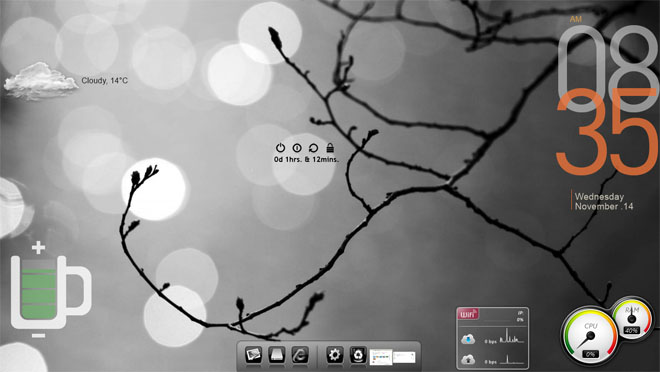
Give Your Windows 8 Desktop A Makeover With Rainmeter & RocketDock

I've always wanted to customize my Windows 7 desktop using Rainmeter to add some interesting look and feel to it, and RocketDock to get rid of the taskbar. But it has never been possible to totally neglect the taskbar, only due to the start menu, which held so many applications in place. In short, I gave up on the idea of customizing my desktop. But since Windows 8 has replaced the Start menu with the Start Screen, I can continue with the customization, and you too can learn how it's done! Read More

5 Tricks For Tweaking Finder In Mac OS X Lion

Mac OS X Lion does quite a few things differently from Snow Leopard, and for the most part, users have either reconciled with it or found an app, script or tweak that helped restore it to how it looked or worked before the new version. Whether you are yet to upgrade to Lion, have recently done so or are already using it without any modifications in the hopes that you will eventually get used to it, here are a few things you can do to bring back some functionality to the Finder. Read More

Windows 8 Manager: Manage, Clean, Tweak & Customize Your System

We, at AddictiveTips, have covered the Windows 8 Consumer Preview pretty extensively, since its release a few days ago. There are a lot of new features and options included in Windows 8, aimed at making the usage experience feel more user-friendly to the new users, as well as appearing to be modern to the old users. Yes, it will take all of us some time to get used to the flashy new Metro UI and the way we interact with the OS, but I am sure using it on a tablet will be a lot of fun even for the first time users. Microsoft has decided against the idea to release a separate operating system for the tablet and has designed Windows 8 in such a way that it can be used on both a desktop computer, or a tablet PC. However, some of the features will be more useful on PC's, while others will seem more practical, such as the Airplane mode, while using them on a tablet. The more experienced users, who are used to having a customized feel for their work space are the most reluctant ones (myself included) when it comes to upgrading to a new operating system due to all the new things that need getting used to. Windows 8 Manager is a tool that allows you to completely manage, clean, tweak and customize your Windows 8. Keep reading to find out more about the tool. Read More

Personalize Windows 8 Start Screen With My WCP Start Screen Customizer

The Windows 8 Start Screen with the Metro UI has had mixed review by users with some welcoming this huge step towards modernization of the Windows operating system, while others complaining about the huge change in Start Screen, as well as the other new options and features that they will have to get used to. Check out the detailed review of the Windows 8 Metro Start Screen done by Usman. By default, the Start Screen has a sea green color and a simple looking background. These can be changed in the PC Settings menu, but you can only change the color and the background in a minor way using the given options. There are no extended options to customize elements, such as text, border color, icon background, group name, number of tiles rows etc. This is where MY WCP Start Screen Customizer comes in. It is a tweaking tool for the Windows 8 Start Screen that allows you to specify different elements of the Start Screen, including color, text, background image etc. Read on to find out more about the tool. Read More

Dock Designer: Customize Mac Dock Backgrounds & Switch Between 2D/ 3D

We’ve reviewed a lot of Mac customization tools in the past; some that allow you to tweak hidden features in OS X Lion, and others that are meant for customizing a particular feature. Dock Designer is a free Mac app that lets you customize the Dock. It lets you switch to a 2D or 3D dock view, allows you to add spaces between apps and folders for a more organized looking Dock, and lets you change the background to any image on your hard disk. The app's interface is simple and, in the event you don’t like the changes, you can revert back to the default Dock using the reset feature. Read More

Start Menu 7: A Transparent, Customizable, Easy-To-Navigate Start Menu

With every new release of the Windows operating system, came along a lot of changes in its interface. One of the most important menus, the Windows Start Menu, has also gone through a lot of UI changes over the years. Even after all those changes, it is still a bit difficult to find all the desired items in the Start Menu, and it is even more difficult to add custom folders or categories to the menu to organize your items. By default, the start menu only maintains a list of the most recent applications, and files accessed, and there is no way for you to customize the list, other than a delete option to remove specific items from the history lists. Today, we have a replacement for the Windows Start Menu that lets you customize the menu exactly according to your need. Start Menu 7 is an application that replaces the default Windows Start Menu with a detailed, easy to navigate and customizable Start Menu. Keep reading after the jump to check out the details. Read More

Lion Secrets: Customize Mac OS X Lion Without Terminal Commands

Mac users, like Windows users, can tinker around their system files and modify the default settings, but not everyone is well versed in executing Terminal commands without doing serious damage. That leaves many people wanting to customize their OS, but lacking the ability to do so easily. Lion Secrets is a Mac app that makes these modifications easier. The app gives you an easy-to-use graphical interface, while executing Terminal commands at the back end to reflect any changes that you want to make. The app allows you to modify both startup programs, system preferences, alerts and appearance in Mac OS X Lion. Read More

UnitedStyles: Design Stunning Outfits & Get Doorstep Delivery [Web]

Are you tired of searching stores for a stunning outfit with the perfect fit? You no longer need to make those unending shopping trips to different stores, trying to find the right dress. UnitedStyles is here to help you follow the latest trends and look beautiful. This web app, with its amazing interface, lets you customize your clothes, allowing you to become your very own fashion designer and tailor. UnitedStyles will make you look and feel great, without having to spend exorbitant amounts on expensive outfits that you aren't even sure how they'll look on you. Using this app, you create and buy your own, totally unique, clothing, all at a very attractive price. You can create clothes with different styles, necklines, sleeves and prints, preview them in 3D, and have them delivered to your doorstep. Read More

Create Your Own Live Wallpapers On Android With Ownskin DiY

Hardcore Android users love tweaking the various aspects/looks of their devices through homescreen replacement apps, custom lock screens, live wallpapers, homescreen widgets, themes and custom ROMs. Ownskin DiY, the free online live wallpaper creator is now available as a free app for Android. Using the app and its online theme library, you can download/install hundreds of themes for free, edit them and the widgets within through the app’s own Wallpaper Editor and share your creations with the world. And what’s best, you don’t even need to root your device. Read More

Tweak Windows 7 Administration, Performance, And Security Settings

Sunrise Seven is a Windows 7 tweaker that allows you to customize a plentiful of  Windows native functions and tools. Compared with previously covered TweakNow Powerpack, it has almost all the advanced options to optimize system performance and change default Windows OS administration and management related settings. It provides options for tweaking with UAC (User Account Control) settings, system performance and security functions, Windows Explorer, and Start menu. For instance, you can make Start menu item look like a Dell Alienware icon, disable folder options, add new items to desktop right-click context menu and so on. Sunrise Tweak has options for both advanced and basic users. One does not have to be an expert to alter Windows 7 features. Read More

Add Functions And Commands In Windows Explorer Context Menu

FileMenu Tools lets you manually customize and extend the Windows Explorer context menu. It adds built-in utilities to perform certain tasks & operations on files/ folders and adds customized commands that let users run external applications, copy or move a files to a specific folder or delete specific file types, and much more. With this tool you can also customize the "Send to” sub-menu by enabling or disabling context-menu commands. Read More

Take Full Control Over Your Windows Desktop Icons With Iconoid

Do you want to change background color of the desktop icons, change the text color of the these icons, save and restore the positions of your desktop icons, or simply want to reduce the clutter on your desktop? Iconoid is a free tool for Windows that gives a user complete control over all his/her desktop icons. You can customize the color of your icons, hide them, select a background, position them easily, or do whatever you want. Read More

How To Customize The Command Prompt(cmd) In Windows Vista/Windows 7

Do you like the default Command Prompt screen in Windows? If not, then you can customize it to your needs by changing the layout, font, and color. There are many reasons why users customize their command prompt, some increase the width because they have to write long codes, some change the size of their fonts to look bigger, etc. The default command prompt style is too common these days, to make mine different I changed the background so that it can match the Windows 7 wallpaper on the desktop.

Read More

How To Create Fully Customized And Professional Looking DVD With DVDStyler

DVDStyler is a free cross platform DVD authoring software that allows you to create professional looking DVDs with full customization. The user interface is pretty simple and easy-to-understand, you will get used to it after navigating around for a few minutes.

To begin, first select the background image, then go to File Browser tab and drag the videos you want to add to the preview window(see screenshot below).

You will have to resize the videos once they have been added, they will also get a title assigned to them automatically. Now finally add some buttons by going to Buttons tab. Once done, you will have to right-click these buttons and go to their properties to edit text, change colors, define action, etc.

Read More

How To Change Gmail’s Looks With New Themes

Google has release a new set of themes for its Gmail service which would be a great news especially for those who tend to get bore easily with the same interface and design with a period of time. A while back you could change the design and looks of Gmail with Greasemonkey scripts on Firefox that allowed you to spice up standard Gmail theme, in order to satisfy its users Google has finally released enough themes that you may like at lease one or two.

Read More

How To Prevent Firefox From Displaying Bookmarks And Web History As Suggestions In The Address Bar

Does this annoy you that Firefox displays bookmarks in its address bar along with web history? Firefox is certainly the best browser in the market but it doesn’t mean its perfect, the annoying feature of its awesome bar is that it displays the bookmarks in its address bar along with web history and suggestions. Most of the users prefer to display only links from the web history rather than the added bookmarks suggestions. To prevent this annoying feature, follow these simple steps.

Read More

How To Change Displayed Date/Time Format In Windows XP And Vista

People who use Windows may have noticed that the clock in the system tray displays time in the 24 hour format by default. I always prefer 12 hour format, if you want to know how to change it or if you simply want to get rid of AM and PM to save the space to stick in one more taskbar icon! Well, here is the solution. Read More