Add A Feature-Rich File Downloader To Google Chrome For iOS

When the Chrome Download Manager tweak was released last year, a lot of people thought that a better alternative will soon make its way to the Cydia store, but even after all that time, we are still looking for the perfect downloader that works with Google Chrome for iOS. As it has been around for longer, Safari has some pretty decent download managers, like Safari Download Enabler. Chrome Downloader is the latest download manager to come out for Google’s iOS web browser. It has seamlessly integrates with the web browser much like the aforementioned Safari DE and supports just about any file format that you have ever heard of. Even if you find a file that isn't compatible with the tweak, you can remedy that by manually configuring Chrome Downloader to always start a download session when a particular type of link is tapped within Chrome. Read More

Download Any File Or Media Stream On Windows Phone With GetThemAll

Before WP8 came out, a lot of people weren't fans of Windows Phone because it was a little too restrictive compared to its predecessor Windows Mobile, or Android.. There was no easy way of sharing media, external memory was not supported and Internet Explorer couldn't download most file types. The latest refresh of Microsoft’s mobile platform has addressed file sharing and external memory issues, but it is still not possible to download most file types while browsing on your phone. That’s why the release of GetThemAll is good news for all Windows Phone users. This new web browser for Mango and WP8 has some comprehensive download capabilities. You can use it to grab HD videos, audio, images and other HTML5 content from any website. The app has a great download manager that lets users create folders for keeping data easily accessible. Read More

Save A Web Page Or Complete Website For Offline Navigation With PageNest

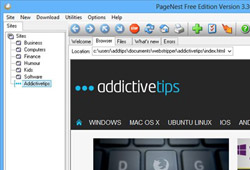
Since the inception of the Internet, the world wide web has become flooded with billions of websites. While high speed Internet connectivity has become quite common around most corners of the world, there are times when we are simply far from its reach. PageNest is a powerful program that can save a copy of a single web page or an entire website for offline viewing. Even though all major web browsers offer the basic functionality of letting you save pages in HTML, PageNest in contrast saves all the intertwined links as well, which in turn lets you navigate through the entire website while offline. In short, the tool can save an entire website on your local drive. This includes the text, images, scripts, CSS, and other multimedia content that is attached to the site itself. The application also comes with an integrated browser function that flawlessly renders the saved webpages and lets you navigate through the links. Read More

uTorrent Beta For Android Released; Provides On-The-Move Downloading

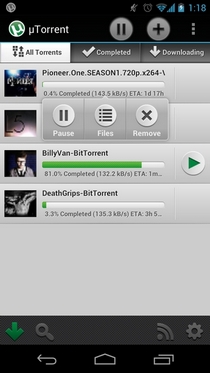
If you think that you’ve had enough of all the various unreliable torrent downloaders and remote torrent clients for Android, and are looking to enjoy a full-fledged torrent downloading experience on your Android device, then here’s some great news for you; a promising looking beta of the famous torrent client, uTorrent, has just hit the Google Play Store, which brings almost the complete set of capabilities that you’ve so far been able to enjoy on your desktop. Besides catering to your torrent downloading and management needs on Android, this Holo-themed app supports several other handy options, including user-specified torrent download/upload speed limit allocation, BitTorrent featured content & RSS subscriptions, simultaneous downloads, support for local torrent files, downloading over W-Fi only, auto-start on boot, search across the web for required torrents, instant previewing of downloaded content, custom download folder allocation, notification bar alerts for download tasks, and lots more. Read More

DownTango: A Simple To Use, Eye-Candy Download Manager

Download managers always got the upper hand when it comes to downloading internet files. Admit it, a dedicated download software is better than the one that comes packed with your web browser. Almost all the popular downloader managers have got resume functionality, browser integration and optimized use of internet bandwidth (some even boost the download speed). I personally use IDM (Internet Download Manager) for all my downloading needs. Although it’s paid, it's worth every penny and provides plethora of features and settings. Recently, after reinstalling Windows on one of my friend’s PC, I started looking for a download utility, which he wanted to be less resource hungry and ergonomically friendly. Surfing through the web, I came across DownTango and thought to give it a shot. It’s not only very minimalistic and clutter-free, but also fulfilled my fellow’s wish of being an easy-to-use downloader. DownTango supports almost all the major web browsers, including Firefox, Google Chrome and Internet Explorer, and automatically grabs their download links. Is it something that might replace your current download manager? Read on to find out. Read More

Get A Functional Download Manager In Chrome For iPhone & iPad

The intuitive interface, the real-time tab syncing and gesture controls in the Chrome app for iOS were enough to make it a worthy competitor for Mobile Safari, but thanks to all the amazing Cydia tweaks available for Chrome, Google’s web browser for iPhone and iPad has arguably become the best app of its genre for iOS. It does have its fair share of negatives, most prominent of which is its rather slow speed, but the features on offer in Chrome are so awesome that they have the potential to make anyone forget Safari. However, one thing that’s still far from perfect in Chrome is the ability to download files directly. Although a tweak named Chrome Download Enabler was released a few days back, it lacked any interface whatsoever, and was also really buggy. Thankfully, we now have a better alternative for downloading content via Chrome for iOS. Chrome Download Manager is a tweak that makes the whole process of initiating, managing and viewing downloads really smooth. With this tweak you will be able to download files belonging to almost all file formats, and then open (or save) those files via iFile or other similar apps. Read More

Downloader Elite: Perhaps The Best, Most Feature-Rich Download Manager For iPhone & iPad

Downloader Elite is the sort of app you can’t really consign to just a single category. Most people will call it a simple download manager or a web browser for iPhone and iPad, but it is actually much more than that. The app includes a decent audio player, can handle a vast variety of video formats (including FLV and HTML5), has a PDF reader, and comes complete with a nice text editor. With support for so many file formats, the app makes everything convenient for users by providing them with a neat download manager. The app is Downloader Elite has AirPlay support, lets you play videos in the background and can be used to open ZIP or Office files. The list of offered features goes on and on, past the break. Read More

AndroGET: Android Download Manager With Acceleration & Resume Support

The Android Market contains many third-party download managers, as well as web browsers that come packed with download managers of their own, each claiming to provide you maximum possible (and in some case, 10 times faster) acceleration for your downloads. However, not all these solutions always work as advertised, nor do they provide enough control over the download tasks. In fact, not all download managers come with true acceleration, resume support and the capability of simultaneously handling multiple large downloads. Enter AndroGET – a free download manager for Android that boasts acceleration, support for automatically grabbing email attachments and download links from within browsers, queued downloading with option to pause, stop, resume and rename download jobs, status bar notifications for completed, failed and ongoing downloads, and a neatly designed UI that helps you filter ALL, Active, Queued and Finished downloads. Read More

Auto-Capture And Download Streaming Video & Audio With Jordy Downloader

Download managers have their own very good reasons. Apart from simply downloading the files, they provide users with umpteen number of more options to play with. Such as download managers usually come with resume capabilities, to continue the process where you last left it off. In addition, download managers also somehow boost the download speed, by prioritizing your internet bandwidth to the download process. We reviewed Orbit Downloader a while back, which is one of the most awesome free download managers you can get. It's simple to use, free and it's blazing fast. Jordy Downloader is another download manager that provides features similar to Orbit downloader. The application can monitor your Windows clipboard for download links, integrate with your browser and notify you when multimedia (video and audio) objects are detected, letting you quickly download  them to specified local destination. The file is automatically added to the Media Detector (Orbit's Grab++ like feature) list, and you can then choose to download or just preview it. You don’t even need to paste the link in the application; Jordy Downloader will automatically detect the link from clipboard. It supports HTTP, HTTPS, FTP servers, online data storage, and video and audio streams. Albeit, the interface of Orbit isn't shoddy, Jordy Downloader simply looks better. Read More

Batch Download All TED Videos With A Single Click via TED Downloader

TED (Technology Entertainment & Design) is a global set of conferences devoted to spreading ideas that address a wide range of topics. Various influential personalities have addressed the conference from time to time including Bill Gates, Bill Clinton, Salman Khan, Larry Page and Sergey Brin, just to name a few. Due to this, the conference has attracted a large set of fandom and followers. Last year, we covered TED Grabber, an open source application that generates links for every TED video that can then be downloaded with any download manager, and supports downloading of subtitles in any language. If you found the download procedure a bit complicated and were looking for rather an easier solution then give TED Downloader a shot. It is another open source application aimed at simplifying the process of downloading videos from TED. Instead of grabbing each video individually, the application enables you to batch download all videos available on the TED website at once, in Low, Regular or High quality. Check out how TED Downloader works after the jump. Read More

Folx Is Powerful File & Torrent Downloader And Manager For Mac

If you’re looking for a Mac app that can download files, manage them and help you apply download and upload speed limits, Folx is worth a try. It is not only just an all-in-one download manager with user agents for all famous browsers, but also a torrent downloader and manager. With Folx installed, you don’t need to install separate applications to download files and torrents. It has the ability start downloading and uploading processes at scheduled intervals. Just like any other download manager, it keeps track of downloadable file links moved to Mac OS X clipboard to quickly start the downloading process. You can immediately start downloading the file, put it in the list, or schedule the download process. Read More

Meteoric – Download Manager / Alternate Browser For iPhone & iPad

Has this ever happened to you that your net connection gave out during a download, or you had to leave a download unfinished for any reason? This can be quite a heartbreaking happening, seeing your hours worth of waiting and patience going down the drain. For this exact purpose, download managers are widely in use today. Safari in iOS isn’t resume supported by default, also there are sometimes lengthy procedures which need to be followed in order to be able to grab the file you want to download. At times it’s convenient to download a file on your desktop computer, but it gives you a pretty tough time when trying to download from your iPhone or iPad (who can forget “video can not be played on Mobile” error). If you are an iDevice user and have suffered from all these issues, then Meteoric is the answer to your prayers. Read More

Accelerate Downloads In Chrome & IE With FileServe Manager

FileServe Manager is a free download management application which is designed to optimize your system resources and to provide you with accelerated download speed. It is much similar to the widely used Orbit downloader and supports downloading files from Windows clipboard, resumption of broken downloads, provision for managing downloads by means of adjusting speed limit, and download scheduling. Read More

Classify Downloads And Set Different Configuration For Each Category With uGet

UGet (formerly known as urlgfe) is a cross-platform, open source download manager for Windows and Linux versions. It is available with an executable file, as well as with a .Deb and .RPM package, which makes it easy to install on Ubuntu, Red Hat, Fedora and the like. It is written in GTK+ and comes with many useful features, such as, pause, resume, clipboard history and batch downloading of files from a URL, which make it easy to use. UGet has recently been upgraded to version 1.8, which can be installed in Ubuntu from the PPA given in this post. The new version has added support for for Torrent and Metalink files, application indicator and speed limit to control per download. You can also integrate it with Firefox by using the Flashgot plugin and download files according to defined categories. For example, you can make a category by the name of software to keep software file downloads separated from, e.g. the video category. Read More

Microsoft Download Manager Enables Quick Download Of Large Files

Microsoft RTM builds can often take forever to download. This is mainly due to frequent errors during the downloading process. Even common download managers like Orbit can suffer from download errors when downloading a Microsoft ISO file. Microsoft Download Manager is a download management application released by Microsoft to enable quick download of large files, such as application and media files. It is mainly designed to help users download files from Microsoft supported websites, nonetheless, you can also use it like any common download manager. Read More

Progressive Downloader Is All-in-One File Download Manager For Mac

If you’re looking for a free feature-rich download manager for Mac, have a look at Progressive Downloader. It is a massive file downloading program which provides almost all the features and file downloading options that you’d expect from an all-in-one file downloading program. The application also offers extensions for Safari, Firefox, and Google Chrome, so you wont have to manually bring it up each time to start downloading files. The Progressive Downloader observes Mac pasteboard for download links; once copied, just open it to begin downloading file right away. Additionally, you can schedule downloads, limit downloading speed, specify post download actions, and run file hash check before starting the download process. The application supports HTTP, FTP, SFTP (SSH), and MMS protocols, multi-thread downloading, and mirror search to find alternative sources for resuming failed downloads. Read More

FatRat Is An Advanced Download Manager For Linux, Supports HTTP(S), FTP, Torrent, And More

Recently we reviewed the GNOME based minimalist download manager Steadyflow, which supports HTTP, HTTPS, FTP and SMB. If you are looking for a more advanced download manager for Linux, then FatRat might just be what you are looking for. It is an open source download manager written in C++ and built on top of the Trolltech Qt 4 library. Some of the main features include Segmented HTTP(S) / FTP downloads, FTP uploads, support for SOCKS 5 and HTTP proxies, RSS feed support, BitTorrent support (including torrent creating, DHT, UPnP, encryption), RapidShare.com uploads, ink verification and folder extraction, MD4/MD5/SHA1 hash computing, and much more. Read More

Steadyflow Is Fast Minimalist Download Manager For Ubuntu Linux

Finding a download manager that can just get the job done is hard. Steadyflow is a GNOME based minimalist download manager, which supports HTTP, HTTPS, FTP and SMB. Developed to be clean, lightweight, and easy to use, it is a useful addition to the Ubuntu desktop. It merely requires a download URL in order to download content to a pre-defined directory. There is also a quick search box to locate previously downloaded files in directories. Read More

Show File Size In Firefox ‘Open With’ Dialog Box

It can be quite useful and helpful to know the size of a file before downloading it. Unfortunately, if you’re a Firefox fan and use the default download manager, you're out of luck, because Firefox itself does not display the file size when it pops up the ‘Open With’ dialog box. The only information displayed is the file name/type, and you get to choose where the file should go. Show File Size is a Firefox add-on that enriches the default Open With dialog box, displaying file size with customizable rounding options. Read More