Get Reverse Google Image Search Option For Facebook Photos In Firefox

Google's reverse image search is a very handy feature. I've used it often to find the original source of an image, or in the case where I like an image for my desktop background, it has helped me find its largest available size. In the past, we've covered quite a number of extensions and add-ons that add Google's reverse Image search to browsers' right-click context menu, allowing you to right-click an image and search for it. Facebook Photo Appraiser is a similar add-on for Firefox that integrate with Facebook and adds a 'Similar images' option for all images on the social network, images allowing you to reverse search them. The search results open in a new tab. Read More

Get Quick Access To Google Keep In Firefox With This Unofficial Add-On

We reviewed an unofficial Google Keep Extension for Chrome when it came out a month back. Since then, Google has released an official extension for its new note takings service but Firefox users can not expect one for their browser because Google doesn't develop extensions for other browsers in order to to keep its competitive edge in Chrome. Firefox users will instead have to rely on unofficial add-ons for the service and if you've been trying to find one, Google Keep is an option that works perfectly. Compared to the Google Keep Extension for Chrome that we reviewed, this one is better as it allows you to upload images to your notes as well. It works exclusively from the location bar, and doesn't offer any other ‘viewing’ modes as there were with the Chrome extension. Read More

Easy Access Lets You Launch Apps Installed On Your PC From Firefox

Firefox and Chrome are two of the leading browsers in the market and they've both moved towards developing their own browser-based operating systems. Chrome has gone a little further than Firefox so far in Chrome OS, but both their respective OS are a work in progress. A very interesting by-product of theses browsers and their operating systems are the app launchers that we can use for accessing installed apps, as we've seen in the case of Chrome. Easy Access is a Firefox add-on developed by Mozilla that adds an app launcher to Firefox’s add-on bar. By default, it can perform five functions: launch Notepad, My Computer, Paint & Calculator, and switch to a different Firefox profile. However, you can add any number of other application shortcuts to this launcher, and even set command line parameters to pass to an application when it launches. The applications appear in a menu upon clicking the add-on's button; however, you can add any one of them directly to the add-on or navigation bar for faster access as well. Read More

Quickly Translate An Entire Webpage From Firefox Right Click Menu

Chrome users have it made; whenever you find yourself on a webpage in a language that isn’t your default, the browser automatically offers to translate. But Firefox users, while they don’t enjoy an inbuilt translate option, needn’t fret about copy-pasting entire paragraphs to a translation web service, either. Using the right-click context menu, you can translate either selected text via Translate Menu or, better yet, the whole page, via the TranslateWebpageAtGoogle add-on. Read More

Search Major Websites Directly From Google’s Home Page

Google is, without question, the best search engine out there for general web searches, but there are quite a number of other popular services that many users search on apart from Google, often for more specific types of searches. Where Googling gives you a comprehensive list of relevant results from multiple websites, searches on services like YouTube, ebay, IMDb etc. give you more relevant results of a particular nature. You can use extensions like Multi Search to select text from any web page and search for it on different websites from the right-click context menu. Search Switch is an extension available for both Chrome and Firefox that adds a switching menu to the default Google search page. It allows you to change the search site by scrolling the mouse wheel, or select one from the list that appears when you click the extension’s button. Read More

Quickly Move Firefox Bookmarks To Any Folder From Right-Click Menu

As many of you might know already, Ctrl+D is the universal shortcut for bookmarking the current page you’re viewing in all major browsers. As quick as it, it adds the current page directly to the Bookmarks bar, or to the last folder that you saved a bookmark to. The good thing is that if you aren't too much of a procrastinator, you can transfer the bookmark to a different folder right there. Click on the little button though, and you have a different story; the page is simply bookmarked and your browser doesn't ask which folder it should go to. You can always clean and sort your bookmarks from the bookmarks manager but if you’re a Firefox user currently unhappy with the Bookmarks library that now also hosts your browsing history as well as downloads, you might want an easier way to sort these bookmarks out. Bookmark Quick Mover is a Firefox add-on that modifies the right-click context menu that appears when you right-click a bookmark in the bookmarks bar. It adds a ‘Move’ option to the menu that shows you all folders in your bookmarks library and allows you to easily move the selected bookmark to any of them. Read More

Access All Downloaded Files From A Separate Tab In Firefox 20

I’m a long time Chrome user but Firefox 20 has almost won me over with its new Downloads button and Private Tab - a little add-on that allows me to open private browsing tabs within a normal browser window in Firefox. Not only does Firefox 20 make me realize how much more useful many Firefox add-ons are compared to Chrome extensions, it also solves a problem I've had for quite a while. My Downloads folder is always cluttered because it takes two clicks to open a downloaded file in Chrome in the Downloads folder, and I have little motivation to move that file somewhere I can find it again, or delete it if it isn't going to be used later. The new Download button in Firefox 20 tackles this problem excellently. I can access downloads and drag & drop them to any folder from a little button and its popup at the top. Not everyone is happy with the new Downloads button in Firefox 20 because it moves the location where you can access all downloads from. Downloads Tab is an add-on that consolidates both the old and new downloads view into something that more people would be happy with, and returns the downloads to a tab in a Firefox window. Read More

dragdis Is A New, Dead Simple Way To Save Web Content Via Drag & Drop

Evernote combined with its web clipper forms what is currently the best way to save web content. Then there are services like Minus that focus a lot on drag and drop to provide users with a quick way to share files over the web. dragdis is a web service that changes the game entirely; to use the service and not fall in love with it would be astounding. It has a web interface and browser extensions that allow you to save videos, images and text to your own repository by dragging & dropping them onto a sidebar. The sidebar appears only when you’re dragging something to it and remains invisible otherwise. Items can be sorted to a new or existing folder as they're being added. The items themselves can be previewed on the service’s web interface and shared on Facebook, Twitter or Google Plus. dragdis is in private beta, but they’re quite quick to send out invites. Read More

Get Endless Scroll In Paginated Websites & Articles With PageZipper

PageZipper is a JavaScript bookmarklet that can merge together multiple pages of a story on a website in order to provide a seamless browsing experience. This can prove to be really handy while browsing online photo galleries, slideshows, blogs and list pages of websites, where each page is usually loaded upon clicking a Next button. What PageZipper does is gets rid of this annoyance by automatically loading the next page for you, and stitching the related pages vertically to present you with one page. This way, you can browse the whole content of a story on a single page, or browse multiple pages of websites by simply scrolling down - no more clicking Next buttons! Read More

Easily Add Favorite Google Services Shortcuts To Firefox Toolbars

Google’s black bar that appears at the top of all its services is a convenient way to quickly access the major Google Services you use, but it isn't necessarily loved by everyone. It's safe to say that some users find it both ugly and distracting since your Google Plus updates are always there to divert your attention from the task on hand. There are also those who find the black bar indispensable, and you might even find some complaining about the bar not being omnipresent across the internet. Google Shortcuts is a Firefox add-on that fixes this; it provides you with Google Services’ buttons that you can place in your URL bar. Users choose which buttons will appear there, so that they aren't bothered with services they don’t use. Provided you're signed in to your Google account, your Google Drive, Calendar, and mail become just a click away. Read More

Hide Unwanted Google Search Results In Firefox

If you’ve ever been bothered by unwanted websites or keywords in Google search results, there's now a Firefox extension called Hide Unwanted Results of Google Search that aims to provide a little bit of help by hiding results from particular websites, or any related content that you specify. As its name implies, the extension only filters out unwanted content from Google's search results, so it will not effect any other search engines such as Yahoo! or Bing. According to its developer, the add-on is basically an alternative to Google’s now disabled ‘Block Sites’ feature that kept certain websites or keywords from showing in the results. Since the official offering by Google is no longer available, this add-on can really save the day for those who used that feature and now miss it. Read More

Add Page Content Or Position-Sensitive Bookmarks In Firefox

If you've ever bookmarked a webpage and later forgotten the reason why you had done so when you first found it, you aren't the only one. A useful webpage's bookmark entry doesn't always tell you why it’s useful, and it’s easy to forget even if you've put it in the right folder in your bookmarks library. Advanced bookmarks Add-on for Firefox helps you remember why you saved a webpage, by letting you save a web page to a scrolled position of your choice, or to a particular text snippet on that page. These bookmarks are stored separately from your other bookmarks and Advanced bookmarks Add-on adds its own Bookmarks manager for these position and content -sensitive bookmarks. Read More

How To Get The Classic Menu Back In Firefox

Firefox and Chrome are compared frequently enough, with Chrome’s minimal interface often becoming the winning point in many comparisons. Chrome sure is cleaner; it has fewer buttons, only one toolbar, and an easy-to-use settings page, but that doesn't necessarily make Firefox a lesser browser or filled with bloat. Firefox doesn't aim to be the ‘simple’ browser that Chrome is, but it still gives you a really clean interface to work with and a lot of flexibility that Chrome can’t always match. The Firefox menu button is one great example of this flexibility; you can choose to work without any toolbars but still access all your options from the Firefox menu button. In its current form, the menu button gives you a very concise list of options but it isn't always easy to navigate, especially if you don’t use it often enough. If you've been using Firefox for a long time, you might even miss the old menu. Firefox Button Classic Menu is an add-on that restores that old menu, making it easier to navigate. Read More

Sync Visited Reddit Links & Unviewed Comments Count Between Browsers

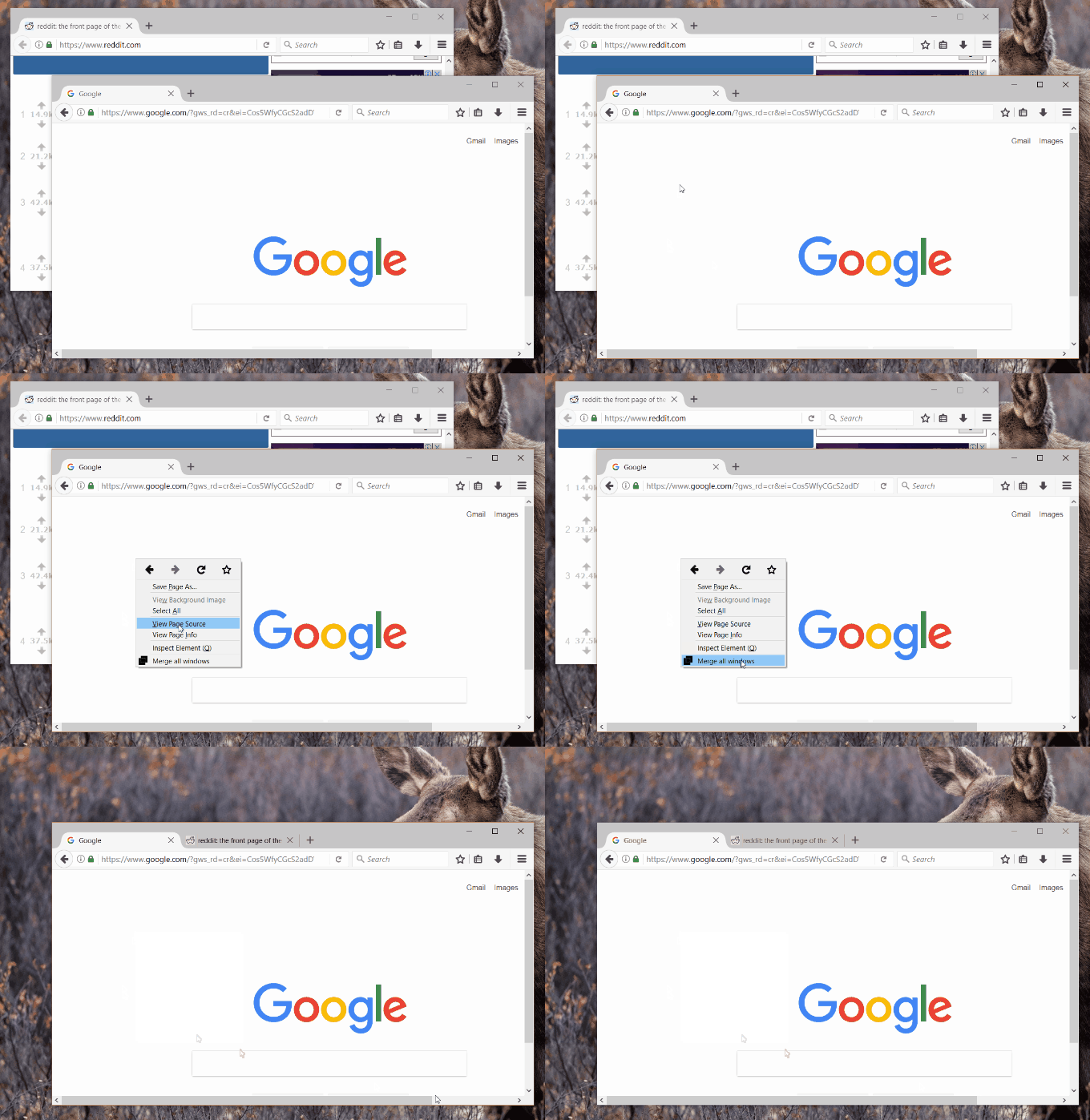
Work breaks may involve a quick walk to grab lunch, a short power nap, or a small browsing session on Reddit. The great thing about Reddit is how you can browse it all you want while at, and by the time you get home, there will be new stuff on the front page. The bad thing is that most of the links you viewed earlier won’t have gone too far down the line, but it will be hard to tell which ones you've visited, if you use different computers at home and at work. Synccit for Reddit is a web service that works through a browser extension to sync your visited Reddit links history between browsers and mobile devices and through the 'reddit is fun' Android app. In this post, however, we'll only be focusing on inter-browser syncing. All you need to do is create a free account with the service, add the different devices on which you want your Reddit history to stay synced, install the extensions on the devices, and you’re good to go! Read More

Open A Private Tab Within A Normal Browsing Window In Firefox

Private browsing mode keeps our online activity discrete and protects us from being tracked by online services, search engines, social networks, tracking ads et al. If you’re a Firefox user, you probably know about its Private Browsing feature already. Though there's one annoying issue with this - Firefox can’t run a normal browsing session and a private one simultaneously. Chrome however, does let you have an normal window and an Incognito window side by side. Private Tab is a Firefox add-on that beats out this Chrome feature; it not only allows you to run normal and private browsing sessions at the same time, but also lets you have normal and private browsing tabs open in the same window! If this sounds too good to be true, you should know there is a small a catch: Private Tab will work in Firefox 20 or higher only and if you’re currently using the stable Firefox version, you will have to wait a while. Read More

View Memory Usage Of All Enabled Add-ons In Firefox

At one point or another, we’ve all asked ourselves, ‘Why is my browser so slow?’. As times goes by, our browser doesn't appear to work as fast as it used to when we first installed it. For some of us, the problem is easily resolved by clearing the cache but when that doesn't work, something else has to be the culprit. The most commonly cited reason that we get for having a slow browser is too many add-ons or extensions. Both Chrome and Firefox have a rich collection of extensions but as useful as they are, they do drag down the browser’s performance. One can disable them to speed things up, but it’s hard to tell which is the most resource-hungry. If you’re a Firefox user, about:addons-memory will help you find the add-ons that are dragging your browser's performance down. Read More

Select, Duplicate, Close & Freeze Multiple Tabs At Once In Firefox

A few days ago, Chrome - my preferred browser - started reloading the home page over and over in a continuous loop. While I tried to sort the problem out, I needed a browser to work with and I turned to Firefox, which I believe is just as good. Using it regularly really makes you appreciate it, but one little feature that I found missing was that I couldn’t select multiple tabs and drag them out as a separate window. Not being able to randomly select multiple tabs also meant I couldn’t pin them all at once or close them. Fortunately, I came across a solution to some of these shortcomings in the form of MultiplaceHolder, a Firefox add-on that allows you to select multiple tabs by clicking each while holding down the Ctrl key. The tabs can then be closed, duplicated, or frozen. Read More

Disable Firefox Remember Password Popup While Keeping Password Manager Enabled

Like other leading browsers, Firefox has a password manager that offers to remember your password every time you log into any website or web service. If you don’t want it to remember the password for a particular website ever, you can disable the feature for that website by using the dropdown arrow next to the 'Remember Password' button on the popup and asking it to never offer to remember passwords for the current website. This popup appears on every website and the only way to hide it is to disable the password manager altogether from Firefox’s options. The downside of doing this is that Firefox will no longer automatically fill the login and password info for websites that you've asked it to remember passwords for. If you still want to use the feature but are annoyed by the popup appearing on every page where you sign in, give Password Dialog Begone a try. It’s a Firefox add-on that blocks the popup without disabling the password manager entirely. Read More

How To Remove Facebook Suggested Pages & Posts In Firefox

Facebook suggests friends for you to add and pages that you might like, which is fine; as the suggestions are presented on the right in a very unobtrusive manner. You can easily ignore them when you’re reading your feed, but the same can’t be said for the suggested and promoted stories that appear in your News feed. Promoted and suggested posts/pages can easily be mistaken as items in your feed if you miss the ‘promoted’ or ‘suggested’ sign. We covered Hide Facebook Suggested Posts for Chrome last year that allowed you to hide the suggested posts. If you've been looking for a Firefox add-on that does the same, look no further. Remove Facebook Suggested Pages and Posts takes care of blocking both suggested posts and promoted stories (from pages and from users) from Facebook on Firefox. Read More

View Song Lyrics On YouTube & Grooveshark From Nine Sources

A lot of desktop music players support on-screen lyrics, but if you mostly listen to music on YouTube or Grooveshark, you might have little or no options for viewing song lyrics. On YouTube, channels add lyrics to within the song video's description or, at times, within the video itself, but it’s rare. YouTube Lyrics is an extension available for Chrome, Firefox, Safari, Opera, and Internet Explorer that displays lyrics for the current song playing in YouTube or Grooveshark in a small popup within the respective tab. The extension searches and loads lyrics from one of nine sources that you can manage from its options page. Read More