Google Now Finally Launched On iPhone, iPad & iPod touch

One of Android 4.1 Jelly Bean’s most surprisingly useful features was Google Now: the intelligent personal assistant that – besides processing basic commands like Siri on iOS – would very intelligently present you with the “right information at the right time”. Now, the acclaimed service is available on the iPhone, iPod touch, and iPad. Check out the details after the jump. Read More

How To Change iOS App Icons Without Jailbreak [Guide]

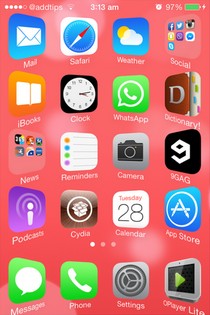
Apple's mobile operating system isn't exactly known or praised for offering users a lot of control. In fact it is notorious for being a walled garden, with Apple pretty much enforcing upon users what it thinks is right, and not giving them many options to tweak it to make it suit their individual needs best. Without jailbreak, iOS offers significantly limited customization when compared to Android; you can’t replace the keyboard, switch to a different launcher, customize app icons… or can you? Yes, we've come across a method that allows you to change the appearance of your app icons without fondling saurik’s beard! Check it out after the jump. Read More

Get Easy Access To System Toggles On iPhone Lock Screen

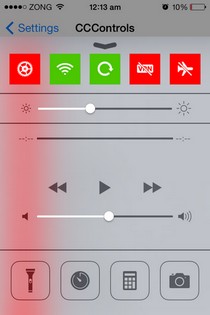
If Infinity Blade (or any other game, for that matter) has taught us one thing, it is that you cannot stay on top without being occasionally challenged. SBSettings has been the king of Cydia tweaks for a long time, and not many alternatives have come even close to garnering the same following as it enjoys. The only criticism that you can direct at SBSettings is that it offers too many options, including some you are never likely to need. Also, the lock screen integration of the tweak isn’t too good, and the screen turns off even if you are going through the toggles listed in the dropdown window. Flusterless and similar tweaks cannot be considered alternatives of SBSettings by any stretch of imagination, since they are too limited in terms of features. LockscreenToggles, however, might be the first Cydia tweak in a long time that can make you leave SBSettings. The tweak doesn’t have as much toggles and customization options as SBSettings, but that also means you don’t have to go through endless manual configuration to get started. Read More

Add Seek Bar To iPhone Lock Screen Music Controls With LSScrubbing

As tweaks like Tempus and LSMusicGestures have shown in the past, the iOS lock screen has a lot of potential when it comes to controlling your phone’s music library on the go. An average iPhone user doesn't need access to their entire song collection from the lock screen, while gestures are only useful to a certain extent and might even become annoying if you have to remember too many of them. Personally, the only thing that has ever bothered me about the default lock screen controls for the stock Music app in iOS is the lack of a scrubber (seek bar). The lock screen controls do include a slider to control the volume of the playback, and you can forward/rewind the song to some extent using the two arrow icons presented there, but it’s not the same as having a proper seek bar, which forces a lot of users to launch the Music app whenever they want to skip to the favorite part of a song, thereby killing the whole purpose of lock screen controls for them. LSScrubbing is a new Cydia tweak that solves this problem by adding a seek bar to the lock screen music controls in iOS. Read More

BatteryDoctorPro Is The Ultimate Power Saving & Monitoring App For iOS

A lot of apps are often labeled as the most comprehensive in their genre, but rarely does one justify the tag more than BatteryDoctorPro. Battery Doctor has been around for Android and iOS for a long time, and BatteryDoctorPro comes from the same developer. There is one main distinction between the two apps though. Unlike Battery Doctor, BatteryDoctorPro has only been released for jailbroken devices. There are some pretty clear reasons for that, since the app incorporates widgets for both NC and SpringBoard. You also get a bunch of toggles to control system actions, just like SBSettings, and there are other similar features that you aren't likely to ever see in an Apple-approved app. Read More

Change UI Accent Color Of iPhone Apps With Emphasize

I know a lot of people who aren’t really into Winterboard themes despite having a jailbroken iDevice. While theming can give your device a completely new look, it does come with a few drawbacks. For one thing, your device’s battery life might be negatively affected if the theme is a bit too flashy, and you also end up losing all the finesse that defines iOS. So, if you don’t have any serious issues with the way things appear in iOS by default, Emphasize might still manage to win you over. The tweak lets you change the color of basic UI elements in iOS. In iOS 6, the status bar changes color to match the current app’s theme. There have also been tweaks like WeatherBar in the past, which are aimed at making your iPhone’s screen appear more interesting and colorful. Emphasize goes one step further, and lets you choose the basic UI color of a third-party or system app. Read More

How To Individually Delete iTunes-Synced Photos From Within iPhone

Even if you are a die-hard fan of iOS, there's no denying that the stock Photos app in iPhone is not one of Apple’s best creations. For one thing, the app is not very feature rich, and has received only a few basic editing options pretty recently. Apart from that, managing your albums and the images within them can get a bit messy at times. Deletion capabilities for iCloud photos were added a long time ago, and the Camera Roll is quite neat, but if you have albums imported using iTunes, good luck trying to do anything with them! For some reason, iOS does not allow users to delete albums or the photos in them if they are synced with iTunes. Not everyone wants to connect their iPhone to a computer merely to get rid of a few annoying pictures, and it seems a bit counter-intuitive to do that as well. While we can only hope that Apple decides to change this in iOS 7, jailbreak users can address the issue right now, thanks to new Cydia tweak, iMageSynced Remover. Read More

MessageBox Lets Chat Heads Float Around Outside Facebook For iOS

People can’t seem to stop talking about the new Facebook update for iOS, despite the fact that it has been around for a couple of weeks now. The newly introduced stickers are pretty nice, but there can be no doubting the fact that the real show-stoppers are Chat Heads. The Cydia store has already received a few tweaks aimed at the Facebook app’s new features, but ever since it was announced that there will soon be a tweak to let you use Chat Heads outside of the Facebook app, many have been waiting just for that. After all, Android already has the same capability thanks to Facebook Home, and iOS users want a piece of that as well. According to the word that was out there, the Chat Heads-liberating Cydia tweak, MessageBox, was supposed to be released last week, but got delayed for some reason. A few hours ago, the developer made the DEB file of the tweak available for the public, and now the tweak has finally been released in the Cydia store! Read More

Brow.si For iPhone Is A Cross Between A Web Browser & Feed Reader

There’s absolutely no shortage of RSS readers or news aggregators on iOS. Hop onto App Store and you will find plenty of such options there, each with their own unique features. Though if you’re looking for an RSS reader that doubles as a snappy web browser, try Brow.si. This fascinating app lets you browse your favorite websites just like you would in any modern mobile browser. In addition, you can subscribe to the ones that you frequently visit and receive push notifications for updated content published on them. Thus, it eliminates the need of using a web browser in conjunction with a separate news reader app for the purpose. Furthermore, any links that you want to open from your subscribed content wouldn't require a separate browser either, also eliminating the need to switch between a browser and your feed reader while going through your feeds. Read More

LinkedIn Contacts For iPhone Unifies Local & Online Address Books & Helps You Stay In Touch

LinkedIn has released a standalone iOS app for its new LinkedIn Contacts feature that aims to help you handle your professional relationships with ease. The app has been built to let you stay in touch with your pals, family and business associates over the world's largest social network for professionals no matter which channel you use to interact and communicate with the them. It aggregates your contacts from your iPhone Address Book, LinkedIn itself, Gmail, Yahoo and Outlook,  and brings them together all in one place, eliminating the need to use separate services or apps for the purpose. This can come exceptionally handy for those who have  their contacts spread across all these various services and would prefer to access them in one place. There's also third-party app integration with services like Evernote to help you sync notes with different contacts across the aforementioned services. The app boasts a great-looking UI and feels fairly snappy. Let’s take a look. Read More

Add A Feature-Rich File Downloader To Google Chrome For iOS

When the Chrome Download Manager tweak was released last year, a lot of people thought that a better alternative will soon make its way to the Cydia store, but even after all that time, we are still looking for the perfect downloader that works with Google Chrome for iOS. As it has been around for longer, Safari has some pretty decent download managers, like Safari Download Enabler. Chrome Downloader is the latest download manager to come out for Google’s iOS web browser. It has seamlessly integrates with the web browser much like the aforementioned Safari DE and supports just about any file format that you have ever heard of. Even if you find a file that isn't compatible with the tweak, you can remedy that by manually configuring Chrome Downloader to always start a download session when a particular type of link is tapped within Chrome. Read More

Prime Adds Color-Coding To Incoming & Outgoing Entries In iPhone Call Log

Apple’s penchant for perfection fully manifests itself in the company’s choice of UI elements for iOS, but there are still a few idiosyncrasies that make the overall experience of using an iPhone slightly annoying. While the OS gets big things like cloud syncing, app environment and gesture control spot-on, there are some little aspects of it that could have made your life a little easier if improved. Take the stock Phone app for example - while it doesn't lack much in terms of features, there is a slight inconsistency in the ‘Recents’ tab that might have annoyed you on several occasions. By default, the iPhone call log displays missed calls in red color, but there is no easy way of distinguishing between incoming and outgoing calls, since they are both shown in the same font. There is a tiny differentiating icon next to each entry, but you can’t analyze the list at a single glance just using that. Jailbreak users can finally address this issue, thanks to the newly released Prime Cydia tweak that brings full color-coding support to the iPhone call log. Read More

Drippler Brings Its Gadget-Specific News App To The iPhone

A couple of my friends have been anxiously awaiting the release of Galaxy S4 ever since Samsung announced the end of April as the ATA for the flagship device's release. We are sure there are a lot of similar people who are looking for the latest information on their favorite gadgets, games or apps. You can get a general idea of the latest happenings related to any device by going through a few blogs or news sites, but there are easier ways of doing the same. Back in 2011, we covered a web service by the name of Drippler, which is a one-stop-shop for all the reviews and news stories on gadgets. The concept is similar to that of The Register app, albeit just a bit less generic. Drippler has had a presence in the Google Play Store for quite a while, and it has now arrived for iOS as well. Let's take a look at it after the jump! Read More

Atom Adds A Sleek Custom App Launcher To The iPhone Lock Screen

All it takes is a single app or tweak to bring a certain genre back in vogue. Prior to the release of JellyLock, there hadn’t been a similar tweak released in the Cydia store for a long time, but now we have an even newer way of adding useful app shortcuts to the iOS lock screen. atom lets you pin six apps to the lock screen, and to make sure you don’t end up launching them by mistake, it uses a clever dragging gesture to get to the shortcuts. To make the unlocking mechanism conforms to the rest of the tweak, atom adds the unlock shortcut in the middle of the app icons, which looks pretty neat. atom might not have as many customizing options as ICSLock Pro, but its default look is good enough to keep most users satisfied. Read More

Best Free Reddit Apps For iPhone, iPod touch And iPad

Reddit is the world’s most popular social news and entertainment website today, with billions of monthly pageviews and unique visitors. Now, a majority of these visitors use the desktop website, but an important fraction of them use their smartphones and tablets to get their daily doze of reddit on the go. With that in mind, we’ll be discussing five of the best reddit apps/clients for your iPhone, iPod touch and iPad. If you happen to own an Android device, we've still got you covered with our list of the best reddit apps for Android. Read More

ReachFast Contacts Is Another Great Gesture-Controlled iPhone Address Book App

Not a lot of great alternatives exist for the stock Contacts app in iOS, but apps like Smartr and Brewster have managed to garner some acclaim due to a few novel features. Having said that, some might argue that an address book should not be loaded with too many features, since associating photos with your contacts is always less important than being able to find them as quickly as possible. ReachFast Contacts is not completely devoid of bells and whistles, but it is not excessively complicated either, and the developer claims that it will offer you the quickest way of making calls and sending texts from your iPhone. The app has gestures, lets you create new contacts in a really intuitive manner, and comes with a search feature that keeps getting smarter with the passage of time. Read More

Get ‘Add To Home Screen’, Dropbox & Sorting Options In iOS Notes App

One might think that most Cydia developers deem the stock Notes app in iOS perfect as it is, because there are very few tweaks in the jailbreak store that deal with Notes. There are a few exceptions like AddNote and MultiNoteDelete, but even these tweaks don’t make any drastic changes to the app. This is why NotesTweak might be among the best tweaks ever released for the Notes app. Although your notes are synced across all your iDevices thanks to iCloud, but not everyone is a fan of Apple’s cloud service, specially since there are a lot of alternatives available for the same purpose that work on multiple platforms, not just Apple's closed ecosystem. If you are a Dropbox user, NotesTweak is likely to become a permanent resident of your iPhone, since its adds Dropbox integration to Notes. You can also save individual notes to your device’s Home screen, which is quite similar to adding webpages to SpringBoard. The ability to let users sort notes in the app just the way they want completes the tweak’s impressive feature list. Read More

[Giveaway] Visio Touch: View, Annotate & Share MS Visio Files On iPhone & iPad

The iPad already has tools like xPlan that let users create elaborate Gantt charts and flow diagrams without requiring access to a computer, but having an app of this kind is not the same as being able to import files from a standard desktop tool. Most people create block diagrams and flowcharts using MS Visio, but just like the rest of the Office suite, Microsoft still hasn't introduced its iOS app so far. Things are not completely hopeless though, as the App Store does offer a convenient way of viewing and annotating VSD and VSDX files on iPhone and iPad. Visio Touch makes it really easy for iDevice owners to import Visio files in a number of ways and convert these diagrams to PDFs for easy sharing. Read More

FBPrivacy Adds A Bunch Of Features To Facebook & Messenger For iPhone

Don’t be fooled by the name - FBPrivacy is not just about improving the privacy level of your Facebook account; this Cydia tweak is more like an unofficial Facebook update that fixes everything that is annoying about two of the service’s most popular iOS apps. FBPrivacy deals with both Facebook and Facebook Messenger, adding some new features to them and removing a few that have never been too close to many people’s hearts. We have already told you about the easiest way of getting rid of the ‘seen’ indicator from Messenger, but now you can enjoy the same level of control in your conversations even if you have decided to stick to the Facebook app’s own chat feature due to the newly rolled out chat heads and stickers. Apart from that, FBPrivacy lets you attach multiple photos in a single chat message, disable the typing indicator, see timestamps for all messages, and much more. Read More

AppShopper Releases New iOS App Discovery Tool With Social Elements

AppGratis outlived AppShopper by a few months, but recently Apple decided to remove the former app from the iTunes App Store as well. Both the apps served the same purpose of letting iPhone users discover new apps with ease. AppGratis had a decent notification system, while AppShopper was great due to the number of filters it offered for browsing. There are other app discovery tools available for iOS, like Hubbl and Kinetik, but there can be no doubting the fact that a majority of users have been affected by the absence of the two most popular names in the app discovery genre. If you are among such users, your day might just get a little better after knowing that AppShopper has made a comeback in the App Store by the name of AppShopper Social. The app is better than ever, but hasn't changed so much that you won’t be able to enjoy all the familiar features you previously loved about it. Read More