Clean/Remove Junk Files On iPhone With iCleaner [Cydia]

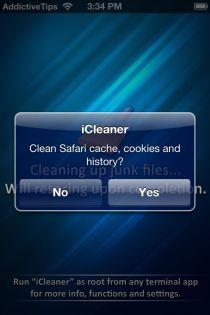
A huge Android fan, I do admire iOS for its fluidity and app loading and exit times. Android on the other hand has been improving at an accelerated pace but is subject to slowing down on accumulation of junk files, like most computer OS as well. iOS however is believed to be resistant to such issues, but that’s how we perceive it and to be blunt, we take the speed and fluidity for granted (but why not?). iOS does keep caches and temporary files that become redundant over time and do nothing but slow your device down while taking up precious space. Well not enough for you to notice, but it always bugs me when something useless takes up space in my phone. iCleaner is to iOS what CCleaner is to Windows and Mac OS X – that is, to clean up junk files. Read on after the break to learn more about this app available for free on the Cydia store. Read More

FixBee: Delete Junk Files And Defragment Hard Drives

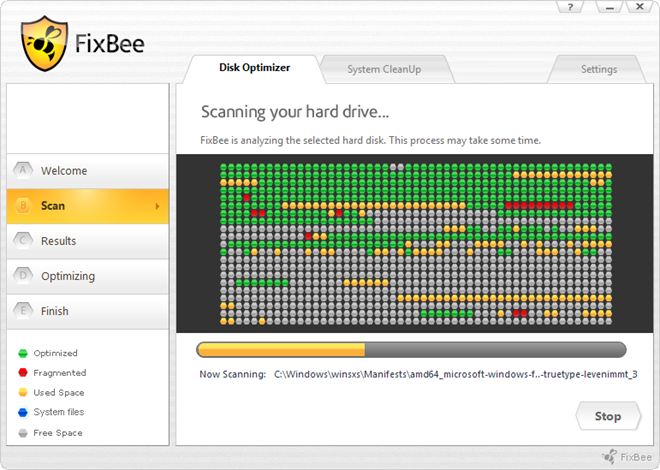
There are two things that you should take care of if you want to keep your computer running smoothly: regularly clean it to remove the junk files, and regularly defragment your hard drive to make sure that your data is neatly stored within. The system takes less time to locate data if your hard drive is defragmented. Think of it as a cupboard where you keep all your stuff. If all the items are neatly placed into labeled compartments and every type of product has its own section, it will be very easy for you to locate the required item. Instead, if everything is haphazardly placed inside the cupboard, it will take you a lot of time to find the required item from the mess. Today, we have a single application that performs both the functions of cleaning, and defragmenting your computer. FixBee is an application for Windows that allows you to easily and quickly defragment, as well as clean your PC. It not only repairs errors, but also removes junk files collected over time that just consume valuable disk space and create clutter, slowing down the computer. Read More

System Ninja: Clean Junk Files, Manage Startup & View PC Specs

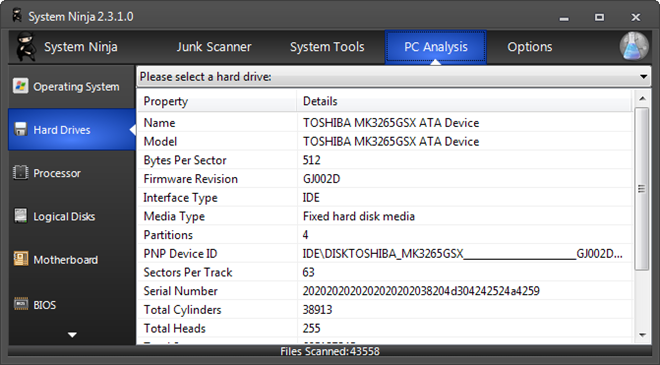
In order to keep your PC working smooth and avoid any crashes, its important that you clean it regularly of all the junk files. Whenever you uninstall an application, some of its items such as the log files, configuration files and registry entries are left by it in your system, which might cause conflict with other applications. Previously, we have covered some very good system cleaners for both Windows and Mac, such as GiliSoft Free Disk Cleaner, Uncloeaner, iBoostUp and Windisk. Today, we have another system cleaner named System Ninja that lets you clean junk files from your system, has a startup manager to remove items from system startup, a process manager to end processes, a file analyzer to generate MD5, SHA1, SHA256 hash values and view other details about a selected file, and a PC analyzer to view the specifications of your PC. More on System Ninja after the break. Read More

CCEnhancer Now Extends CCleaner Support For Up To 500 Applications

A few months back, we reviewed CCEnhancer, which is a tool that adds support for additional programs in CCleaner. Previously, CCEnhancer had the ability to add support for 270 (additional) applications for CCleaner, however, it was recently updated with support for up to 500 applications. The extra applications and files that can be removed by updating CCleaner via CCEnhancer include, MS Office saved CEIP data, MS Office Temp and unsaved files, Sun Java files, Google crash reports, additional junk files for widely used applications like Windows Live Messenger, uTorrent, Skype and more. Read More

Scan & Clean Your Computer With FileLab Windows Cleaner

Gone are the days when you had to download an application to get it to work. With changing times and faster internet connections, more complex web apps have begun surfacing, allowing users to perform different tasks without downloading complete applications to their systems. In order to keep your system one notch up, its advisable to keep it free from extra files junk or unwanted registry entries, let alone virus. After FileLab’s web-based Video Editor and Audio Editor apps, they have come up with a Windows junk file removal tool, labelled as FileLab Windows Cleaner. This app is capable of cleansing your PC of problematic items, including Registry Entries, Junk Files, Recycle Bin, Broken Shortcuts, Corrupted Applications, Rootkits and Malware. Read on past the break to see how it works. Read More

UnCleaner: Remove Junk/Temp Files Without Messing Up Browser History

Different applications leave numerous useless files, such as logs and temporary files, in your PC when you install and uninstall them. Other Windows functions such as Windows update and downloaded installations also leave some files behind. During the update process, several temporary files are created for installation and application of new patches. These unnecessary files and folders clutter up your hard drive, causing a decrease in PC performance. Moreover, they eat up valuable disk space that can be used to store other data. Deleting this data manually is not advised as one cannot be sure about which files are safe to delete and which ones can mess with important settings. UnCleaner is an application that displays a file report detailing all the junk files in your system, and cleans them in one go. The application allows you to set task scheduler to enable system cleaning on every startup. Some of the files that it cleans include Windows account temp files, Windows updates downloaded files, Windows installer temp files, Windows shell cached files and a lot more temporary and junk files from your system. Read More

Optimize, Tweak & Clean Windows PC With Toolwiz Care

Toolwiz Care is a comprehensive system tune up application that comes with a large collection of system utilities and optimization tools, all designed to clean, optimize and tweak components of your computer for better performance. Toolwiz Care includes a set of 40 different tools, including registry cleaner, disk analyzer, startup and boot time optimizer, process manager, privacy cleaner etc. Read More

JetClean: Clean Clutter And Boost PC & Internet Performance

There are very few free system cleaners that also provide good optimization options to enhance system performance. One such example is the infamous Ccleaner, which is a widely used junk file remover. However,  it does not provide many system optimization features. On the contrary, other applications like Advanced System Care, which do offer comprehensive PC tune up, add many useful features only to their paid version. JelClean looks to fill that gap. Read More

Windisk: Automatically Clean Junk Files When You Log Off

Windisk is an advanced system cleaning application to help you improve PC responsiveness by removing junk files from your system. It cleans up all temporary files, browser data (from Internet Explorer, Firefox, Chrome, Opera and Safari), list of recently viewed items, and invalid registry keys. Windisk is not different from CCleaner except for the fact that it works in a more automated manner and delivers cleaning results only in the form of a log file. Perhaps the best feature of Windisk is its ability to remove your browsing traces and system clutter when you log off, thus effectively erasing all traces left behind. Read More

Delete Obsolete Application Data From Your System With AppCleaner

The widely acclaimed system cleaning applications, like CCleaner, Glary Utilities, Advanced SystemCare, etc., often fail to completely remove junk from the system, which compels user to try other cleaning utilities to ensure that the left over data of uninstalled applications and obsolete files are no more present in the system. AppCleaner is a freshly baked junk cleaning utility, allowing you to scan system for applications’ data, Temp directories, hidden locations containing junk files, browsing history and traces, etc. In addition to pre-listed applications and system paths, it lets you specify folders which are to be scanned during the cleaning process for junk data. Unlike CCleaner, it allows you to select all the important Windows registry locations to remove junk entries in order to optimize the registry structure. Similarly, a host of Windows locations can be included in cleaning process, which includes, FTP accounts, Recycle Bin, Windows Explorer’s MRU lists, Chkdsk File Fragments, User Assist History, Old Prefetch data, Menu Order cache and so on. Read More

Clean Obsolete And Unwanted Files In Windows With Aero OneClean

Every system cleaner has its pros and cons and while some clean junk files from certain directories, others are more useful for their extra features. Recently, we provided a comparison of some of the best system cleaners to identify the best available option for our readers. It is a common fact that no particular junk file cleaner erases unwanted files from all required directories, therefore, since long I have been in search of finding a way to single out junk file directories from multiple application and system folders. Read More

Which System Cleaner To Use? We Compare The Best Cleaning Utilities

Windows provides Disk Cleanup as a default junk file removal utility. However, it is not as effective as one might like, therefore, many users resort to alternative third-party software for cleaning system clutter. We have previously covered many free system cleaning utilities which provide multiple benefits such as system maintenance and cleanup. While some are more capable of removing junk files from the system, others seem to be more effective in providing registry fixes and extras like file shredding, trace erasing and malicious file removal. In this post we will analyze the best system utilities and provide you with a conclusion regarding the most effective tool for your PC. Read More

CleanMyPC Brings CleanMyMac’s System Cleaning Features To Windows [Giveaway]

CleanMyMac for Mac is what CCleaner is for Windows. Many users who’ve used CCleaner on Windows consider CleanMyMac as to be the best comparable junk cleaning tool for Mac. However, there are certainly a lot of differences one can point out when it comes to deeply clean Mac and Windows with CleanMyMac and CCleaner, respectively. Almost all the Windows based cleaning tools, including widely used, Glary Utilities and CCleaner, lack at certain areas. This compels users to consider other cleaning utilities to clean junk off the system and to find all superfluous safe-to-remove files. Recently, the developers behind CleanMyMac have released its counterpart for Windows OS, called CleanMyPC, which brings almost all the essential cleaning options of CleanMyMac with other complementary features especially designed to find and remove junk from Windows system. Read More

Find Large Files On Your PC With DiskFerret Lite

DiskFerret Lite is the free version of the Java powered DiskFerret software. It is a disk analyzing utility which runs inside your browser and therefore does not require installation. With DiskFerret Lite You can get a comprehensive overview of the files that are consuming the most space on your hard drive and hence identify and remove unwanted files. The information of a selected drive is displayed by size, user, top files (according to size), file type and duplicate files. This information can be viewed in a number of ways including pie charts, bar charts, tree map chart, ring chart and a text based table. Read More

Clean Both Internet Explorer 9 And Firefox 4 With Latest CCleaner

CCleaner is a widely used system optimization and privacy tool. As we all know,  it works as a system cleaner, MRU list eraser, registry cleaner and can be used to wipe free space from a system. The latest version 3.05 has recently added support for Internet Explorer 9 and Firefox 4, along with enhanced registry cleaning for obsolete software and junk file removing ability for many widely used applications like iMesh, Yahoo Messenger, Skype, Adobe Air apps, etc. Some of its main improvements include:
  • Internet Explorer 9 Support
  • Support For Firefox 4
  • Registry Cleaning Support for Windows Services and Cleaning of Obsolete Firewall Rules
  • Cleaning Support For More Applications
Read More

Xleaner – Clean Unnecessary File Directories That Other Cleaners Can’t Clean

Gradually as the Windows suffers from system crashes or power loss and software installations, it's performance is deteriorated due to temporary files left in the air. It's recommended to wipe these temp files to make it look spick and span again. CCleaner is cited by many as the most useful software for getting rid of unnecessary files from temporary file directories. However, many apps like CCleaner are not as effective as many layman think. In fact it leaves behind clutter from many directories (e.g. the log files and Temp from the Windows directory, Prefetch files and even the Temp in user profiles). Xleaner is a similar yet more dynamic application (also available in portable form) that cleans unnecessary files in a more comprehensive way from numerous Windows directories. It not only cleans junk files, but also provides privacy trace erasing options. Xleaner allows users to choose specific applications, browsers and directories to erase files from. Read More

Remove All Junk Files From Your Windows And Linux System

When I wrote about two tools that will remove all temp files from Windows, reader Vadim pointed out another great tool. BleachBit is a file and privacy cleaner that was originally developed for Linux only, but is now available for Windows too. What it does is fairly simple, the main objective is to remove all Cache, Cookies, Chat & System Logs, History, and Temp Files from commonly used software and services. The full list of commonly used programs include: Adobe Reader, Chrome, Firefox, Flash, GIMP, Google Earth, Hippo OpenSim Viewer, Internet Explorer, Java, OpenOffice.org, Opera, Real Player, Safari, Second Life Viewer, Skype, System, Vim, Vuze, and XChat. Read More