Create Image & Voice Notes On Android & Export To PDF With ArcNote

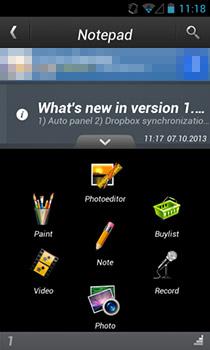
Note taking apps are common but most are limited to saving simple text notes. ArcNote is an audio and image note-taking app for Android from the developers of the famous Perfect365 image editing app for Android, iOS, Windows Phone and Windows. It’s a break from the normal text-based notes apps that you usually come across; you can directly take a camera shot or use one of the images already saved on your device for image notes. A single note can contain multiple images and audio recordings. Images can be edited so that only a particular user-defined area is highlighted. ArcNote isn't for jotting down a quick address, nor is it useful when you want to make a quick grocery list. It’s more suitable when you can take a picture of whatever information you need to save, like a business card, a poster or sign, or even a whiteboard, or quickly capture audio, for example an important part of a lecture, interview, presentation or just some instructions from your significant other before you go out shopping. While notes themselves aren't text based, you can add comments to any image in a note. Images can be edited individually, or even in batch. Read More

Watch Video Lessons & Take Time-Synced Notes Side By Side Using VideoNot.es

A great way to learn online is through Coursera, an award-winning site that collects video lectures from some of the best university professors and academics out there and makes them available to people around the globe, for free. All you need to do is sign up and try to follow the study guidelines, week-to-week. VideoNet.es is an online, paperless solution to video note-taking, that saves you the trouble of overusing notepad or Evernote while watching Coursera, Khan Academy, Udacity, edx or educational YouTube videos. Not having to first pause the video, restore notepad, and then write your thoughts can make learning even Computational Neuroscience a bit more breezy. Read More

Writeapp Offers Distraction-Free Note Taking With Optional Public Sharing

If you search for a good note taking service, you will find that Evernote is what most people recommend, and perhaps rightly so. Evernote is a very powerful and feature rich - so rich that it can be overwhelming for some due to all its note types, tags and all. Besides, its focus is on taking and saving all sorts of notes, and the rich formats that it supports can become distracting if all you want to do is jot down plain text. For a relatively simpler option, you can go for Keep - a note taking service from Google, or you can take Writeapp for a spin. It's a simple web app for jotting down and saving plain text notes in a distraction-free interface You can sort notes into notebooks and manage them easily. You can also use it to keep a private journal, or selectively make notes public to publish them in what could be considered as a plain-text blog. The note editor is quite simple and supports plain text with no rich formatting options. Each note is saved with a title and can be edited any time. Read More

Google Keep vs Evernote vs OneNote vs Notes vs Simplenote

Now that Google Keep is live, it wouldn't be right if we don't compare it with other popular note taking services out there. In our detailed review of Keep, we've mentioned that its features are rather basic at the moment, especially if you compare it with note taking giant Evernote. However, Evernote isn't the only impressive notes service out there, and it’s only fair to broaden our comparison. After considering just what features does it takes to make a good note taking service, we ended up with quite a list. Not all services here share the exact same feature set, but each of them has its own pros and cons and as a user, this comparison should give you a quick idea of which one of them is right for you, and whether switching to Google Keep will work for you, or should you stick with the one you're currently using. Read More

Hands-On With Google Keep: Notes & To-Do Lists For Web & Android

Google’s new note-taking web service Keep is now live, along with its Android app. Keep lets you create notes and to-do lists that sync over Google Drive. Notes may contain text, voice or images. Notes and lists can be color-coded, and are searchable. With Keep, Google aims to let you collect and consolidate all your thoughts, ideas and useful information together that will be synced and accessible across all your computers through your browser, and across all your Android devices using the Keep app. Let's take both the web service and its Android app for a spin and see what it's all about. Read More

Digitize & Combine Real-Life Notes On iOS With ‘Edit & Share’

Times might have changed, but the practice of jotting down notes during presentations still as useful as ever. Smartphones and tablets have started assisting people in this endeavor to some extent, but some still prefer written text over typing it or making audio/video recordings. You can easily snap a picture of someone else’s notes, or capture everything your teacher/boss might have written on the whiteboard, but it is always a nightmare to try and keep these random pictures organized. On a computer, you might organize photos from particulars lecture or presentation in their individual folders, but the same can’t be easily done on an iPhone or iPad. With Edit & Share however, you can create separate projects for photos that are related to each other. There are plenty of editing options in the app that let users stitch images together, crop them or add text notes to make everything searchable. Read More

SomNote For Android & iPhone Is A Simple, Elegant Note-Taking App With Cloud Sync

Tired of trying and testing all sorts of inconvenient, unstable and overly cluttered note-taking tools? Try SomNote – an extremely user-friendly note-taking web app that is not only aesthetically pleasing, but also supports a suite of features that make your task of notes management a breeze. You can create multiple notes, supplemented with important multimedia/document attachments, under various custom folders. For each account, the service offers a maximum of 100MB of free cloud storage space, which is more than enough to handle your vital attachments till you manage to safely transfer them to your computer. SomNote supports saving your notes automatically at frequent intervals, and lets you resort to a previously saved state of choice in case you mess up a note big time. If you’re a smartphone user, you can avail all these features on the go with the newly released Android and iOS SomNote clients. Read More

Fetchnotes: Note-Taking With Twitter-Like Inline Hashtags; Now On Android, iOS & Web

Despite not being an avid Twitter user, I love a few things about the micro-blogging service. For instance, the way in which Twitter utilizes the concept of inline hashtags is something quite commendable. While composing a tweet, all you need to do is put a hash symbol (#) before the desired subject, place, person or topic in order to get your tweet organized, and easily discoverable within the extensive pool of hashtags that exist on the network. Wouldn't it be great if you could employ the same concept to routine note taking? Say hello to Fetchnotes – a cross-platform note-taking app for Windows, Mac, Linux, Android and iOS-powered devices that lets you add inline hashtags to your notes for easier organizing and searching purposes. Sporting a neatly designed UI, Fetchnotes makes your task of creating notes extremely convenient via simple swipe gestures. Each user-defined hashtag represents a specific category/topic under which you can assign all your relevant notes. This simplifies searching for all notes falling under a specific hashtag, as all you need to do is tap a tag to view all the posts under it. Read More

PlanDroid: A Note Taking, To-Do List & Task Management App [Android]

PlanDroid is a multi-purpose Android app that comes with a built-in to-to list manager, calendar, task reminder and note editing tool to help you manage your routine tasks and notes from one place. Using the app, you can define various categories, and add all the relevant tasks under each category, complete with relevant priority levels, multiple reminders, notes, estimated completion time, and a brief description. Apart from exporting and importing the task list to and from local storage, you can also sync it with the app’s native calendar to get a comprehensive overview of your agenda for a particular day. In addition, the notes editor of the app provides you with commonly used text-editing tools (bold, italic, underline, highlight etc.) to help you prepare notes. That’s not all; the app offers extensive configuration for your reminders/alerts, and lets you tweak its homescreen according to your requirements. Read More

Official Microsoft OneNote Mobile Client Released For Android

Today seems to be a good day for Android fans with a couple of big announcements coming from tech giants. First, it was news of the release of Google’s Chrome browser for Android, and now it’s Microsoft bringing its trusted note-taking and sharing tool, OneNote, to the Android Market. Initially released as an iOS-exclusive app, and then released for Windows Phone 7, Microsoft’s official OneNote client is now available to Android users with all the note management features it is known for, including remote access to your SkyDrive account for syncing notes and notebooks in real-time (with support for offline access), enhanced text formatting (with built-in spell check tool), in-app photo capturing and attachment, option to add hyperlinks, images and bullets to notes and plenty more. Read More

Add Notes & Reminders To Application Windows With Stick A Note

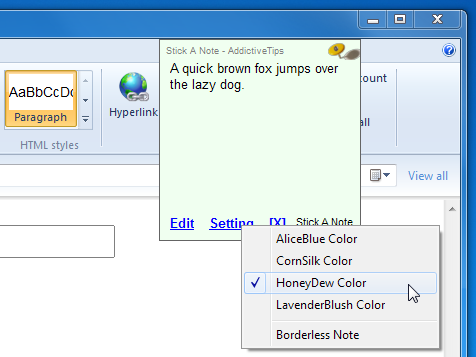
Sometimes, random thoughts cross our mind during the most absurd moments. For instance, while working on a project, you will suddenly remember that you had to make a phone call. Note-taking applications like Sticker (a portable and light-weight application for taking notes on desktop) and Stickies (a clone of Mac's popular tool for note taking) allow you place sticky notes anywhere on your desktop, but what if for some reason you cannot afford to minimize the application? Stick A Note is portable application that enables you to stick notes to windows of active applications using hot keys. You can add relevant information particular to each application, such as project completion time, outline of an article you are writing, an important email address, etc. The application allows you to add the sticky notes in four different colors, and change the hot key to enable the sticky note. Read More

Microsoft Releases iPad Client For OneNote

Whether you are out shopping for groceries or making a list of the buddies you want to invite for a Friday night bash, you need a handy note-taking tool to store information anywhere and anytime. We don’t have a database with SQL running in our brains, and it's only natural to go blank about even the most important tasks, whether they are of a personal or professional nature. Microsoft's virtual notebook OneNote serves that purpose pretty effectively. The OneNote mobile client for iPhone has been around for quite a while, and now, an iPad version of the app is also available on the App Store. For those of you who aren't familiar with what the app does, it allows you to create notes and checklists, share them via email, attach photos to notes, and sync all with your SkyDrive account on the go. Read More

Tag Contacts & Add Images To Notes With Note Well For Windows Phone 7

Windows Phone 7 has pretty deep Office integration and OneNote renders the use of other note-taking apps pretty much redundant. But nothing is perfect and there are gaps in usability which third-party apps can take advantage of and add to their own arsenal of features. Note Well is one such app which strives to bring some of the features that are not present in the Office hub by default. Using this free app, you can add images to the notes you write and tag people from your contacts list in your notes. Read More

Gem Collects Commonly Used OneNote 2010 Options & Functions In Single Tab

OneNote 2010 comes with a host of features and tools to make note taking a breeze, but it doesn’t allow categorizing most frequently used options into groups, such as, print out, create new page, section & indented page, adjust size, arrange printouts, view inserted files and so on. Since it becomes quite a wearisome task to manually find these options from OneNote 2010 interface, you may need a plugin that can collect these functions under one hood. Read More

Sync Notes With Your PC, Android, iPhone, And iPad With Doit.im

We found Doit.im to be a very useful note taking application when we reviewed it back in 2009. Now it has been updated and enhanced with all new features and mobile apps for Android, iPhone, and iPad. Doit.im therefore, is now capable of synchronizing notes across your PC and mobile device. Additionally, notes can also be accessed and managed  by logging into the Doit.im website. The new features include adding note start time, deadline, context, projects tags and saving of notes to the cloud. Read More

Make Sense Out Of Minutes Of Meetings With minute.io

Whether you consider meetings to be important or a waste of time, one thing every meeting has is a designated minute taker and if that’s you, minute.io might just make life easier and meetings less torturous to sit through. minute.io helps you record events of a meeting, it classifies the events as ToDos, Okay, Info and Idea. You can enter members who will be attending the meeting and assign events to them. A due date for each event can be added. After the meeting, you can mail minutes of the meeting to all everyone in two clicks. Read More

SideSlide Is An Advanced Configurable Desktop Organizer And Launcher

SideSlide is an application which aims to bring a whole new way to organize programs, shortcuts, frequently visited locations, RSS Feeds, and much more, under one extensible workspace. According to the author “SideSlide is an advanced, unobtrusive, dockable, skinnable, instantly accessible, highly configurable Desktop Extension on Steroids!”. All settings of this application are stored inside a single folder, therefore it is completely safe to use Read More

Notesbrowser Groups Multiple Notes Into Sections & Categories

We have come across many note taking applications such as WYSIWYG and LaTeX based Gwennel tool, KeepNote to maintain notebook hierarchy, and an XML based NoteFly. If you need a note taking application which is geared towards managing extensive number of notes and multiple kind of information, Notesbrowser is what you need. As its name suggest, it employs a browser having broad layout for creating notes in different categories and in multiple sections. Read More

Add Note For Every File And Folder via Right-Click Context Menu

Out of staggering number of note taking applications, File Notes is an ingeniously useful application which is by far the most prominent from the rest of note taking applications, primarily because of the fact that it offers note taking option with folders and with any type of file. Adding more, it integrates with right-click context menu to let user add notes on the go. Read More

Gwennel Is A WYSIWYG LaTeX Based Note Taking Application

Gwennel is a portable feature-rich note taking application which is based on WYSIWYG (What You See Is What You Get) editor pattern. The application is a small and light-weight editor which takes only 199KB of your disk, providing you with long list of features and options to keep tab on each note. The best part is that it is more like a full-fledged word processor that takes absolutely no time to open and has an ability to perform other processes instantly. Read More