How To Set Reminders For Notes In Evernote On OS X, iOS & Web

It’s hard to find any shortcoming with Evernote, both as a service and with any of its apps. It’s rich in features and since it’s available on so many platforms, you can create and sync notes from just about anywhere. Though hard to spot, one shortcoming that Evernote did have was the lack of reminders for the notes users created and with a recent update to both its desktop and mobile apps, that has been fixed as well. If you use Evernote on a Mac or an iOS device, or its web clipper in your browser, you can now set reminders for your notes. Users can receive emails for the reminders they've set, as well as Notification Center alerts on both OS X and iOS. Sadly, the Windows and Android apps have been left out. Not only are Windows users unable to set reminders, it seems they will not be able to view the ones set from a Mac or an iOS device either. Here's how you can set up Evernote to give you reminders on your device or as emails. Read More

Indigo Is An Android & WP8 Voice Assistant Capable Of Casual Conversation

It is no secret that Windows Phone does not have as many alternatives to Siri as Android, and even the personal assistants that are available in the WP Store have their shortcomings. Speaktoit Assistant is good for having a fun chat every once in a while and has a very customizable UI, but you can’t get it to perform a plethora of useful tasks. Ask Ziggy, on the other hand, has often been accused of being a little too simplistic. So it is nice to see a new talking personal assistant that has been released at the same time for both Android and WP8. Indigo is a voice-controlled personal assistant that can entertain you while having the basic purpose of making your life easier. Read More

Abstergo Lets You Clear Individual iOS Notifications Or Turn Them Into Reminders

It’s been around for more than a year, but some of you might still be using Lorem - the Cydia tweak that lets iOS users clear a single notification from a group within the Notification Center. A lot of tweaks dealing with notifications have been released since Lorem, and Abstergo combines the features offered by these newer ones with the functionality offered by Lorem. With Abstergo, you can get Remind Me Later options for any notification (just like with AnyReminder), and the tweak is also capable of letting you clear notifications from the lock screen or the NC just the way you want. You can use Abstergo to clear all notifications with one gesture, create reminders out of notifications without even unlocking your device, and convert texts into reminders from the stock Messages app. Read More

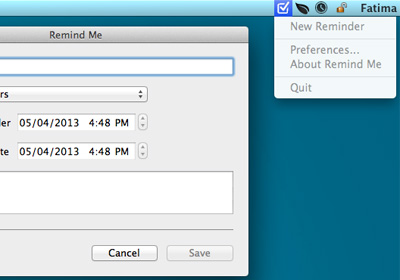
Quickly Add Entries To Reminders App From Mac Menu Bar With Remind Me

Reminder apps are very common for just about all platforms, and Mac as well as iOS come with one that syncs over iCloud. This app, called Reminder, is rather basic; it allows you to group reminders by list and lets you set the priority level for each of them. There are various more as well as less sophisticated reminder apps available for Mac but if you just want a quick way to add reminders to the stock Reminders app, try out Remind Me. It is a free app available in the Mac App Store that’s built to make the process of adding reminders to the stock Reminders app easier. If you’ve used Reminders, you know that you can click an empty line in the app’s interface and start typing. The text you enter is immediately added as a reminder, no questions asked. And that is, perhaps, where the problem lies. Once the reminder has been added, you have to click on its information button to view/edit is due date. Where Reminders is extremely simple, it’s also slightly confusing and liable to make you forget adding a due date to your reminder. Remind Me aims to be the extended 'Add reminder' dialog box that Reminder never had. Read More

Get ‘Remind Me Later’ Options For iOS Mail, Messages, Alerts & Safari

The Remind Me Later options offered by iOS 6 brings a lot of convenience to the life of many. As always, Apple has done pretty well with the feature in terms of innovation, but the implementation can be deemed a little limited. Some might argue that restricting such a great feature to just calls is a big waste and if you agree, AnyReminder is the perfect tweak for you. This new Cydia release brings the Remind Me Later option to Safari, emails, text messages and notifications from all apps. Anyone who is always a little too lazy to create a new reminder can now do so right from within an app or important notification. The tweak can also help you with clearing the entire list of pending notifications from your lock screen. Read More

Astrid For iOS Now Lets You Sync Reminders & Add New Ones Using Siri

There can be no denying the fact that apps like Astrid outshine Apple’s Reminders by a long margin, but many users still prefer the stock app because of its integration with Siri. Astrid does have a dictate mode of its own, but nothing beats Siri when it comes to creating reminders using just your voice. Also, the stock Reminders sync across all your Apple devices over iCloud, which is great if you own multiple iOS or OS X devices and want to access your tasks on all of them. If you have been an Astrid user for a long time but still crave for these feature of the stock Reminders app, Astrid has just taken care of it. With Astrid’s latest update, you can now set reminders for it using Siri, make the app import to-dos straight from the Reminders app, and keep your tasks synced across various devices over the cloud. Read More

RemindMeAgain For OS X Nags You With Repeated Reminders To Complete A Task

Reminders in Mountain Lion is a feature-rich app that saves your reminders to iCloud and syncs them to your iOS device. Though what if you just want to be reminded about a single thing time and time again on a recurring basis? RemindMeAgain is a free app available on the Mac App Store that does just that. You can set a reminder, which will then popup at regular intervals defined by you. When dismissed, the timer is reset and the app reminds you again after your pre-defined interval has passed. Reminders in Mountain Lion is perfectly equipped to give you repeating reminders but RemindMeAgain isn’t meant to replace Reminders; it’s meant to give you that constant nagging on your Mac that about something important, without giving you alerts on your iOS devices. Read More

Holiline Displays A Ticker Of Reminder Alerts In Windows Taskbar

Holiline Reminder is a simple task reminder utility for Windows that aims to help you in keeping a tab on your daily agenda. It lets you specify various types of reminders for important tasks or events such as your best pal’s birthday, or a long anticipated concert of your favorite artist. The application displays event notifications directly on the Taskbar - a neat feature that makes it stand apart from other similar apps, most of which employ notification bubbles or sound alarm for the purpose. This minimalistic approach also keeps things less cluttered and confusing for the users. Read on for more details. Read More

24me Is A Smart Reminders, Bills & To-Do List Manager For iPhone

Siri might be the most hyped virtual assistant out there, but when you take a closer look at it, you are sure to realize that it is little more than a novelty feature in most scenarios. Sure, it can create reminders and provide you with quick answers to simple questions, but that’s about it. Now, take away all of Siri’s bells and whistles (along with her ability to speak) and endow it with a ton of new, useful features, and you will have 24me. This iOS app truly deserves to be called a personal assistant. With 24me, you won’t have to worry about personal reminders, reminders to pay the bills, remembering your friends’ birthdays and making important calls. The app integrates a lot of financial and service accounts, so that notifications from your phone company, the cable guys and the bank can all be viewed on one screen, and that too without having to painstakingly configure each task manually! Read More

Generate Your Own Expandable Notifications With Notif For Android Jelly Bean

If you find conventional Android alarm clock, reminder, to-do list and task management apps out there a bit too arduous to work with, and are looking for a faster and simpler solution, here's an app that might spark your interest. Fresh to the market, Notif is a fully customizable notification generating app for Android Jelly Bean devices. The app lets you create personalized, expandable notifications in as many as four different ways. Designed to take advantage of JB’s rich notification feature, the app can be used to simultaneously add multiple custom notifications to the concerned area on your device in the form of a one-line alert or an expandable notification. In the latter’s case, you have the option to create a notification comprising a custom title and text message, a notification containing a photo, as well one containing a list of items. You have control over everything ranging from the notification icon to the nature (temporary, ongoing, importance-wise), type, number and content of notifications. Read More

Goal Go Flag For iPhone Trains You To Adopt Any New Habit

There are many iOS users out there who can’t stand the sight of a badge on any of the app icons on their iPhone’s Springboard. They just have to oblige to the app’s wish, and get rid of the unwanted badge. This is one of the things upon which the Goal Go Flag app is based. The app can be treated as just another reminder/to-do app, but, in fact, it has the potential to do much more for its users. The main objective of Goal Go Flag is to make users adopt the habits of their choice. The app will send you reminders during the day to ensure that you perform the desired task at least once daily during the period you choose to follow the app’s habit cycle. It comes with Facebook integration (optional), bringing a social touch to the whole thing, so that you can boast of your achievements to motivate yourself. Read More

BrightNest Provides You With Weekly Tips & To-Dos For Home Maintenance [Web]

BrightNest is a free web application that helps you take care of your home by providing you with tips, reminders, manuals and more, related to household maintenance. The app only requires a simple signup, after which you will enter a few details about your house, such as number of rooms and types of appliances. Once done, you will be able to add to-dos, tips and more to your Dashboard. In addition to that, you will be able schedule and assign important tasks to yourself and other members of the family. The app will then deliver weekly to-dos to your dashboard and Inbox. These tips can help you save cash and maintain your home in a more organized manner. More details after the break. Read More