MRT Mixer Makes Audio Mixing A Breeze On Windows

If you enjoy listening to your local radio station at work, home or on the road, you might have noticed the constant genre switching on many channels every now and then. At one moment it’s playing jazz, and the other it starts sending high bass into your ears, and then suddenly, you begin hearing that boring radio ad while eagerly awaiting the next song. This constant shift of tracks is called audio mixing, which is considered an effective way of making radio more enjoyable to an audience with diverse tastes. Apart from radio, you might also find audio mixing across a multitude of other entertainment mediums. Today, we’re going to take a look at MRT Mixer - a desktop app that allows you to easily do your own audio mixing while listening to your favorite tracks. Let’s look at the things that make this app awesome. Read More

Identify Songs With SoundHound, Shazam & More From Android Lock Screen

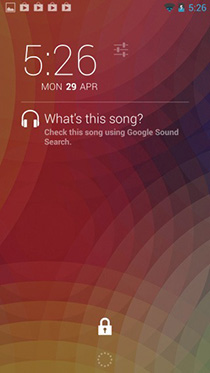
No mobile platform beats Android when it comes to customization; you can tweak every single bit of the operating system – from replacing the home screen interface or the look of your lock screen to flashing entirely different ROM, it gives users complete flexibility and control over their devices. In the 4.2 Jelly Bean update back in November last year, Google unleashed another great feature by allowing users to customize the lock screen of their Android device with various widgets. This feature further extended Androids customization abilities and apps like DashClock quickly emerged in the Google Play Store to take it to the next level. In case you don't already know about DashClock, it’s an awesome alternative to Android’s stock clock widget, but that's not all; it allows adding several extensions to it for all sorts of other information like weather, Feedly, calendar, Gmail and more. Today, we've got an amazing DashClock extension for you called Sound Search for DashClock  that brings Google’s ‘What’s this song?’ feature to the lock screen, with support for several other popular sound identification services as well. Read More

Collect & Organize Music From SoundCloud, YouTube & More With Whyd

We reviewed Songdrop as a great way to gather all the songs you listen to online. The web service is like your online music folder that allows you to save music from online streaming services. Whyd is a similar service with a much simpler interface. It’s currently invite-only, but you can sign up for an invite  and it shouldn't take too long for it to arrive. Whyd works with a bookmarklet for your browser and lets you add songs from SoundCloud, YouTube, and any service that links directly to song files. The songs you add can later be listened to directly on Whyd. The service supports playlists as well as subscribing to other users and listening to music they've saved. Whyd isn't storage space for your music; rather it’s a way to gather all the online music you listen to in a single place for easy access. Read More

Quickly Queue Songs In The iOS Music App With Cyueue By Saurik

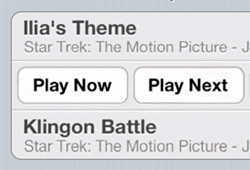
iOS’ Music player has remained pretty much dormant since its initial release on the original iPhone back in 2007. It can be argued that it is this way because Apple did everything right the first time, but that’s just not true when you compare the stock Music app with music players available on other platforms. One of the many features lacking in iOS’ Music app is the ability to dynamically queue songs without going through the process of creating a playlist. Cydia’s developer Jay Freeman AKA Saurik has developed a new tweak that solves just this problem. Check it out after the jump.

Read More

Gather & Play Music From Multiple Sources Under One Roof With Songdrop

We listen to music from a lot of different sources; SoundCloud, Grooveshark, Pandora, YouTube, Last.fm, the list just goes on and one. At times, the services we use decide to play nice with each other and allow us to transfer our preferences from one to the other. At other times, we can use apps to help us connect these services and consolidate our listening experience in just one service. Songdrop is one such web service that acts as a song aggregator. It allows you to add songs to groups, which the service calls Mixes, from any website. There is a small catch though: you can drop a song (add it to the service) only from the song's own page. In addition to creating your own mixes, you can search other users’ mixes too and if you like the songs they have, you can drop them into your own collection. The service also has a dedicated Chrome extension, while users of other browsers can use the service’s bookmarklet to add songs. Read More

Download Songs From SHOUTcast Stations With ESFSoft Radio Downloader

Many of us listen to online music streams while doing several other activities like work, exercise, commuting and what not. While there are countless streaming services available that offer something for everyone's taste, a times you just need the music to be available offline in order to listen to it on the go, especially in areas where you don't have wireless broadband, or just to cut down on your data connection bills. Also, at times you are listening to a radio station and on comes a song that you like instantly. You keep waiting for the presenter to call out the name of the song and artist at the end but it doesn't happen, and you are left wondering which song that was. You can search for it using different methods such as Googling its lyrics, but that in itself can be a bit too much trouble, especially in case of less-known indie music. ESFSoft Radio Downloader helps you with that by allowing you to download radio streams from Shoutcast.com and automatically save them to your computer. The application downloads each song in a different file, letting you easily create a complete playlist. Read More

Music Identification App Shazam Comes To Windows 8

Listening to songs on the radio is a great way to find out new tracks that you might like. However, sometimes it happens that you miss the name of the song when the DJ says it. One way to look up the name of a song, is to search its lyrics on Google (a method I personally use quite regularly). However, some tracks (of the trance genre, for instance) do not have a lot of lyrics to identify the song with, and you can only recognize the song if you hear it somewhere again. If you are not a fan of using the lyrics method, you may use music detection services to you to identify the artist and name of a song by listening to a small sample of the whole track. Shazam is a particularly famous music identification service that, other than fetching the artist and song name of a song being played nearby, also provides additional info, such as lyrics, album reviews, recommendations for similar songs, links to its YouTube videos, etc. The service has had apps on popular mobile platforms (iOS, Android & Windows Phone 7) for a while now, and is now available on Windows 8 and RT as well. Read More

Sing! For iPhone & Android: Enjoy Karaoke With Anyone Around The World

Karaoke is an activity that has been providing people with entertainment for decades. It is a real confidence booster, and might let you discover your hidden talents as well. Everyone likes singing along to their favorite songs, and Karaoke is the thing that takes this habit to the next (and more serious) level. Smule’s new Sing! app lets you perform Karaoke versions of all the songs you love, but it doesn’t stop there. There are some really cool voice enhancement filters available in the app to make you sound like a real singer. Other than that, you can multiply the fun by collaborating with your friends (or even strangers) to sing group karaoke or duets. Read More

TuneWiki Releases iOS Music Player With Live Lyrics & Song Recognition

TuneWiki is a well-known name among music fans, and it is usually the first destination for anyone trying to find lyrics for a song. The service has a social network of its own as well, where you can connect with people having similar music interests as you. You would think that such a useful service will have an iOS app of its own, but surprisingly, the official client for the service has been released just today (even Windows Phone got a TuneWiki app way before iOS). However, after taking the iPhone app for a spin, we can say that the wait has been completely worth it. TuneWiki for iPhone is a complete music player that features scrolling lyrics. Apart from that, if you are a registered TuneWiki user, you can follow and find people who are listening to your favorite songs, thus letting you create a music-oriented social network. The Shazam-like song discovery feature of TuneWiki makes it a complete app for dealing with everything related to songs and music on your iPhone. Read More

AutoRap: Just Talk Into Your iPhone/iPad To Create A Rap Song

Unless you are Eminem or B.o.B, listening to any hip hop song is sure to make you feel a little amazed at the speed at which rappers seem to say stuff while keeping pace with the beat. It really is no child’s play, but hip hoppers do have some help from the latest gadgets and music instruments available out there. So, can no one rap like the pros without having access to a real, well-equipped studio? Well, now you can, thanks to the new iOS app AutoRap. Coming from smule, the app is good enough to make even your grandmother sound like a seasoned rapper. If you are thinking that you will have to do a lot of work with the app’s settings before you get a good result, think again. You just have to talk to the app, and that’s it! No need to mind the beat, or try to speak as fast as you can. AutoRap takes care of everything, all by itself. Read More

ListenItLater Is Like Read It Later Or Instapaper For Music [Web]

Music is believed to be the most vivid language in order to express the inexpressible. The passion for music has never been as alive and nourished as it is since the internet resources revealed music oriented communities that help everyone who is serious about music. In the realms of a wide range of such applications, ListenItLater (sounds similar to Read It Later, no? It’s not just the name, but the functionality too) grabbed my attention due to its potential to help you listen to a continuous stream of songs or be the DJ of your own music station. ListenItLater allows you to easily save the music you find so you can play it when you do have the time, helping you find, save and listen to your new music easier, better, and faster. Read More

Mashduo: Compare iTunes Libraries & Export List Of Missing Songs [Mac]

Creating a good music library takes a lot of time and effort. One scenario, the more common one, is where you just keep adding music files randomly to iTunes, but an organized library requires more than that. If you’re out to create the best music library ever, or just a reasonably good one that you can brag about, it might be a good idea to take a look at what you friends listen to and start off with the songs they have. Mashduo is a free Mac app that will help you do just that. The app compares iTunes library XML files. You can, at any given time, view the differences between two XML files, both graphically and in a list. You may then export the complete list of songs that aren't common between the two. Read More

Song Exporter Pro: Transfer iPhone & iPod Touch Songs To Your Computer Over WiFi Without iTunes

If you are new to iOS, using iTunes can prove to be a nightmare. There are a host of errors you might run into, or you might accidentally lose some of your data in the name of “syncing”, if your device has ever been associated with another computer and iTunes library. Even if you do manage to tame the wild beast that is iTunes, it still won't let you extract and transfer to your computer, the music that is already on your iPhone, iPod touch or iPad. There are many apps and services that let users do just about anything to bypass iTunes, and Song Exporter Pro is one such useful app. If you have a lot of songs on your iPhone, iPad or iPod touch, this app will let you download them to your computer, given that both devices are on the same WiFi network. What's even better, is that you can do this on any computer, irrespective of OS, drivers or in the absence of iTunes, since all transfers are handled through the browser. This is as simple as it gets. More past the break. Read More

TuneUp Mobile For iPhone Released; Fixes iTunes Library Metadata & Provides Song Recognition

Quite a long time ago, we covered a now-quite-popular iTunes plug-in called TuneUp, which allows users to, well, tune-up their iTunes music library, filling in all the missing metadata and finding cover art for tracks. If you like to pay attention to detail, then you are sure to love TuneUp. Now, won’t it be really useful if there were some way of directly diagnosing the mistakes in your iPhone’s library, without having to connect to iTunes? Well, with the release of the official TuneUp Mobile app for iOS, now there is. The app not only helps you fix song titles from within your iDevice, it also recognizes any song that is being played around you (much like the famous track recognition apps, Shazam and SoundHound). Read More

Tabster: Music Tablature Manager With Search, Store & View Options

Learning to play music is a difficult job, specially when you are doing it on your own. Instruments like the guitar, drums and keyboard require a lot of practice and demand dedication from the learner. If you are one of those people who are (or have been) lucky enough to attend a music school, you must know the importance of being able to read “Staves”, but most self-taught music enthusiasts rely on tabs (tablatures) to learn how to play new songs. Ultimate-guitar is a hugely popular website specially among people learning to play guitar because of its massive collection of songs. However, with all the tablature versions each song has on the website, it is difficult to manage all your favorite tabs. Tabster is an application for Windows that takes care of this problem and provides you with a simple tab manager to search, store and retrieve stored tabs for easy viewing. Moreover, you can edit, as well as create new tab documents to save them to your computer or upload onto the internet. More on Tabster after the break. Read More

Create Personalized Feed Of Music News With Muzine For iPad

Music these days goes way beyond just listening to songs. Singers are some of the biggest celebrities around, and that is why there are many sources where you can stay in touch with the latest happenings in the music industry. Muzine is one such app which will make sure that you are always the first to know each time your favorite band is about to release their new single, or your favorite singer signs a record deal. You can find these new items all over the web, but Muzine aggregates everything for you, and goes a step further by letting you personalize everything and choosing the artists you are interested in, so that the newsfeed in the app is arranged accordingly. The app will even analyze the songs which are already there in your iPad’s music library, and that’s what makes this iOS app perfect for music lovers. Read More

Plugication: Resume Music Play On Connecting iPhone Headphones [Cydia]

No matter how polished iOS has become compared to its earlier versions, there are a few things in your iPhone which still remain as annoying as ever. One such annoying thing is the stoppage of music play whenever you unplug the headphones from your iPhone, iPad or iPod touch. This can prove to be a real life-saver when you unplug the earphones accidentally, but it would have been even more useful if the music resumed playing when the headphone was plugged back in. For some reason, this is not the case, and music doesn’t start playing automatically the way it stops upon unplugging. Not any more. Enter Plugication, a new Cydia tweak which makes sure that your flow of music is never broken. The tweak will start playing your music from where you last left it, as soon as you connect the headphones to your iDevice. Read More

iAlbums: Get Lyrics & Additional Info About Current Song In iPhone

You can find a lot of iOS apps and Cydia tweaks which add lyrics to the music in your iPhone or iPod touch’s library, and you have to admit, it makes the whole experience of listening to music much more enjoyable (unless you are listening to Nicki Minaj, of course, in which case, it’s better to leave the lyrics alone). iAlbums goes a step further, and not only you get to view the lyrics of any song, the app generates a whole feed for the Now Playing song, which includes news articles related to the artist or song and you might even find a few links to other versions of that song. Read on to know more about this useful app. Read More

AlbumFlow For WP7: Beautiful Music Player With A Cover Flow View

When it comes to looks and user interface, Windows Phone 7 can surely hold its own against Android and iOS, and this is evident from the beautiful Zune music player on WP7. The Music & Videos hub, as it is properly known as, got even better with the Mango update, due to the lockscreen album art support which was added to it. However, as they say, there is always room for improvement, and apparently that’s what the developer of AlbumFlow thought. The app features your music library in a fluid and interactive way, and you can literally float through your music in this simplistic music player. Read More