LinksWatched Notifies You When Duplicate Tabs Are Opened In Firefox

Duplicate tabs i.e. the same URL opened in more than one tab clutter your browser window unnecessarily. Duplicate tabs are mostly opened by accident or forgetfulness, and rarely out of necessity. We tend to open some of our most frequently used sites multiple times because we forget we already have them open in a different tab, or we can’t find them. LinksWatched is a Firefox add-on that helps fix both these problems; it alerts you when you open a duplicate tab by adding a red border inside the window when a duplicate link is opened, and giving you a desktop notification alerting you that you've opened a link that’s already open in another tab, with the option to switch to it. Compared to extensions like Prevent Duplicate Tabs for Chrome that just close the duplicate tab, LinksWatched doesn't dictate what is done with the duplicate tabs, so the control stays with you. Read More

Use The Mouse Wheel To Quickly Switch Between Tabs In Chrome

If you thought a Batman spinoff on yet another item just wasn't possible, Tabman Tabs Manager is a Chrome extension that will change your mind. It’s a tab manager that adds a Batman-like button to the URL bar, which in turn allows you to switch between the different tabs open in the current window. It'll serve little to no purpose if you just have a few tabs open but for those marathon browsing sessions, it can make finding specific tabs from the countless open ones a lot easier! It’s somewhat similar to Sidewise Tree Style Tab that we covered a few days ago, except that it focuses on switching tabs and provides both a mouse gesture (moving the scroll wheel) and use keyboard shortcuts to open the extension’s panel. If you don’t like switching between tabs via a popup, Sidewise Tree Style Tab works in a ‘Dock’ mode as well, where it separates into another window and allows you to search and switch between tabs from it. Read More

Get A Tree Style View Of Chrome Tabs; Group & Hibernate Them

Chrome is probably the most popular web popular browser out there, but it has often left many power-users somewhat unsatisfied. Imagine you’re a corporate lawyer who needs dozens of case files open in dozens of tabs, or a researcher who needs to keep countless of tabs open at the same time while you write that thesis. Chrome is fast and simple, but sometimes what you need more is endurance. The side-docking Sidewise Tree Style Tabs is an extension that aims to take care of managing all those tabs more effectively. In a nutshell, you can give it any load of tabs you wish, and fully expect it to run those marathon browsing sessions for as long as you want. Read More

Quickly Separate Current Chrome Tab To New Window With Predefined Section Of Screen

There is no single best way for managing tabs within a browser window. Between leading browsers Chrome, Firefox, Internet Explorer, Safari and Opera, and the large number of add-ons and extensions that change the way tabs and windows are managed by default, there is, as yet, no clear winner. Tab to Window Keyboard Shortcut is yet another extension for Chrome that takes a crack at window and tab management. The extension’s primary purpose is to let you separate a tab from a window and move it to a window of its own. What it does in addition to this is allow you to choose just how the new and original window will take up space on your screen alongside each other. For that, it splits the screen into two parts, letting you decide the size of each. The shortcut for separating a tab to a new window can be customized. Read More

Get A Google Now-Like Chrome New Tab Page With Weather & News

Extensions that modify the New Tab page in Chrome are very easy to find, but you’ll likely go through at least fifty of them before you come across one that you actually like. New Tab Page - as its name indicates - is a Chrome extension that changes the New Tab page in Chrome. New Tab Page features a search bar, intelligently incorporates recently visited pages, shows you the latest news and weather forecast for your current location, and still keeps your Chrome apps accessible from the New Tab page. The extension isn't customizable at all, but its default layout is excellent for the simple reason that it manages to fit all the above on a single page without sacrificing any feature that Chrome offers on its stock New Tab page by default. Read More

Group Chrome Tabs Into Windows Based On Title, Hostname & URL Using TabJuggler

As powerful as they are, browsers sometimes disappoint users when it comes to tab management and navigation, the biggest and most apparent shortcoming of course being tab management. For starters, you can only switch to the first ten tabs with keyboard shortcuts. Though Chrome and Firefox have not yet introduced an easier tab navigation system, developers have helped make it easier with add-ons and extensions. TabJuggler is one such extension for Chrome that makes it easier to detach tabs and separate them into windows. It lets you sort them by their URL, search them, and bring any one of the matching results into focus. Read More

OneTab Lets You Save & Close All Chrome Tabs To Restore, Export Or Import Later

We’ve covered quite a few extensions for backing up your open tabs; Sesh is one excellent Chrome extension we reviewed a couple of years back that saves your session as well as the tabs you have open across multiple windows. Each of these extensions have one unique feature or the other to offer. OneTab is a Chrome extension that is a similar backup tool for the tabs you have open in a window, with the added benefit of being able to import and export saved tabs. Although it lacks a sync feature, its import feature will allow you to transfer tabs between browsers on different systems. You can store as many different sets of tabs as you like, and each exported set is marked by the date and time it was saved. Apart from restoring tabs, you can remove all tabs, or selective ones from a session. Read More

Select, Duplicate, Close & Freeze Multiple Tabs At Once In Firefox

A few days ago, Chrome - my preferred browser - started reloading the home page over and over in a continuous loop. While I tried to sort the problem out, I needed a browser to work with and I turned to Firefox, which I believe is just as good. Using it regularly really makes you appreciate it, but one little feature that I found missing was that I couldn’t select multiple tabs and drag them out as a separate window. Not being able to randomly select multiple tabs also meant I couldn’t pin them all at once or close them. Fortunately, I came across a solution to some of these shortcomings in the form of MultiplaceHolder, a Firefox add-on that allows you to select multiple tabs by clicking each while holding down the Ctrl key. The tabs can then be closed, duplicated, or frozen. Read More

‘The Great Suspender’ Selectively Suspends Chrome Tabs To Save Memory

We’ve covered extensions in the past that unload inactive tabs. Since every loaded tab takes up memory, the purpose of these extensions is to only keep those tabs actively in memory that you are actively using, thus freeing up memory used by inactive tabs and preventing browser and system slowdowns. While quite useful, all these extensions unload tabs from memory automatically after a user-defined time period of inactivity. The Great Suspender is a Chrome extension that lets you manually unload a tab whenever you want. You can suspend a single tab or all tabs open across a window. The extension also maintains a history of all tabs that you’ve ever unloaded. A tab or an entire window of tabs can be reloaded just as easily. The Great Suspender also lets you define an inactivity period after which a tab will automatically be unloaded, so you don't lose that functionality either. You can create a whitelist to keep the extension from applying the inactivity rule to certain tabs. Read More

PDFNut For Mac Is A Great PDF Reader With Tabbed Viewing

Ever since I started using a web browser that supported tabs (something that didn’t happen for me until Chrome debuted), I’ve always felt that tabs were the right way to view any and all types of content. They make browsing and navigation easy and the lack of window clutter is an added advantage. This is one of the reasons why I find the lack of tabbed browsing in both Finder on Mac and File Explorer on Windows 8 to be perplexing. The good thing is, the tabbed browsing trend has caught on and spread to all sorts of applications over the years. PDFNut is a free Mac app available in the Mac App Store that applies this concept to PDF viewing. The app lets you open multiple PDF files in different tabs, features a bookshelf that you can add files to by dragging & dropping them onto the app, allows bookmarking and annotating pages, searching text within a PDF file and supports table of contents. Read More

Pin, Detach & Change Position Of Chrome Tabs With Keyboard Shortcuts

Browsers have quite a few keyboard shortcuts for managing tabs; you can open a new one, close the current one and switch to one of the first nine tabs. However, should you have more than nine tabs open, you’re out of choices, and will have to reach for the mouse to switch to that tenth tab. MoTa is a Chrome extension that helps move tabs around. Although it doesn’t make up for the lack of keyboard shortcuts that your browser has, it makes the tabs more manageable. MoTa lets you change the position of the current tab; you can move it to the start or end of all tabs, or move it either to the left or right of its current position. Additionally, it lets you pin/unpin tabs and attach or detach tabs from windows. Read More

The Grim Tab Reaper Automatically Bookmarks & Closes Inactive Tabs In Firefox

One problem with working with a large number of tabs, is the fact that we often forget to close the inactive ones, despite having exhausted their need a long while back. Sifting through numerous tabs cannot only be a difficult task, but they also increase the memory usage (especially on Firefox). The Grim Tab Reaper is a clever Firefox add-on that will automatically bookmark inactive tabs and close them after a certain time interval has elapsed. By default, the time to automatically close inactive tabs is set to 48 hours, but users can increase/decrease the time from the add-on's options. Note that this tool will never close web app tabs, or the active ones. Tabs that are reaped get a tabreaper tag associated with them, so you can easily find them by clicking the Recent Tags option in the Bookmarks menu. Read More

Search Plus: Search Tabs By Keywords & Sort Them By Title, URL & Time [Chrome]

One of the bigger nuisances associated with working with a large number of tabs, is the tab handles getting squeezed so close together that favicons disappear. Then, at other times, you might want to quickly search a word or phrase across all opened tabs, close a set of tabs or shift existing tabs into a new window. Search Plus is a browser extension for Chrome that offers you a set of useful features that improve your tabbed browsing experience. The extension acts like a search engine for the tabs that you have open. It helps to find the tabs you’re looking for provided you can enter the name of the site you are looking for. Search is done across windows so it matters little which window a tab is open in. The extension will let you preform various operations, such as search a specific text string through all tabs, collect tabs into a single window, insert text to the titles of tabs, capture images from tabs and more. Read More

TabsPreview Adds An Eye-Candy 3D Preview For Open Tabs In Chrome

TabsPreview is a Chrome extension that gives you a gorgeous 3D preview of all your opened tabs, with multiple search capabilities and customization options. It provides an instant thumbnail preview of all the opened tabs within the new tab screen or a new window. This can be quite handy for people who work with several tabs and often find it difficult to sift through them. Whenever you click the extension's button in the toolbar, TabsPreview refreshes the thumbnails, so that you can always view the latest previews for all your open tabs. In addition to that, the extension offers you different preview modes, such as Stack, Grid, Glow etc. Both the scroll wheel or arrows displayed at the bottom of the page can be used to navigate between the previews, and you can also look through opened tabs by entering keywords in the search bar. Read More

PowerSwitch: An Alternative Way To Find & Switch Between Tabs In Chrome

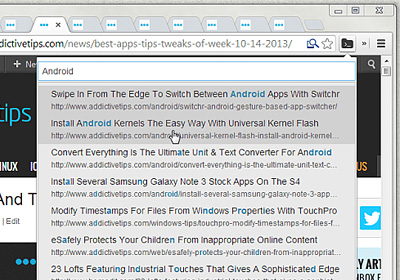
When you’ve got lots of windows open with multiple tabs, finding a particular one can be a cumbersome task. PowerSwitch, a Chrome extension, makes things easier and lets you switch between multiple tabs via an on-screen list. It lets you you switch tabs instantly with a Ctrl+k keyboard shortcut, which displays a list of all your open tabs in a new window. You can then select a tab and hit enter to navigate to it. This eliminates the need to visually scan the tabs one by one in order to find the right one. PowerSwitch can be a handy utility for people who work with several tabs that often results in short tab sizes. Read More

Tab Grouper: Sort All Tabs Alphabetically And By Domain [Chrome]

Working with multiple tabs from the same domain can be quite confusing, specially when they all look the same. Won't it be nice if you could quickly locate your desired tabs without having to sift through all of them? Tab Grouper, a Chrome extension, solves this common problem by sorting and grouping tabs alphabetically. The extension has no buttons or options, and works automatically once installed. It arranges the tabs alphabetically, so you can quickly find the right one without wasting time. However, when you open a link, the new tab is moved from its default location to a new one, so you might want to wait a few seconds before you start browsing. Read More

‘Google Reader Inline’ Pulls Full Text For Truncated Feeds [Chrome]

Won't it be great if you could read full-text feeds within Google reader, without having to open all those extra tabs? Google Reader is a popular RSS and Atom feed reader that displays partial content for certain feeds. In order to view full-content, you have to right-click the links and open them in new tabs. This process can not only be time consuming, but also causes the tab bar to get cluttered after a while. Google Reader Inline is a Chrome extension that makes things easier by converting truncated feeds into full ones automatically. It loads full-form articles within the Google Reader frame, so you no longer have to open new tabs to view full content. Moreover, you can even view the original article in a neat page that is overlaid the current one. You can then click anywhere outside the page to go back to your feeds. Read More

Save & Send Multiple Tabs To Any Email Address [Chrome]

There are many extensions out there that allow you save or bookmark all your open tabs, so you can access them at a later time, but Save & Email My Tabs offers something more. This Chrome extension, as the name implies, lets you enter an email ID in a pop-up, so you can send a bunch of tabs with only a click or two. Normally, you would have to open your email in a new tab, sign in, and then copy-paste the entire list of links, which not only requires unnecessary steps, but can also be quite complex. Save & Email My Tabs is a one-click solution to what would normally take a little time to accomplish. While it may not be for everybody, it's a really great extension if you keep a lot of tabs open and often want to send large amounts of content to someone else. Read More

Automatically Close Private Browsing After Ten Minutes Of Inactivity [Firefox]

Launched a private browsing session in Firefox and totally forgot to close it? Now you're worried that someone else could access your computer and all the confidential information in the private session? If you regularly use private browsing, but often forget to close tabs, then Private Browsing Auto-Exit, a handy Firefox add-on deactivates and closes your private browsing session after ten minutes of inactivity. This basically means that as soon as it's been ten minutes since you last switched tabs or loaded a page, the Private Browsing window with all open tabs will automatically be closed. Once you’ve installed this nifty little tool, you will never be worried about your private data or unclosed tabs. By default, the time to automatically close inactive tabs is set to ten minutes, but according to the developer, a new feature will be added to the add-on which will allow you to set your desired time. Read More

New Chrome Beta Syncs Open Tabs Across All Devices, Including Android

Up till now, Chrome allowed its users to sync the browser’s history, passwords, extensions, themes and settings, but with the latest Chrome Beta, when you're signed into Chrome, the tabs you have open on one device are available on all your other linked devices, too. To access open tabs on all your devices, simply click the Other devices option on the New Tab page, and with a click, you will be able to open tabs and migrate the tabs' back/forward navigation history, so you can start browsing right from where you left off. Moreover, if you use Chrome for Android Beta, the tab will also be available on your phone. The only requirement for syncing tabs is to sign in to your Google account. Note that all synchronization options are enabled by default, and data is stored in encrypted form on Google servers, protected by the user’s Google account password. Read More