Fix Outlook 2010 Problem: PST File Repair Tool
Microsoft Office Outlook 2010 is quite stable but not perfect, if your PST file becomes corrupt then you will need a repair tool to fix it. PST stands for Personal Storage Table(also referred as Personal Folder File) and is used to store all your Inbox, and other information. If it becomes corrupt, then your Inbox will also get corrupted.
If Outlook 2010 is crashing, you could try running in Safe Mode and determine what is causing the problem. If you can’t find a problem, then there is a high chance it could be due to corrupt PST file. So how do we fix it? There are two methods, either use an official tool or a 3rd party tool.
Outlook Inbox Repair Tool (SCANPST.exe)
It is an official repair tool that is included in Office 2010 by default and was included in Office 2007 as well. But what surprised us was that it couldn’t be found inside the Microsoft Office 2010 Tools folder, did Microsoft forget to include the most important tool in this folder? See screenshot below.
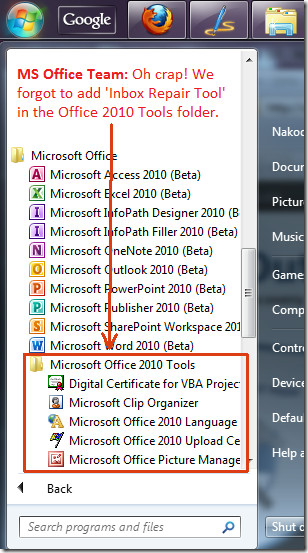
You will have to navigate all the way to C:\Program Files\Microsoft Office\Office14 folder and search for SCANPST.EXE file.
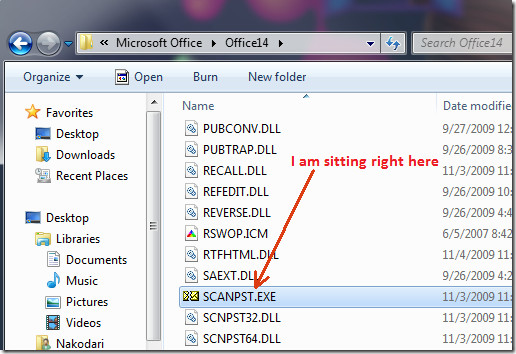
Double-click this file to open Microsoft Outlook Inbox Repair Tool. Now hit Browse and locate your PST file. It is located at:
C:\Users\[Username]\AppData\Local\Microsoft\Outlook\[Name].pst
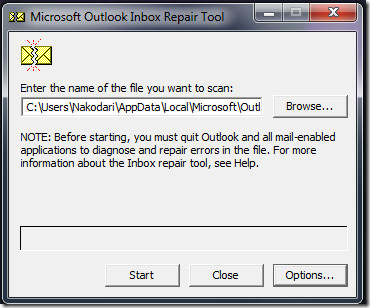
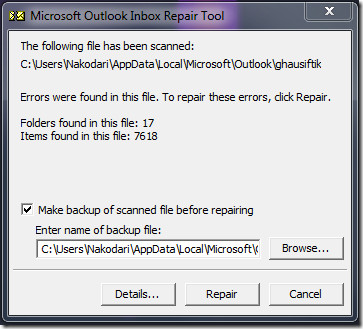
Once done, hit Start and it will begin checking for errors. When the process is complete, hit the Repair button. Make sure a backup option is checked to remain on the safe side. Before attempting any repair, it’s always wise to backup your Outlook PST file to prevent potential data loss. If you run into similar corruption elsewhere, you can also restore damaged Office files.
Stellar Outlook PST Repair Tool
I would always recommend going for the official tool, but if it fails to fix the PST file then you can give Stellar Outlook PST Repair a try. Select ‘Repair PST File’ from the main window, select the PST file(it has a build-in tool that can search for PST file), and choose the output destination.
So why is the output destination needed? It will first scan your corrupt PST file and then recover everything into a new usable PST file.
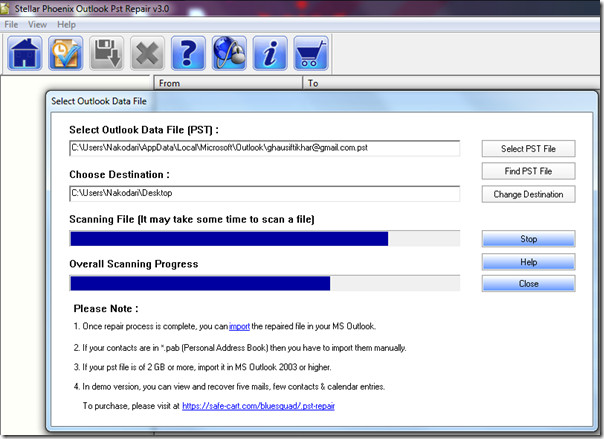
Download Outlook PST Repair Tool
Apart from Outlook 2010, both tools will work on Outlook 2007/2003 too.
For more, check out our guides on:
- Recovering Outlook 2010 Emails,
- Recovering Outlook 2010 Attachments, and
- Recovering Outlook 2010 Passwords.
All the above mentioned guides have been guaranteed to be working.

To repair corrupt Outlook PST files, you can get the help of Kernel for Outlook PST
repair software. The software is capable to fix any kinds of PST errors
and recover lost Outlook mailbox items without any hassle
There are several utilities to repair Outlook PST file. However, you have lost data from Outlook PST file due to file corruption then recovery is not possible with Outlook Inbox Repair Tool. So, I am sharing Recoveryfix for Outlook PST Repair software that can recover and repair your damaged PST file, then save in new/old PST file format.
I also used above one Outlook PST repair tool i.e. developed by Stellar. In comparison with
ScanPST.exe, It seems reliable with higher quality assurance of successful outcome.
Of-course!
Stellar Phoenix Outlook PST repair is available with free demo version. By using demo version, MS Outlook user can check the reliability of the utility easily.
+1 for the same tool.
Thank you. This helped me solve an issue that did not seem to have an obvious solution. My email search capability stopped working apparently for no reason after deleting a bunch of emails, and I tried office repair, and other tips, but this did the trick.
Thanks for the tip . . . repaired the pst file. Great help, thanks again.
Are you a user who wants to fix Outlook 2010 PST file? If
yes, then without delay use Remo Repair PST software for fixing corrupt,
inaccessible and damaged PST file.
Thank you very, very much….this just saved my sanity.
Thanks a lot really nice information
You forgot to mention the cost involved for actually being able to save the file that the Stellar Phoenix program fixes. Nearly $128
The scanpst option did find errors and says it repaired them, but my email was not recovered. I attempted to use this file several times and it kept saying there were errors. If it was fixed, why are there still errors?
SCAN.PST tool repairs the corrupted PST
file. In case Outlook file get highly corrupted then Inbox Repair
tool does not work and you need Stellar Phoenix Outlook PST Repair
software to resolve all corruption issue. This way you can safely
recover your email data from damaged PST file.
Oh, my goodness – thank you so much!! I’ve been troubleshooting all day. In retrospect, yes, I should have thought of the .pst … but instead I’ll just be grateful that you were here to provide the answer.
This worked great but my SCANPST.exe was located here C:Program Files (x86)Microsoft OfficeOffice14
Wow…. outlook loaded 10x faster after repairing the open issues. Thank you!
Thank you sooo much!
SysTools OST Recoery tool to help corrupt ost file repair and convert ost to pst
Thanks a lot, it just worked fine !
all of this didn’t work for me. Tried the fix tool, didn’t work. I tried uninstalling office, and reinstalling thinking it would recreate the .pst file, but it didn’t. I ended up copying a .pst file from another computer in our office and pasting into the location on my computer and all is well.
Thanks a lot…..it saved my one year of hard work…
Hello , please can you help me? i have an account in outlook, when i open it, the messages comes to inbox, without saving it, because when i close it and open it again all message gone *_* what i do to save messages in inbox, help please
fuck !!!! this is not free !!!!
PST is really getting a big problem for Outlook users.But thanks to software tools provider that still there are so many Outlook Repair tools available in the market so that we can repair our Outlook in case of crash and deletion.
hi ,
I have recently upgraded MS office 2007 to 2010 which is licensed copy and it was sucessfully, but one strange thing i have noticed is when ever i click on any mail it pops up some junk characters to save as, i have tried multiple combination to fix this issue , please help is some one has any solution for this , not sure if thats is os problem .I am using windows 7 enterprise version .
you may use pst repair tool from repair pst file.com .. it will fix all your kind of outlook error. such as common error 0x80040600. and other error too..
I have used Scanpst.exe many times. it is powerful tool.
Thank you,
Maulik Bhuptani
http://www.macrowroldsoftwares.com
Well Done Mate. Perfect instructions. Spent much time looking for a resolution, and thank You.
My Inbox shows 63 unread messages however when i filter on anything except attachments it tell me nothing to view, where have my e-mails without attachments gone?? this is driving me insane. please help
Great i fixed the probellm at last. I hope !!! took a while to find the path as it was in hidden files, but got there in the end
Hi,
I find the above mentioned blog to be very useful in locating scanpst.exe location . But not all time you can retrieve your data and information using this technique. So my advice will be to first take the back up of your data before repairing the PST file.
Thanks
recover pst file fast and easy :- www.pstrecovery.net
Such tools are also available to convert ost to pst file . Convert OSt to PST tools converts ost file to pst file and recover all ost file components. I recovered my ost file by a tool available at http://www.convert-osttopst.com
I don’t have the AppData folder. I had ported over data from one computer into another. Is something wrong w/the install?
Erica, while transferring data from one computer to other computer. You should have enabled the Hidden folders and copied that data too.
Open My computer > Organize > Folder options > View > Check “show hidden folders” > click OK.
Now, in MY computer > C:/ Drive > Users > open “your user account name ” folder & you will find the APP DATA folder
I’m using Micriosoft Outlook 2010. I can’t click and open excel file from in coming email attached? How to fix it? Thanks for help
I do not have the SCANPST.EXE file… what do i do?
Fantastic – your very helpful instructions fixed my outlook 2010 which was just hanging on startup. Phew! Many thanks…Chris…
thanks a lot
really it is very useful tools
i can recover all my emails through it
THANK GOODNESS and YOU for the answer to this question regarding the file to correct Outlook . I have no idea what corrupted my outlook but am so grateful for your help.
I have been working to repair outlook pst file last 2 days…….Given above article helps me more to solve the pst related issues
To Gary McJim, thanks for letting me know that with Windows 7 64-bit, the location of the SCANPST exe file is in a different folder. Otherwise I would not have even thought of looking in \Program Files (x86).
Outlook 2010 would not open, period – and this fixed it. Had to do some searching to find my .pst file, but finally did locate it. Thanks!!
Unparalleled accuracy, unequivocal clarity, and unnedibale importance!
Thanks for Outlook 2010 Help. Read article “Fix Outlook 2010 Problem:PST File Repair Tool”. I am using Win 7 64-Bit with Office 2010 32-Bit; default for loading Office 2010 on Win 7 64-Bit is the 32-Bit Version. I was able to Import my backup pst file from Win XP 32-Bit w/o any problems following your article on “Office Outlook 2010 Import And Export”. Used this article to do the export from Win XP. I located the SCANPST file on my system; the file is in C:\Program Files (x86)\Microsoft Office\office14\SCANPST and listed as an Application File. This location is probably due to OS is 64-Bit and Office 2010 is 32-Bit. My problem is that the Outlook Data File is not located in C:\Users\[Username]\AppData\Local\Microsoft\Outlook\[Name].pst as you indicated. After importing my backed up pst file and setting up my first email account I found the Outlook Data File located in My Documents\Outlook Files\Outlook [as Type Outlook Data File]. I cannot fine a Folder on my system for AppData/Local/Microsoft. Any Suggestions? Can I Move the Outlook Data File to a different location and not have it in My Documents folder which seems to be a risky place to have it. Thanks. ps sorry for the long message.
I find the file location kind of (actually VERY) scary. If you move it (which you could do with all previous version of Outlook), you get “access” errors, even though the “Test” button works just fine. Hope someone knows of a solution, because there WILL be a lot of accidental (PEBCAK errors) lost .pst files.
Thank you for this info… I have a semi related question… How do I know which pst file my Office 2010 is currently using? The reason I ask this is because when I look into the folder where the pst file resides, there are many pst files there. (Like 7) This is because of former techs that were helping me backup and transfer my outlook from one computer to the next over the course of a few years.
Is there a way to view this info from outlook 2010?
Thanks – fixed my Inbox problem in a couple of moments, great!
Thank you, very helpful.
Naresh, no need to convert from Outlook 2010 to Outlook 2007 format – the PSTs are the same format for both.
Hey Nakodari, Thanks a bunch 🙂
THANK YOU! THANK YOU! THANK YOU! This had made my day, week year, decade!!!!!
Nakodari, thanks so much for this tip. It just saved my day. Thanks so much.
how can i convert 2010 pst to office 2007 format
What?