9-Lab Removal Tool Is An On-Demand Virus, Rootkit & Registry Scanner

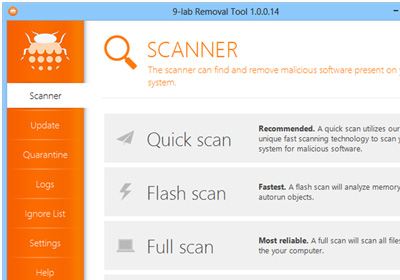
As malware continually evolving, so are the security firms that are fighting back with equally robust, top-notch security solutions. And thanks to an increased awareness, so is the end users' knowledge and expertise to keep their PC safe from malicious threats. 9-Lab Removal Tool is an advanced anti-malware app for Windows designed to take care of shady software lurking on your computer. The application effectively removes malware including viruses, trojans, rootkits, malicious registry keys, spyware  and other harmful or potentially unwanted items from your machine. The application comprises of a simple UI and boasts an advanced protection engine that can detect and remove malware from every nook and corner of your PC, including hidden locations and services launched at system startup. Read More

Autorun Angel Is A Cloud-Based Security Analyzer For Startup Items

My first hand experience tells me that Windows Task Manager is not the most efficient way to find out the integrity of currently running processes or applications that auto execute during Windows logon. Although it allows you to kill unresponsive applications or disable them entirely from running, you can never be so sure whether a process or service is malicious, or harmless to your system. This is where tools like Autorun Angel really shine. This nifty little app scans your computer for autorun entries against its own cloud database, and highlights only those services or autorun programs that seem dangerous to your system or may be the root cause of an ongoing problem. This can include all sorts of malware including spyware, adware, trojans, viruses et al. According to the developer, the scan engine is powered by NictaTech Antivirus Engine, which is the company’s native cloud engine for checking for viruses. Read More

A Look At The New Features In Avast 8

Avast is known for creating some of the best security tools in the industry. The company has been producing robust, reliable and efficient antivirus and security applications for the past several years, winning many accolades and certifications from critics and computer security experts. Avast! 8 is the latest incarnation of their long running antivirus suite and we've got to say it does pack a serious punch of features. The security juggernaut has debuted the program in four flavors: Avast Free Antivirus 8 (the one reviewed here), Avast Pro Antivirus 8, Avast Internet Security 8 and the top of the line Avast Premier 8. Let’s see take a closer look at the new features added in Avast 8. Read More

Advanced Mobile Care For Android Gets Cloud Backup, Privacy Advisor & More

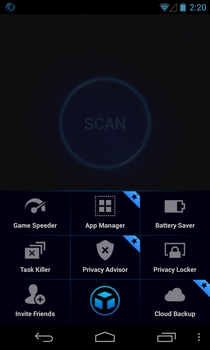
Back in November, IObit debuted their power-packed Android optimization, protection and task management app in the Play Store by the name of Advanced Mobile Care. At the time of its release, the app emerged as one of the few truly multipurpose Android apps supporting several handy system care utilities like real-time virus protection, 1-tap performance boost & system cleanup, multi-mode power saver, app manager, privacy protector and Game Speeder, among others. After barely a couple of months of its release, version 2 of Advanced Mobile Care has been rolled out with even better and more powerful features including multilingual support, Privacy Advisor, Cloud Backup, revamped app manager with support for APK management, a multipurpose 4x1 home screen widget, updated database, and several bug fixes. Read More

Bitdefender Antivirus Now Available Free Of Cost For Home Users

Bitdefender has long reigned the consumers’ wallets with its various security applications, including its ever-popular antivirus software. Though the trend of using a paid antivirus has started to decline lately, apparently because companies like Avira, AVG and Microsoft are offering their antivirus solutions without costing a dime. This has finally compelled BitDefender maker to release a free edition of its own that - apart from looking gorgeous and apparently performing better than its arch rivals - is ready to combat even the most obnoxious of malware including viruses, trojans, spyware, rootkits and other threats. More on Bitdefender Antivirus Free Edition after the jump. Read More

Scan Files For Malware On The Go With VirusTotal Uploader Portable

With millions of files available for download in the internet, it is very important for you to have an antivirus installed on the systemyour computer in order to keep it safe and secure from viruses and other malware. While downloading executable files, one should be extremely careful since installing virus-laden program can lead to data loss and corruption. VirusTotal is a service that allows people to check a file against a large number of antivirus services and detect if there's anything wrong with it. Today, we found a third party portable app for the service called VirusTotal Uploader Portable that lets you check locally saved files, online hosted files and even running processes on the VirusTotal service. Read More

USB-AV Offers You Complete Malware Security For USB Flash Drives

In the course of a day, many of us attach several USB flash drives to our computers. Even though almost every computer has an antivirus solution installed on it nowadays, there is still a chance that attaching a random USB drive containing a virus that the antivirus is not be able to detect yet will result in an infected computer. Also, some of us who practice safe downloading habits and choose not to keep a full antivirus software running in the background are also subject to catching viruses from USB flash drivers of our friends that we may connect to the computer for transferring some files. Many of these viruses don’t even require you to access the drive, and can spread through the system as soon as the auto run feature kicks in. USB-AV is an application for Windows that allows you to keep a check on all the connected USB drives and scan them for malware as soon as you plug them in. Read More

Kingsoft Antivirus Is Yet Another Cloud Based Anti-Malware Solution

A few days ago, I reviewed the latest and greatest offering from Panda Security – Panda Cloud Antivirus 2.0 – which brought many new enhancements to the table, including Behavioral Analysis Engine and 50% faster scan speed. Then, just a couple of weeks back, Avira also announced their own flavor of Cloud Antivirus with the release of an early Technical Preview. As cloud computing is on the horizon, every major company is taking a part in it, some with infinite storage promises and others to catch malicious threats right from the cloud. Chinese software company Kingsoft couldn’t resist either, and have released their new cloud based antivirus solution called Kingsoft Antivirus 2012. Albeit not new, the latest build is called Cheetah SP4, and so far, seems pretty good. Its interface isn’t the only thing that will catch your attention, but the efficient scanning engine, too. Obviously, its not comparable to other popular paid antivirus solutions, but surely is one of the best freeware anti-malware around, and may even go toe to toe with MSE. Keep reading for more details after the break. Read More

Roboscan: Feature-Rich Anti Malware Suite With Dual Engine Protection

Antivirus and anti-malware programs are the part and parcel of every PC. Our computers now carry so much information of our credentials and other important data, there is absolutely no room for any kind of security loopholes. However, no matter how many precautions you take, various external threats still make their way in through the internet. If you’re not satisfied with your current antimalware software, then give Roboscan Internet Security a shot. The developer touts it as a Dual Engine security application, comprising of BitDefender and Roboscan’s Tera Engine, both of which work in conjunction to provide multi-layered protection. Another keystone feature is its Smart Scan Technology that makes the scan process pretty fast and effective, by keeping previous scan records in its Whitelist for future references. A firewall is also incorporated that provides real-time virus protection, and the application comes with an integrated file shredder to get rid of your unwanted data for good. The elegant UI not only looks fascinating, but also provides plethora of options and settings. Read More

Crystal AEP Protects Your System Against Drive-By (Unintended) Download Exploits

From home-based users to large scale industrial organizations, the relevance of the Internet has exposed systems to a variety of vulnerabilities where viruses, malware and hackers easily penetrate through firewalls to gain and exploit root access of the systems. Usually, a conventional antivirus compares programs and data with a database of known ‘bad’ programs to detect and kill viruses, but, on the internet, an unsuspecting user may follow directions on a website of interest, yielding installations, which actually fall through the security cracks of the system. Another popular penetration method used by malware is through ‘drive-by downloads’. These exploits aren't caused by any user interaction and come into effect due to malicious websites, escaping through internet-exposed software (such as your browser) to the system. Crystal Anti-Exploit Protection prevents attacks that originate without any user interaction and works in coordination with your anti-virus to present a highly secure usage experience. Read More

Detect & Remove Fake Antivirus Scams From Your Windows PC

Computer viruses come in all shapes and sizes – ranging from malware and spyware to trojans and worms - but the most dangerous ones are guised under an Antivirus banner themselves. Yes, that’s true; perhaps you didn’t imagine, but viruses can even attack your PC in the form of an antivirus, which are usually termed 'fake antivirus'. Various companies make money by deceiving people into believing their PC is infected by a virus (which, in most cases, it is not), and then try to sell a fake antivirus (or more of a Pro version of an already abysmal free version). This not only hurts your wallet, but such antivirus security applications create a nagware, seriously disturbing your PC workflow, if you don’t buy the full application. To combat this problem, today we have a software for you labelled Fake Antivirus Remover. Developed by Trend Micro, the famous Japanese computer security company, the software is designed to help you detect and remove fake antivirus applications from your system. The software is currently in its Beta release, and comprises an easy to use interface. Trend Micro claims that the software can successfully detect and remove plethora of different fake antiviruses off your machine – Additional Guard, Advanced Defender, AKM Antivirus, AlphaAV, Anticare, Antivir64, BitDefender, BlueFlare Antivirus, bug doctor, BootCare, CleanV, Cyber Security, Data Protection, Ddos Clean, Dr, Guard, Easy Scan, HDD Fix, Infor-Safe, Malware Defense, LightClean, Privacy PC – just to name a few. Read More

AppRemover Now Lets You Remove Almost Any AntiVirus Suite & Its Left Over Data

There are certainly sheer number of security related software available out there to fight even the most obnoxious of viruses, malware, trojans, worms, spywares etc. Sometimes while switching to a new antivirus or anti-malware program, we want to first remove the existing security application. However, the Windows application uninstaller is not effective enough to remove every single bit of the installed anti-virus suite/application, and it often leaves behind various traces in the form of registry files and other preferences/settings file. Back in 2008, we covered an application known as AppRemover (reviewed here) to get rid of this nuisance, it's an app uninstaller that allows you to remove any system security-related software within a few clicks. Since our review, the application has been completely revamped, and now it supports a wide range of system security solutions including McAfee, Kaspersky, AVG, Avast, Avira, ESET, GDATA, k&, Kingsoft, Panda, Symantec, Lavasoft, TrendMircro, TrustPort, Norman, Webroot, ClamWin and so on. We took a deeper look inside to see what changes the developers has made to this nifty little tool. Read More

[Giveaway] ESET Mobile Security For Android Out Of Beta, Now Supports ICS & Honeycomb

The reliable computer and network security solutions provided by ESET are highly regarded among domestic and professional computer users all across the globe. When the company launched the public beta of ESET Mobile Security for the Android platform in June last year (2011), Android users were introduced to arguably one of the most comprehensive protection tools for their devices. This multi-lingual app encompasses several sought-after security features to secure your device and all the underlying data from any sort of unauthorized access. The app's feature set includes real-time device protection from viruses and malware through on-demand (user-requested) and on-access (event-triggered) scanning, specifying blacklists for all incoming calls, SMS, and/or MMS from specific users, integrated security audit to identify the most vulnerable aspects of your Android device, multiple anti-theft tools (SIM matching, specifying a trusted SIM card via its IMSI number), and a built-in task manager. The app just recently shed its beta tag and is now available as a 30-day free trial, after which it requires you to purchase a 1-year license to continue availing all the security features. Read More

Anvi Smart Defender: Powerful Anti-Malware & Performance Optimization Software For Windows
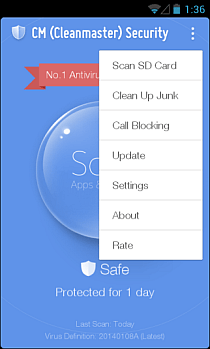
Protecting your system from malware is a daunting task, which should be given utmost priority. In order to prevent systems from getting infected with malware lurking around the internet, the folks over at Anvisoft have developed a smart anti-malware solution called Anvi Smart Defender. This powerful anti-malware utility has the ability to pin a lot of malware types to the ground. Coupled with a stylish-looking interface, the application protects your PC from viruses, tojans, adware, spyware, profiling bots etc. It includes 3 scan modes including Quick Scan, Full Scan, Custom Scan, as well as, a Cloud Scan feature to analyze any suspicious file by uploading it to its online cloud server. Other major features include, real-time protection and system optimization, where the latter provides various tools to optimize your computer's performance. Read More

USB Disk Manager: Control Level Of Access & Viruses For Flash Drives

Plugging in random USB flash drives into our computers is one of the primary sources of viruses and spamware. What happens is that when a USB is inserted into an infected computer, the virus automatically transfers itself into the target machine. When you plug the same USB flash drive into another computer, the virus gets transferred to the new PC and infects it. If you own a computer at a public place, for instance a library or a café, it is bound to get infected again and again because of a lot of different flash drives being connected to transfer data. You can use an antivirus, but as new viruses get created everyday, there is a chance that some of them will not be detected by the antivirus. Alternatively, you can use USB Disk Manager, a portable application for Windows that allows you to choose the level of access you give to USB flash drives. Read on to find out more about USB Disk Manager. Read More

NoVirusThanks Uploader: Upload & Scan Files With Multiple Antiviruses

There’s a saying that prevention is better than cure. That is the main principle that antivirus programs work on, but there are situations where just having an antivirus is not enough. With thousands of new viruses coming out each day, it is possible that a new viruses slips out of the database of the antivirus you are using. Viruses can effect the computer in a lot of ways - installing malicious software on the system, stealing personal information and exploiting security holes to let hackers in and out without any hindrance, thus making the data saved on our hard disks vulnerable to theft. With everything going digital, even extremely important things like our finances and financial details (online banking, shopping etc), one has to be really careful in keeping the system secure against people with malicious tendencies. NoVirusThanks Uploader is one such application that can be used in addition to your antivirus for helping you take care of your computer security by uploading files to an online scanning server. Keep reading to find out more about the application. Read More

FireTower Monitors & Validates Auto-Run Entries Against Web Database

With hundreds of new viruses being created each day, it is possible for your PC to get infected even if you have an antivirus installed on your system. The way most viruses work is that they create an auto run entry on your computer to ensure that they are executed whenever your system boots up. So, the virus will keep on doing what it is supposed to do, no matter how many times you restart your PC. Today, we have a tool called FireTower that can be a lot of help to you in tackling this issue. It is an application for Windows that performs an analysis of all existing auto-run settings and automatically validates the legitimacy of the auto-run entries through a web validation check. When the analysis is complete, all entries are displayed in different threat level categories. More on FireTower after the break. Read More

ThreatFire Protects Your PC From Zero-Day Attack / Exploit

Viruses, Trojans, Worms, Spyware and other malicious agents are continuously increasing in number, hence making malware attacks more frequent than ever before. We normally use Antivirus programs to protect our computers, but the problem is that an Antivirus only detects known threats which it can identify after going through a virus definition update. This leaves a significant amount of time for malware to invade your PC (before your Antivirus is updated). ThreatFire is an anti-malware application which, in contrast to traditional Antivirus programs, acts differently. It continuously protects your PC against zero-day attacks by detecting malicious instances instead of relying merely on definition updates. For example, it looks for applications which may be trying to capture your keystrokes or logging the steps you're taking. ThreatFire is not necessarily meant to replace your Antivirus suite; it can work seamlessly in conjunction with your existing Antivirus application. The most distinctive feature of ThreatFire is its ability to detect zero-day exploits. Zero-day attacks are amongst most lethal ways of exploiting root access of system, as they are programmed to slip through security cracks of installed applications. Read More

ESET Mobile Security For Android Fights Viruses, Spyware, Spam & Theft

ESET couldn’t have picked a better time to make a debut in the Android Market. Currently under yet another malware onslaught, the Market needs more major players from the system security genre to step into the foray. ESET Mobile Security is a comprehensive security suite for Android that includes an on-demand (user-requested) and on-access (event-triggered) scanner for viruses or spyware, SMS and MMS spam blocker, SIM authorization, remote control via SMS commands from an authorized phone number (or from Business Edition of ESET Smart Security and ESET NOD32 Antivirus), security audit, built-in task manager, automatic and manual security database updates and password protection for mentioned features. As of this writing, the app is in beta and available for free on the Android Market. However, there is no indication as to whether the final release will be free as well. Read More

BitDefender For Android Keeps Your Device Free Of Malware

Android's vulnerability against internal and external threats is no surprise to anyone. However, a good thing is that there are plenty of security apps in the Android Market that help users keep the lid closed on all such threats. Be it adware, spyware, viruses or any sort of spyware, you're almost certain to find a solution to various types of threats. While some of the tools are offered by relatively new companies, most of the trusted apps come from reputable companies which are gradually starting to take interest in the fast-flourishing smartphone industry. ESET, Norton, Comodo and Trend Micro are just a few examples of some tech giants that have already jumped on to the Android bandwagon. An encouraging aspect, however, is that the trend is still on the rise, as we continue to see other names enter the foray as well. In beta as of this writing, BitDefender Mobile Security is a comprehensive anti-malware application for Android that, with an assortment of user-activated and passive (background) tools for system protection, “keeps your Android device safe on the move” with negligible effect on battery and performance. The app features a cloud-based, on-demand Malware Scanner that sifts through all installed apps while tallying their security status with online BitDefender servers and an on-install scanning service that automatically scans newly installed apps. In addition, it allows users to view scan history (Event Viewer) and a Security Audit of all installed applications with the option to filter by permissions. Read More