Clips: Instantly Share Clipboard Items From iPhone To PC via Dropbox

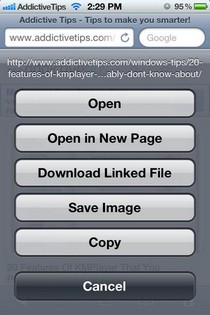
One of the features that made Chrome a really popular browser on iOS, is its real-time tab syncing. People really find it useful that everything they do on their iPhone is reflected on their computer straight away. Clips is a Cydia tweak that is based on the same concept, except that it syncs your iDevice’s clipboard rather than browser data. Using this action menu-based tweak, you can share images and text from your iPhone to PC with a single tap. All you need is a Dropbox account and a Windows PC to enjoy some really efficient instant sharing. Although the text data from your clipboard will appear in your Dropbox account immediately after you give it the Clips treatment, you will need the service’s desktop client to read the shared files. While this might be a slight inconvenience, there are no such limitations for images and even for text you are sure to get used to the way things work in Clips. Read More

Edit & Customize The Appearance Of Notification Banners On Your iPhone

A lot of tweaks are released for Cydia users each week, and they vary in their functionality quite a bit. Having said that, you are sure to notice that usually there are a few tweaks that are pretty similar in features, and get released pretty close to each other. Today, the focus of the developers over at the Cydia store appears to be on notification banners for iOS. Thanks to MiniBanners and SimpleBanners, users with jailbroken iPhone, iPad and iPod touch devices can now change iOS notifications in any way they want. In a way, MiniBanners gets rid of the banners completely and replaces them with a new and more compact notification style of its own. On the other hand, SimpleBanners endows users with more control over the way notification banners appear on iDevices, but still maintains the basic appearance of stock notifications. Read More

PowerDown Enhancer: Disable Or Reconfigure iPhone’s Power Off Menu

The idea of preventing unintended shut down of iOS devices is nothing new, and Cydia tweaks like Archangel make sure that your iPhone doesn’t get powered off in case you are using Gevey SIM or are on a tethered jailbreak. There are many scenarios in which you might wish to keep your device powered on for good, and even if your memory is good enough to never betray you, someone else might grab your phone and shut it down when you are not around. PowerDown Enhancer is a new Cydia tweak that offers about the same functionality as Archangel, but with a few bonus features. Thanks to this tweak you can disable the Power Off menu completely. No matter for how long someone holds down the power button, nothing will happen. If you want to put the menu to good use, rather than just doing away with it completely, it is possible to configure it for options like respring, discreet respring and initiating safe mode. Read More

[Giveaway] Open Links Directly Within Any iPhone App Using BrowseInApp

The “Safari versus Chrome” debate is still hot among iOS users, but as always, the developers over at the Cydia store have got a rather distinct opinion of their own. BrowseInApp is a new tweak that aims to make web browsers a little less important on an iPhone. No, it is not a standalone web browser; you will still have to continue using your current browser for routine tasks. The sole aim of BrowseInApp is to provide a quick and easy way to open links from within any app. If you have this tweak installed on your iPhone or iPad, you will be able to open any web link within the app you are currently using, without having to navigate your way to a web browser. BrowseInApp will open the link in the blink of an eye, and the tweak’s own browser comes complete with a usable address bar, back/ forward keys and a close button! Read More

Speero: Gesture Activated System Toggles, Shortcuts & App Switcher For iPad

SBSettings might be perfect for the smaller screens of iPhone and iPod touch devices, but it loses some of its awesomeness if you try using it on an iPad. The tweak is not optimized for big screens, and that makes it a little less useful, and a lot less pleasing to the eye. However, as there is no good alternative available for it on the iPad, jailbreak users are forced to keep using SBSettings. Not anymore! Speero is a tweak that has the potential to replace SBSettings on iPad. The tweak has a lot of system toggles, app shortcuts and other similar features. In addition to that, one thing that really sets Speero apart from SBSettings is the presence of App Switcher within the tweak’s menu. You can also add app shortcuts and customized actions to the mix. Read More

Get A Functional Download Manager In Chrome For iPhone & iPad

The intuitive interface, the real-time tab syncing and gesture controls in the Chrome app for iOS were enough to make it a worthy competitor for Mobile Safari, but thanks to all the amazing Cydia tweaks available for Chrome, Google’s web browser for iPhone and iPad has arguably become the best app of its genre for iOS. It does have its fair share of negatives, most prominent of which is its rather slow speed, but the features on offer in Chrome are so awesome that they have the potential to make anyone forget Safari. However, one thing that’s still far from perfect in Chrome is the ability to download files directly. Although a tweak named Chrome Download Enabler was released a few days back, it lacked any interface whatsoever, and was also really buggy. Thankfully, we now have a better alternative for downloading content via Chrome for iOS. Chrome Download Manager is a tweak that makes the whole process of initiating, managing and viewing downloads really smooth. With this tweak you will be able to download files belonging to almost all file formats, and then open (or save) those files via iFile or other similar apps. Read More

Maximization Lets You Force-Run Any iPhone App In Full Screen Mode

Although the screen size of iPhone has always been kept rather small by Apple in order to keep one-hand usage possible at all times, there are still a lot of people who aren’t fans of the iPhone’s diminutive display dimensions. When you have got a smartphone with a 3.5-inch screen, every little area of the display becomes important. So, it is quite understandable if some users are disappointed when any app does not take full advantage of the available screen area by refusing to run in full-screen mode. Admittedly, nothing more than the status bar remains visible at the top of the apps that don’t support full-screen mode, but why even have that? Maximization is a new Cydia tweak that allows users to make any app (stock or third-party) run in full-screen mode, without the status bar ever getting displayed! Not only does the app give you the choice to select the apps that will be affected by Maximization, it also adds a battery percentage and time display to the Notification Center grabber, so that you don’t have to come back to the Springboard just to see the time. Read More

Set Mobile Safari’s Default Search Engine To Wolfram Alpha, Baidu, Yandex & Others

A few months back, we covered a rather complicated method for adding more options to the list of default search engines in Safari for iOS. While that method (involving iFile and file system editing) still works perfectly, the margin for error in it is very little. One wrong entry in the registry, and you might end up rendering your iPhone’s Safari completely unusable (I landed my iPhone in that condition doing that, so that's personal experience right there). So, it was about time some clever developer came up with a one-touch solution for this issue. SearchEnable is a new tweak that automatically adds 8 new search engines to Safari’s stock list, which natively includes only Google, Yahoo and Bing. Of course, you cannot add a search engine of your choice to the list using this Cydia tweak, but the offered options should prove to be sufficient for most people. Read More

ClockWind: Make Your iPhone Seem Faster By Speeding Up UI Animations

If you have a lot of Cydia tweaks and apps installed on your iPhone, iPad or iPod touch, your device is bound to start getting a little slow after some time. Mostly, the reason behind this lag is nothing really serious, and you can pin the problem down to something as simple as UI animations taking longer than usual to load, giving the appearance that your iPhone’s performance has diminished. So, even if you can put your finger on the problem, is there any possible way you can fix it? Well, maybe you can’t, but a 12 year old Cydia developer, iHackerMe, has certainly come up with a rather neat solution for these lagging animations. ClockWind is an awesome tweak (specially for older iOS devices), using which you will be able to control the speed of all system UI animations in iOS. The end result is that your iPhone will appear to be working faster, as less time will be spent on animations, and you will be taken to your desired OS destination in the blink of an eye. Read More

Perform A Wolfram Alpha Search On iPhone Using An Activator Gesture

Wolfram Alpha is a rather unique search engine, and can help a lot of users in getting more information on any subject in less time. If you don’t know what Wolfram Alpha is, it is a search engine that integrates content rather than results consisting of pages. The service comes up with a complete article related to any entered keyword, complete with images, text and related links. Although the service has got an iOS client and a web version, now you can search Wolfram Alpha even faster than before, if you have a jailbroken iPhone, iPad or iPod touch. Gesture control is all the rage these days, and the new tweak WolfRam Quick Search makes use of Activator gestures to let its users look for any Wolfram Alpha definition you want. Its like having a widget for the search service, waiting for you to perform the chosen gesture so that it can come into action. Read More

Add A Refresh/Stop Button To The Address Bar In Chrome For iPhone

Everyone appears to be absolutely in love with the Chrome app for iOS. The first impression of the new iPhone web browser might be that it is perfect, and has got all the features anyone can possibly want. However, that is not the case. Although Chrome is better than Safari in quite a few areas, there are still things that could have been better in Google’s official browser app for iPhone and iPad. If you don’t believe that, and happen to think that nothing can be improved in Chrome, take a look at our post discussing some of the best Chrome-related Cydia tweaks available in the jailbreak store. The Cydia developer community isn’t satisfied with the Chrome app just yet, and the latest tweak released for the enhancement of the browser is named EasyRefresh for Chrome. If you have ever used the Chrome app on your iPhone, you are sure to have noticed that if you want to refresh any page, you have to go to the app’s options menu and tap the button from there. EasyRefresh solves this problem by adding a new refresh button to the address bar, just the way it works in Safari! Read More

Place Widgets & App Shortcuts On iPhone Lock Screen With AnyLock

The introduction of Notification Center in iOS 5 really made widgets popular among users of jailbroken iDevices. There are many NC widgets available in the Cydia store, and tweaks like Dashboard X have gone one step further by bringing widgets to the iPhone Springboard. AnyLock is not a competitor of Dashboard X, as it does not add widgets to the Springboard, but the functionality it offers is rather similar to Dashboard X. Users of this new tweak will be able to customize the lockscreen of their iPhone by placing any widget or app icon there. If that isn’t enough for you, you can even choose to remove a few stock features of the lock screen, in order to optimize it for the accommodation of more app shortcuts and widgets. Read More

SiLight: Toggle On Your iPhone’s LED Flashlight via Siri

Siri can do a lot of things thanks to the vast array of Cydia tweaks available in the jailbreak store, and even more new features will be added to its repertoire in iOS 6. Most of the tasks Siri is capable of performing are related to the software aspect of your phone, or other apps, and there is not much Apple’s personal assistant can do if you want to control any hardware component of your iOS device. That is exactly why SiLight is a rather unique tweak for Siri-enabled iDevices. Using SiLight, you will be able to toggle on the camera flash on your iPhone with a simple verbal request to Siri. This promises to be the fastest flashlight solution for all iOS devices that have access to the speaking virtual assistant. Read More

NetMeter: Monitor Your iPhone’s Data Usage From Notification Center

It might not be entirely wrong to say that mobile data gained more popularity among users with the advent of smartphones. There’s no denying the fact that the world was no stranger to capable mobile devices even before 2007, but one cannot argue with the fact (either) that Apple’s iPhone shaped the smartphone industry into what it is today, and introduced the layman to the world of easy-to-use and humane on-the-go computing. We’ve come a long way since then, and high-speed data protocols in the form of 3G and 4G LTE are the new buzz. However, mobile data doesn’t come cheap, and one thing that continues to haunt all smartphone owners are excessive data costs, should they not be on an unlimited data plan. Natively, iOS does let you monitor cellular data usage, but with a couple of caveats. One, you have to dig deep within settings to pull up the data usage stats your for device, and two, there’s really no easy way to monitor WiFi usage. True that the App Store boasts a few quite capable apps for that, again, you have to rely on an app for a reporting that should otherwise have been available at a single touch. Luckily for jailbreak users, NetMeter Widget for iOS Notification Center is a Cydia tweak that goes hand in hand with the NetMeter app, and lets you glance at your iPhone’s mobile data usage from the notification center, along with a few other useful statistics. Read More

Search For Cydia Tweaks From Within iPhone’s Notification Center

At times, jailbreak users just have to wonder that how anyone can survive on iOS without access to the Cydia store. Cydia tweaks, apps and themes play an important role in the lives of countless people who own jailbroken iPhone, iPad or iPod touch. Although there is a lot of quality content available in the jailbreak store, this is not the only factor that makes Cydia so useful for such a diverse range of users. It’s the sheer number of items present in the Cydia store that ensures there is always something there for everyone. The jailbreak store does have its fair share of annoying nuisances, like the fact that you have to wait for it to refresh every time it is launched, but overall, people tend to love it. Although Cydia provides its users with so many useful tweaks, when you come to think of it, there aren’t too many of them that enhance the store itself in any way. This is what makes Cydia-SearchNC a noteworthy release. This Notification Center widget will let you search the jailbreak store right from within the NC on your iPhone! Read More

BetterChrome Adds Social Sharing Options To Chrome For iPhone/iPad

Thanks to all the Chrome-related tweaks available in the Cydia store, Mobile Safari won’t be left with any distinguishing feature pretty soon. Until now, you can make Chrome your default iOS browser, add some awesome new features to it and also open any link in Google’s iPhone web browser using the nifty buttons added to Safari by a couple of tweaks (to learn more about all the best Cydia tweaks for iOS Chrome, head to our list post on the subject). Although there is already a nice collection of such tweaks in the Cydia store, BetterChrome is still one that can prove to be useful for a lot of people. This tweak adds a whole new menu to the Settings area of Chrome, and that new menu focuses on providing users with a few really handy sharing options. With BetterChrome, you will be able to share any page or link over Facebook, Twitter and Google+, right from within Chrome for iPhone and iPad! Read More

Metroon Brings A Working Windows 8 Experience To iPhone

I remember back in the day when customization was one of the bigger reasons behind jailbreaking an iPhone. Over time, the jailbreak aesthetics scenario evolved much like the platform itself, and Winterboard was no longer the sole theming platform for iOS devices. Of the many contenders that surfaced (and vanished), Dreamboard remained the sole worthy alternative to the much-acclaimed Winterboard, and brought with it perhaps an entirely new scope for iPhone and iPod touch themes. Not only was theme switching made dead easy, but the themes and skin packs themselves were much refined and more customized on Dreamboard. We even did a roundup of our top 5 picks in free Dreamboard themes back in November 2011. What that roundup was missing, however, was the new Metroon theme, a fresh release in Cydia that brings a complete and (surprisingly) functional Windows 8 experience to jailbroken iPhones. Whether you hate Microsoft’s latest operating system or deem it a right step towards the future is another debate, but Metroon is one Dreamboard theme you have to try out, and we’ll explore it in depth just past the jump. Read More

QuickIM For iPhone: Google Talk & Facebook Chat Client With Quick Reply

One of the biggest advantages of smartphones is connectivity on the go. Although you get that with almost any phone (that’s the whole purpose of a mobile phone, anyway), these devices allow internet access without restricting mobility, and that makes the whole idea all the more practical and useful. In today’s world, Google Apps have replaced plenty of enterprise suites for a lot of organizations, and even outside that, many users prefer using Google Chat due to its deep integration with Gmail and lightweight desktop client. Then, Facebook being the most popular social network, its chat service, too, is one of the most convenient methods of staying connected on the go. All the major smartphone platforms – iOS, Android, Windows Phone et al – have a plethora of multi-protocol chat clients that allow connection to various instant messaging services. The problem, however, is that not all solutions are equally effective; some may be resource intensive, others may lack (push) notifications, while still others may have an ugly interface. Furthermore, for iPhone and iPad, even though we have Facebook Messenger, it’s not that efficient, and on the Google chat front, neither is there any official client, nor are the third-party solutions that impressive. Perhaps that’s the reasoning behind the Cydia app, QuickIM. Currently supporting Facebook Chat and Google Talk, this app for jailbroken iPhone, iPod touch and iPad makes it super easy to stay connected with your buddies on these platforms, employing an easy interface, push notifications, and quick reply & compose features. Read More

Apply Filters & Effects To iOS Icons With Aicon

There are a lot of themes available in the Cydia store that can be used to completely revamp the looks of your jailbroken iPhone or iPad. These themes, however, have one disadvantage: they change every aspect of your iOS device, and do not let users tinker with individual areas of the platform (not easily, at least). So, if you want to have complete control over your iDevice (and that’s exactly what jailbreak is for), then Aicon is a new cosmetic option you are sure to appreciate. This fresh Cydia app allows users to change the appearance of their Springboard icons in numerous ways. You don’t have to go through a lot of complicated steps to re-theme your icons, as the app has plenty of filters of its own. You can apply a new filter to all the icons with a single tap, and there is also the option to apply a combination of multiple filters simultaneously. Read More

Prevent iPhone Banner Notifications From Obscuring The App In Use

Has it ever happened to you that you were deeply immersed in the intense gameplay of perhaps a tower defense game on your iPhone or iPod touch, laying down your strategy to prevent the oncoming hordes of enemies from reaching your base, when suddenly, the whole world comes to a halt! You hear the game’s mystifying soundtrack fade out as the familiar chime of a text notification takes its place, and the game pauses itself to give room to the banner notification dropping down from the top of the screen. If you’ve experienced this, or anything similar to what I described, you’d know what a big annoyance this whole situation is! What’s worse, the dropping banner notification covers the top part of the screen, so if any navigation controls are there (which is quite common across the iPhone ecosystem), they’re temporarily (and unnecessarily) blocked, and should you accidentally tap in that area while the notification is visible, you’ll immediately switch to whatever app sent the notification. Considering all this, and perhaps many other similar scenarios, one can only deduce that Apple has made a fundamentally erroneous judgment call with iOS banner notifications. CoverMeNot is a new Cydia tweak in town that addresses this seemingly-small yet highly annoying banner behavior, and modifies it in the simplest of ways to make our lives easier, which we’ll discuss just past the jump. Read More