Create, Edit, Convert PDF Files & Export As EXEs With PDFCool

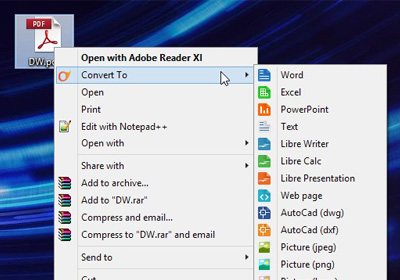
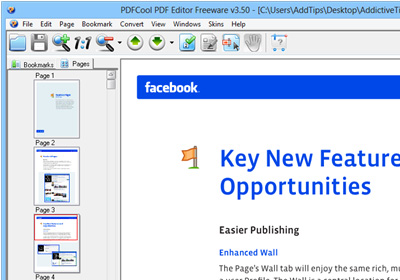
We have covered plenty of PDF editors for desktop, web and mobile platforms like PDFzen for Windows, Web, iOS and Mac OS X that allowed editing and sharing PDF files in a collaborative manner. PDF Mod was a another comprehensive option for Linux. In a nutshell, there are many PDF tools out there, all offering their own feature-sets and functionality. Should you be looking for another one to try out, give PDFCool PDF Editor a go. It’s a free PDF viewer and editor for Windows that bundles a variety of PDF-related tools in the package. Read More

Freemore Audio Video Suite Is Your One Stop Shop For Media Editing & Conversion

There are countless Audio and video conversion tools out there but with all the available options, it may get fairly tough to look for the right one at the right time. Even if you find the one that meets your requirements, odds are that it would be either be paid or in case of being free, have either way too many configuration options making it confusing to use, or offer too little control at what it does. Freemore Audio Video Suite takes care of this nuisance by amalgamating a number of different multimedia tools into a single freemium package that's easy enough to use for the average user while decently powerful enough for power users. It’s a compendium of various frequently used audio, video and document converters and editors that you would otherwise have to download separately when required. The suite includes audio editor, sound recorder, ringtone maker, MP3 cutter and joiner, audio and video converter, DVD burner, image and PDF converter, and the list doesn't stop here. It’s rare that you find such a huge collection of distinct apps in free software but Freemore not only delivers it; it delivers it exceptionally well. Read More

Save Web Pages As PDF Documents For Offline Viewing

Saving webpages for offline viewing is nothing new. Almost all web browsers allow this functionality via letting you store web pages in HTML format, albeit also creating additional folders to store pertaining scripts, images, files and related content during the process. Even though offline HTML pages allow you to navigate just like you would while you’re actually online, this isn't always a solution. If you’re looking for a way to simply store the web page - for instance a page consisting of an article that you want to read later - it’s better to save it in PDF format instead. One of the advantages of PDF is that you don’t have to keep multiple files akin to HTML. To quickly Xerox a webpage into PDF, try locking your sights on Weeny Free HTML To PDF Converter. It’s a lightweight yet powerful software that automatically converts and saves a web page into PDF at a breakneck speed. You can either convert an existing HTML file, or try entering the website’s URL and the tool takes care of the rest. Read More

Scan Master Might Be The Best Free Document Scanner & PDF Manager For Android

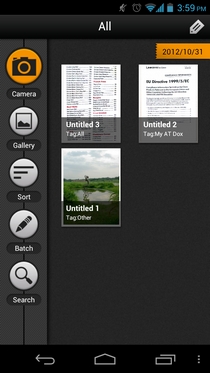
Google Play Store has plenty of quality document scanning Android apps to offer, but most of the available options are either paid or way too feature-restricted to fulfill users' needs. Fresh to the market, Scan Master is an absolutely free Android document scanner that offers almost all the features that are mostly only available in paid apps from the genre. Besides sporting an easy-to-use scanning tool, the app is equipped with a built-in image editor, document manager, PDF batch processing tool, comprehensive document importer (with Gallery & cloud support), automatic document edge detection, document enhancement tool, advanced file finder & sorter, and PDF document sharing. Using Scan Master, you can manage your PDF files under various custom tags, create PDF documents out of your local & cloud photos, snap multiple document pages in one go, assort documents within a PDF file in a custom order, merge multiple scans together to constitute a single PDF file, and tinker with document enhancement settings to create high quality digital versions of real documents in virtually no time at all. Read More

[Giveaway] PDF PROvider For iPad: Convert Photos, Webpages & Documents To PDF Documents

Most professional documents are stored as PDF files, because of the fact that the chances of accidentally altering the text and other content of the file are really slim. An iPad is used by a lot of people for business purposes, and that makes PDF files and iPad a good combination. Maybe that is why there are a lot of iOS apps dealing with PDFs, and most of them are really popular with iPad users. Despite all the competition from similar apps, PDF PROvider is surely among the most comprehensive PDF-related apps for the iPad. The app lets its users create PDF files out of webpages, images, maps and Dropbox documents. Not only is it a good PDF converter, it is also perfect for viewing PDFs, as the viewer in PDF PROvider lets you add annotations, stamps, text and illustrations to files. In addition to all that, PDF PROvider has the option to append existing files with content from sources you find at a later time. Read More

Free PDF Image Extractor Lets You Save Images From Multiple PDF Files

While working extensively with PDF files, we often need to extract high quality images from the PDFs for creating separate documentation in other formats. Earlier, we have covered Fusion PDF Image Creator for Windows and PDF Toolkit for Mac OS X, whereby the former only supports image extraction from a single PDF file and the latter provides numerous PDF manipulation features, but limited only to Mac OS X platform. Although, it takes up a lot of time in extracting images from PDFs manually, you can save more time if a large number of PDF files could be automatically converted and saved in respective folders. Today we discovered Free PDF Image Extractor, which allows you to effortlessly extract images from multiple PDF files and automatically organize them for the better. Read More

First PDF: Convert PDF To Word (DOC), Text & Several Image Formats

Looking for a PDF manipulation tool that can quickly convert PDF documents into Word and Text format without having to manually configure conversion settings? Try First PDF. It's a simple, free Windows application that allows you to not only convert PDF documents to DOC and Text format, but also to export them in different image formats, namely PNG, JPEG, TIFF, BMP, GIF and Multi TIFF. The application may prove to be extremely useful in instances where you want to convert a PDF file to an editable MS Word DOC file or if you want to embed a specific page of a PDF document into your website, as an image. As far as PDF to DOC conversion is concerned, it has the ability to preserve the text formatting as well as other applied text styles without changing the original structure of the document. Read More

Batch-Convert PDF Files To PowerPoint Presentations via Hot Folders

A while back, we reviewed 3DPageFlip PDF to Flash, a handy tool to easily convert your PDF files to SWF format, so you may embed your PDF documents (as flash) into HTML pages. Today, we came across a similar tool from the same developer that helps you convert most PDF files to PPT (MS PowerPoint) format. PageFlip Free PDF to PowerPoint is quite useful in situations where you want to present your important PDF files as a PowerPoint presentation, whether for a class project or to give a demonstration during a meeting with your boss. Like PDF to SWF tool, this utility also provides three different ways to convert your documents, i.e. Batch, Hot Directories and Command Line. Read past the jump for more details. Read More

PDF Reader Pro Is One Of The Most Comprehensive Document Viewers For iPhone & iPad

An iOS app that handles PDF files might not sound like something too exciting, but PDF Reader Pro has so much more to offer. The app lets you view PDF files on your iPhone or iPad, but that’s not all it does. It rises above the crowd owing to the staggeringly large number of additional features it has on offer and is undoubtedly one of the best if its kind out there. PDF Reader can handle images, videos, HTML, iWorks files, common document formats and, of course, PDFs. Most of the formats compatible with the app can be converted to PDF with a single tap, regardless of the file’s size. In addition to all this, PDF Reader Pro comes with some amazing sharing options, and you can get files in and out of the app over WiFi, via email, iCloud or just about any other cloud service you can possibly think of. The app’s reader is sleek, and comes with a lot of options to improve your reading experience. Read More

Convert PDF Documents To SWF In Bulk Using 3DPageFlip PDF to Flash

Just a few days back, we featured 3DPageFlip’s PDF to HTML converter. The program, along with CLI (Command line-interface) mode, lets you perform PDF to HTML conversion using a simple GUI-based Batch Mode. Recently, we came across another application from the same developer, called 3DPageFlip PDF to Flash. It offers somewhat similar PDF conversion options, but instead of converting PDF documents into HTML files, this particular application converts PDF file into the SWF format. It may come handy in situations where you need to convert multiple PDF document into SWF files and embed them into HTML pages. The program includes three different conversion modes, namely Batch Convert Mode, Hot Directories Mode and Command Line Mode. Read past the jump for details. Read More

3DPageFlip PDF To HTML: Easily Convert Simple PDF Documents To HTML

Previously we covered pdftohtml - an open source, CLI (command line-interface) based software to convert PDF documents to HTML files. Well, if you’re not so fond of using CLI based applications, but need a fast PDF to HTML converter, give 3DPageFlip PDF to HTML a shot. It lets you convert your files in batch operation, thus saving time. The application comprises off three conversion modes, named as Batch, Hot directories and Command Line. More details after the jump. Read More

Scan And Convert Documents & Images Into PDF And PS Formats

If you ever find the need to convert your pictures to PDF documents then SuperGeek Free JPG To PDF Converter is worthy of a shot. It is an easy to use, wizard-based utility for Windows, which can easily convert JPEG files to PDF. Contrary to its name, it is basically designed to convert all widely used image formats, such as PSD, JPG, TIF, BMP, PNG, EMF, PCX, TGA etc., into PDF format. The conversion process is very much easy and lets users set file compression and page size before converting the images. Not only does it convert image files to PDF format, but it also allows creating PS (PostScript) file of the selected image. Apart from choosing an image file that might be stored on your Hard Drive or other storage medium, you can choose to scan a document via built-in scanner feature to grab an image and directly convert it into PDF format. Most of the free tools leave a watermark after the conversion process and force you purchase the full application to get rid of any watermark. The story here is quite the opposite though, as it doesn’t watermark images while converting them into PDF documents. Read More

Hexonic ScanToPDF: Convert/Merge Scanned Images To PDF Format

Hexonic ScanToPDF is a flexible solution to convert scanned image files to a PDF file format. You can also convert existing images on your computer by simply dragging and dropping your files into the app. It’s a great and feature-rich utility that works flawlessly, no matter which image file you throw at it. Both single and batch conversion of image files is supported.  The application also lets you merge multiple files at once, and is quite fast and easy to use. It supports all the major image formats such as JPEG, TIFF, Multipage-TIFF, BMP, PNG and GIF. More details inside. Read More

Green Cloud Is A Virtual Printer Driver To Save Paper & Ink Costs

GreenCloud Printer is a virtual printer driver that helps you save money on your daily print jobs. With the help of this application, you can save up to 33% of paper, ink and toner costs, without reducing paper quality (as claimed by the developer). It completely integrates with installed applications as a virtual printer, and allows reviewing printing jobs, removing unwanted pages, grouping pages per sheet of paper and printing documents as PDF. Furthermore, you can directly send your documents to GoogleDocs, Dropbox, Evernote or Minus. Read More

PDF24: Create PDF Documents & Take Screenshots In PDF Format

PDF24 PDF Creator is an application that integrates with any program that has a print option, and allows converting different kinds of files to PDF format. With this tool, you can convert single and multiple documents into PDF files. Unlike other application of it’s kind, such as DoroPDF Writer, PDF24 PDF Creator provides the additional functionality to merge, split, extract pages out of, and copy PDF documents. You can also secure a PDF file and add PDF information, including the author’s name and title. Details after the break. Read More

Z-ViPrinter Creates Digitally Signed PDF From Any Application

Some use Cute PDF for converting documents into PDF format. Another option is Doro PDF which allows creating encrypted and password protected PDF documents. While both of these PDF writers have very useful for converting different kinds of documents into PDF files, they do not allow previewing the document structure before conversion which often results in problems with the alignment of the newly created PDF document. Moreover, they do not provide the option to Digitally Sign PDF documents which is quite commonly used nowadays due to copyright issues. Read More

Doro PDF – Create Encrypted PDF Documents From Any Windows Program

Previously reviewed Cute PDF allow you to create PDF documents from any application with a printer option, but if you need more security for a file that is to be converted to PDF format, Doro PDF Writer saves the day. It can not just convert but also encrypt and password protect the newly created PDF file. Doro PDF Writer is a robust PDF writer which allows creating encrypted and password protected PDF documents from any application with a printer option. You can configure advanced settings to manage the quality and color management of the converted document. Read More

Nitro PDF Reader Brings Advanced Tools For Free

PDF files are amongst the most popular document formats these days, and their increased usage means every computer would need at least some kind of reader that could handle them. Adobe’s own reader may be good, but not only is it taxing on system resources but also leaves the user craving for ‘some more’ features. Other alternatives like Foxit and Sumatra have been around and about for quite a while, but here comes a new contender that claims to be better than all. Meet Nitro PDF Reader. Read More