Pencil Camera HD: Live Sketch Effects For Photos & Videos On iPhone

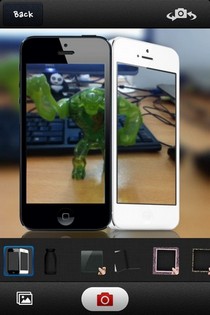
Photo editing is among the most popular app genre for iOS, and the subcategory of photo editing that has always managed to capture the imagination of a lot of iPhone users is sketching. Everyone likes getting an artistic view of their ordinary photos, and an iPhone can certainly help with that thanks to the amazingly large collection of photo editors available in the App Store. While there are many iOS apps that offer just one generic sketch effect, Pencil Camera HD is a lot better compared to all those. The app comes with a collection of 15 effects, but the special thing about them is that they are all related to sketching in one way or the other. Another feature that makes Pencil Camera completely awesome is its live filters. The app allows its users to get a preview of the way their photo or video is going to look before they have even shot it. Even during recording a video, you can change the sketch effect, or tinker with brightness, contrast or focus of the image on screen. Read More

Font Art: Add Stylish Text To Photos In Your iPhone & Online Accounts

A couple of months ago, we covered an app named Textgram, which allowed users to create text-oriented photos for sharing over Instagram. Ever since discovering that app, I have kept it on my iPhone, and it has come in handy on quite a few occasions. Textgram offers a lot of options for making the text look beautiful and really fancy, but something that it more or less ignores is the background for the text snippets. There are just a few templates that users can apply to their text masterpieces in Textgram, and that is a big limitation of the app. Font Art is an iOS app that lets you add beautified text to any photo you want. This means that the number of background templates offered by Font Art is unlimited, and you can write anything over any image! Font Art doesn’t stop here, though, and offers the choice to import photos directly from Flickr, Instagram and Facebook, rather than just the usual camera and camera roll options. You can make some basic changes to the images before adding text to them, and when the time comes for actually writing upon the pics, you will have a lot of gorgeous fonts, text colors and styles at your disposal. Read More

AnyShape Brings Easy Selective Photo Editing To The iPhone

Despite the presence of some pretty comprehensive photo editors in the App Store, there are times when you just have to transfer a photo to your computer so that it can be edited on Photoshop. The most troublesome photo editing issue suffered by iOS apps is their difficulty in selecting a particular editing path with precision. You can try all you want, but it is next to impossible to achieve the neatness possible in desktop photo editing tools. However, if you are feeling too lazy to take your photo editing work to your computer, and want to do everything on your iPhone, AnyShape might just be able to help you. There are countless photo editors available for iOS, but in our opinion, none of them is likely to offer editing path selection options that are as convenient as the ones in AnyShape. The app is a comprehensive photo editor, complete with filters and image enhancement tools, but its main focus is on letting you select the exact part of the picture you want to edit or crop, and that is why AnyShape can prove to be useful for both casual editing and the more serious stuff. Read More

Dramatic Black & White: Add Greyscale Sophistication To Your iPhone Photos

For me, the good old fashioned black and white effect for photos was a quick and effortless way to make an ugly picture, somewhat tolerable. However, with recent advancements in camera and photo editing apps, have made an otherwise simple black and white effect into a lot more then simply applying a preset filter. Dramatic Black & White is one such app that comes built with a plethora of b&w effects that are actually quite intuitive and easy to use from the word go. Yes, the app is to the point and will not leave you caught up wondering “oooh…what does this button do?”, in case you remember Dee Dee from Cartoon Network's Dexter. Read More

Collagetastic: Create Photo Collages & Send Them As Postcards [iOS]

Some might label Collagetastic as just another collage-maker for iOS and leave it at that, but actually, this photo editor has got the kind of finesse and uniqueness that is rare in other photo apps. For one thing, the effects offered by Collagetastic are pretty amazing, and there are a lot of them. Other than that, you can choose any layout for the collage you are creating, and there is the option to import photos to the app directly from your Facebook, Picasa, Flickr or Instagram accounts. The collages created via Collagetastic can be sent to your loved ones as postcards, thanks to the app’s integration with Sincerely (a service that prints and delivers personalized cards). Read More

PhotoMagic: Add Color And Lighting Effects & Frames To Images [Mac]

Adding effects to photos doesn’t sound like a complex idea but as Instagram can testify, it is actually a billion dollar idea. Regardless of what Instagram is worth to Facebook, its user base is proof that amateur photography is something we can’t get enough of and photo effects play a huge role in this. PhotoMagic is a Mac App worth $9.99 in the Mac App Store and it is a simple app that lets you add a large variety of color filters, frames, textures and light effects to an image. The output image is very similar to what you get from Instagram except you have more effects to choose from. Altogether, the app has 72 color effects, 17 lights effects and 90 frames to choose from. The output is saved in JPG format and images you create can be shared on Flickr and Facebook. The app also has a crop tool that allows you to crop an image on one of four preset sizes. Read More

Toolwiz Pretty Photo: Lightweight Yet Powerful Image Editor With Filters

Even if you know a little about photography, capturing mesmerizing moments in camera isn’t something hard. However, your effort really shines during the post processing of photos, i.e., when you give final touch ups and apply various photo filters using third-party photo editors. In this way, you not only enhance your photos to make them look better, but also remove various deficiencies that remained in the RAW image. Everyone knows about Photoshop, but only a few are familiar with all of its sophisticated sets of tools and features, so it’s better to use some basic photo editing application instead, especially if you’re an amateur. One very feature-rich yet easy to use photo editor I came across is Toolwiz Pretty Photo. Just as its name implies, it is designed to make your portraits prettier, and comes packed with a number of annotation tools, photo filters and image effects. Read More

Tiled For iPhone & iPad: Powerful Collage Maker With A Metro-Style UI

One thing that you’ll find in abundance across any platform – iOS, Android, Windows, Mac and even Web – is perhaps photo editors and manipulators, and within those, collage creators, to be more specific. These tools not only make it easy to produce astounding images that can awe your friends on social networks, but may also help if you’re a meme fan, as the panel-layout provides an easy base for creating your humorous masterpieces. The thing about smartphones is, they’ve put every sort of tool in the palms of our hands, and collage creators are no exception. iOS, in this regard, is rather well-endowed, as the platform boasts several capable apps for creating collages on the go. We have reviewed several of the kind before; Photo Wall, which lets you create collages graffiti style on iPhone/iPad, or Nostalgio, which impresses with its wide array of Frame templates, and my personal favorite, Frame Artist, which is arguably the most comprehensive collage maker for iOS that I’d seen to date. Tiled is a new entry in the same genre which packs a vast and handsome set of features, capable of rivaling the best in business while maintaining user friendliness. Read More

Photo Genius: Official Aviary Image Editor For Windows Phone

When it comes to photo editors that are simple and elegant, no one does it better than Aviary. The service provides its plugin for many apps that do not primarily deal with photo editing but still want to come up with a decent set of options for their users. Recently Aviary released its standalone photo editor for iOS and Android, and we all know which platform usually follows those two when it comes to app releases. Photo Genius has just become available in the Windows Phone 7 Marketplace, and using this app from Aviary, Mango users will be able to apply a host of photo effects to their images. Not only that, the popular Enhance feature is there in the app as well, just to ensure that you can make photos look better with a single tap. Photo Genius has a few other really cool features too, like fancy stickers, red-eye removal and even a teeth-whitening menu. Read More

Popular Mac App Color Splash Studio Comes To iPhone

Color splash photography is a genre of photo editing that is not as complicated as some of the other fields, but the results you can get thanks to splash effects are certainly good enough to make your ordinary photos look like works of art. If you own a Mac, then Color Splash Studio probably introduced you to this class of photo effects. The famous Mac photo editor has recently been released for iPhone, and now you can edit your iDevice’s photos in a beautiful touch-based environment. The app offers some pretty good photo filters (named Dramatic Effects), and you can also choose individual objects in an image to apply these filters and other color splash effects to them. Another great aspect of the app is its sharing capabilities. Color Splash Studio comes with Instagram, Facebook, Twitter and Flickr integration, and you can even get your images delivered to you (in real life) as postcards, thanks to the app’s collaboration with the Sincerely service. Read More

Foto-Mosaik-Edda Is A Highly Customizable Mosaic Creator For Windows

Mosaic photography is something we all love. Whether you do it as a hobby or for the sake of your profession, it’s a unique, exciting and fun way to share your favorite photos with others on the internet. Today, we have a mosaic creator for you called Foto-Mosaik-Edda. This Windows application is designed to let you create fabulous photo mosaics using either your own image database or grabbing images directly from Flickr, which you can then poster-print in high resolution. It’s a feature-rich mosaic maker that comes with plethora of settings; for instance, the ability to set tile pixel size and tile count, image orientation, specify custom poster size in megapixels, tile format (digital cameras, DSLR cameras and HD), Flickr support, tile borders and many others. Is it worth a try? Read on to find out! Read More

Popular Collage Maker ‘PicCollage’ Released For Android

Developed by Cardinal Blue Software, PicCollage is a collage maker that is revered for its simplicity and plethora of features. Using its various tools, users can create beautiful collages out of their device, camera, Facebook and web photos, and share their masterpieces with the entire world. In addition, the app is laced with a variety of background templates, easy to use multi-touch gestures to maneuver images, and extended photo sharing features. The app also integrates Aviary’s photo editor plugin to help you enhance and embellish your photos before placing them on the canvas. Initially available only to iOS users, the app has just been released to the Google Play Store. Read More

Photo Editor: Aviary’s Standalone Image Editing App For iPhone & Android

Aviary’s photo editing plugin is the most popular of its kind among both Android and iOS app developers. Most smartphone social networks, and other apps that don’t primarily deal with image editing, turn to Aviary’s plugin to provide their users with a convenient option for making changes to their photos without having to leave the app. For quite some time now, Android users have been benefiting from the Aviary Photo Editor plugin (reviewed here) to beautify their photos, but what can be better than a standalone Aviary app that can edit both camera and gallery images? Photo Editor by Aviary has been released for both Android and iOS, and photo editing has never been this easy. Read on to know all about this beautiful photo editing app. Read More

8 Useful iPhoto Tips You Probably Don’t Know About [Mac OS X]

iPhoto is the iTunes equivalent for managing photos, and comes pre-installed on Mac OS X Lion 10.7. The app is meant to make it easier to transfer and organize photos between your iPhone and Mac, your camera and, generally, all your images. However, iPhoto isn’t just a photo organizer; it is feature rich and can be used to do a lot more. The application's key feature remains, of course, its library, which, like that of iTunes, is excellent. For beginners to even average users, iPhoto does take some time getting used to, and there are quite a few common problems that beginners face. This post addresses all those issues for iPhoto ‘11, version 9.2.1. To check which version you have, go to About iPhoto in the iPhoto menu. Read More

[Giveaway] SoftOrbits Photo Retoucher: Retouch Photos To Remove Unwanted Blemishes

Photo editing often involves too many tasks such as color correction, cropping, masking, layering, retouching and whatnot, in order to get the perfect image. Most of the high-end photo editors are stuffed with endless number of features (some that you don’t even need). However, if you are looking for a rather simple solution to quickly fine-tune your favorite photos, then go ahead and give SoftOrbits Photo Retoucher a try. This application provides you with a number of tools to quickly touch up your old photographs using tools like Spot Remover, Scratch Remover, Concealer Brush and Image Correction. Other noteworthy features include image cropping and a marker tool to remove unwanted objects in images. The application also lets you work with multiple images at a time. More details after the jump. Read More

PictureCollageMaker For Windows Boasts Countless Templates, Frames & Photo Effects

Who doesn’t like making those beautiful-looking photo collages? After all, it makes the whole photo sharing experience a lot more mesmerizing. Previously, we have reviewed an umpteen number of photo collage tools, such as Cookiepix for Mac (review), Shape Collage (review) and the recently covered CollageIt (review), just to name a few. However, if all this isn’t enough to satiate your appetite, then go ahead and give PictureCollageMaker a shot. This feature-rich application has a quite a lot to offer, and is filled with a gargantuan amount of templates, frames, masks, clip art and photo effects.  You can create your collages either through a wizard mode, or by manually selecting various parameters, the latter of which is much more comprehensive. Read More

Fotor For iPhone & Android: Massive Camera App With DSLR-Like Focus, HDR, Photo Effects & Collages

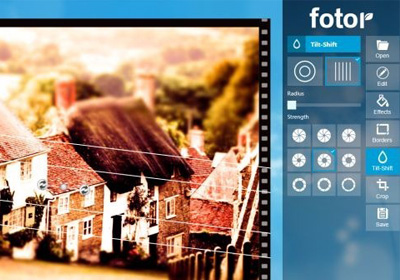
It is quite an old (read: wrong) notion that photos taken from a smartphone camera can never be as good as the ones shot from even the cheapest standalone cameras. The camera quality of smartphones has evolved tremendously over last few years, with Nokia's latest PureView technology being testament to what you can achieve optically on a mobile device. However, although most stock cameras are rather restricted, smartphone cameras have a host of supporting apps to go with them, and these apps have the potential to make your photography seem absolutely professional. Since iOS sports the largest collection of apps among smartphone platforms, it is understandable that some of those apps are just about perfect for the camera in iPhone. Fotor is one such app that combines a photo-editor with a fully-featured alternative camera for iOS devices. Some of the features in Fotor (like post-shooting focus, the Anti-Ghost option and the HDR mode) are good enough to give whole apps a run for their money. Read on to learn about everything Fotor has on offer. Update: The Android version of the app has been released to the Google Play Store, and you can find its download link at the end of the post. Read More

Popular Windows Phone 7 Photo Editor & Camera App ‘Fhotoroom’ Goes Free

We have covered quite a few photo editing apps for Windows Phone 7, and some of them are quite comprehensive when you look at the number of photo effects and filters they offer. However, most of those apps are specialized only in some areas of photo editing. Fhotoroom is the number one app in the Marketplace category of photo editors, and it focuses on just about all aspects of photo editing you can imagine. Like Instagram, Fhotoroom has a few pretty good public galleries, and its editor maintains its ease-of-use despite being really feature-rich. Even the camera in Fhotoroom is good enough to take on any standalone camera replacement app, and everything about the app has just been taken to the next level of awesomeness, thanks to the latest update of Fhotoroom. Read on for details. Read More

FreezePaint For iPhone: A Unique Way To Merge Parts Of A Photo With Another

Photo apps for the iPhone are a dime a dozen but every now and then, you come across a unique one that stands out. For instance, one that lets you take a photo, freeze any part of it on screen by freely swiping your finger on it and then take another picture with your selected frozen parts overlaid on it. You can even remove the dark circles around your eyes with it, with ease, though in a rather unorthodox manner. It’s a concept rather hard to describe in words, but we’ve got you covered with our detailed review, hands-on screenshots and even a story! Read on for our detailed review. Read More

Photo Sharing Network SmugMug Releases Official App For Windows Phone 7

SmugMug might not be as popular as Instagram, but it is a service that is used by professional photographers and is not limited to just mobile platforms. The photos available on SmugMug are generally high in quality, because the user base of the service consists of people who don’t share photos just for fun. Rather than predefined, one-touch filters and photo effects, SmugMug allows its users to make adjustments they want to their photos. If you are a Windows Phone 7 user, and admire SmugMug, you'll be delighted to know that the official mobile client of the service has just hit the Marketplace. The app lets you control every aspect of your SmugMug account, and even if you don’t have one, you can browse through public galleries and share photos from the app. Read More