Lion UX Pack Transforms Windows 7 To Mac OS X Lion User Interface

Those of you who have been regularly following AddictiveTips, would know that we have covered a number of elegant skin packs for our readers in the past, including the Android , Windows Phone 7 Mango, iOS, Windows 8 and the Ubuntu Skin Pack. Most of these skin packs were developed by Hamed, and required following a simple setup wizard for getting the job done, instead of going through any complex theme patching methods. Recently, we cam across a Mac OS X Lion skin pack that was even easier to install than the previously reviewed Lion Skin Pack. The Lion UX Pack has been designed to instantly transform your Windows 7 system into a Mac OS X Lion style desktop. Read More

How To Prevent Applications From Restoring In Mac OS X 10.7 Lion

Available only in Mac OS X 10.7 Lion, Restore feature resumes applications, after reboot or system shutdown, from where you left off. This may become annoying when it’s required to stop launching applications after system reboot on which you were working previously. Although Mac OS X Lion lets you choose system-wide applications and windows which are not to be resumed every time you login to Mac, there are certain applications which skip through this restriction. Also the option to disable restoration feature on per-application basis is nowhere to be found, you either have to disable restore feature for all applications or keep it enabled. Read More

Classic Trash X Is A Smart Way To Empty Trash In Mac OS X 10.7 Lion

Originally written for Mac OS X Snow Leopard and former versions, Trash X has recently been updated with support for Mac OS X 10.7 Lion. Trash X is an extension of Mac native Trash utility. For those who have never tried Trash X before, it offers a number of options to easily send files and folders to Trash, shred files/apps and folders, eject mounted disk images, clean volume data for selected applications, all via a simple drag & drop. For instance, you drag a mounted application or external hard disk over its icon to quickly eject it. Similarly, when you drag the disks over Trash X icon while holding the command key, it will empty the Trash only on those volumes. File shredding functionality has also been integrated into Trash X. You can forcibly delete the file/folder or choose to shred the items in question. Read More

Hide Launchpad App Pages & Refresh App List With Launchpad-control

We covered Launchpad-control since it helps displaying only important applications in Mac OS X 10.7 Launchpad. The Launchpad sorts installed applications in alphabetical order, making it easier for users to find applications from stack, and supports mouse-gesture feature to let users quickly navigate through application pages. If you’ve installed a great deal of applications, it would definitely become tiring to manually hide each application using the launchpad-control. Launchpad-control latest version 1.3 has been written to address this annoying problem. This update brings an option to hide applications by pages. You can uncheck the page you want to hide, and it will immediately conceal it with all underlying applications in Launchpad. Another noteworthy aspect is that it can do full reset of Launchpad by creating a fresh application listing database file. Read More

Add Reverse Scrolling In Mac Snow Leopard, Customize It In Mac Lion

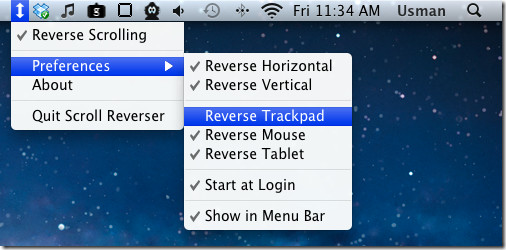
One of the most annoying iOS inspired feature of Mac OS X 10.7 Lion is reverse scrolling. Lion emulates the scrolling behavior of iOS devices, where you scroll up to actually move down the page and conversely is the case with scrolling up the window. If you want to restore the natural scrolling in Mac OS X Lion, you can disable reverse scrolling behavior from System Preferences. Nevertheless, you may also want to enable reverse scrolling behavior before using trackpad or magic mouse. If you frequently switch between mouse pointing devices, Scroll Reverser may help you manage between natural and reverse scrolling behaviors for each device. It’s a menu bar application for Mac OS X to customize reverse scrolling behavior for all types of mice and trackpads with a scroll wheel or scroll gesture support, including, Magic Trackpad, Magic Mouse, Mighty Mouse, and MacBook trackpads. Read More

Deeper 1.4 Is Exclusive Mac OS X 10.7 Lion Tweaking Utility

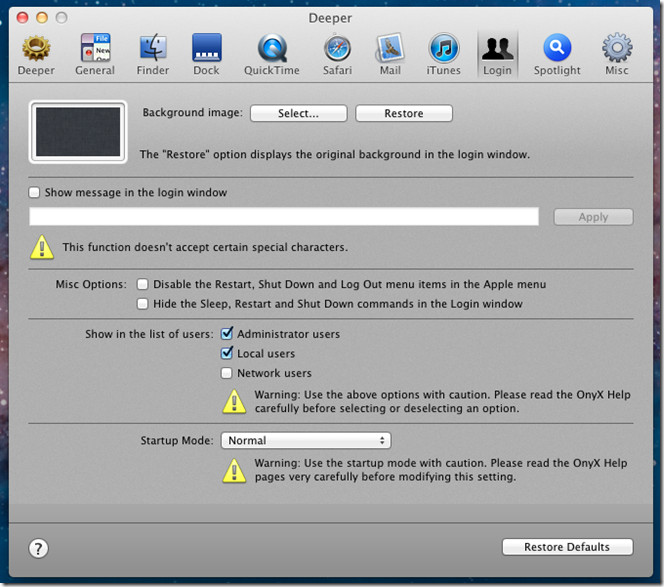
Deeper is a brilliant Mac OS X customization utility which includes a comprehensive list of options and tools to tweak with different indigenous applications, including, Safari, Mail App, iTunes, Dock, QuickTime, etc., and Mac’s Finder, System Dock, Spotlight, and Login screen. For those who are not familiar with Deeper, it accumulates a collection of tweaks in 10 different categories, allowing users to easily reveal numerous Mac hidden features, toggle applications’ user interface specific elements, and enable hidden features of aforementioned Mac applications. Read More

Bring Mac OS X 10.7 Lion Text Editor To Windows 7 With Lion TextEdit

TextEdit is a Mac OS X word processor and text editor which comes pre-installed with Mac. TextEdit was a replacement for the legacy text editor known as SimpleText. Mac OS X Lion TextEdit for Windows is a portable Mac style text editor for Windows which can be used as an alternative to the native Windows Notepad. This Mac's TextEdit clone is yet another third-party attempt to create an application which aims to mimic features of a Mac application. Some other examples include, the previously reviewed PhotoBooth and JumpPad. Read More

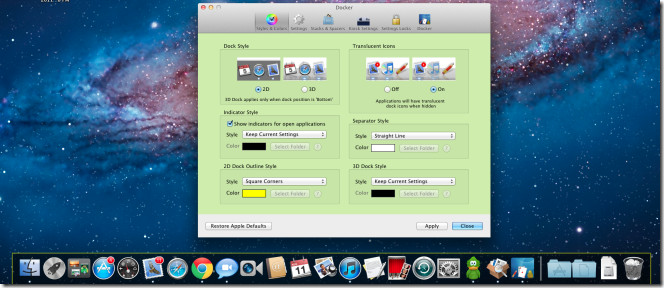
Customize Mac OS X 10.7 Lion System Dock With Docker

Since Mac OS X offers a very limited set of options to change different elements of system dock, including, position, icon size, application window minimize effect, etc, many users rely on 3rd party tools to change dock layout as well as its appearance. If you’ve been hanging around multiple tools to overhaul Mac system dock, have a look at Docker. Unlike other dock tweaking tools, Docker is an all-in-one system dock tweaker that caters to almost everything related with dock ranging from Dock Style, Icons, Indicator Style, docked application separator, 2D and 3D Dock Style, Standard and magnified size of items in dock, Disable bouncing icons, Hide in-active applications and more. Read More

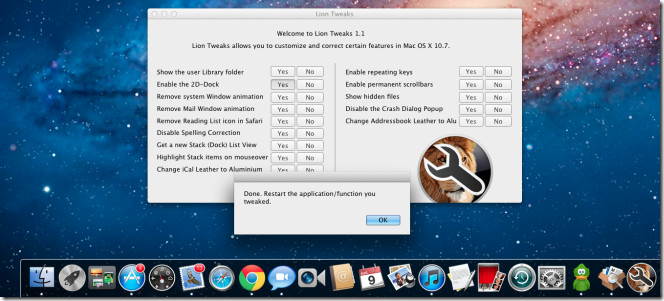
Toggle Mac OS X 10.7 Lion New Features On / Off With Lion Tweaks

The latest Mac OS X 10.7 brings a whole lot of improvements along with a dozen iPad inspired UI features and animations. Although these improvements don’t come into conflict with UI design and core features of Mac Snow Leopard, many users hate the idea of bringing the iPad like UI elements and animations to Mac OS X. If you’re amongst those who want to keep Mac OS X 10.7 installed on your system but also want to toggle some of its new features, window options and animations on/off, Lion Tweaks is probably the best Mac Lion tweaking application that you can try. Read More

Create Mac OS X Lion Install Bootable DVD / USB With Lion DiskMaker

If you’re planning to upgrade your Mac OS X 10.6.6 or higher to Mac OS X 10.7, aka, Mac Lion, you might want to create a bootable Mac Lion install DVD disc or USB drive before installing it on your system or upgrading other systems to Mac OS X 10.7 as well. Lion DiskMaker may come useful to quickly install Mac Lion on previous Mac OS X versions without having to use Mac Lion redeem code in App Store. This AppleScript based application provides best alternative to tedious procedure of burning Mac Lion package contained Disk Image, namely, InstallESD.dmg  to DVD and USB flash drive. Not does it only save you Mac volume licensing count it also attempts to include all those files which are required to install Mac Lion. With LionDiskMaker, you won't have to look for Mac Lion package in Applications folder; when you launch it, it automatically starts finding Mac Lion package and prompts you about the search result. Read More

Hide Launchpad Applications With Launchpad-control [Mac]

Supporting multi-touch gestures and full-screen mode, Lauchpad is a great little feature of Mac OS X Lion which lets you access installed application from a distraction free environment and also allows you to group similar applications into folders. Launchpad contains all those applications which are present in Mac Applications folder accessible from system dock. Since there is no native option available in Mac OS X 10.7 (Lion) that can tweak with Launchpad application listings, you may need a tool, like, Launchpad- control to place those applications in Launchpad which you use most frequently. It provides nothing but a list of all installed applications to hide those items which you don’t want to show in Launchpad. Read More

TotalTerminal Replaces Visor In Mac; System-Wide Terminal With Hotkey

Many Mac proficient users like to use Terminal utilities like, Click2Shell, cdto, etc., to quickly launch Terminal for performing numerous system tasks. Both mentioned tools open current location in Mac Terminal from Finder toolbar, preventing users from manually navigating to current location in Terminal. If you’re looking for a more convenient way to launch Mac Terminal window, try out TotalTerminal. It’s an Terminal.app plugin which provides a persistent Terminal Visor window. Although it isn’t meant to open current Finder folder in Terminal, you can quickly slide down Terminal from system menu bar by using default hotkey combination Ctrl + ~ to instantly start running required system commands. When this hotkey combination is re-triggered, it will hide the Terminal. Read More