8 Common PayPal Scams in 2026 and How to Avoid Them
We live in a technology-dominant era, and PayPal scams have become one of the most pressing concerns for online users today. We’ve lived to see both tremendous advancements in several tech branches and an increase in interest in these advancements. It’s hard to believe that merely a few years back we didn’t have the option to video chat, send huge files at lightning-fast speeds, perform complex security checks to log into our accounts (including facial recognition), and one of the most important ones, acquire goods by paying over the Internet.
While for some this is still science-fiction, most of us not only adapted to the technical advancements of our age but also embraced them fully. As a result, we have moved our bank accounts online and we’re using webpages and applications in order to manage stuff around, like create deposits, wire money to a friend, pay for insurance, invest in stock actions, and even buy cryptocurrencies.
Take PayPal, for instance. It’s one of the most popular online payment processors, and people have been relying on its services for more than 20 years now to perform single or recurring payments or even set up merchant accounts in order to receive money from their customers.
PayPal is in fact so popular that you can find it as an accepted and trusted payment method on almost every e-commerce website, right next to other frequently-used methods such as bank transfers, credit cards, checks, money orders, and since recently, cryptocurrency.
What is PayPal?
As we’ve mentioned above, PayPal is an online service that enables you to make or receive online payments without significant effort. All you have to do is create an account and link a credit card or a bank account you can use to go online shopping and, respectively, withdraw money from your PayPal account to your bank account. Technically it’s possible to create a PayPal account without linking a card or a bank account, however, you won’t be able to use PayPal to its full extent.
In fact, you’ll get a whole load of notifications even if your card recently expired, letting you know that you can’t use the service without renewing the required information (i.e. the expired credit card details). A while back, there were some guides online teaching you how you can trick PayPal into letting you create an account by using a credit card generator, and it probably worked.
However, PayPal got smarter and started to perform credit card verifications on newly created accounts. The verification process usually meant that PayPal would take a modest sum of money (like $1) from the card or bank account you’ve linked and send a code to your bank account, included in the payment details of the sum they just withdrew.
PayPal anti-scam verification
In order to verify your account, you had to get a bank statement (which is nowadays infinitely easier than it was 10 years ago, given that most of us are using mobile banking apps), obtain the code that PayPal slipped into the payment details, and paste it on the website, in the card- or bank-account-adding dialog. Once you did that, PayPal could verify your account successfully. Once the verification process was over, PayPal would send you a refund for the sum it withdrew from your account for verification.
We’re guessing that this move was to discourage anyone who would try to scam PayPal or PayPal users by making them submit real information that could be verified, which subsequently meant that PayPal users could be held accountable for their potentially shady operations.
Speaking of PayPal scams, you probably want to learn more about them, as well as how you can protect yourself from such unfortunate incidents. In this guide, we’re going to show you some of the most common ways you can get scammed on PayPal as well as how you can keep yourself safe from these cons and their perpetrators.
Common PayPal Scams in 2021
1. Smishing

This is arguably the newest method that could be used to scam you if you’re a PayPal user. Although its name might pull a chuckle out of you, this type of PayPal scam is not as silly as you think: in fact, it combines two of the most effective ways (phishing and SMS messages) of conning someone to get various things from them, including money and sensitive information that could be further used for unauthorized access.
What’s new about this type of scam is that it makes use of your phone, which means that the scam artists could catch a lot of users off-guard, who may not expect that an attacker could attempt to attack them through this channel. Note that this attack has been observed in various forms: SMS alone, email alone, and a combination of the two, such as sending you an SMS informing you that you’ve received an email regarding an important event occurring on your PayPal account (such as it being banned or limited).
How smishing works
So here’s how the attack works: you receive a message, be it through SMS, email, WhatsApp, Facebook, or a combination of these channels. The attackers add a sense of urgency to their emails so that in the event that they catch you off-guard, you will fall into their trap and provide them with the information they require. Furthermore, the message will sound very official, so as to not raise any suspicions that anyone other than a PayPal representative has sent it.
Usually, this PayPal scam message will inform you that your account was banned, locked, or limited, and will ask you to perform a series of actions in order to recover it or prevent it from being deleted altogether (and your funds lost forever). More often than not, these messages will also include a link that, upon clicking, will lead you to a page that looks almost identical to the PayPal official website, and will ask you to log in to your PayPal account.
If you do put your real PayPal credentials there, you won’t be logged in to your PayPal account. Instead, the scammers will receive your login details and will try to lock you out of your account or steal your money from it. However, most attackers don’t stop there and will ask you additional personal details, such as the street you grew up on, your mother’s maiden name — things that you usually get asked by security questions. Doing so can facilitate easy access to other accounts of yours to the hackers.
Usually, you can figure out that you’ve been scammed moments after handing your PayPal credentials to the phishing page, since most of the time it leads nowhere, or just throws a generic message your way. However, since scammer creativity knows no limit, logging into the phishing page can sometimes prompt you with an error (such as “wrong password“), asking you to try again, but this time redirecting you to the official PayPal website, so as to not raise any suspicions.
Protect yourself against smishing scams
Now that we’ve presented you the worst-case scenario that you could go through in the event of a smishing attack, you’re probably left wondering what you can do to protect yourself against this type of con. It’s quite simple, actually. First of all, you can check if the email address of the sender is legit (PayPal emails should have a @paypal.com suffix). However, email spoofing is still a thing, so you can’t really know for sure just by checking the address.
However, you can simply try visiting the PayPal official website, which is and has been for a long time now PayPal.com, and check if your account is in good standing. If it is, then you can delete the message you received and stop worrying about it. If you still have doubts, you can go to the official PayPal website and contact support to put your doubts to rest.
Note that PayPal has an email address where you can report these fraud attempts. Just forward any email you receive to phishing@paypal.com and delete them afterward. If you receive a suspicious invoice or money request sent through PayPal’s own system, do not call any phone number included in the message — report it from directly inside your PayPal account or the app instead.
2. Display name spoofing

We’ve casually mentioned some form of spoofing above, but display name spoofing isn’t the same as email address spoofing. We’ll get to the scam in just a few after we briefly explain the differences between these two forms of spoofing. Email address spoofing is essentially sending an email message from a forged address. The scammer usually chooses an official address, so that it seems official.
However, most of the time these emails are detected by major email service providers, such as Gmail, and you can usually notice that they lack security certificates, or that the domain from which the email message is sent couldn’t be verified. On Gmail, for instance, there’s a question mark on the sender’s profile picture, and hovering your mouse cursor over it should inform you that Gmail can’t verify if the email has been sent by the domain owner or a scammer.
How name spoofing scams work
Now with name spoofing, things are somewhat similar. Most email services have ditched displaying the full email address of the contact that’s sending you an email message. You probably noticed that you don’t see email addresses as much in the sender field, and that this information has been replaced with a display name, that everyone can choose for themselves. For instance, if johndoe@domain.com has set his display name to John Doe, you won’t see the email address anymore, and you’ll see John Doe instead.
However, hovering your mouse over the sender’s display name or opening the email source should reveal the email address of the sender. Certain email service providers such as Gmail let you view both the display name and the email address, so you can snip a name spoofing scam right in the bud if you’re vigilant enough.
To give you an example that applies to our scenario, if the attackers aim to get some of your PayPal information, they can change their display name to something relevant, such as PayPal Customer Support or PayPal Tech Support. Pair that with an urgent-looking message such as YOUR ACCOUNT HAS BEEN BLOCKED in all caps, and you got yourself a recipe for disaster.
Most users forget to check the actual email address of the sender, which usually results in losing their account or getting their money stolen without even realizing what happened (until it’s too late, that is). Fortunately, it’s not difficult at all to dodge a display name spoofing PayPal scam if you’re careful enough. First and foremost, reputable services such as PayPal don’t use countdown timers that you need to beat before they lock you out of your account, so take your time.
Second of all, merely opening an email doesn’t mean that your account has been compromised. You actually have to take one or two more steps to let that happen. Therefore, you can open the suspicious email and check if the address of the sender looks fishy, such as janedoexyz123@domain.xyz. Attackers resort to email addresses that look like these (we call them burners) because they’re easy to generate and most of them self-destruct after a given period of time.
How to protect against name spoofing
The best way to protect yourself against this type is the same as we’ve mentioned above. Even if the email has that sense of urgency to it, keep in mind that PayPal won’t just delete your account and run away with your money. If you receive a scam email, take a step back and try to be logical about it: access PayPal’s official website and check if everything is alright. If you still think that something is off, try accessing the login manager. You can find it in the Activity category of PayPal’s Settings section.
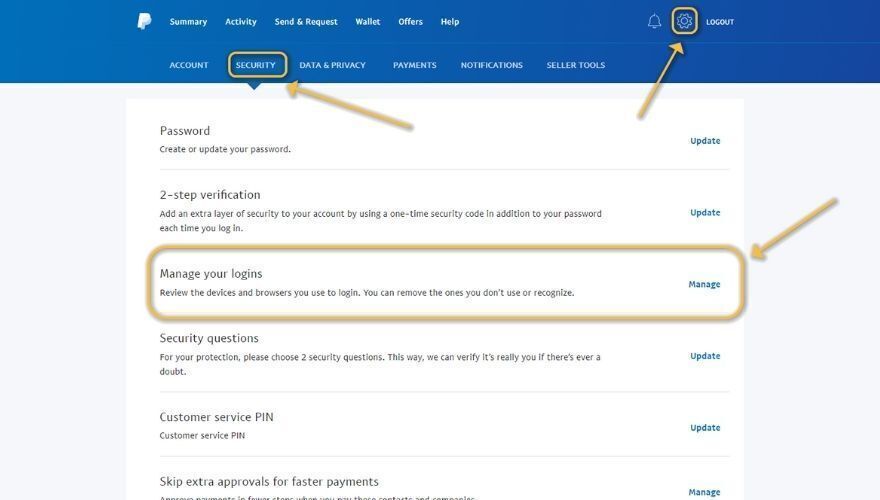
If you do notice some strange logins on your PayPal account, you should change the password of the email you associated with your account, and if you’ve set an email recovery on that PayPal email, you should also change the password for it. After you’re finished changing passwords, remove the suspicious login from the PayPal login manager and consider enabling 2FA (2-Factor Authentication). Similar security measures apply to other payment platforms as well—if you need to deactivate Cash App account due to suspicious activity, it’s important to act quickly to protect your funds.
3. Inheritance or advance-payment scam
This is one of the most common (and oldest) types of PayPal scam that’s been going around for as long as I can remember. If you’re a 90s kid, you may remember some of your relatives or acquaintances talking about receiving an email that they’ve won millions of dollars and that they must send an advance payment to unblock the money.

A different version of that is the rich prince from Africa who needs to sneak out some money from his country and can’t do it without your help, so he asks you to wire some money to a bank account so that he can trust you — and basically this is the oldest trick in the book. There could be literally thousands of versions for this scam, and each one seems to piggyback all the others. Brides who need to get away from their countries, huge lottery wins, inheritance from relatives you never knew you had, tax refunds — you name it, it’s all there.
Now if you didn’t know about any of those, you can keep your eyes peeled and understand that if something seems just too good to be true, it probably is. Back in the day, these PayPal scams mainly focused on credit card owners and bank customers, so everyone tried to convince you to wire some money in a specific bank account. Nowadays the targets of these scams can include virtually any form of payment, especially if it’s online.
Therefore, you may notice that a wealthy prince from Africa desperately needs you to send $100 or a similar sum of money via PayPal, or Revolut, or Monese, or Venmo, or even request cryptocurrency from you; the possibilities are endless and these scammers have no shame. Now we don’t want to feel guilty if someone contacts you about winning a legitimate prize and you just brush it off as being a scam, so here’s how you can spot a scam email:
- There are a lot of grammar errors
- The sender won’t (likely) use your name, but will address you as Dear, or My Friend, or user, or even use your email address, like “Dear johndoe@domain.com“
- Capitalizing every word, either all caps or the first letter of each word
- Asks you a lot of personal details, such as your address, full name, or social security number
- Prompts you to click on a link that looks shady (or doesn’t, scammers got quite clever lately)
- Due to poor translation, the email rarely makes sense (bad translation, which is immediately obvious and easy to spot)
How to protect against inheritance scams
If you receive such an email message, regardless of the story it tries to feed you, check if there’s any source you can verify with. For instance, if there’s a bank address or phone number, try looking it up and see if the details from the email match the ones on the OFFICIAL website of the bank. Also make sure that the bank (or the business, whatever you find in the email) is a reputable one, and not one that just launched their website minutes ago, or their only presence is on social media (easy to cover).
As usual, if these scammers are trying to compromise your PayPal account, you can report these PayPal scams to PayPal by forwarding the emails you received to phishing@paypal.com. Reportedly, PayPal will go the distance to ensure that the website (domain) that’s been used to (attempt to) trick you will be taken down as soon as possible.
4. Spoofed (fake) hyperlink

This one is usually used in conjunction with other PayPal scam methods since it can’t just occur somewhere in the wilderness of the World Wide Web. Therefore, you’ll probably see this one paired with an email, a message, a post somewhere on a forum, or even on a dedicated shady website. The principle behind this scam is very simple: you see a link that’s actually masked as a hyperlink. Or the other way around. Okay, this might sound a bit convoluted, so let us try and simplify.
If you want to create a hyperlink, you’ll need two things: the actual URL that you’re trying to access, and an object that will serve as the access point, whether it’s text, an image, or a different hypertext object. In this scenario, the scammer is using a text-based hyperlink, which means that it will make a piece of text in the email, message, or post, clickable. Once you click that link, it will send you to a certain location on the Internet, most likely a website.
How the fake hyperlink scam works
Some scammers have figured out that if they use an actual URL as the text of their hyperlink, it could trick users into clicking it, believing that it would lead them to wherever the text (fake URL) hinted at. To make it even more believable, they took official PayPal URLs and placed them in their posts, messages, or emails, and linked these texts to malicious phishing websites.
A phishing website is most often a page that tries to imitate its official counterpart. A while back, a phishing page would look nothing like the official website, so it was very easy to spot it and steer away from it. However, nowadays attackers can simply clone a page and use it for their own malevolent purposes, whether it’s stealing your money, or getting their hands on your private information so as to compromise other accounts of yours.
How to avoid fake hyperlink scams
Luckily for you, fake hyperlinks are some of the least dangerous forms of PayPal scams, since you can easily avoid them. If you see a URL that’s also clickable, hover your mouse cursor over it and check if the two links are identical. If they are, then you’re probably safe. If it’s a phishing link, there will be some differences between the two URLs and you need to be very careful about clicking it. We’ve added an example of such a link below, so you can test it and see how misleading it could be to get targeted by such a scam attempt. Don’t worry, it’s perfectly fine to click it.
As you can see, you were expecting to land on PayPal’s home page and the link apparently took you someplace different. In a fake hyperlink scam scenario, you may be asked to put in your login details, which the attacker will collect later on, or you could even compromise your system’s security if the attacker is crafty enough and riddled the landing page with hooks and scripts.
5. Social media scams

These are the absolute worst since they get sent by virtually anyone who has an account on social media platforms. Even you might’ve sent one such link without having any ulterior motives. Let’s describe a scenario and you decide if it’s similar or not. You’re scrolling on Facebook, and you see a post claiming that you can win $100 or so on PayPal if you just fill out a quick survey, then send the link to 5 of your friends.
How social media PayPal scams work
Without hesitation, you click on the link, fill in a survey that has way too many grammar mistakes to be legit, but you shrug it off and think “what’s the worst that could happen?“. Also, the survey is absolutely full of questions that were designed to fish as many personal details about you as possible, and at the end, you’re also asked to provide an email address, so you could be contacted in the event that you won the big prize. Once again, you happily comply.
Before you close it, there’s one more thing you can do, either to increase your odds of winning the big prize or to become eligible, depending on the design of the scam: you have to send the link to 5 of your Facebook friends, so you do that too.
Now, do you see the problem here? You’ve just handed out willingly a lot of sensitive information about you, including your email address. The attacker now knows for a fact that you own a PayPal, since the scam was only addressed to PayPal users, and you’ve helped the attacker perpetrate the scam by single-handedly sending it to 5 of your friends.
If your friends were as enthusiastic as you were, they probably filled in their details too, more so considering that they’ve received the scam link from a person that they all (hopefully) trust. At the end, they probably handed out their email addresses too and sent the link to 5 more people. It goes on and on, and by the end of it, the scammers have a pretty nifty database comprising a lot of personal data about each and every single one of you, so they could get to work trying to get hold of your PayPal accounts.
However, what we’ve depicted above was just one of the scenarios, and one of the blandest ones, too. Instead of a survey, the link could’ve led you to a phishing website where you could’ve been fooled into handing out your PayPal username and password for a wide variety of reasons. For instance, the scammer could mention that you need to perform a PayPal authorization to receive some sort of payment or prize, and that usually involves logging in to your account.
We’ve mentioned above that social media PayPal scams are the worst, because platforms have awful content filters, and it’s easy to understand why, given that most of these platforms have literally billions of users, which makes it downright impossible to track everyone. If that’s not bad enough, consider that all of these social media platforms let you buy advertisement slots and create promoted posts, and some of these platforms do an absolutely terrible job at filtering out scams.
Every once in a while, we stumble upon social media advertisements that seem to come from big companies. Now here’s the kicker: almost all of these scam advertisements seem to celebrate some sort of anniversary of the company mentioned in the ad, and promise to shower you in gifts if you do a bunch of tasks, all of which take place on a certain website, where the ad takes you. People see stuff on social media, assume it’s legit, fall in the scammers’ traps, and that’s the end of it.
How to avoid social media scams
If you want to avoid this type of scam, take a look at who’s posting it and follow it upstream until you find the original poster. On social media, that’s incredibly easy to do. There’s an off-chance that you will reach an official, legitimate company that’s really trying to reward its customer base for their loyalty, but that’s usually easy to spot, since the big company will also have posts related to the giveaway/event, and will be extremely open about it.
If you encounter a cheap knock-off page of the official company or entity that’s either claiming that they’re actually the official page, or that they’re official partners, stay away from anything they post and don’t shy away from letting other people know that there’s a scam involved. Good prevention measures mean that the scam has fewer chances to spread organically. As an added measure, you can go ahead and report them if the social media platform you’re using gives you that option.
6. Accidental overpayment scam

This PayPal scam occurs a lot less often than others since it involves the scammer going to extreme lengths with both its creativity and financial resources. The scam goes like this: you’re selling a product on the Internet, and you’re approached by buyers who offer to send you money for that product on PayPal. You give them the PayPal address, send the product, receive payment, and notice that the buyer has sent you a higher amount than you requested.
Now you may be approached again by the buyer, who asks you to refund the extra amount, but also asks you if you can refund the amount on a different PayPal account. While this may seem quite harmless at first, here’s what’s actually happening behind the scenes. Most likely the scammer has stolen a PayPal account and has intentionally sent you a larger amount of money for that product.
You send the item you were selling to the destination address that the buyer specified during the transaction, and then you send the extra amount of money to the scammer’s “real” PayPal address. Now here’s where it gets ugly: if the person who owned the stolen PayPal account figured out that their account has been compromised, they can report fraudulent activity, and PayPal can help them cancel the payment and get a full refund of their stolen amount of money.
This is the absolute worst-case scenario, seeing as you not only lose the product you were selling, you also lose the money you received for it from the scammer, and you also lose the amount you refunded to the scammer’s real PayPal account. After receiving the money, the scammer could spend it and delete their PayPal account, making it even more difficult to trace them and recover your losses.
Note that the scammer might not ask you for a refund, but you could still lose the money and the product you’re selling if the account that’s used to buy your product is a stolen one, and the original owner of the account reports the fraud to PayPal.
In this case, the scammer pays you from a stolen PayPal account, you send the product to the specified address, the scammer receives your item, then the real account owner catches wind of what’s happening, reports the fraud, PayPal then returns the money to their rightful owner by taking them from your account, and you’re once again at a loss.
How to avoid overpayment scams
If you want to avoid overpayment PayPal scams, just cancel the order, contact PayPal as soon as possible, and report potential fraud. Also, you may want to wait before you send the product, just enough for PayPal to sort things out for you. Remember that it rarely happens for a buyer to overpay, and it almost never happens that a buyer requests a refund to a different account.
Unfortunately, this method is only effective for overpayment scenarios, since there’s absolutely no way for you to know that the account that recently bought stuff from you has been hacked, more so considering that information mismatch between a specified shipping address and buyer information is completely normal.
If you’re even a bit suspicious about certain buyers’ PayPal account legitimacy, your safest bet would be to contact PayPal and inform them of your suspicions. We already know that PayPal provides you with buyer protection by helping you get a refund if you can prove that you were scammed, but few people know that PayPal also offers fraud protection services for merchants.
PayPal is quite proficient at investigating these issues by simply contacting the buyers and asking them to confirm the personal information on their account.
Another thing you could do to check if the account you’re receiving the offer from has been hacked is to contact the buyer yourself via email and ask them about the purchase. If you notice that the buyer has no idea what you’re on about, cancel the order. Last, but not least, you can try to delay the shipment of your products for a while, at least until PayPal sorts things out for you.
7. Investment opportunity and/or charity scam

These PayPal scams can be safely placed in the oldest tricks in the book category since they’re not exactly fresh on the scam market. You may have heard about pyramid or Ponzi schemes, so we’re gonna go ahead and say that those always start as investment opportunities that you simply can’t pass. You receive a presentation and acknowledge that you’ll have to put in a little elbow grease, you start at the bottom, you bring more people, you put in some money, and you hope that you’ll move up towards the top.
However, that never happens and after you’ve recruited a number of persons, you get the boot, and by the time you realize the mess you’ve got yourself into, it’s quite a bit late to tell your friends and family that they’re also gonna go down with you. Well, if this even remotely rings a bell, then you know what you’re up against when it comes to investment opportunity scams on PayPal and probably know how to steer away from them already.
How investment/charity scams work
If not, then let us be your guide for a few minutes. We’re not saying that you should avoid every investment opportunity that you come across (we couldn’t stand the guilt of keeping you from becoming a billionaire), but you should at least be careful who you’re doing business with. Oftentimes, if an investment opportunity sounds too good to be true, it probably is.
A sincere business person who can offer you extremely accurate predictions of how your investment will multiply its value over the course of mere months, or even weeks for the most daring ones, is, unfortunately, a unicorn nowadays. There are some businesses that can break through and help you increase your investment, but they’re definitely not the kind of businesses that send you emails full of grammar errors, misspelled words, and a scammy-looking presentation.
You know the kind: bright, with designs inspired (if not downright shamelessly copied) from Microsoft Word’s Word Art, poor-quality pictures, a lot of words but no actual useful information, and not to forget the several promises that you’re going to be rich with a minimum investment of “just <insert a medium-high sum of money here>.”
Your first red flag should be that no respectable business person will ever request money from you through email, and via PayPal on top of everything. Most serious businesses hold meetings and open presentations, in order to gain the trust of their investors and not feel like a shady back-alley dealing of sorts. If you’re serious about investing and want to avoid PayPal scams of this nature, you can use Google to look up more information about the company before committing any funds.
8. Invoice and Money Request scams
One of the more insidious PayPal scams right now is the invoice and money request scam — and what makes it especially dangerous is that the message arrives through PayPal’s own real system. Because it’s a genuine PayPal notification rather than a spoofed email, it can easily slip past spam filters and look completely legitimate at first glance. If the notice mentions a digital purchase you don’t recognize, this Amazon billing explanation can help you tell a legitimate charge from a scam.
There are three main variants to watch out for:
- An invoice or money request for something you never bought. You receive a legitimate PayPal invoice or money request from a stranger for a purchase you never made — perhaps for software, a subscription, or electronics. The goal is either to trick you into paying without thinking, or to panic you into calling a phone number to “dispute” the charge.
- An invoice note with a fake support number. The invoice includes a message in the notes field — something like “If you did not authorize this charge of $299.99, call us immediately at 1-800-XXX-XXXX.” That number connects to the scammer, not PayPal. Callers are often pressured to hand over personal information, PayPal login credentials, or remote access to their computer.
- A fake payment confirmation claiming funds are pending or on hold. You receive what looks like a PayPal payment confirmation saying that money sent to you is pending or on hold until you ship an item or call a support number to verify your account. This is entirely fabricated — no real payment has been made.
How to protect yourself against invoice and money request scams
The rules here are straightforward and worth remembering:
- Do not pay any invoice or money request for something you did not purchase.
- Do not call any phone number listed in the invoice note, email body, or message — those numbers belong to scammers, not PayPal.
- Verify by logging in directly. If you want to check whether a payment or request is real, go to PayPal.com or open the PayPal app directly and check your account activity there. Never rely on a link or phone number in the message itself.
- Report suspicious invoices and money requests from inside PayPal. Open the request in your PayPal account, use the report option available within the platform, and do not engage with the sender outside of that process.
- Forward phishing emails to the correct address. If you received a suspicious email that appears to come from PayPal, forward it to phishing@paypal.com and then delete it.
9. Shipping, rerouting, and prepaid label scams
Overpayment is not the only way scammers target PayPal sellers. There is a whole category of shipping-related fraud that can hit you even when the payment itself looks perfectly normal. If you sell goods through online marketplaces and accept PayPal, these patterns are worth knowing inside out.
How shipping and rerouting scams work
The most common variations look like this:
- Address change after payment. The buyer contacts you after paying and asks you to ship to a different address than the one on the PayPal transaction. This is almost always a red flag. The address on the transaction is the one tied to the buyer’s verified PayPal account — any address change requested off-platform breaks that link entirely.
- Buyer’s preferred shipper or shipping account. The buyer asks you to use their own shipping account or a specific carrier they prefer. This gives the scammer control over the shipment and can allow them to reroute or intercept the package after it leaves your hands.
- Prepaid shipping label. The buyer sends you a prepaid label to use. These labels can be fraudulent, purchased with stolen card details, or tied to a rerouting scheme. If the label is later disputed or cancelled, you could lose both the item and any claim to Seller Protection.
- Package rerouting after shipment. Even if you ship to the correct address initially, some carriers allow in-transit rerouting. A scammer can redirect the package to a different address after it has left your possession, making it difficult to prove delivery to the correct buyer.
How to protect yourself as a seller
The core rule is simple: only ever ship to the address shown on the PayPal transaction details page. Everything else follows from that:
- Do not accept address changes communicated off-platform, through messages, email, or any channel outside of the official transaction.
- Do not use a shipping account or prepaid label supplied by the buyer.
- If a buyer asks to change the shipping address after paying, cancel the transaction, issue a refund, and ask them to repurchase with the correct address on file in their PayPal account.
- Be aware that PayPal’s Seller Protection can fail if the shipment goes to an address that does not match the one listed in the transaction details — meaning you could lose both the item and the payment if a dispute is filed.
10. What to do if you already clicked, paid, or shared your PayPal details
Knowing how to spot a PayPal scam is valuable, but what matters most in the moment you realize something has gone wrong is knowing exactly what to do next. Quick action can limit financial damage and prevent a scammer from locking you out of your own account. Work through the following steps in order, as fast as you can.
Emergency response checklist
- 1. Change your PayPal password immediately. Log in to PayPal directly at PayPal.com and update your password to something strong and unique. Do this before doing anything else.
- 2. Change the password on the email account linked to your PayPal. A scammer who has your PayPal login details will almost certainly try to access your email next, since it can be used to reset your PayPal password and lock you out completely.
- 3. Enable multi-factor authentication (MFA). If you have not already set this up, do it now on both your PayPal account and your linked email account. This makes it significantly harder for anyone else to get in even if they have your password.
- 4. Review your PayPal account thoroughly. Check recent transaction activity, linked bank accounts and cards, automatic payments and subscriptions, and active login sessions. Remove any sessions or linked payment methods you do not recognize.
- 5. Report the incident to PayPal. Use the official help and contact flow at PayPal.com to report what happened. Do not call a number you found in a suspicious email or message — use only the contact options available inside your verified PayPal account.
- 6. Contact your bank or card issuer. If any unauthorized transactions have already gone through, call your bank or card issuer directly to dispute the charges and ask about blocking further unauthorized activity on accounts linked to PayPal.
- 7. If the scam involved a phone call, download, attachment, or remote access tool — disconnect the device. Run a full malware scan using reputable security software before using the device for any financial or account-related activity again.
- 8. Preserve all evidence. Before closing anything, take screenshots of the suspicious message, invoice, or website. Note down any transaction IDs, invoice IDs, and email headers. Save these in case you need them for a PayPal dispute, a bank chargeback claim, or a report to local law enforcement.
