What to Do if Your Phone Is Stolen iPhone/Android Guide 2026
Knowing what to do if your phone is stolen can make the difference between recovering your device and losing your personal data forever. You check your pocket for that familiar rectangular shape. It’s not there. You panic. Where’s your phone? Liam Neeson can’t help. Heck, he’s probably had his phone stolen at some point too.
What do you do when your phone disappears? What happens to your private data?
Phone Theft: Was Your Device Stolen?
“What do I do if I lost my phone,” you exclaim in exasperation. First, take a deep breath. Then determine if you’ve actually lost your phone or if it was stolen. A lost phone is easily replaced whereas a stolen phone requires more steps.
Loss vs Misplaced vs Stolen Phone
Losing your phone and misplacing it are two different issues. For those of us who are forgetful, we may not remember where we put our phone, only to find it in the least expected place like the fridge. You went for a glass of water, you put your phone back instead of the Brita filter … we’ve all been there. Right?
A misplaced phone requires detective work. It’s in the last place you left it. Duh. But a lost or stolen phone, that’s tricky. There are many factors involved in retrieving a stolen iPhone or Android. Home invasions and robberies declined during the pandemic because we were all at home. It’s hard to rob someone’s dwelling when they’re there.
According to a study done by Prey Project originally in 2019 and updated in 2022 , we’re most likely to misplace and lose our phones at home:
| Misplaced | Lost | Stolen |
|---|---|---|
| Home | Home / own car / private location | Home |
| Office / work | Street / public place | Street |
| Street | Office / work | Public transit |
| Public transit / ride sharing | Public transit / ride sharing | School |
*List based on Mobile Theft and Loss Report by Prey Project
You’ll notice in the above chart that home is where the heart is and also the place you’re most likely to see your phone disappear – whether it’s in the couch cushions or via theft. Once you’ve torn your dwelling apart and realize that your smartphone is nowhere to be found, you may be looking at a lost or stolen phone.
Even though home invasions declined during the pandemic, we’re in a post-pandemic era where not only are we leaving the house, we’re going on trips. Understanding what to do if your phone is stolen — whether at home or abroad — is more important than ever.
According to a survey done by Lookout in partnership with the FCC, Europeans are more likely to be pickpocketed than Americans. The data provided shows that 28% of Europeans will lose their phones to a pickpocket whereas, 11% of Americans will suffer the same fate.
Here’s where semantics come into play: once your phone is lost, it’s as good as stolen. Any unseemly character who comes across your lost phone is going to do their darndest to steal your data.

Dialing for Dollars: Phone Theft Stats
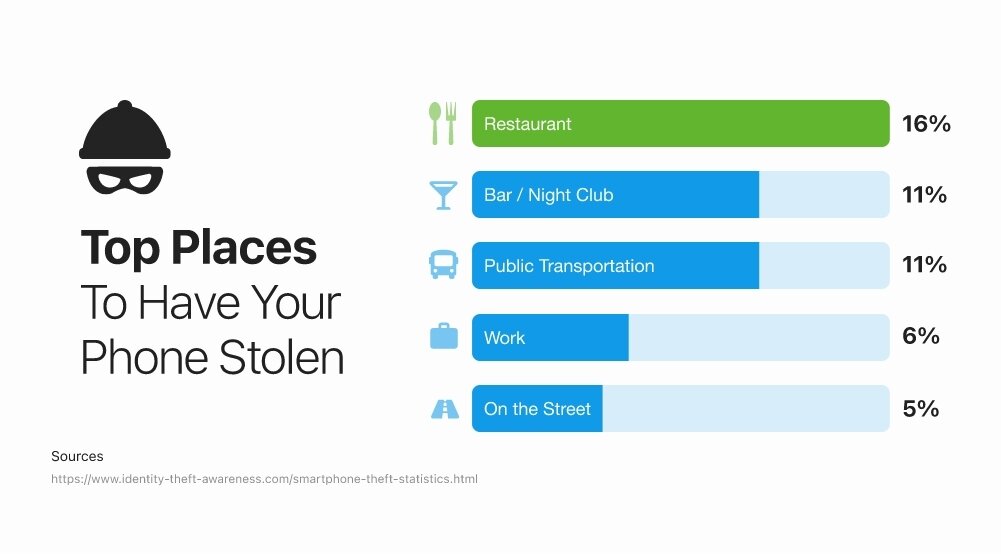
Secured locations like homes, offices, and schools account for 55.08% of phone thefts. On the other hand, unsecured locations like public transport, restaurants/bars, and streets, account for only 32.03% of phone larceny.
When we’re at home our guard may be down since we’re in our comfort zone. At the office and school, we’re focused on our work/studies and may ignore a missing phone for hours while we’re engrossed in our tasks.
But that’s not all:
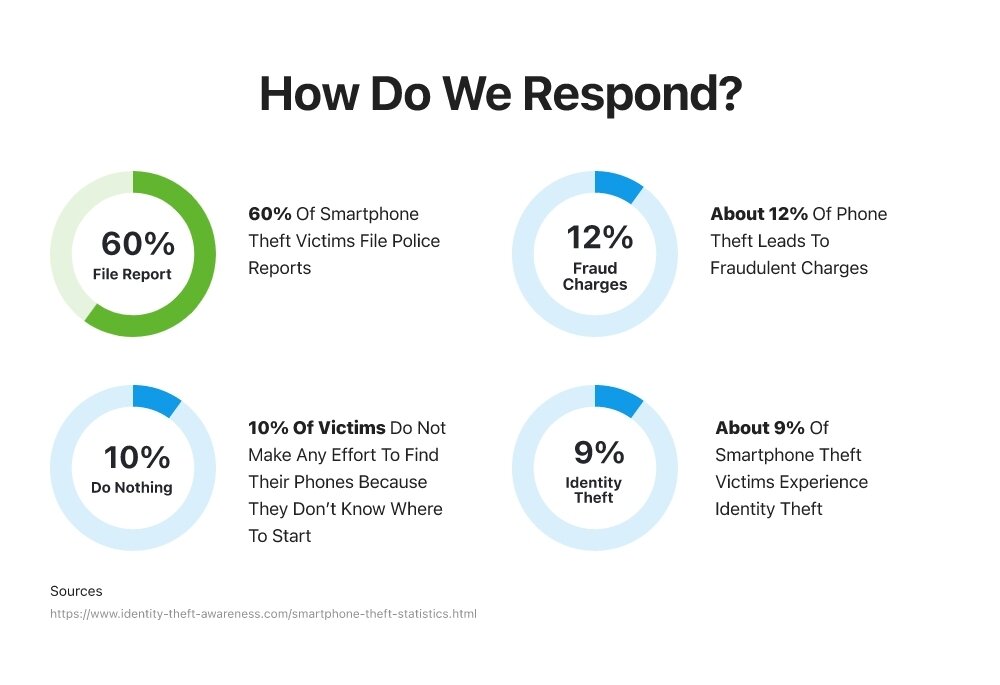
- 12% of phone theft leads to fraudulent charges with 9% of that leading to identity theft
- 60% of phone theft victims file police reports
- 10% of theft victims don’t try and find their phones because they don’t know how
- 44% of robberies occur because the victim left their phone unattended in a public space
- 11% of stolen phones are lifted directly from our hands, pockets, purses, or bags
Another issue that directly correlates to phone theft is extortion. Those who fall victim to having their phone stolen are likely to pay $500-$1000 to get their personal data back (photos, videos, music, etc.).
An even scarier stat: 68% of stolen phone victims are willing to put themselves in danger to get their device back and retrieve their personal info. We do not recommend putting yourself in peril to get your phone back. There are safer steps you can take — and knowing what to do if your phone is stolen ahead of time puts you in a much stronger position. More on that later.
It’s Phone Theft O’Clock
Time is of the essence when it comes to stolen phones:
- 40% of victims had their phones stolen between noon and 5 pm
- 18% of stolen phone victims had their devices thieved between 10 pm – 5 am
What to Do If Your Phone Is Stolen: How to Track It
Your phone’s been taken? Let’s get it back. According to the Lookout/FCC data, of the 76% of phones that are stolen, 39% are iPhones and 37% are Android devices. The first thing to do if your phone is stolen is to use your device’s built-in tracking tools before the thief has a chance to disable them.
How to Find a Lost iPhone
We’ll show you how to find a lost iPhone that is turned off too because some thieves are crafty enough to get your data even when your device isn’t on. Thieves, can’t trust ’em.
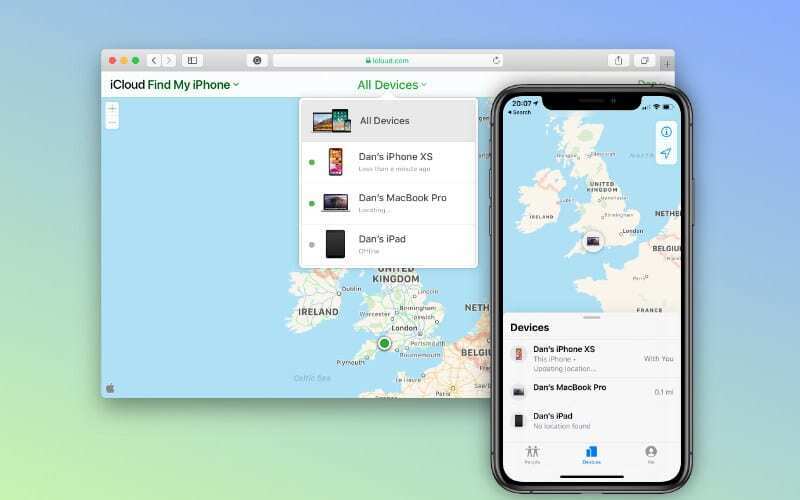
Step 1: Sign into iCloud.com/find or use the Find My app on another Apple device like your iPad or Macbook
Step 2: Mark your device as lost by remotely locking it with your passcode.
- In the Find My app, choose Devices or Items
- Select your missing phone
- Scroll down to Mark As Lost or Lost Mode
- Select Activate or Enable and you will be prompted with specific steps relating to your device
- Once done, hit Activate to lock your missing phone remotely
Step 3: This step is only for those who want to erase the data from their phone post-theft. If you do not want to erase your data, do not attempt this part of the tutorial.
- Go to the Devices tab in the Find My app
- Select the device you wish to erase
- Choose Erase this Device
- Select Erase
Important notes about erasing your iPhone: Treat remote erase as a last resort — try to locate the device first and check your insurance or AppleCare+ claim requirements before erasing, since some claims require the device to remain intact. Do not remove the stolen iPhone from Find My before or after erasing it. Removing the device from Find My also removes Activation Lock, which is one of the strongest deterrents against a thief reselling your phone. If the iPhone is offline when you initiate the erase, the erase will begin the next time it connects to a network. On supported newer versions of iOS, the device may still be locatable via Find My even after an erase has been completed.
If you have AppleCare+ with a Theft and Loss clause, do not erase your device. Instead, file a claim with Apple.
What if Find My isn’t activated or you have no way of downloading the app? Don’t fret. Change your Apple ID password on another device. You will also need to change your passwords for everything else you may use on your phone like Twitter, Facebook, Instagram, email, etc.
Next, you’ll need to figure out how to disable Apple Pay if you have it set up. Just kidding. You don’t have to figure anything out because we’ve done it for you!
Step 1: Visit account.apple.com and log in
Step 2: Click on the device you want to remove payment from
Step 3: Click on the credit cards associated with that amount and hit Remove Card
Find My Android Phone
Before you head to Find My Device, make sure the conditions are in place for it to work. Find My Device requires that your phone be turned on, signed in to a Google Account, connected to Wi-Fi or mobile data, and have Location enabled. Find My Device (now called Find Hub on newer Android versions) must also be enabled on the device. If any of these conditions aren’t met, you may only see a last known location or no location at all.
Step 1: Visit android.com/find
Step 2: Sign in to your Google Account
Step 3: If you have more than one phone, click Lost at the top of the screen
Once done, the lost Android phone receives a notification and the map will show you where the phone is.
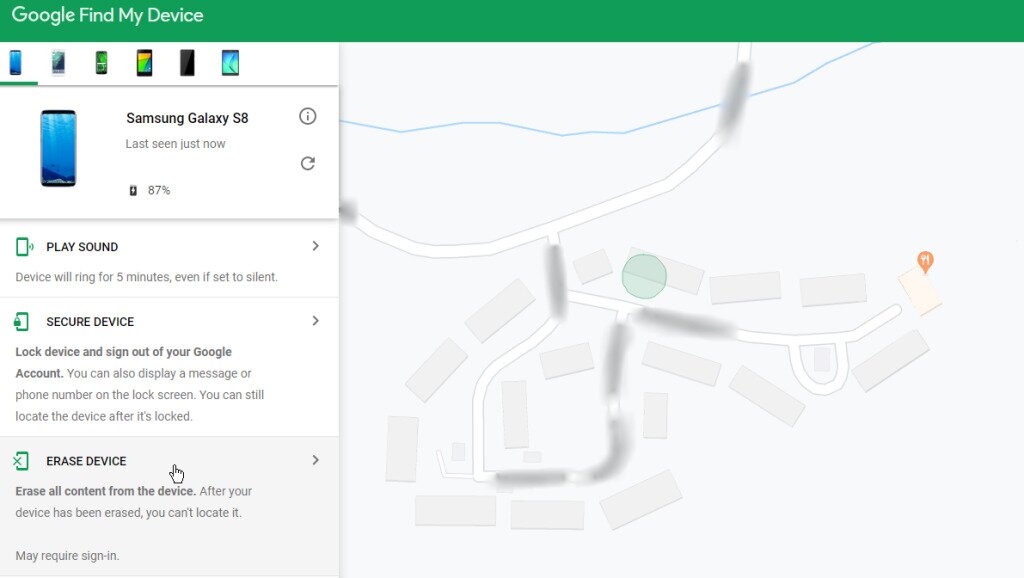
Step 4: Click Enable Lock & Erase
Step 5: Decide your action:
- Play Sound – this causes your phone to ring loudly for 5 minutes (even if it’s set to vibrate or silent)
- Secure Device – locks your phone and if you don’t have a password set up, you can add one. Note: the Secure Device option will also sign the phone out of your Google Account and remove cards from Google Wallet.
- Erase Device – if you erase your phone’s data, you will be disabling Find My Device
What to Do If Your Phone Is Stolen: How to Report It
Filing a police report is the most common step to take when you need to report a stolen smartphone. Knowing what to do if your phone is stolen means acting quickly — the sooner you file, the better your chances of recovery. You may need the serial number to complete the report. Keep the case number from the police report handy — you will need it for carrier and insurance claims.
To find your iPhone’s serial number go to account.apple.com and sign in with your Apple ID.
- In the Devices section, you’ll be able to locate the IMEI/MEID and serial number
- If you happen to have kept your phone’s original packaging, the numbers are on the barcode
- You can also contact Apple support to get these numbers
For Android users, go to Google.com/dashboard, sign in, and under the Android tab, you’ll be able to get your IMEI number. If you have the original packaging, you’ll see the serial/IMEI number there as well.
You should also contact your carrier as soon as possible. Here’s what to ask them to do:
- Suspend your line – This stops unauthorized calls, texts, and data charges from running up on your account immediately.
- Blacklist the IMEI – Carriers can flag your device’s unique IMEI number so it cannot be activated on any network. This makes the phone much harder to reactivate or resell, reducing its value to thieves.
- Replace your SIM or eSIM – A new SIM prevents anyone using the stolen phone from intercepting your calls, texts, or SMS-based verification codes.
- Start an insurance or device-protection claim – If you have carrier device protection, AppleCare+, or coverage through your home insurance, ask the carrier to initiate or direct you to the claim process. You will typically need your IMEI/serial number and the police report case number.
Secure Your Accounts and Payment Apps
Once you have locked or secured your device, your next priority is protecting your accounts. The real danger of a stolen phone is often not the hardware itself — it’s account takeover. Work through this checklist as quickly as possible.
- Change your primary account password – Update the password for your Apple Account or Google Account immediately. This is the master key to your digital life on that device.
- Review signed-in devices – Check the list of devices signed in to your Apple Account (via account.apple.com > Sign-In & Security) or Google Account (myaccount.google.com > Security > Your devices). Remove any unrecognized devices, but do not remove the stolen phone itself — doing so on Apple’s side removes Activation Lock, making the device easier for a thief to use or resell.
- Sign out of high-risk apps remotely where possible – Prioritize email, banking apps, password managers, messaging apps, and cloud storage. Many of these services let you sign out all sessions from their web interface or account settings page.
- Remove or suspend cards in Apple Pay or Google Wallet – Visit account.apple.com or pay.google.com to remove payment cards associated with the stolen device. Then check your bank and card statements for any suspicious charges.
- Change passwords for accounts that use SMS or email resets – Any account where a thief could trigger a “forgot password” email or text to the stolen phone and number is at risk. Change those passwords now, before the thief thinks to try.
iPhone users: Apple recommends reviewing your Sign-In & Security settings and recovery methods at account.apple.com to make sure no recovery phone number or email address has been changed without your knowledge.
Android users: Using the Secure Device option in Find My Device will sign the phone out of your Google Account and remove cards from Google Wallet automatically — but you should still change your Google Account password and audit your signed-in devices manually.
Watch for Phishing and Recovery Scams After a Theft
Once your phone is stolen, you become a target for a second wave of fraud. Thieves and scammers know that a panicked phone owner is more likely to click first and think later. Here’s what to watch out for:
- Fake “we found your phone” messages – You may receive texts, emails, or even calls claiming someone has found your device and asking you to click a link or call a number to arrange its return. These are often phishing attempts designed to steal your Apple Account or Google Account credentials.
- Bogus carrier or Find My notifications – Scammers send emails mimicking Apple, Google, or your carrier, directing you to fake sign-in pages. Always navigate directly to iCloud.com, account.apple.com, or myaccount.google.com yourself rather than clicking links in unsolicited messages.
- Requests for your passcode or verification codes – No legitimate carrier, Apple employee, or Google representative will ever ask for your device passcode or a verification code sent to another device. If anyone claiming to have found your phone asks for this information, hang up or do not reply.
One important nuance about lock-screen messages: When you put your phone into Lost Mode, you have the option to display a contact message on the lock screen. This is useful if you think the phone was genuinely misplaced, but if you know the phone was stolen, think carefully before putting personal contact details on the lock screen. Apple explicitly warns that thieves can use that contact information for social-engineering attacks — for example, calling or texting you to manipulate you into disabling Find My or sharing account credentials. Apple will also never proactively contact you to say your phone has been found.
E.T. Phone Home: How to Protect Your Device
Like everyone’s favorite 80s alien, we want to be in touch at all times. We’re constantly connected and a stolen phone really throws a wrench into our day-to-day activities. The best way to handle what to do if your phone is stolen is to prepare before it ever happens. To protect yourself from potential theft:
- Make sure your phone has a passcode and that you’re using strong passwords on all apps
- If possible, use FaceID or fingerprint ID to unlock your devices
- Insure your device via your home insurance, AppleCare+, or your phone company provider
- Turn on finder apps
- Take note of your phone’s serial and IMEI number
Beyond the basics, take advantage of the modern theft-protection features now built into both platforms — these go well beyond a simple passcode.
iPhone: Enable Stolen Device Protection
Stolen Device Protection is an Apple security feature available on iPhone (iOS 17.3 and later). When enabled, it adds a biometric authentication requirement (Face ID or Touch ID) and in some cases a one-hour security delay before a thief can make critical changes — such as changing your Apple Account password, updating recovery methods, or turning off Find My. To turn it on, go to Settings > Face ID & Passcode > Stolen Device Protection. This is one of the most meaningful safeguards you can enable before your phone ever leaves your sight.
Android: Enable Theft Protection features
Google has introduced a suite of Android Theft Protection tools available on Android 10 and later (with some features requiring Android 6+). These include:
- Theft Detection Lock – Uses on-device AI to detect sudden movements consistent with a snatch theft and automatically locks the screen.
- Offline Device Lock – Automatically locks the device if it is disconnected from the network for an extended period, limiting what a thief can do while offline.
- Remote Lock – Lets you lock your phone using just your phone number from any browser, even if you don’t have your Google Account password handy.
You can find these settings under Settings > Google > All Services > Theft Protection on supported devices. Google has also updated Find My Device to Find Hub, which expands location tracking capabilities, so make sure Find Hub is enabled and your device is enrolled.
Two more practical prep steps:
- Enable automatic backups – Turn on iCloud Backup (iPhone) or Google One Backup (Android) so your data is always current. If you do need to erase your device, you won’t lose everything.
- Hide lock-screen message previews – On both iPhone (Settings > Notifications > Show Previews > Never) and Android (Settings > Notifications > Sensitive notifications), you can prevent message content from appearing on the lock screen. This stops a thief from reading SMS verification codes — which could be used to reset your passwords — without unlocking the device.
Stolen iPhones and Androids are resalable without your data. We suggest backing up your data regularly through automatic backups so if you fall victim to phone theft, you can erase everything on your smartphone but still access your photos, videos, and other personal info like that pic of you from last Halloween that you don’t want anyone to see. You know the one.
Sources: