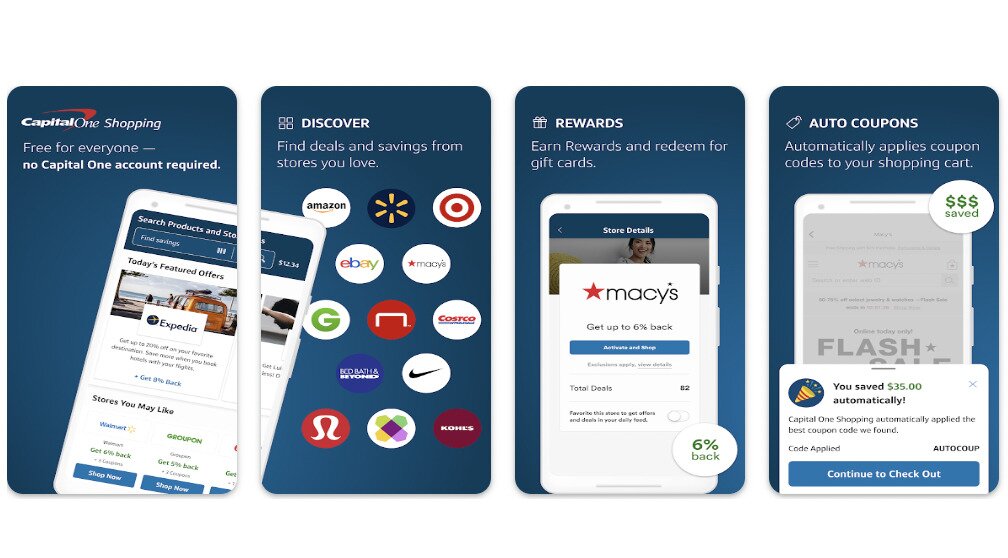
Shopping is always more fun — and gratifying — when you can find the best deal possible on what you’re looking for. The Capital One Shopping extension and app work almost as your personal online detective, on the case to find the best prices available. But in an infinite online marketplace, sniffing out the best deal available isn’t always easy.
This article is sponsored by Capital One Shopping and Capital One Shopping pays for referrals when a user clicks on the links provided.
What Is the Capital One Shopping Extension and App?
The Capital One Shopping app or extension is a free tool that you can install onto your mobile device or computer to help you look for ways to save money. The product comes in two forms: as an app on a mobile device, or as a browser extension on a computer. How it works, however, depends on which platform you’re using — and it’s worth understanding those differences before you install.
On desktop: The browser extension installs directly into Chrome, Firefox, Edge, or Safari and runs automatically in the background as you shop. It surfaces price comparisons, tests and auto-applies coupon codes at checkout, and tracks price drops — all without requiring you to leave the retailer’s page. You can also set preferences and build a watchlist so the extension knows exactly what to keep an eye on.
On iPhone and iOS: The experience works differently. You’ll need to download the Capital One Shopping app from the App Store, then add it as a Safari extension and explicitly allow it on the websites you visit. Some rewards and shopping offers are triggered when you shop through the Capital One Shopping app’s built-in shopping flow rather than inside a separate retailer’s app.
On Android: The app is available on Google Play, and rewards and offers may be activated when shopping through the Capital One Shopping app or a supported mobile browser flow, rather than within individual retailer apps.
Because the desktop extension and mobile app behave differently depending on your platform and browser, it’s worth reviewing the setup steps specific to your device after installing.
If your product has specific options, such as a size or color preference, you can add those into your Capital One Shopping app too, to ensure it’s searching for exactly what you want, and doesn’t turn up anything that’s frustratingly close but not quite right.
When it does find a deal, Capital One Shopping will send you a notification within 10-15 seconds of locating the product. The program also provides a summary of all the costs — and ways to save money — involved with the proposed product, including the total price (incorporating tax, shipping and any coupon discounts), pricing history, the return policy, and the estimated delivery time.
You’ll also get product reviews and rankings, plus recommendations for related products and deals determined by the purchases of other Capital One shoppers.
You can also search for deals directly through Capital One Shopping by going to the Capital One Shopping website (on a computer) or directly through the app (on a mobile device), where a list of discounted items or those available for coupons are available and automatically updated.
The Capital One Shopping extension can be downloaded directly from the Chrome Web Store, the Mozilla Firefox Add-On page, the Microsoft Store or the Safari Extensions store, and quickly and easily installed to work with Google Chrome, Mozilla Firefox, Microsoft Edge and Safari web browsers.
The app is also available for mobile, compatible with both iOS and Android operating systems, and available on both the App Store and Google Play.
And the best part? You don’t even have to be a Capital One customer to enjoy the benefits of Capital One Shopping. The app is available for everyone, and always free.
The Capital One Shopping extension works as your own personal shopper, sniffing out deals at the lightning pace of technology while you do the legwork of shopping on Amazon manually.
To help ensure you’re always getting the best deal out there, the app uses all the best aspects of the Internet to cover as much digital territory as possible in its search.
Automatically Applying Coupon Codes
Once the app knows what you’re looking for, one of the first things it’ll do is search the World Wide Web far and wide for any coupons related to that product. This can be especially helpful, as not only will it help you save time, but often coupons and other similar deals can be easy to miss if you don’t happen to see the promos.
There’s also no shortage of bogus coupons out there, run by scammers attempting to steal your personal information or worse. To protect against accidentally getting you involved in such a scam, the Capital One Shopping extension will first test the coupons to make sure they work and come from legitimate sources.
But all of this works seamlessly in the background while you continue searching. You’ll be notified if and when the app finds a usable coupon, and the discount will be automatically applied when you check out — saving you from having to remember that extra step, or getting any weird code words or numbers straight!
Instantly Comparing Prices
Another tricky tool of the Internet trade the Capital One Shopping extension utilizes is instant price comparisons. And in a marketplace as infinite as the Internet, this can be particularly helpful, saving you precious time — and money.
Manual price comparisons can be cumbersome, and particularly difficult. Many products will have extra costs that don’t appear until you’ve made it mostly through the checkout process — including taxes or extra shipping fees.
But Capital One Shopping can compute those numbers in an instant, and use its plugged-in state to instantly browse through prices at over 100,000 online retailers, casting out a huge net for potential savings.
When the app does find a better price, it’ll send you a notification showcasing the cost difference and offering a link directly to the other retailer, ensuring that ways to save money are always just a click away.
Issuing Price Drop Alerts
Capital One Shopping knows what you like, and what you likely would want. The Capital One Shopping extension keeps track of products you’ve viewed or purchased, so it has a generally good idea of the types of products you’re looking for.
But the app puts this information to use by keeping constant tabs on the price of these items across the web. You can also enter in the products you’d like the app to keep looking out for. And if and when the Capital One Shopping app detects a price drop on any of these items, it will send you a notification.
Earning Rewards for Gift Cards
Even if the app can’t figure out how to save money on a particular purchase, it does its best to help you out.
Each purchase you make while the Capital One Shopping extension is installed will go toward earning you Capital One Shopping Credits. Once enough of these lucrative points add up, you can redeem them in the form of gift cards for dozens of top retailers, including Walmart and eBay.
So even if you’re not saving money now, Capital One Shopping will help you save money later.
Understanding how the rewards system actually works from start to finish can save you a lot of head-scratching down the line. Here’s what to expect at each stage.
How you earn credits: Capital One Shopping Credits are earned through eligible purchases made via participating merchant offers and links within the Capital One Shopping app or extension. These credits are entirely independent of any Capital One credit-card rewards program — you do not need a Capital One bank account or credit card to earn or redeem them.
Redemption format: Credits are redeemed for digital gift cards, not cash. You can choose from a selection of popular retailers when cashing out, though availability can vary. Notable omissions — such as Amazon — have been flagged by users, so it’s worth checking the current gift card catalog before you accumulate a large balance.
When credits post: Eligible purchases don’t always show up immediately. Because Capital One Shopping typically waits until the merchant’s return window has closed before finalizing a reward, there can be a noticeable delay between your purchase date and when credits appear in your account. This is normal behavior, not a missing reward.
Gift card delivery: Once you redeem your credits for a digital gift card, it can take up to approximately three business days for the card to appear in your account.
Expiration: Capital One Shopping Credits do not expire as long as your account remains active and in good standing, so there’s no pressure to redeem immediately.
Signup bonuses: Capital One Shopping occasionally offers signup bonuses for new users. When available, these typically come with their own eligibility requirements — such as verifying your email address, reaching a minimum spend threshold within a set time window, or making a qualifying purchase through the app. Read the bonus terms carefully before assuming credits will post automatically.
How to Install and Use the Capital One Shopping Extension
Installing the Capital One Shopping extension is a quick and easy process that can lead to untold Internet deals on your favorite products.
How To Install It
Installing the browser extension is as easy as making three clicks or less!
If you’re using a mobile device, start by simply visiting your device’s app store, and searching for Capital One Shopping. Once the suggested app appears, click on it to install the device to your phone. The rest should happen automatically.
If you’re using a computer, tablet or other device, you can install the Capital One Shopping extension either by visiting the appropriate app store for your device, or by searching for Capital One Shopping in a search engine.
The website should have a button you can click to get the installation process started. This will take you to an additional page, with the option to read through an additional overview of the app, as well as read through the app’s privacy policies and reviews.
When you’re ready, there will be an additional button to click, which will automatically download the app and add it to your web browser.
Once the download is complete, you’ll be able to open the app or browser extension, where you’ll be prompted to enter some information to get started. You’ll also be able to set your preferences at this point, or use the app to plug directly into the Capital One Shopping website, where additional deals are available.
Even armed with the Capital One Shopping extension on the lookout for how to save money, there are other steps you can take to help maximize your savings when shopping online.
Use the Watchlist
First, make sure to add any of your favorite products to the Capital One Shopping extension’s watchlist. This means it will always be specifically hunting for moments when the price for that product drops, on any of over 100,000 online retailers.
This can be especially helpful if there are certain products or living expenses you use on a regular basis, such as grocery shopping, personal care products, pet products, cleaning supplies and even some gym memberships.
Another great way to utilize this feature is to use it for things you don’t need to buy right away. If you see something that would make for a great birthday present or holiday gift, for example, you can add it to the watchlist, and buy it when it goes on sale.
Check for Comparisons
The Capital One Shopping extension and app is always at work, meaning it’s constantly scanning tens of thousands of websites for not only price drop alerts but product price comparisons.
That means the odds are good that the program can turn up deals for you when you want or need them most. So before pressing “Buy Now” on any item online, make sure to check your Capital One Shopping app for any possible price comparisons.
Stack Your Savings With a Rewards Card
Capital One Shopping Rewards — the credits you accumulate toward gift cards — are earned through eligible purchases made via participating merchant offers and links within the app or extension. These Shopping Credits are entirely separate from any credit-card rewards program, and you do not need a Capital One account or card to earn them.
That said, if you do use a rewards credit card for your purchases, you can stack those card-specific rewards on top of any Capital One Shopping Credits you earn — a useful way to double-dip on savings with no extra effort.
Look for Even More Savings
While we’re on the subject of paying with plastic, choosing the right kind of card to hook up to your account can also add up to additional big savings.
There are so many different types of credit cards out there, all with their own specific set of deals, sweeteners, and payback rewards. Look for one that rewards online shopping generally, or could be coupled with your specific types of purchases to add up to even more savings.
Pros of the Capital One Shopping Extension
A browser extension designed to look for ways to start saving money can come with many benefits. And the biggest and most obvious pro of using the Capital One Shopping extension is exactly that — saving money.
All told, the app has helped customers save hundreds of millions of dollars collectively across its user base — a number that continues to grow alongside its rapidly expanding audience.
And speaking of savings goals, the app is also free to download and free to use. Plus, Capital One Shopping is available for anyone — users don’t need to have a Capital One account to use this service.
Aside from delivering on its money-saving promises, the Capital One Shopping extension is also easy to use.
Following a ‘set it and forget it’ philosophy, all the program requires is for you to add your preferences in the app or web browser, then let it do its thing. Capital One Shopping works seamlessly in the background, not bothering or interrupting your shopping until or unless it finds a deal to tell you about.
And with the potential to rack up Capital One Shopping Credits, you’ll be able to cash in eventually, whether or not the program ever finds you a deal. These credits can be redeemed for gift cards at dozens of popular retailers, making them a sweet bonus just for doing your regular shopping.
Cons of the Capital One Shopping App
While the Capital One Shopping extension can help you find more ways to save money, the program is not without its missteps.
Reviewers noted the app’s Amazon price comparison toolsometimes misses the mark. Instead of redirecting you to a page with a great deal, this feature can sometimes bring you to the homepage of an item that is currently out of stock, or to one where the deal has already expired.
The gift card feature can also be a bit cumbersome to navigate. Rather than being able to sort out cards by their cash-out value, you’ll have to click on each individual retailer to see how much your gift card is worth. Some have said the selection of retailers also felt limited, excluding some big name companies like Amazon.
And those concerned about personal privacy should note that the Capital One Shopping extension doescollect personal data, including personally identifiable information such as your name, address, email address, and age; your location; and your browsing history.
This also includes how you interact with websites — such as the position of your mouse, how quickly or slowly you scroll through a page, and your keystrokes — as well as any text, images, sounds, videos or hyperlinks appearing on websites you’ve browsed.
Capital One Shopping vs. Competitors
The Capital One Shopping extension isn’t the only app of its kind. In fact, there are a number of other apps that also scrape the Internet in search of coupons, deals and other ways to save money.
Honey is another popular browser extension used by frequent online shoppers. The app is similarly unobtrusive and works by scanning the Internet for coupons, which are automatically applied when you hit the check-out. But unlike the Capital One Shopping extension, that’s the only feature this program offers.
Swagbucks also follows a similar formula, looking for sales, coupon codes, and reward options. But this feature doesn’t have a rewards program that can add up to gift cards the way Capital One Shopping does.
Common Reasons Capital One Shopping Rewards or Coupons Don’t Track
Capital One Shopping works well most of the time, but real-world usage — reflected in thousands of app-store reviews — shows a handful of recurring issues worth knowing about before you start relying on it for rewards. Here’s what can go wrong and what to do about it.
The purchase was returned or canceled. Capital One Shopping only finalizes credits after the merchant’s return window closes. If an order is returned, exchanged, or canceled, any pending credits will not post.
Checkout happened outside the Capital One Shopping flow. On desktop, the extension needs to be active and enabled on the retailer’s site at the time of checkout. On mobile, rewards are typically triggered when you shop through the Capital One Shopping app’s built-in browser or via a designated offer link — not when you go directly to a retailer’s standalone app or website. If you bypass this flow, tracking may not occur.
Another coupon or cash-back tool interfered. Using multiple browser extensions that modify checkout — such as another coupon tool or a separate cash-back extension — at the same time can cause tracking conflicts. If you use more than one, try disabling others temporarily and completing checkout with only Capital One Shopping active.
The merchant hasn’t finalized the reward yet. As covered in the rewards section above, credits can take until after the return window closes to appear. If your purchase is recent, wait until that window passes before assuming something went wrong.
The reward rate differs from what you expected. Rates shown in promotional emails and targeted in-app offers sometimes differ from the general offer rate available to all users. Always check the active offer terms before completing a purchase if a specific rate is important to you.
The retailer’s page breaks with the extension enabled. Some users report that certain retailer pages load incorrectly or behave unexpectedly with the extension active. If this happens, try disabling the extension temporarily, completing your purchase in that session, then re-enabling it — or switch to a different supported browser.
If none of the above explains a missing reward, and the return window for your purchase has closed, contact Capital One Shopping support directly. Keep your order confirmation handy as proof of purchase when you reach out.
FAQs
Online shopping can be a deceptively tricky arena. You may still have many questions about the Capital One Shopping extension and how the program works. We’ve tried to answer some of the most frequent questions below.
How does Capital One Shopping make money?
Capital One Shopping has a similar business model to many other apps and browser extensions designed around online shopping.
The company has partnerships with various retailers, which the app will direct you to, and makes a commission if you make a purchase from them. Capital One Shopping also profits from advertising which may appear on the app or the website.
Does the Capital One Shopping extension cost anything?
No. The Capital One Shopping extension and app are absolutely free — and you can use these programs whether or not you have a Capital One account.
Does Capital One Shopping work?
In a word: Yes. Despite occasional missteps, the app by and large will work to find you savings.
Some reviews have uncovered that these savings can tend to be pretty small, with one analysis finding that the largest savings accumulated through the app was $46, but the average savings found added up to just a couple bucks.
Still, those types of small savings can start to add up, especially if you’re a frequent online shopper. And even if you’re not, why spend more money than you have to?
Conclusion
Online shopping is one of the easiest, best, and most convenient ways to make sure you’re finding exactly what you want. And the Internet can be a great tool for finding great deals on exactly what you want — but this process can also be overwhelming, especially if you aren’t sure where to look or where to start.
This is where the Capital One Shopping extension can help. The program seamlessly searches the World Wide Web for ways to save money on the things you’re already looking for — and can even recommend some things you may like that you didn’t even know you should be looking for.
Plus, the extension now has roughly 10 million users on Chrome alone, with 5 million-plus downloads on Google Play, around 97,000 Google Play reviews, and more than 1.6 million ratings on the App Store — strong signals that a very large portion of the Internet agrees that the Capital One Shopping extension is worth the time and the money saved.
Unlock the digital world with AddictiveTips! From breaking down AI advances to solving tech glitches and spotlighting hot gadgets, our team turns complex tech jargon into easy-to-follow guides that make sense.