Log Out of Netflix on Roku Even If the Button Is Missing
Trying to log out of Netflix on your Roku but feel like you’re missing something obvious? You’re not alone; Netflix kind of hides the sign-out option.
This guide walks you through how this works on your Roku streaming device. You might want to do this to switch accounts or stop someone else from using yours. The directions work whether you’re using a Roku stick, a Roku box, or a Roku TV.
We’ll also cover what to do if the sign-out option doesn’t show up, plus a couple of backup ways to get your account off the device if you need to.
The Fastest Way to Sign Out of Netflix on Roku
Here’s the short version:
Note: Remember that signing out does not end your subscription. You’ll need to open your account settings from the app or website to truly cancel Netflix.
- Open Netflix.
- Press the back button to open the side menu.
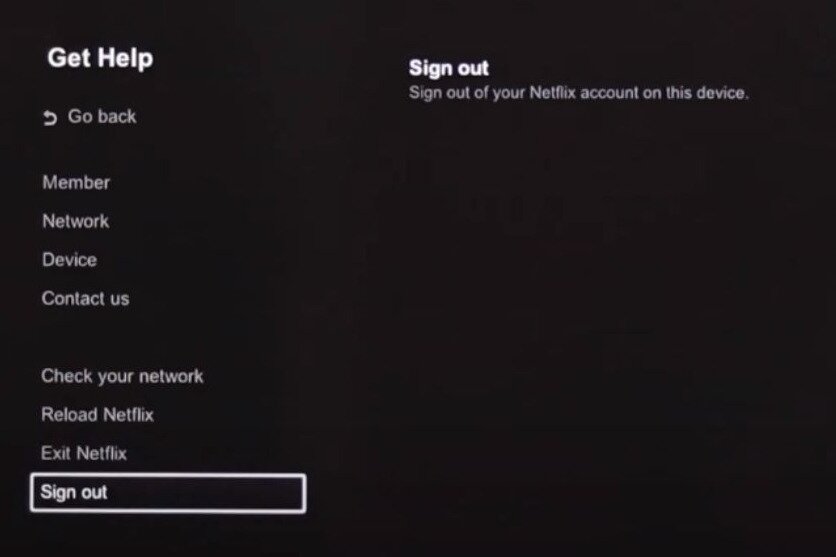
- Scroll to Get Help or Settings.
- Select Sign Out, and then confirm that you really want to.
Steps to Log Out of Netflix on Roku
These steps are current for the Netflix app on Roku devices and Roku TVs, including TCL and other Roku-powered TVs. Although the menu labels can vary slightly.
- Open the Netflix app from the Roku home screen.
- Press the back button on the remote.
- Scroll down and select Get Help. On some versions of the app, this may show up as Settings instead.
- Choose Sign Out from the list.
- Select Yes to confirm.
When the Sign-Out Button Is Missing (Other Ways to Log Out)
Sometimes the Get Help or Sign Out option just doesn’t show up. This happens on certain Roku models, older Roku TVs, or after app updates. No worries, though; you still have a couple of ways to sign off.
Remove Netflix from your Roku
This signs you out by removing the app. It works on Roku TV, TCL Roku TV, and players.
- Press the Home button on the Roku remote.
- Highlight Netflix (don’t select it) and press * on the remote.
- Choose Remove channel, and then confirm that you really want to.
Tip: If you want Netflix back later, go to Streaming Channels to search for it. You’ll need to sign in again.
Use the hidden remote code
Can’t find any sign-out options in the app? Press these buttons on the remote: Up, Up, Down, Down, Left, Right, Left, Right, Up, Up, Up, Up.
A menu will appear; select Sign Out, Start Over, Reset, or Deactivate.
Log out of Netflix remotely from your account
This is the easiest way to sign out of Netflix if you’re not in front of the Roku, like if you stayed logged in at a hotel or a friend’s house.
- Open the Netflix Manage Access and Devices page. Log in when asked.
- Select the down arrow next to your Roku.
- Select Sign Out.
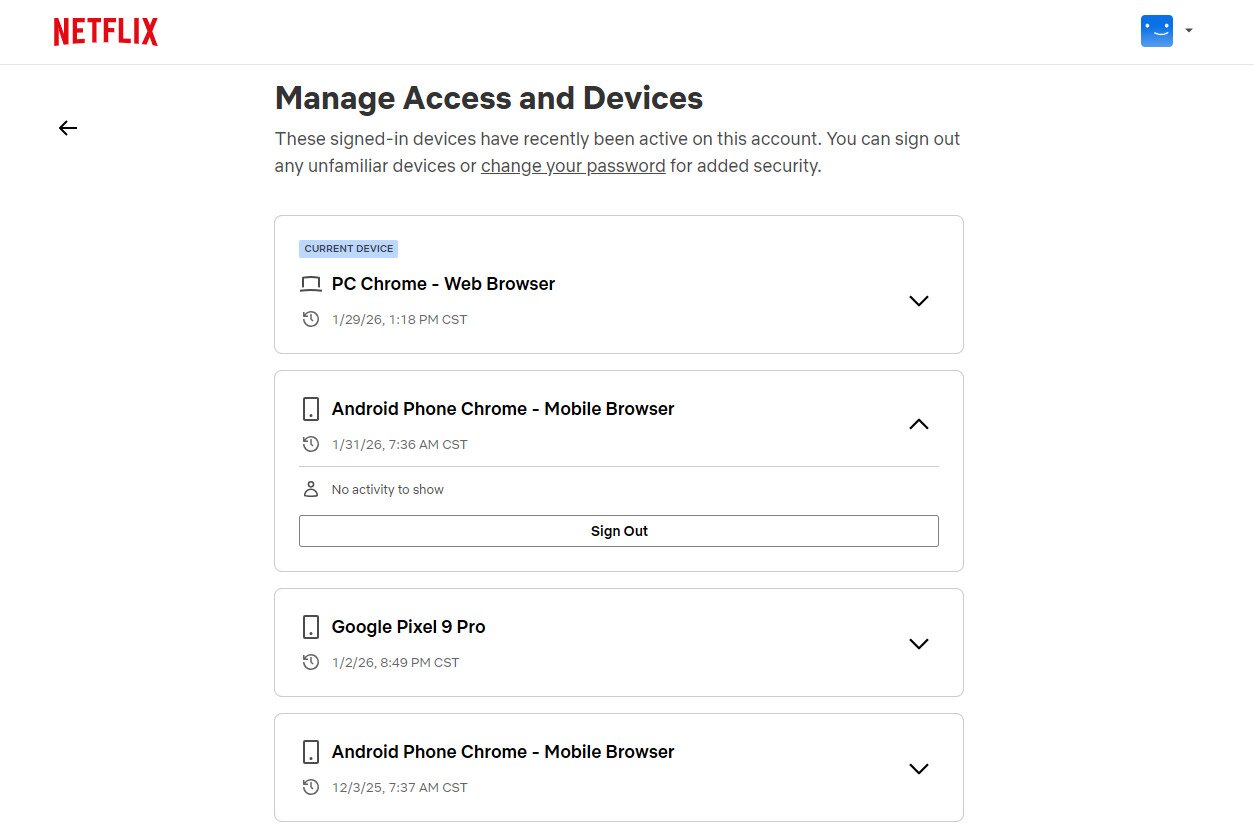
Note: Something to keep in mind is that not every device shows up on this list. Devices that haven’t been used recently, were only used for Netflix games, or only accessed Netflix’s Tudum content may not appear. Even so, this is still the best option when you can’t physically use the Roku.
Switching to a Different Netflix Account on Roku
Netflix doesn’t offer a built-in account switcher on Roku. To use a different account, you’ll need to log out of the current one first.
Once you sign out using one of the methods above, Netflix will return you to the sign-in screen. From there, enter the email and password for the other Netflix account and choose a profile. Roku will keep you signed in until you log out again.
How to Switch Netflix Profiles on Roku
However, you can switch profiles within the logged-in account. This doesn’t work on really old models, but does for modern ones. Here’s how:
- Press the back button on the remote.
- Select our profile icon at the top of the menu.
- Choose a different profile to switch to it immediately.
Frequently Asked Questions
How do I log out of my Netflix account on Roku?
Open Netflix and press the back button to open the side menu. Go to Get Help / Settings > Sign Out.
How do I log into a different Netflix account on Roku?
You’ll need to log out of the current account first. After that, Netflix shows the sign-in screen where you can enter the new account details.
What if I can’t find the “Sign Out” option on my Roku?
You can remove the Netflix app from your Roku or use the remote button code sequence.
Can I log out of Netflix remotely?
Yes. Log in to your Netflix account in a web browser and choose the device you want to sign out from on the Manage Access and Devices page.
How do I reset Netflix on my Roku device?
Deleting the Netflix app and reinstalling it resets the app and signs you out.
Does logging out of Netflix on Roku log me out everywhere?
No. It only signs you out on that specific device.
Why does Netflix hide the log-out option on Roku?
A TV-style interface is used for Roku, and the sign-out option is tucked into the help or settings area instead of being front and center.
Will removing the Netflix channel delete my Roku account?
No. It only removes Netflix and signs you out of your Netflix account, not your Roku account.
Do these steps work on Roku TVs like TCL Roku TV?
Yes. The steps are the same on Roku streaming devices and Roku TVs, including TCL models.
