Why No-Logs VPNs Matter in 2025
Virtual private networks (VPNs) are an effective way to encrypt your browsing activity and hide your location from third parties, giving you stronger online privacy. One crucial part of this protection is using a no-logs VPN.
These VPNs hide your internet traffic from your ISP and most outside parties aside from your VPN provider. A no-logs VPN won’t store this information, keeping only what’s essential for operating the service. On the other hand, VPNs that do keep logs can sell this information to third parties or even turn it over to authorities, putting your privacy at risk.
Here we will discuss why a strict no-logs policy matters and which VPNs we recommend to protect your privacy to the fullest.
What is a No-Logs VPN?

A no-logs policy refers to a VPN provider’s data retention practices. Every VPN provider must keep a small amount of information, such as billing details and encrypted login credentials, but they should never store anything that identifies your browsing activity.
One major reason that users want a no-logs policy is the possibility of legal authorities requesting identifying data from their VPN provider. In many jurisdictions, the provider must comply, and if logs exist, this completely undermines your privacy. Of course, the simplest solution is not breaking the law in the first place, but some users still prefer this extra layer of protection.
Another risk of your VPN provider keeping logs is hacking. If a provider suffers a breach, that data can be exposed. If nothing identifiable is stored, nothing can be stolen—and the user is safe.
Lastly, some shady VPNs, especially free services, quietly sell your data to third parties without your knowledge, usually for marketing or advertising purposes. This is one of the main reasons we rarely recommend a free VPN for privacy, though there are a few reputable exceptions.
Activity Logs vs Connection Logs
Even VPNs with no-logs policies keep some form of limited data. Understanding the differences can help you choose wisely:
- Connection logs: These include information such as the date you connected and the duration of your session, how much data was transferred, which VPN servers were used, and the incoming and outgoing IP addresses. You want to find a provider that keeps no connection logs or only the bare minimum needed for operations.
- Activity/usage logs: Include files downloaded, apps used, and specific websites visited. You want a VPN that keeps none of these.
- Full logs: Store all identifying information and directly tie your activity back to you. These are common in workplace settings, where privacy isn’t expected.
- Minimal logs: Temporary logs may be used by your VPN provider for troubleshooting or performance metrics. Customer data, such as payment details, are typically kept permanently. To stay more anonymous, many privacy-focused users choose crypto payments for additional anonymity.
Why a No-Logs Policy Is Essential for User Privacy

Many people choose VPNs to stay anonymous, avoid tracking, reduce exposure to cyberattacks, and prevent targeted advertising.
So, why does it matter whether your VPN keeps logs?
There are a few reasons. For one, providers that store logs can sell your data to third parties. This is extremely common with free VPNs and directly undermines your privacy.
Another issue is legal requests. Many countries require companies to hand over user data if asked. If logs exist, the provider may have no choice.
In 2016, IPVanish’s parent company (Highwinds Network Group) received a summons for records from the US Department of Homeland Security. They were forced to turn over logs related to a child abuse investigation. The suspect was thankfully caught, but IPVanish had claimed to be a no-logs VPN, so the company had misled its customers.
IPVanish later changed hands, and the new owners have asserted their commitment to user privacy by adopting a stricter no-logs policy, and undergoing third-party audits to verify compliance. Still, the incident damaged its reputation.
The company then changed ownership, fully aware of their now tarnished reputation. They have also undergone third-party audits to prove their claims of no-logs are accurate, which they seem to be, helping give current customers some peace of mind.
The point is simple: privacy claims are only as trustworthy as a provider’s data-retention practices. IPVanish is not the only provider that has faced scrutiny over false no-logs claims.
It goes without saying, you don’t want to be doing anything illegal, but privacy-focused users should still be aware of which providers have been less than honest about their data practices.
Key Features of a Verified No-Logs VPN

So how do you find a verified no-logs VPN provider? We’ve got you.
Here are the must-have features when choosing a platform:
- Independent audits: Third-party audits verify whether the provider actually keeps no identifiable logs. Choose VPNs that undergo regular, transparent audits and make the results available.
- A clear, official no-logs policy: This should be easy to find, easy to read, and explicitly stated.
- Strong encryption: Even with no logs, the provider should still use secure encryption to protect your data from interception or breaches.
- Diverse server locations: More servers mean better anonymity, easier region-switching, and more difficulty for trackers.
- Fast speeds: VPN speed can make or break your online experience. A no-logs VPN should also be fast enough for streaming, gaming, and everyday browsing.
- Responsive support: Ideally 24/7 availability.
- Multiple VPN protocols: Options such as OpenVPN, IKEv2, and WireGuard let you balance speed and security.
How to Evaluate No-Logs Claims: Audits, Jurisdiction, and Data Retention

Before we give you some quick tips on evaluating factors like data retention and VPN legality, it’s important we talk about provider jurisdiction and what that really means.
The 5, 9, and 14 eyes alliances are existing agreements between several countries to share intelligence with each other, as necessary. These agreements can involve sharing browsing data, IP logs, communication metadata, and other forms of surveillance.
VPN providers must follow the laws of the country in which they operate. If required to hand over user data, they must comply. That’s why, for privacy-focused users, it’s important to choose a provider based outside these jurisdictions. Though some non-14-Eyes countries also have poor privacy laws, so doing your research is still important.
At the same time, a true no-logs policy means there is nothing meaningful to hand over. Even if the provider is based in a high-surveillance country, compliance is irrelevant if the data doesn’t exist. For this reason, a VPN located in a surveillance-based country isn’t necessarily a deal breaker, so long as they genuinely aren’t keeping information that could come back to bite you.
To sum up, you can evaluate a no-logs VPN as follows:
- Review recent third-party audits: This is one of the strongest indicators of trustworthiness.
- Check provider jurisdiction: This is one of the strongest indicators of trustworthiness.
- Read the official privacy policy: Every VPN stores a little data. The real question is whether anything sensitive is retained. Being informed helps you understand what you’re agreeing to. Here is NordVPN’s official privacy policy, if you want to get an idea of what it entails.
Best No-Logs VPNs in 2025 (Comparison Table)
To save you time, we’ve put together a comparison table showing which no-logs providers have independent audits, their jurisdictions, and other key privacy details.
| VPN | NordVPN | Surfshark | ExpressVPN | Proton VPN | CyberGhost |
| No-Logs Policy | Yes | Yes | Yes | Yes | Yes |
| Audit Status | Verified multiple times, most recently in 2024 | Verified in the past and in 2025 | Verified multiple times and in 2023 | Verified yearly, including 2025 | Verified in 2022 and 2024 |
| Jurisdiction | Panama | Netherlands | British Virgin Islands | Switzerland | Romania |
| Speed | 89.11 Mbps | 87.25 Mbps | 87.48 Mbps | 86.07 Mbps | 89.53 Mbps |
| Servers & Locations | 8,400+ VPN servers in 167+ locations | 4,500+ servers in 100+ global locations | Approx. 3,000 in 105 global locations | 16,755 servers in 127 locations | Unknown number of servers in 100+ locations |
| Streaming & Torrenting Support | Yes | Yes | Yes | Yes | Yes |
| Free Trial | 30-day money-back guarantee | 30-day money-back guarantee | 30-day money-back guarantee | Free plan, 30-day money-back guarantee | 45-day money-back guarantee |
| Customer Support | Email and live chat | Email and live chat | Live chat | Email and live chat | Email and live chat |
How to Choose the Right No-Logs VPN for Your Needs
Here’s a quick step-by-step guide to choosing the right VPN for privacy and other needs:
- Determine what you’ll use it for most. Are you looking for a VPN for torrenting? Do you need multiple supported VPN protocols?
- Look for good baseline features like lots of VPN server locations, great customer support, and a free trial/money-back guarantee.
- Check jurisdiction locations and verify when the provider was last audited by an independent entity for no-logs.
- Look into any past incidents where user data was surrendered.
- Review their privacy policy in detail
- Check user reviews on forums like Reddit for complaints about privacy issues or other red flags.
- Choose the best fit and test it with a free trial if available.
How to Use a No-Logs VPN: Quick Start Guide
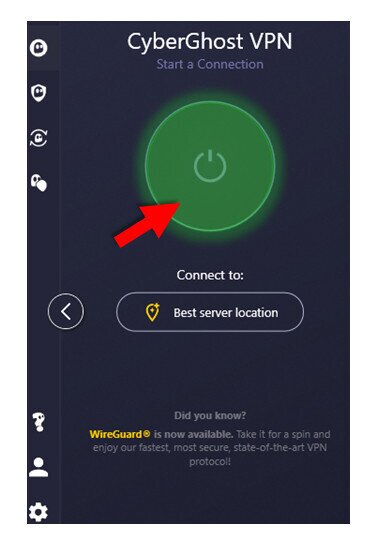
Here’s a quick guide to getting started with a no-logs VPN:
- Choose your provider using the tips in this guide.
- Purchase your subscription plan.
- Download the VPN from the official site or app store.
- Install the application.
- Review and accept privacy agreements if prompted.
- Log into your new VPN account.
- Select a server or region from your dashboard and activate your encrypted connection.
Frequently Asked Questions (FAQ)
What does “no-logs” mean on a VPN?
This means the VPN provider doesn’t keep records of your online activity such as IP addresses, browsing history, or session details beyond the minimal requirements for billing and account troubleshooting.
Which VPNs have a verified no-logs policy?
Many mainstream VPN providers have a verified no-logs policy. Always check the audit reports for confirmation of their policies. Some recommended no-logs VPNs include NordVPN, Surfshark, Proton VPN, and ExpressVPN. These all have great features and track records for privacy, as well as a free trial or money-back guarantee included.
Are no-log VPNs legal?
In most countries, yes. Only extremely restrictive countries like North Korea, Belarus, Iran, and Iraq prohibit no-logs VPNs, and using one in those regions can have legal consequences.
Is NordVPN a true no-logs VPN?
There is no 100% no-logs VPN, but NordVPN has undergone multiple third-party audits confirming its no-logs claims, verifying that they keep only minimal operational data needed to run your account.
How can I verify a VPN’s no-logs claims?
Your best bet is to read the third-party audit report thoroughly. If access to this information requires an account, try the service’s free trial or money-back guarantee.
Does a no-logs VPN keep me completely anonymous?
No technology can guarantee complete anonymity, but VPNs do make a significant difference. Logging into accounts, cookies, tracking scripts, or government surveillance could still identify you.
Can I use a no-logs VPN for streaming and torrenting?
Yes. Look for providers that have fast speeds, reliable up-times, and support for torrenting. You’ll also want a wide range of servers to choose from, so you can find the best connections and access more geo-restricted content.
What should I look for when choosing a no-logs VPN?
Look for recent, verified third-party audits and do some research to see if the provider has turned over user data to authorities in the past.
Do no-logs VPNs affect speed or performance?
All VPNs slightly decrease speed and performance, whether they keep logs or not. If you choose a solid provider, however, the effect should be barely noticeable.
Is a free VPN ever truly no-logs?
No. All VPNs, free or not, keep limited user data for things like billing and login credentials, so it’s impossible to be 100% log-free. However, many VPNs are committed to their no logs policy, only keeping the bare minimum of user data required for operations. For free VPN providers, selling your data to third parties is fairly common. However, if they have been properly audited and have a strong reputation for privacy, you may be all right.

