Find & Trash Clone Files Or Replace With Symbolic / Hard Links Using Fequal

Even though many of us now use our smartphones and tablets for common tasks like exchanging emails or surfing the web, desktop and laptop PCs still have the edge when it comes to dealing with large amounts of information. Most importantly, it's the huge variety of very elaborate and powerful applications available for PCs that make them so great. Fequal is a handy desktop application for Windows that allows you to find identical files on your system. It also allows you to swiftly remove duplicates from your hard disk with a click, and even replace them with shortcuts, symbolic links or hard links to the copies that you're keeping. If you’re not sure what symlinks or hard links are, they are basically pointers registered on the file system to a specified location. Unlike shortcuts, symbolic links do not take your precious disk space, but are treated as files by programs. Read More

Secure Folders With Bluetooth, Remove Duplicates & Rarely Used Files With PC Manager

Is your PC running out of memory? Time to get rid of some duplicate files that you've been pilling up for a while. Applications that get rid of duplicate files like Auslogics Duplicate File Finder, DeDupler, BitFinder and DoubleKiller are sure to be handy, but recently I came across PC Manager and found that it does a lot more than simply trashing clones. PC Manager is a Java-based application that not only lets you find and remove duplicate files, but also offers tools like rarely used files remover, files securer via Bluetooth, and password generator. Read More

Delete Duplicate Files While Retaining Access From Multiple Locations

Duplicate files not only waste precious storage space, but can also make your PC dead slow by increasing disk seek times. So in order to keep your machine in optimal performance, it's a good idea to periodically delete all those duplicates. One way to do this would be to find and delete each item one by one, which itself can be fairly time consuming. To save you from this tedious and repetitive task, there are tools like DeDupler that make the task of finding and removing duplicates a breeze. More details after the jump. Read More

NoClone Is A Duplicate File & Folder Finder With Content Comparison

A lot of files get accumulated on our computers as a result of downloads from the internet, copying files from our cameras, mobile devices and USB flash drives, and file transfers over the network. If left unnoticed for a while. we often end up with multiple copies of the same files in different locations, which can be pretty annoying as they consume a lot of valuable disk space without serving any purpose. Manually locating and deleting duplicate files is obviously a very lengthy and tedious process and by default, Windows does not provide you with any option to deal with duplicate files in separate folders. To avoid all this work, you can use any of the available third party tools that check selected folders for duplicate files according to different criteria such as file names, metadata, and file sizes, image dimensions etc. NoClone is one such application for Windows that lets you search for duplicate files and folders in your system in order to easily get rid of them. Read More

Remove Duplicate Words, Phrases & Sentences From Text Files With Text Deduplicator

Writing and editing large documents is a time-consuming process that requires a lot of concentration from both the author of the document and the editor. While spelling and grammatical mistakes can be located using different tools, one particular type of mistake i.e. duplication of sentences and phrases can be more difficult to locate. Since there is no technical fault with a duplicate sentence, the usual grammar checks do not highlight them and in order to locate them, you usually have to manually go through the whole document while retaining full concentration - a tiresome practice when you are dealing with a considerably large document or a large number of documents. Text Deduplicator Plus is a portable tool for Windows that makes it easy for you to located duplicate words, phrases and sentences in large text files. In addition, it can also sorts lines into alphabetical order, count the total instances of duplicate items in the file, and even remove them. Keep reading to find out more about Text Duplicator Plus and its features. Read More

Find & Delete Duplicate Files Or Move Them To Another Folder

Over time, a lot of files get accumulated in our hard drives due to downloading content from the internet or copying files from our cameras and mobile devices. We often end up with multiple copies of the same files, which is pretty annoying as they take up valuable hard drive space without serving a purpose. It is extremely tedious to look for duplicate files manually by browsing every folder, and even then there is a chance of missing out on many. There are several tools available that allow you to locate and delete duplicate copies of files such as GDuplicateFinder and Fast Duplicate File Finder. Free Duplicate Finder is another application for Windows to help you locate duplicate files, and its lets you do so based on file type including photos, music, videos, documents, executable etc. When found, the duplicate files can be moved to a different folder, allowing you to decide if you want to delete or keep them. Read More

GDuplicateFinder: Search For Duplicate Files Based On Auto-Generated Hash Values

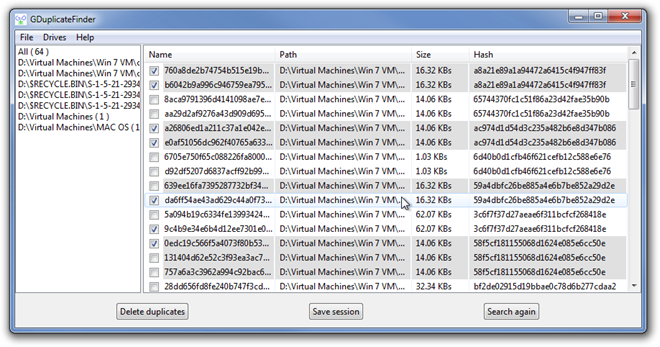
With fast internet speeds and large hard drive spaces, it is very common for people to have multiple copies of a single file in their hard drive. For instance, it can happen that you download a song in one folder, and after some time, you forget about the previous copy and download it again into another folder. This will cause you to have two copies of the same file. Even if you have a lot of free disk space, more than one copy of the same file is a waste of storage. Same is the case with images; you can have the same image with different names in a folder, or with the same name in different locations. This duplication of files eats up disk space, along with cluttering up the system. Whenever you come across such files, you can delete them manually; however, performing a complete sweep of the hard drive to look for all the duplicate files is sure to be a tedious and time consuming task for anyone. Previously, we have covered a lot of applications, such as Anti-Twin, a portable application to search for duplicate files, and CloneSpy, a tool that scans for files with same names and data. Today, we bring to you GDuplicateFinder, an open source application that looks for duplicate files and generates their hash value for verifying if the files match. Read More

Duplicate Cleaner Now Lets You Search Duplicates By Custom Filters

Having duplicate files in your hard drive is pretty annoying due to the fact that you cannot go about checking each and every folder for duplicate content, but if you use a duplicate file finder, you can easily locate and delete those extra copies of files from your hard drive. Back in 2008, we covered Duplicate Cleaner, an application that assists you in deleting duplicate files. Since then, it has been updated with quite a lot of new options and features. Apart from a revamped interface, the most significant improvements include the ability to add custom file filters, custom maximum and minimum file size, search for duplicates according to created/modified date and time and more. Read past the jump for further details. Read More

CloneSpy Helps You Free Disk Space By Identifying Duplicate Files Based On Name & Data

Some users randomly store files on their computers, which may result in having multiple copies of the same files at different locations. This is especially the case when we download files such as music, videos, documents, photos etc., from the internet, not knowing if we already possess a copy. It not only fills your hard drive with duplicate content, but also hogs down overall PC performance. CloneSpy is a useful tool that can help you delete these duplicates within a few minutes, depending on how much junk you have on your hard drive. It comes with a user-friendly interface and a powerful scanning engine to locate files with not only same names, but also identical data. Read More

dupeGuru ME – Find & Removes Duplicate Songs by Tags, Audio Content

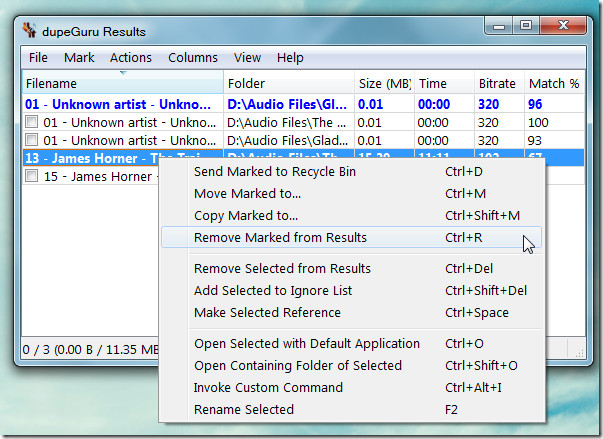
dupe Guru is a cross-platform application which efficiently finds duplicate files on a computer according to file name and file's content. The developers behind dupeGuru have recently launched a new application called dupeGuru ME (Music Edition), which is designed to specifically identify duplicate music files from a very large collection of songs. It scans for not just duplicate songs but can also be configured to locate songs having duplicate tags or meta information within your music directories. Like the standard dupeGuru application, dupeGuru ME also has versions available for Windows, Mac and Linux based operating systems. dupeGuru ME identifies duplicate content using similar words, regular expressions, file content, etc and supports MP3, WMA, AAC (iTunes format), OGG, FLAC, loss-less AAC and loss-less WMA formats. Read More

Duplicate Commander Finds Duplicate Files Based On File Data

Duplicate Commander is a powerful tool to search, remove, and manage duplicate files from your computer. A best aspect of Duplicate Commander is that it identifies duplicate files based on file information instead of merely searching for files with similar names. This allows you to identify and remove duplicate files even if they have a completely different name. It is fast, easy to use, and available in portable form (as well as with an installer). The primary features include a fast counting engine, ability to exclude user-defined folders and files, scan files by size, and convert duplicate files to NTFS hard links (a link which points to a copy of the file). It provides the option to easily delete, copy, or move duplicate files. You can revert the actions back through its undo script anytime. Read More

AllDup Scans Every Data Byte-by-Byte To Find And Remove Duplicate Files

If you’ve found some duplicate files while visually scanning different folders, it’s an indication that all the drives must be checked for the duplicate files and folders. Before choosing a duplicate file cleaner, do check that to which extent it can search and apply filters using regular expressions and if it considers NTFS junctions as duplicate or not. AllDup offers a quick way of finding and removing duplicate files while supporting almost multiple types of filters to narrow down the search. It was developed to be light on system resources, so you can carry on with your work during the scanning process. An option to include or exclude NTFS junction points is also available to include or exclude folders from scanning which are referring to other (linked) folders. With AllDup, you can define search criteria according to your system current state. You can for instance choose to thoroughly scan the system for duplicate files by enabling file content byte-by-byte compare option or check most recently added folders and files only. Read More

Find And Perform Action On Duplicate Files With DuplicateFinder

We have covered many duplicate finders before where most of them find and delete duplicates. After all, this is what most users want to do. One can, however, do a lot more with duplicates files, such as, moving or copying them to an external drive or performing an operation using a 3rd party tool. Bytessence DuplicateFinder is a duplicate finder which provides such options to users. According to the developer, it uses optimized detection algorithms and supports Unicode file name support, with the choice to define filters for scanning file directories. Duplicate files after identification, can be deleted, copied, moved or passed as a parameter to external programs. Read More

Dupy Scan: Compare File Properties And Scan Files & Folders For Duplicates

Dupy Scan is a portable application to scan files and folders for duplicate items. Finding out duplicate files manually from different locations is a tedious task as one needs to navigate through different locations and need to check file's properties and other attributes. The application supports multiple options to check  duplicates by different properties, hash comparisons and other basic attributes. While showing complete comparison results and duplicate file list, it also lets user save the comparison list in CSV format. Read More

Outlook Automatic Duplicate Remover

Sometime Outlook folders are overwhelmed by loads of data, containing lot of duplicates content, such as, emails, attachments, contacts, notes, and so on. Removing them manually can get very frantic and tedious. AODR is a free, portable tool which facilitates users to remove duplicate content in Outlook, it has a dead simple, nifty and intuitive interface, which lets you to choose folders to scan and remove duplicates from Outlook 2010/2007/2003. Read More

Clean Up Ubuntu & Remove Duplicates With FSlint (FileSystem Lint)

FSlint (FileSystem Lint) is a cool application which lets you identify and remove duplicates from your Ubuntu system. It is a very powerful and rich tool that has the capacity to find duplicate files, installed packages, bad name clashes, temp files, bad links, empty directories, and redundant whitespace.  Go through the following simple steps to install and use it. Read More

Remove Duplicate Music Files With Similarity

Removing Duplicate music files is nothing new, we have covered two posts before on removing duplicate audio files. Both DoubleKiller and Audio Comparer can find and remove similar audio files. But since no specific tool is 100% accurate in removing duplicate music files, it is always safe to test multiple software. Similarity is free tool for Windows that uses three different algorithms to find duplicate music files. These algorithms are content based, tags based and experimental respectively. It supports the following file formats, MP3, MP2, OGG, WMA, ASF, FLAC, APE, WF, and WMA, and the following tags ID3v1, ID3v2, ASF, WMA, and Vorbis. Read More

How To Find And Remove Duplicate Audio Files

There are plenty of audio tools out there which let you remove duplicate music or audio files. But these tools compare audio files by their name, tag, artist, etc which is not an accurate method. What if you have two similar audio files under completely different names? This is where Audio Comparer comes in. It actually listens to your music or audio files and compare them based on the audio content. This process is obviously a little slow, but the results are very accurate. Read More

Find And Remove Duplicate Videos, Songs, Pictures, And Documents Instantly

There comes a time when our hard disk becomes cluttered. There are multiple files lying around and we don’t know about it. Sometimes we download a software and few months later a new version is launched and we forget to delete the old setup file. Sometimes we have a same song, picture, or document in multiple directories. Having duplicate files can consume a good amount of hard disk space. Read More