Delete Cash App Account Safely and Permanently on Mobile
Cash App makes your life easier by digitizing your finances like sending, spending, banking, and investing online from Android, iOS, and computer.
However, since it’s a monetary transaction app, it’s wise to delete the account if you don’t want to use it anymore. Learn below how to delete Cash App account and keep your data safe and private.
Reasons to Delete Cash App Account
There could be numerous reasons for closing the Cash App account. For example, you’ve found a better app for money management, or you need more advanced features than what Cash App currently offers. Security concerns are another common reason — if you suspect unauthorized access, closing the account promptly is the safest course of action.
However, most important is that you always need to either temporarily or permanently disable the account on any app meant for monetary transactions. Taking this step protects your financial information from potential misuse. Knowing how to delete Cash App account properly ensures you don’t leave sensitive data exposed.
Before You Close Your Cash App Account
Before you start the closure process, work through this complete checklist. Skipping any of these steps can leave funds, active payment sources, or scheduled charges tied to an account you no longer have access to:
- Cash out your balance. Transfer any remaining Cash App balance to your linked bank account. You cannot withdraw funds after the account is closed.
- Sell or transfer any Bitcoin. If you hold Bitcoin in Cash App, you can sell it and cash out the proceeds before closing. Alternatively, if you want to keep your Bitcoin rather than sell it, transfer it to an external wallet first — once the account is closed, that option is gone.
- Sell any stocks or other investments. Cash App also supports stock investing. Liquidate any stock positions and withdraw the funds — these holdings are not automatically transferred when you close an account.
- Confirm there are no pending transfers. Check your activity feed and make sure all payments — sent or received — have fully settled. Closing an account with a transfer still in flight can complicate getting your money back.
- Cancel any recurring payments or subscriptions. If you have set up any recurring payments or if any subscriptions are billed through Cash App, cancel them before closing. Otherwise those scheduled charges may fail and create collection issues.
- Unlink your bank accounts and debit cards. Go into your linked accounts settings and remove any connected bank accounts and debit cards. This prevents any future attempted charges from hitting your funding sources after closure.
- Download any records you want to keep. Export your transaction history and request any personal data you need before closing (see the section below for how to do this).
Completing these steps first will help you avoid errors during the closure process and ensure you don’t lose access to any money, assets, or active payment arrangements. Taking the time to prepare before you delete Cash App account makes the entire process smoother and more secure.
Download a Copy of Your Personal Data
Before closing your account on Cash App, it’s important to understand that there are two separate actions here: exporting your transaction history and requesting a full copy of your personal data. These are not the same thing.
To export your transaction history (statements only):
- Open a web browser and sign in to your Cash App account at cash.app/account.
- Navigate to the Statements or Documents area within your account.
- From there you can download account statements or export your transaction history as a CSV file.
Note that this only gives you a record of your transactions. It is not a full copy of all the personal information Cash App holds about you.
To request a full copy of your personal data or submit a deletion request: Cash App also offers a separate in-app path for personal data access and deletion. In the app, tap your Profile icon > Support > Account & Settings > Delete Your Personal Information. This allows you to submit a formal data access or deletion request directly.
Importantly, this is a separate privacy workflow that operates independently of account closure — you can initiate it at any time, including before you confirm account closure. Do not wait until after closing if you want to get this process started. Keep in mind that closing your account does not automatically delete all the personal data Cash App holds about you, which is exactly why submitting this request is a separate and important step.
Alternatively, you can visit Cash App’s official support and privacy help page and look for the option related to accessing or downloading your personal information.
This process is distinct from simply exporting statements and should be completed before you delete Cash App account if you want a complete record of the data Cash App holds about you.
How to Delete Cash App Account on iOS
Follow these easy steps to delete Cash App account using an iPhone:
- Tap on the Cash App icon to run the app. It’s the green rectangle with the USD sign.
- Access the Banking section and Cash Out your funds.
- Also, if you’ve got Bitcoins (BTC) sell or transfer those too.
- Tap on the Profile icon in the top-right corner of the app.
- Tap Support.
- Tap Account & Settings.
- Tap Close Your Cash App Account.
- Tap Confirm to complete the closure process.
Don’t uninstall the app yet. Wait for an account closure confirmation email. Once you get that, long tap on the app until a menu pops up with the Remove app option. Tap Remove app to delete the app from your iPhone.
How to Delete Cash App Account on Android
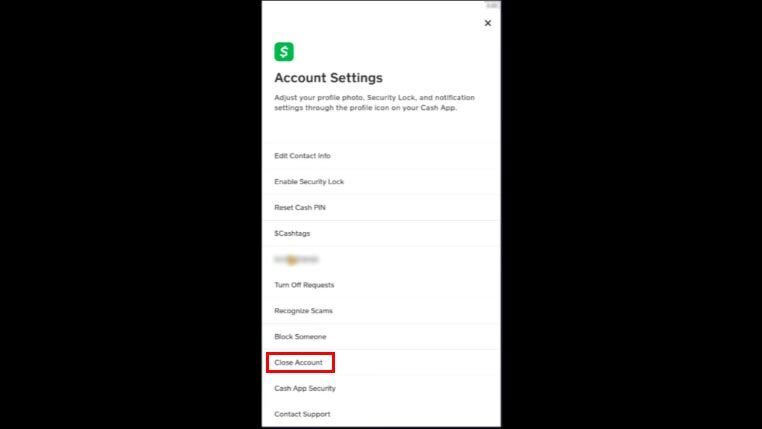
The steps to delete Cash App account on Android follow the same current in-app flow as on iPhone. Here is the full process:
- Tap on the Cash App icon to open the app.
- Access the Banking section and Cash Out any remaining balance to your linked bank account.
- If you hold Bitcoin, sell it or transfer it to an external wallet before proceeding.
- Tap the Profile icon in the top-right corner of the app.
- Tap Support.
- Tap Account & Settings.
- Tap Close Your Cash App Account.
- Tap Confirm to finalize the closure.
As with iOS, do not uninstall the app until you receive the account closure confirmation email. Once confirmed, you can uninstall Cash App from your Android device.
How to Delete Cash App Account on PC
Unlike the mobile app, Cash App does not currently support account closure through a web browser. The menu options previously described for the web — such as “Personal,” “Profile,” “Deactivate Account,” or “Delete” — do not reflect Cash App’s actual web interface and will not lead you to a working close-account option.
To delete Cash App account, you must use the mobile app on an iOS or Android device. Follow the step-by-step instructions in the iOS or Android sections above. Once you have closed the account from your phone, you can log out of any browser sessions and clear your saved credentials on your PC.
If you do not have access to a mobile device, contact Cash App Support directly through their official help page to request account closure assistance.
What to Do If Cash App Won’t Let You Close the Account
If you follow the steps above and the close-account option is blocked or you hit an unexpected error, one of the following common issues is usually the cause. Here is how to work through each one:
You have a small remaining balance. Even a few cents left in your Cash App balance can prevent closure. Open the Banking tab, check your balance carefully — including any rounding or pending credits — and cash out the full amount to your bank. If the balance is too small to transfer (below the minimum transfer threshold), try adding it to a payment to a trusted contact to zero it out.
You still hold a micro-amount of Bitcoin. Bitcoin balances are tracked to many decimal places. Even a fraction of a cent worth of BTC can block your attempt to delete Cash App account. Navigate to the Bitcoin section of the app, sell all holdings, confirm the sale has settled, and then attempt closure again.
Your account has been suspended. If Cash App has flagged or suspended your account, the close-account option may be unavailable in the app. In this case, first try to withdraw any remaining balance from your account. Then contact Cash App Support directly through the official help page at cash.app/help and ask them to close the account manually. Do not use third-party numbers or contacts claiming to be Cash App support.
You did not receive the closure confirmation email. After confirming closure in the app, Cash App sends a confirmation email to the address on your account. If it does not arrive within a few minutes, check your spam or junk folder. If it is not there either, the closure may not have fully processed — log back into the app to verify the account status, and if the account still appears active, go through the close-account steps again.
You want to delete your individual transaction history. It is not possible to delete specific transactions or selectively remove transaction history from within Cash App. Your transaction records are tied to the account as a whole. If removing your personal data is the goal, the only path is to delete Cash App account entirely and then submit a personal data deletion request (see the section above on downloading your personal data for the in-app steps to do this).
If you have worked through all of the above and the close-account option is still blocked, contact Cash App Support directly using one of these official channels:
- Phone: Call Cash App support at 1-800-969-1940. This is the official Cash App support line — do not use any other number you find through a web search, as scam numbers are common.
- Live chat or help request: Visit cash.app/help and use the in-app or web chat to connect with a support agent.
When you reach a support agent, be prepared to verify your identity — Cash App will confirm account ownership before taking any action. Once verified, clearly explain that you are unable to close the account through the app.
If a tiny residual cash or Bitcoin balance is blocking your attempt to delete Cash App account and it falls below the normal withdrawal threshold, tell the agent explicitly that you want to forfeit the remaining balance so the account can be closed. Support can process this on their end and complete the closure manually.
What Happens After You Delete Cash App Account
Before you hit confirm, it is worth knowing exactly what account closure means in practice — because several of these consequences are permanent and cannot be reversed.
- Your Cashtag is permanently disabled. Once the account is closed, your unique Cashtag is gone for good. It cannot be recovered, reassigned to a new account, or transferred to someone else.
- Login access is immediately revoked. You will no longer be able to sign in to your account on any device or through the web.
- You lose access to your transaction history in the app. Once closed, you cannot open the app to pull old statements or payment records. This is why downloading your history before closure — as covered in the section above — is so important.
- It is account closure — not app deletion — that triggers all of the above. Simply uninstalling Cash App from your iPhone or Android device does not close your account, does not remove any linked bank accounts or debit cards, and does not stop Cash App’s existing data retention obligations. Your account remains fully active in the background until you go through the formal closure steps described in this guide.
If you delete the app without closing the account first, anyone with access to your phone number or email address could still log back in. Always complete the in-app closure process before uninstalling. Understanding what happens after you delete Cash App account helps you make a fully informed decision before proceeding.
Closing Your Cash App Account vs. Deleting Your Personal Information
This is an important distinction that many users overlook: closing your Cash App account is not the same as deleting all of your personal data.
When you delete Cash App account, you lose the ability to send or receive payments, and your account is deactivated. However, Cash App may retain certain records about you even after closure. This includes information required for legal obligations, tax reporting, fraud prevention, and regulatory compliance.
In other words, closing your account does not automatically wipe Cash App’s records clean.
If your goal is to have your personal information removed as completely as possible — not just to stop using the app — you need to take an additional step. After downloading the records you need, submit a personal data deletion request through Cash App’s privacy process. You can find this option through Cash App’s official support and privacy help page. This is a separate request from closing the account and can be submitted independently — including before you confirm account closure.
Keep in mind that even after a deletion request, Cash App may be legally required to retain some information for a defined period. The privacy request process will tell you what can and cannot be removed.
Conclusion
So far, you must have found the answer to your search query on how to delete Cash App account. You can follow any or all of the above methods to close your Cash App account on iOS, Android, or PC. Whether you’re switching to a different payment platform or simply want to protect your financial privacy, knowing how to delete Cash App account correctly ensures the process is complete and your data is handled properly.
You may also want to know about common PayPal scams and how to save your money on PayPal.
