*67 How to Hide Your Caller ID on iPhone and Android
If you’ve ever wondered what does *67 do, here’s the short answer: Star 67, also written as *67, is the classic phone number trick that lets you hide your caller ID and call anonymously. You may have heard of it before, but did you know it still works? That’s right! Below are the simple steps you can take to show a private number for outgoing calls. Depending on your carrier, it might say “Restricted” or “Blocked” to the recipient. In most cases the recipient won’t see your real number — though there are some exceptions covered below — and it’s totally free and easy to do.
If you’d rather use a different number-blocking method, we’ve included some alternatives below.
What Does *67 Do?
- *67 blocks your outbound caller ID for one phone call only — it does not permanently change your caller ID settings.
- You dial it immediately before the phone number, with no spaces or extra characters (for example, *671234567890).
- The recipient usually sees “Private,” “Blocked,” or “Unknown” instead of your real number.
- It does not permanently disable caller ID — your number will appear as normal on your very next call unless you dial *67 again first.
- It may not work for calls to 911, toll-free numbers, some business or government lines, or internet/app-based calls.
How to Use Star 67 (*67)
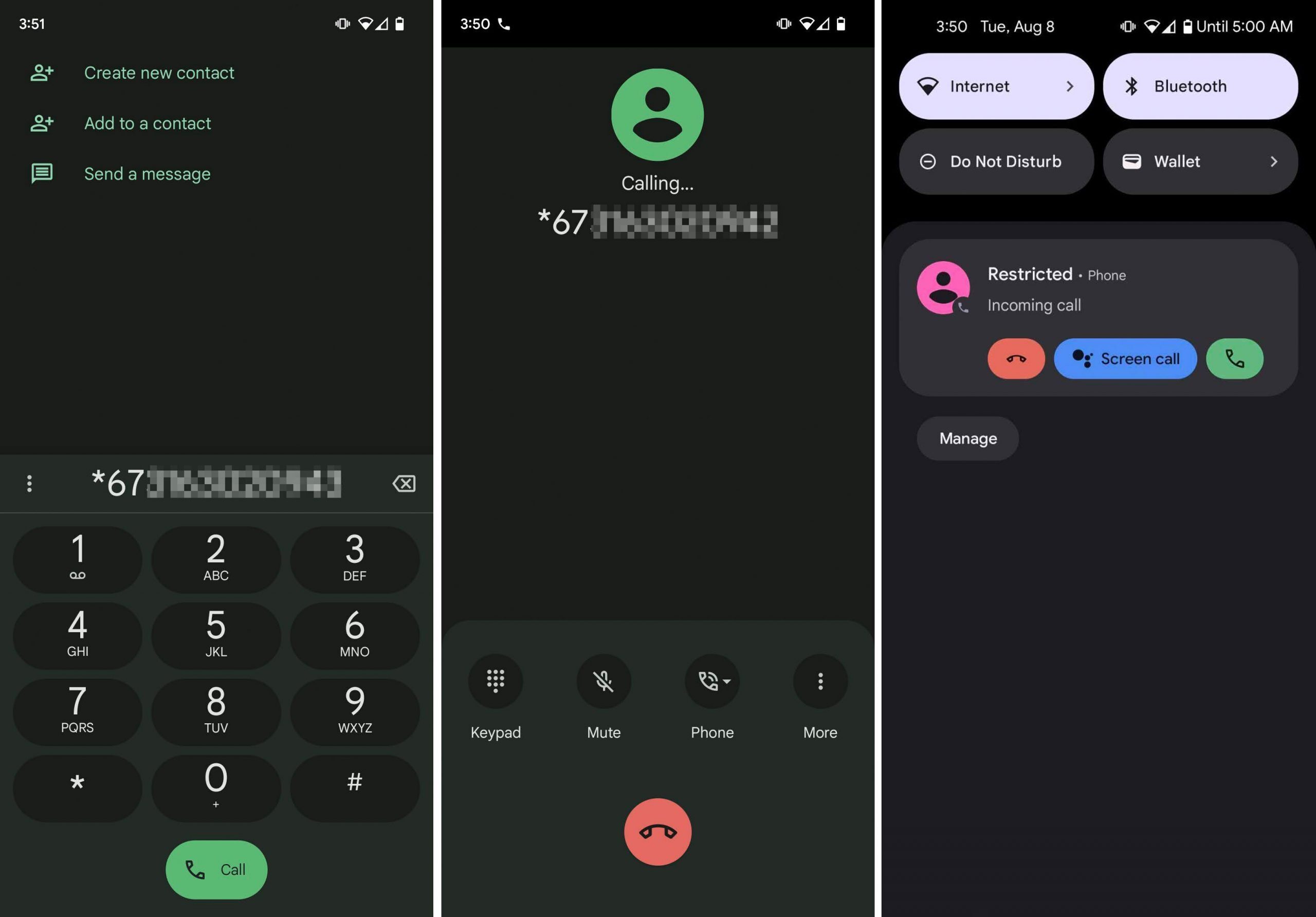
Whether you have an Android device or an iPhone, hide your number using Star 67 by simply dialing *67 and then typing the number you want to call. Don’t add any other characters, just type those three characters, followed immediately by the phone number.
For example, let’s say we want to call 1234567890. Calling that number directly will show your real phone number, or your name if you’re in the person’s contacts.
However, calling *671234567890 will send a request to your carrier before the call is triggered, asking to hide your number from the recipient. This code is widely supported for standard voice calls, but it is not universal — some carriers, plans, business lines, and internet-based calling services may not honor it.
Certain calls still transmit caller information for safety or verification reasons. The recipient usually sees “Private,” “Blocked,” “Unknown Caller,” or something similar, but this is not guaranteed on every network.
Using *67 on a Landline or Home Phone
The code works on landlines and home phones just as it does on smartphones. Here’s how to use it:
- Pick up the receiver and wait for a dial tone.
- Dial *67. You may hear a brief tone or pause before you can continue.
- Enter the full phone number you want to call, including the area code.
- Press the dial button or wait for the call to connect automatically.
The same exceptions still apply on landlines: the code will not block your number when calling 911, toll-free numbers, or certain business and government lines. Some carrier configurations may also limit its effectiveness, so check with your provider if you run into issues.
How to Block Your Caller ID on an Android
Some Android devices let you hide your caller ID from within the settings, meaning you don’t have to use the per-call dialing method.
Here’s how it works on most Android phones:
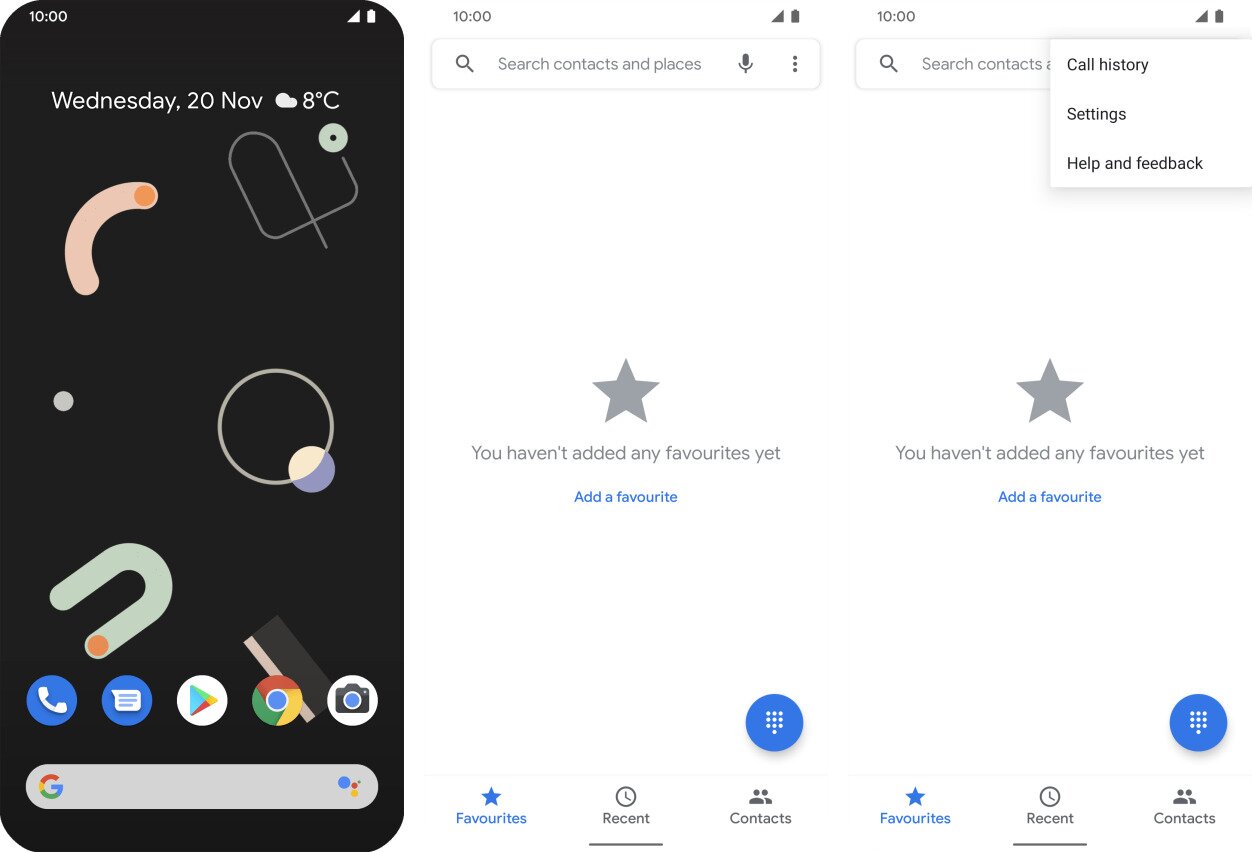
- Open the Phone app.
- Tap the three dots menu at the top, and then choose Settings.

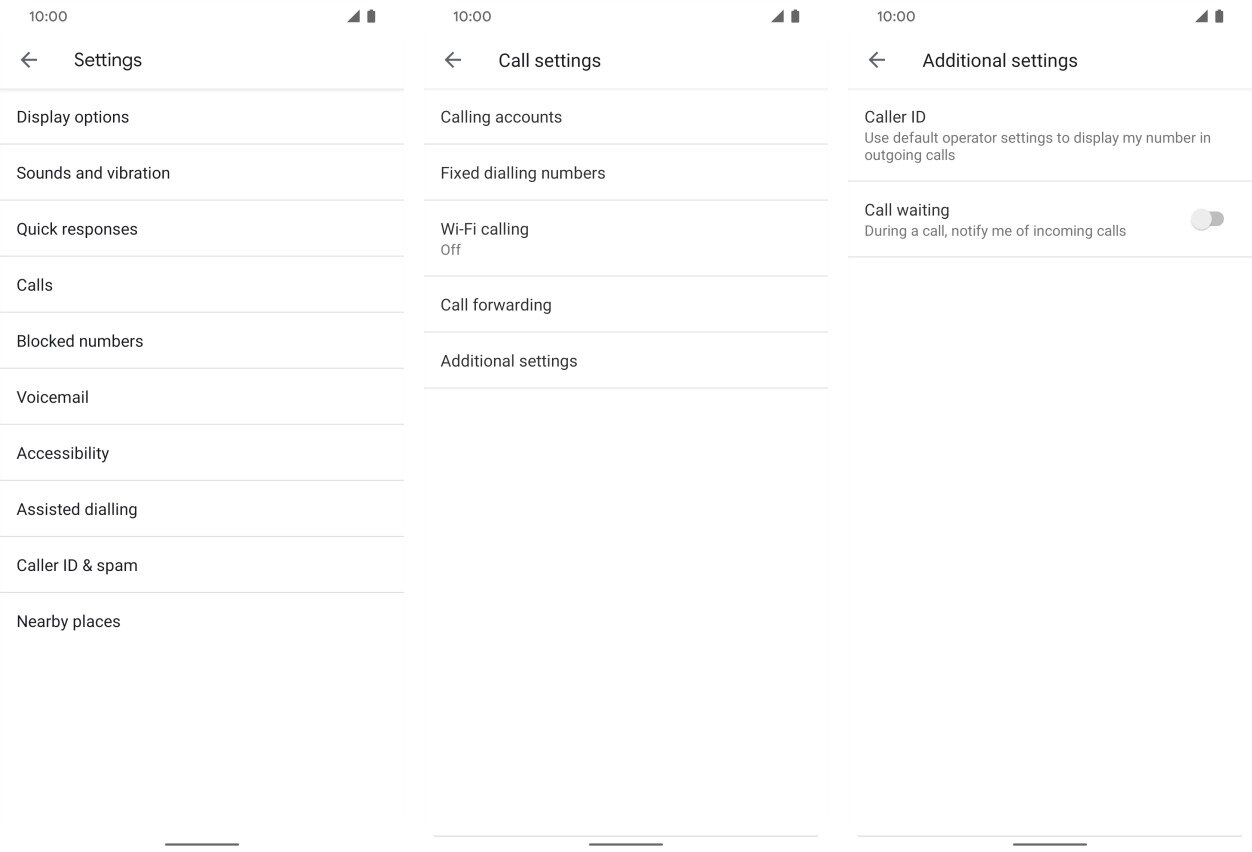
- Select Calls. (Not all Android devices have this option. If that’s you, then stick to Star 67 or pick an alternative caller ID blocking method at the bottom of this page.)
- Go to Additional settings, and then tap Caller ID.

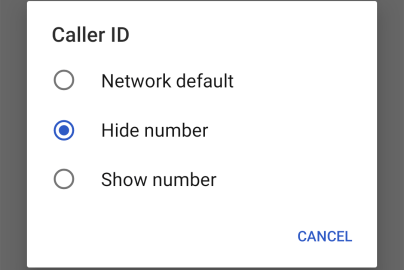
- Finally, select Hide number from the list of options.

Can’t Find the Caller ID Menu on Android?
Android menus vary quite a bit depending on the manufacturer and carrier. If the path above doesn’t match what you see, try one of these alternate routes:
- Phone app > Settings > Calling accounts > SIM card > Advanced settings > Caller ID > Hide number — common on Samsung and other Android skins.
- Some devices label the same option under Supplementary Services instead of Additional settings, with the same Caller ID option inside. You may also see a Network default option, which defers to whatever your carrier has set for your account.
- If you have a dual-SIM phone, you may need to select the specific SIM you want to apply the setting to before the Caller ID option appears.
If none of these paths are available on your device, use the dialing code directly when placing a call or choose one of the alternative methods at the bottom of this page.
How to Block Your Caller ID on an iPhone
Much like Android, iPhone supports setting up a caller ID block from within the phone’s settings. Any outgoing calls you make, after completing these steps, will show “No Caller ID” instead of your phone number.
- Open the Settings app.
- Select Phone.
- Tap Show My Caller ID.
- Use the toggle switch called Show My Caller ID to toggle it white (green means it’s not hidden).
If Show My Caller ID is missing from your settings or appears greyed out, your carrier controls that setting and has not enabled it for your plan. In that case, use *67 on a per-call basis as your fallback — it works independently of the in-settings toggle.
Caution: Anonymous calling is not a reliable way to reach someone who has blocked you. Device-level blocks, carrier-level blocks, and anonymous-call rejection or spam filtering can all still stop the call or send it directly to voicemail — regardless of whether your number is hidden.
What to Do If *67 Doesn’t Work — and What Does *67 Do in These Cases?
If you dialed the code and your number still showed up — or the call didn’t go through at all — work through this checklist to diagnose the problem:
- Confirm you’re using the standard phone network. Understanding what does *67 do on different networks is key: the code only works on traditional voice calls. If you’re calling through a VoIP app or internet-based service such as WhatsApp, Google Meet, or similar, the code is typically ignored entirely. Switch to your phone’s native dialer and try again.
- Try the phone-settings method as a backup. If per-call blocking isn’t working, the in-settings caller ID toggle (described in the Android and iPhone sections above) may still function on your carrier. Conversely, if the settings toggle is missing or greyed out, dialing *67 on a per-call basis is your fallback.
- Check your SIM selection on dual-SIM Android phones. If your device has two SIMs, the call may be routing through the SIM that doesn’t support caller ID blocking. Verify the correct SIM is selected before dialing.
- Check whether your carrier or plan supports the feature. Some prepaid plans, business lines, and certain carrier configurations disable per-call blocking. Contact your carrier’s support to confirm whether the option is available on your specific plan.
- The call went to voicemail anyway. Even when caller ID blocking successfully hides your number, the recipient’s phone may have anonymous-call rejection or spam filtering enabled. In that case, the block worked — but the recipient’s own settings prevented the call from ringing through. This is not a failure of the code itself.
If none of the above resolves the issue, consider one of the alternative methods in the next section, such as a second phone number app, which doesn’t rely on the dialing code at all.
Other Ways to Block Your Number When Star 67 Isn’t Enough
Star 67 is an easy solution to hide your caller ID, but you have to manually type each number you want to call anonymously. Plus, some people’s phones automatically filter out phone calls from unknown numbers, so you might not even get through if you call anonymously this way.
Fortunately, there are some alternative caller ID blocking methods if your carrier doesn’t support the code or if you need a different workaround:
Free Phone Number Apps
One of the best ways to keep your phone number private is to simply not use it! The alternative, then, is to utilize a second phone number app.
There are plenty of these on the app store for your Android device or iOS device, so you’ll have no problem finding a good one. Instead of your real phone number showing up for the recipient, every call you make through a secondary phone number app will show that service’s phone number instead of your real one.
Google Voice and TextNow are two great examples. You can pick your number from a list of available phone numbers. That app-assigned number is what the recipient sees instead of your real one, which does a good job of keeping your personal number private.
However, this is not full anonymity: the recipient still sees the app-assigned number, and in some cases your profile name or account details, and the service provider can always identify the account behind a call. Think of it as a privacy layer rather than a complete shield.
Messaging Apps
This is very similar to the free phone number apps, but instead of blocking your number by obscuring it behind a different number, you’re simply using the internet to make a call.
Facebook Messenger, Google Meet, Signal, and Snapchat are just a few examples. Those apps work through your username, so the recipient sees your name and username, but not your phone number — which does protect your personal number from being shared.
That said, these apps are not true drop-in substitutes for *67: the recipient must typically use the same app, and instead of seeing a standard “Private” or “Blocked” caller-ID label, they see your app identity. The app provider can also identify your account. If you’re also reconsidering chat app privacy, our guide to Telegram account deletion can help.
Most of these types of apps run on an Android device or on an iPhone, and even work from a computer, so you could make anonymous phone calls from there or your phone.
Ask Your Service Provider
Many carriers offer a permanent, line-level caller ID block that hides your number on every outgoing call by default — no need to remember to dial *67 each time. This is sometimes called “permanent line blocking” or “default caller ID suppression,” and it can often be enabled through your carrier’s account settings online or by calling customer support directly.
This option is particularly useful if you make a high volume of calls and want your number hidden consistently, such as for a small business, a home office line, or simply for ongoing personal privacy. That said, availability varies: not all carriers offer it, some prepaid plans don’t support it, and certain business or enterprise lines may have different rules. Always confirm with your specific carrier whether the feature is available on your plan.
Using *82 to Unblock Your Number for One Call
If your carrier has permanent caller-ID blocking enabled on your line, you can override it for a single call by dialing *82 immediately before the number — for example, *82 5551234567. This tells the network to transmit your caller ID for that one call only, after which the default block resumes automatically.
It is important to understand that *82 is the reverse of *67, not a companion to it. If you are already using *67 on a per-call basis (meaning your line does not have a default block), you do not need *82 — *67 only suppresses the single call it prefixes, so your number appears normally on every other call without any extra steps.
*82 is carrier-dependent and is not universally supported across all providers or plans. Verify the correct unblock code with your carrier before relying on it, as some carriers may use a different code or require you to manage the default block through your account settings instead.
According to the FCC’s guide on caller ID, consumers have the right to block their number on a per-call basis, which is exactly what does *67 do — it enables that per-call privacy right directly from your phone’s dialer.
Reminders About Using Star 67 & Other Call Block Services
Here are some important things to keep in mind:
- Toll free numbers aren’t supported, so you can’t block your number when you make calls to toll free numbers using this method.
- Emergency services such as 911 will always receive your caller information regardless of any blocking code. Your number is transmitted by law for safety reasons and cannot be blocked on these calls.
- Some business lines, government numbers, and verification services require caller ID to complete the call. If the recipient’s system mandates an identified number, your call may be rejected or blocked automatically.
- International calls may not honor the blocking code. It works within the North American Numbering Plan, but its behavior on calls going outside that system varies by carrier and destination country.
- Carrier and plan restrictions can override per-call blocking. Some prepaid plans, business accounts, or carrier configurations do not support it, so the code may simply have no effect.
- App-based and VoIP calling (such as calls made through WhatsApp, Google Meet, or similar services) routes through the internet rather than the traditional phone network, so *67 is typically ignored entirely.
- Some phones are set up to block unwanted spam calls or have anonymous call rejection turned on. Therefore, your call might go straight to voicemail or be rejected when people receive calls from you after you use caller ID blocking.
- Don’t abuse this. Star 67 should be used for your protection only, not to make prank calls.
Frequently Asked Questions About What Does *67 Do
- Does *67 still work today? Yes, *67 currently still works on standard voice calls across most carriers in the United States. However, it is not universal — some carriers, plans, and call types may not honor the request to block your number, so results can vary depending on how and where you’re calling.
- Does *67 work on cellphones? The code works from both a regular phone (landline) and a cellphone. The method described above works the same for both.
- Does using *67 cost money? No, but making phone calls of any kind does incur charges if you use minutes beyond what you pay for. There is no inherent cost to use Star 67, specifically.
- What does *67 do on an iPhone vs. Android? The behavior is the same on both platforms — dialing *67 before a number sends a request to your carrier to suppress your caller ID for that single call. The difference is that both iPhone and Android also offer in-settings options to hide your number permanently, as described in the sections above.
- What does *67 do if the recipient has anonymous call rejection? If the recipient has enabled anonymous call rejection on their line, your call may go straight to voicemail or be blocked entirely. This is a limitation of the method, not a failure of the code itself.