Learn How to Block on TikTok and Protect Your Privacy
TikTok, like any social media platform, can be a mix of great and not-so-great experiences. If you’ve ever wondered, can you block someone on TikTok — the answer is yes, and it’s easier than you might think. If someone is negatively affecting your time on the app, learning how to block someone on TikTok is a quick and effective way to protect yourself from toxic, spammy, or even abusive accounts. This guide will show you how to block someone on TikTok, both for mobile and desktop versions. If only blocking jerks were this easy in real life.
Why Would You Want to Block Someone on TikTok?
Before diving into how to block someone on TikTok, let’s cover why, first. This world is an increasingly crazy place and sometimes the people on social media can be particularly toxic, aggressive, or just not the right fit for you. Here are some of the most common reasons TikTok users block accounts:
- Harmful content: This could be triggering content, such as accounts that glamorize harmful behaviors such as eating disorders, or it could simply be someone spreading misinformation or hateful propaganda. Either way, you don’t need that in your life, so curating your feed to fit your needs may be a good idea.
- Cyberbullying: If someone is bullying or stalking you on TikTok, it’s important to shut that down fast. Not only should you consider blocking them, but you may want to report them as well. We’ll cover how to do that later in this guide.
- Scammers and bots: Both types of accounts run wild on any kind of social media. TikTok is no exception. Feel free to weed them out via the block function. Likewise, you can report them to TikTok too.
- Unwanted admirers: There are a lot of creeps online who like to slide into your DMs or comment on every video you post. If they make you uncomfortable, that’s what the block feature is for.
- Maintaining your privacy: Doxxing is a real problem these days. This is when someone with malicious intent finds identifying personal information about you and uses it against you, such as to find out where you live or give out your information to the public without your permission. TikTok is particularly dangerous for this, as many users don’t consider what background identifying data can be seen in a seemingly innocent video. If you want to keep your anonymity and you feel like someone is putting your personal information or privacy at risk, you may want to block them sooner rather than later, before it draws the wrong kind of attention.
Can You Block Someone on TikTok with Your Smartphone or Mobile Device?
Yes — and learning how to block someone on TikTok from your phone is very easy. The steps are similar for any kind of mobile phone, including Android and iPhone. It’s also the same if you want to know how to block someone on TikTok you don’t follow. You just need access to their profile. Here are the steps:
- Sign into TikTok
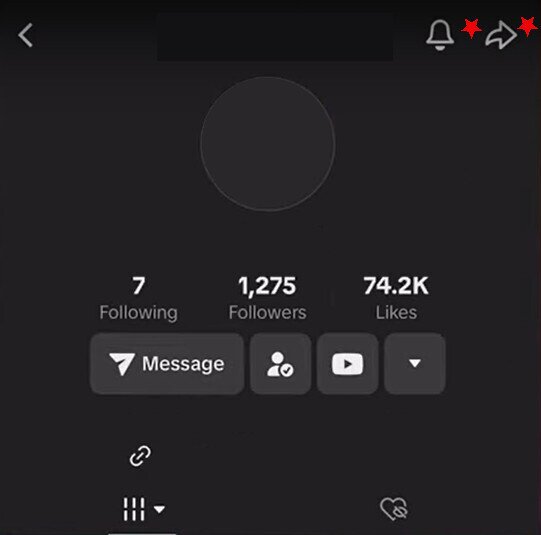
- Go to the profile of the person you want to block
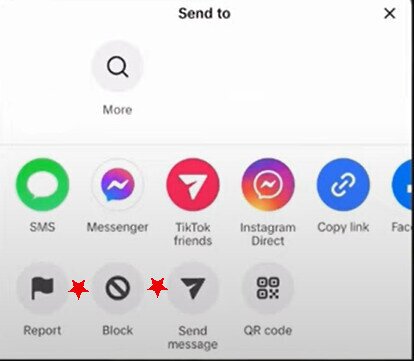
- In the upper right of that person’s profile, tap the Share icon, arrow, or More (three-dot) menu — the exact icon can vary depending on your app version and account type, so look for whichever of these appears in the top-right corner

- A menu will pop up on the bottom of your screen. Tap the Block option

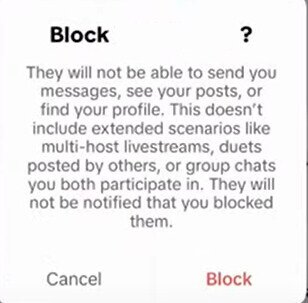
- A confirmation pop-up will appear letting you know the conditions blocking creates. Tap Block again to confirm and you’re all set!

Can’t find the Block option? If the Block option doesn’t appear after tapping the top-right icon, try the other icon (Share arrow or three-dot menu — whichever you haven’t tried yet). If it still doesn’t show up, update the TikTok app to the latest version and retry. You can also try accessing TikTok through your mobile browser at tiktok.com as an alternative.
How to Block Someone on TikTok From Your Desktop
The desktop steps to blocking someone aren’t too different from the mobile versions. Here’s how:
- Sign into TikTok on your desktop
- Find the user profile you want to block
- Look for the Share icon or a three-dot/More menu to the right of their profile picture and click it — depending on your browser and TikTok’s current interface, this control may appear as either a Share arrow or three horizontal dots
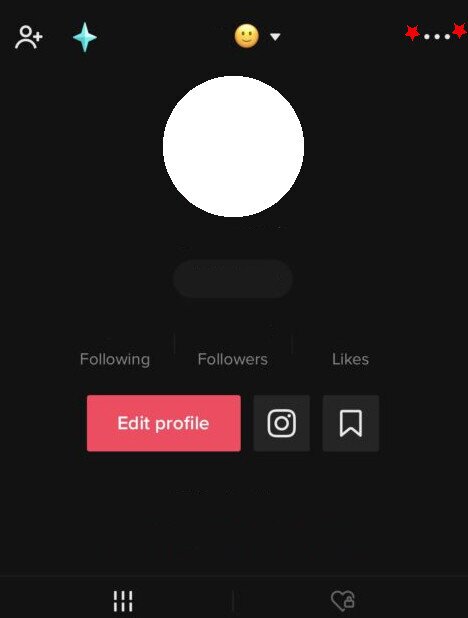
- From there, the option to block will appear. Choose Block and then confirm this action by clicking Block again.
- Done!
Can’t find the Block option on desktop? If Block doesn’t appear under one icon, try the other — both the Share arrow and the three-dot menu can surface the Block option depending on your browser and TikTok version. If neither works, try a different browser or update your current one, then retry.
How to Block in Bulk on TikTok
If you need to know how to block someone on TikTok for multiple accounts at once, we’ve got you. The situation where you’d most likely need to block in bulk is when you have multiple comments on one of your videos and you want to block these commenters at the same time. Here’s how:
- Open the TikTok app
- Go to your video that has the commenters you want to block
- Tap Comments
- Choose a comment and long press on it. A pop up menu will appear
- Tap Manage multiple comments
![TikTok menu options]](data:image/jpeg;base64,/9j/4AAQSkZJRgABAQAAAQABAAD/2wCEAAEBAQEBAQEBAQEBAQEBAQEBAQEBAQEBAQEBAQEBAQEBAQEBAQEBAQEBAQEBAQEBAQEBAQEBAQEBAQEBAQEBAQEBAQEBAQEBAQEBAQEBAQEBAQEBAQEBAQEBAQEBAQEBAQEBAQEBAQEBAQEBAQEBAQEBAQEBAQEBAQEBAQEBAQEBAf/AABEIAAoACgMBEQACEQEDEQH/xAGiAAABBQEBAQEBAQAAAAAAAAAAAQIDBAUGBwgJCgsQAAIBAwMCBAMFBQQEAAABfQECAwAEEQUSITFBBhNRYQcicRQygZGhCCNCscEVUtHwJDNicoIJChYXGBkaJSYnKCkqNDU2Nzg5OkNERUZHSElKU1RVVldYWVpjZGVmZ2hpanN0dXZ3eHl6g4SFhoeIiYqSk5SVlpeYmZqio6Slpqeoqaqys7S1tre4ubrCw8TFxsfIycrS09TV1tfY2drh4uPk5ebn6Onq8fLz9PX29/j5+gEAAwEBAQEBAQEBAQAAAAAAAAECAwQFBgcICQoLEQACAQIEBAMEBwUEBAABAncAAQIDEQQFITEGEkFRB2FxEyIygQgUQpGhscEJIzNS8BVictEKFiQ04SXxFxgZGiYnKCkqNTY3ODk6Q0RFRkdISUpTVFVWV1hZWmNkZWZnaGlqc3R1dnd4eXqCg4SFhoeIiYqSk5SVlpeYmZqio6Slpqeoqaqys7S1tre4ubrCw8TFxsfIycrS09TV1tfY2dri4+Tl5ufo6ery8/T19vf4+fr/2gAMAwEAAhEDEQA/AP3aHjrQPtVuTPeIEdxIqWs7RSCMbowH+U4L/wAUSTK2ArbBhq7sK2sNiNKN5t8kqlWEJpuThJqMpLovd5+W/wAcOZPVVlatSTlVXLyykqcHOnJOCqQTlC6uub3ox5nGSdOooSi0tf8A4TvRDyJJMHkZWRTg8jKkAqcdQQCOhFc/uvp/5K/8jscGm1eGjtpUg1p2ak015ptPofCbXNx9os/383WX/lq//PP/AHq2X8Cv/wBwv/Szmn/Fof8AcT/0ks/aLj/nvN/39f8A+KrJbL0Rsf/Z)
- Choose the comments from the people you want to block
- Choose More
- Choose Block accounts
- Tap Block
![TikTok menu options]](https://www.addictivetips.com/app/uploads/2024/09/manage-multiple-comments-1.jpg)
How to See Who is Blocked on TikTok
If you want to know how to see who you blocked on TikTok, it’s very easy. Your blocked accounts list is the central place to review everyone you’ve blocked and unblock them one by one if needed. Here’s how to access it on both mobile and desktop.
On mobile:
- Sign into your TikTok
- Tap your Profile
- Tap the hamburger menu at the top of the screen (it looks like 3 horizontal lines)
- Select Settings and Privacy
- Select Privacy
- Select Blocked Accounts, though you may have to scroll to find it. You should be able to see who you’ve blocked now.
On desktop/web:
- Sign into TikTok at tiktok.com in your browser
- Click your profile picture in the top-right corner
- Click Settings
- Select Privacy
- Select Blocked accounts to see your full list
If the menu labels look slightly different in your browser or account type, look for Privacy first and then Blocked accounts within that section — those two labels are the most consistent across versions. From this list you can also unblock anyone directly by clicking Unblock next to their name.
What Happens When You Block Someone on TikTok?
Knowing whether you can block someone on TikTok is only half the picture — understanding what actually changes after a block helps you set realistic expectations. Here is a full breakdown organized by what stops right away, what may still linger, and what blocking cannot protect you against.
What stops immediately:
- Viewing your profile or videos: Your profile and content become invisible to the blocked account on the platform.
- Following you: Any existing follow relationship is severed automatically. They will no longer follow you, and you will no longer follow them.
- Sending you new direct messages: The blocked account loses the ability to DM you going forward.
- Commenting on your videos: They will not be able to leave new comments on any of your content.
- Liking your content: Interactions such as likes are also blocked.
- TikTok does not notify the blocked user. The person you block will not receive any alert or message telling them they have been blocked.
What may still remain visible:
- Past DM threads: Existing direct message conversations typically remain visible to both parties in their inboxes, but no new messages can be sent. The chat history does not disappear automatically.
- Old comments and likes: Previous comments left by the blocked user on your videos may disappear from your view, but this can vary — don’t rely on it as a guarantee.
- Multi-host LIVE sessions: If you and the blocked user appear in the same multi-host LIVE, they may still see you in that context.
- Duets and stitches made by others: If a third-party account has made a duet or stitch using your content, the blocked user can potentially still see you within that other creator’s video.
- Shared group chats: If you are both members of the same group chat, the block does not automatically remove either of you from that conversation.
What blocking does not protect against:
- Alternate accounts: Blocking is account-level only. If the person creates or uses a different TikTok account, they can still view your public content, follow you, and interact with you from that account. Blocking does not extend to accounts you haven’t specifically blocked.
- Logged-out browsing: Anyone — including the person you blocked — can still view your public videos by visiting tiktok.com without logging in. If your account is public, your content remains accessible this way.
- Mentions and tags by others: If a third party tags or mentions you in a comment or video, the blocked user may see that mention depending on the context.
- LIVE and collaboration invites from other accounts: Blocking one account does not prevent that person from using an alternate account to invite you to LIVE sessions or collaborative features.
A few other things to keep in mind:
- When blocking in bulk, you can only block up to 100 users at one time.
- You can reverse a block at any time — see the section below for how to unblock someone.
How to Unblock Someone on TikTok
Changed your mind about a block? Unblocking is just as straightforward as blocking. There are two main ways to do it.
Method 1: From the blocked user’s profile (Mobile and Desktop)
If you can navigate directly to the person’s profile, this is the quickest route:
- Open TikTok and search for the blocked user’s username
- Tap or click on their profile
- You will see an Unblock button on their profile page — tap or click it
- Confirm the action when prompted
Method 2: From your Blocked Accounts list (Mobile)
If you cannot remember the username or want to manage multiple blocks at once, use your block list:
- Open TikTok and tap your Profile
- Tap the hamburger menu (three horizontal lines) at the top right of the screen
- Select Settings and privacy
- Select Privacy
- Select Blocked accounts
- Find the user you want to unblock and tap Unblock next to their name
- Confirm when prompted
Method 2: From your Blocked Accounts list (Desktop)
- Sign into TikTok on your desktop browser
- Click your Profile icon and navigate to Settings
- Select Privacy and then Blocked accounts
- Locate the user and click Unblock next to their name
- Confirm the action
Keep in mind that unblocking someone does not automatically restore any previous follow relationships — they will need to follow you again, and you will need to follow them again if you wish.
Why Can’t I Block Someone on TikTok?
Some possible reasons you can’t block someone on TikTok include:
- You can’t find the block button. Depending on your app version, device, and whether you’re on mobile or desktop, the block control may appear under a Share arrow icon or an overflow/More menu. If you’re having trouble finding it, try opening the user’s profile directly and look for both the Share icon and any three-dot or More menu — the block option should be accessible from either. If it still doesn’t appear, update the app to the latest version, then retry. If the problem persists, try accessing TikTok via a different device or through the web version at tiktok.com.
- You’re having connectivity issues with your phone or PC so TikTok can’t process your request
- You tried to bulk block more than 100 accounts at once
- The app is being buggy. Often, closing out of it and reopening or even rebooting your phone will fix these issues
How Can You Tell If Someone Has Blocked You on TikTok?
There are some possible signals that may suggest someone has blocked you on TikTok, but it’s important to know upfront that TikTok does not send you any official notification when you are blocked. The platform gives no direct “this user blocked you” message, so you can only look for a combination of indirect clues.
Even then, the same signs can appear for other reasons, such as the account being deleted, deactivated, renamed, or set to private. Look for multiple signals rather than relying on any single one.
Here are the signs to watch for, and what they may or may not mean:
- Their username or profile doesn’t appear in search. If you search for a specific username you know is correct and it returns no results, this may mean you were blocked — but it can also happen if the account was deleted, deactivated, or the username was changed. To investigate further, try searching for the account from a separate TikTok account or while logged out.
- “Account not found” in your messages. If you’ve previously messaged this person and your inbox now shows “Account not found,” this may indicate a block, but it can equally mean the account was deleted or deactivated. Try locating the profile from a different account to see whether it still exists before drawing conclusions.
- Their web profile shows no content or appears unavailable. Looking up the user’s profile in a browser can provide another data point. However, a profile appearing to have no content does not definitively confirm a block — the account may have been deactivated, the user may have deleted their videos, or their privacy settings may have changed. A “private account” label simply means they restricted their audience and did not necessarily block you.
- Their previous comments on your posts are gone. If a user had commented on your videos before and those comments are now missing, this may be one sign of a block. However, this can also happen if the user deleted their own comments, deleted their account, or if TikTok removed the comments for other reasons. Missing comments alone should not be taken as confirmation.
The bottom line: because none of these signals are definitive on their own, the most reliable approach is to check across multiple signals and, where possible, verify using a secondary account before concluding you have been blocked.
Frequently Asked Questions
Here are some frequently asked questions regarding blocking and staying safe on TikTok.
Can I report someone’s TikTok account?
If you want to take blocking someone a step further and actually report them to TikTok, it’s luckily quite simple. Here is what to do, keeping in mind TikTok doesn’t always take action against these reports. Still, it can be worth a try:
- Sign into the TikTok app
- Find the profile you want to report
- Tap or click the arrow to the right of their profile picture
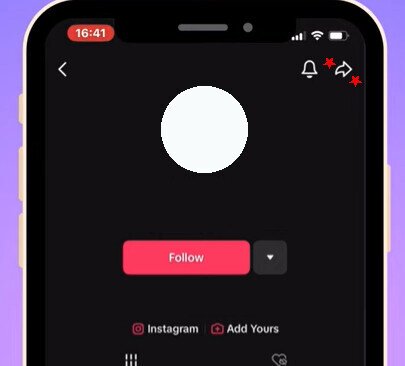
- Tap or click Report, on the bottom left
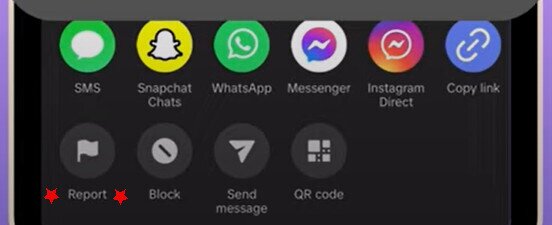
- Confirm this action by pushing Report Account
- Select the reason for reporting them
- Tap Submit. Note: Be sure to only report someone for a genuine reason, not as a prank or joke. Also be aware, TikTok (and all social media platforms) has a reputation for ignoring valid reports, so keep trying but understand it may be a bit of a battle…
Can I report a harmful direct message?
Because one of the biggest reasons for needing to block someone on TikTok are abusive or inappropriate users who harass you from your inbox, learning how to report direct messages that make you uncomfortable is important. There should be consequences for such actions. Here’s what to do:
- Sign into your TikTok account on your device
- Click or tap your Inbox
- Click or tap the chat you want to report
- Press and hold this chat message if you want this particular message reported. You can also tap More options (at the top) to report the entire chat
- Tap Report and block or just Report
- Click or tap Done
Can you block someone on TikTok without going to their profile?
Yes, you don’t have to go to an account’s profile to block them. You can actually block them from one of the comments they may have left on one of your videos, or just use the bulk block feature we already covered. Unfortunately, you do need some kind of access to their account this way to block them, so if they haven’t left public comments or interactions like that, you may not be able to block them without actually visiting their profile.
How do I stay safe on TikTok?
Knowing how to block someone on TikTok is just one important step to stay safe on the platform. Other possible tips include:
- Not using your real name, if possible
- Not providing detailed location information, such as what city or street you live on
- Preview your videos for any slip-ups regarding identifying information, such as street signs behind you or someone off-screen calling your name
- While gaining followers is exciting, if one of them gives you a bad vibe, listen to your instincts and consider blocking them
- Use TikTok’s built-in privacy controls to meaningfully reduce your exposure. Go to Profile > Menu (hamburger icon) > Settings and privacy > Privacy, then: set your account to Private, limit who can send you direct messages, restrict who can comment on your videos, turn off video downloads, limit Duet and Stitch permissions, disable contact syncing, and turn off personalized ads where the option is available. These settings have a direct effect on who can find and interact with you on the platform.
- Enable 2-step verification and use a strong, unique password to reduce the risk of your account being compromised. You can find 2-step verification at Profile > Menu > Settings and privacy > Security > 2-step verification.
- Limit your activity status so others won’t know when you’re online
- A virtual private network (VPN) — such as these secure VPNs for Windows — can hide your IP address from your internet service provider, school or work network, and public Wi-Fi hotspots. However, a VPN does not make you private from TikTok itself. Once you’re logged in, TikTok can still link your activity to your account, device identifiers, contacts, advertising ID, and in-app behavior regardless of whether a VPN is active. For genuine privacy within TikTok, the built-in privacy settings described above will do far more than a VPN alone.