How to Use Tor With a VPN: Tutorial to Install IPVanish
If you’re less than 100% familiar with how to use Tor with a VPN, you’re in good company. Both technologies offer sophisticated methods to lock down your privacy online, and using Tor with a VPN in tandem is surprisingly easy. Today, we’ll lay out how to get started using Tor with a VPN together, step by step.

Tor is an anonymity network that spans the globe and works to ensure that its users are protected from censorship, detection and invasion of privacy. Its current name is derived from “The Onion Router”, which was its original project name. Onion routing itself is what the Tor network uses, by encrypting and redirecting information throughout its network multiple times before it reaches its destination. This adds “layers” of encryption, hence the “onion” in onion routing.
The history of Tor is fascinating: What would become Tor was originally developed by the US Navy and DARPA. DARPA’s contributions are of particular note, since their ARPANET is the ancestor of our modern-day internet. The goal of Tor back then was essentially the same as it is now: to allow for private, encrypted communications to take place between its users.
Since its inception, Tor has evolved to become a tool used by many types of people all over the world. This tool can be used to leak and blow the whistle on unscrupulous government or corporate doings, to safely communicate with journalists without fear of being tracked, to browse less secure parts of the internet’s underbelly, and so much more. Using Tor can be legal or illegal, but in either case its users enjoy great anonymity and privacy from third-party or government snooping.
Today, we’re going to discuss two of the biggest names in privacy: Tor and VPNs. More specifically, we’re going to dive into how these technologies can be used together and why it’s worth the effort. Additionally, we’ll cover how to use IPVanish with Tor, which is one of our most highly recommended VPN services for Tor. We’ll start with the basics first.
What is a VPN?
A VPN is a Virtual Private Network. This technology has existed for some time, and chances are you may have already encountered it without knowing it. Many school and business networks use VPNs to increase security and allow secure remote access to the network for their employees and faculty. This implementation of VPN technology isn’t generally focused on anonymity or a high level of encryption, but this can vary on a case-to-case basis.
A more common and prominent implementation of VPN technology is known as Commercial VPN. Commercial VPNs, as the name implies, are VPNs that allow paying consumers to access their networks. These VPNs have a strong focus on privacy, often encrypting data to such a point that neither an ISP or government can decrypt it. Many of them come with an assortment of extra features, but the primary goals of a VPN provider are to provide privacy and security to their users, with the occasional side of geo-spoofing and specialized encrypted messaging apps.
While Tor works through “layers” of encryption and redirections, VPNs use various VPN protocols to protect and anonymize their data. These protocols, like L2TP and OpenVPN, offer great performance and much lower latency than the Tor network, allowing users to more easily share files and stream video than your typical Tor connection would allow.
Both of these technologies are prominent. Both serve similar purposes. So you may be asking yourself the following question:
Why Use Tor with a VPN?
It’s easy to see what Tor and VPNs have in common: They’re both made to protect the privacy of the user and the security of their data. They’re both capable of bypassing government censorship and allowing for safe, encrypted communication between their users. There are a few key differentiators, however, and we’ll go over those now.
VPNs are:
- Much faster, thank to VPN protocols designed to maximize speed while still using secure encryption.
- Generally, a premium option, as free VPNs either offer a poor experience or are simply unsafe to use.
- Far better suited to filesharing.
Tor is:
- Much slower than a VPN, due to the nature of onion routing and its encryption. In theory, this could make Tor more secure, but the latest VPN protocols have yet to be broken.
- A completely free, open source application via the Tor Browser. You don’t have to pay a cent for Tor’s great security.
- Poorly suited to filesharing and related applications due to slow network speeds.
- Allows access to .onion domains. These domains are only accessible via Tor, and offer access to secure, hidden services.
Their security benefits differ, too. VPNs are designed to hide your traffic from your ISP through their encryption, while Tor is made to hide you while you’re using the Tor network. ISPs can detect both types of traffic, even if they can’t access it.
Most security compromises of either networking solution are down to user error, but there are a few worth noting. VPNs are extremely secure, unless your provider keeps detailed logs of your activity, which could allow authorities to trace your usage of the VPN back to you.
Tor, meanwhile, is designed in such a way that many nodes within its onion routing would need to be compromised in order to pose a threat to its users. The PCs of its users would also need to be compromised despite Tor’s security settings for this to occur.
The first scenario is quite possible, and relies entirely on your VPN provider. The second is much less likely, but if you’re an enemy of a government or are actively being harassed by one, for example, this is still a possibility that you’ll likely prefer to avoid.
So, why use Tor with a VPN? The honest answer is more nuanced than it might first appear. Combining Tor with a VPN does not eliminate risk — it changes who you are trusting. You move some trust away from Tor’s entry nodes and toward your VPN provider. The Tor Project itself generally does not recommend adding a VPN unless you have a clear reason to do so and fully understand the tradeoffs, because a misconfigured or untrustworthy VPN setup can actually reduce your anonymity rather than increase it.
It’s also important to be clear about what a VPN cannot protect you from, regardless of whether Tor is in the picture: logging into personal accounts, browser fingerprinting, malware on your device, or endpoint compromise. These threats remain entirely outside what a VPN addresses.
With that said, there are scenarios where combining the two makes real sense. Here is a practical threat-model breakdown to help you decide:
Good Fit: Hiding Tor Use from Your ISP
If your primary concern is that your ISP can see you are connecting to the Tor network — even though they cannot read your traffic — routing Tor over a VPN (VPN-to-Tor) is a reasonable approach. Your ISP sees only an encrypted VPN tunnel. The VPN provider, however, does see that you are a customer and can log connection times, so choosing a provider with a verified no-logs policy matters here.
Limited Benefit: Ordinary Private Browsing
If you are simply browsing privately without a specific threat in mind, the standard Tor Browser on its own is already a strong tool. Adding a VPN introduces a new point of trust and potential logging without meaningfully improving your day-to-day privacy. For most everyday users, Tor Browser alone — or a reputable VPN alone — is sufficient.
Bad Fit: Trusting a Logging VPN or Expecting Full Anonymity
Using a VPN that keeps logs with Tor can make things worse, not better. If a VPN provider logs your real IP address and connection times, that data could be used to link your activity back to you — something Tor alone would not have exposed. No combination of tools provides full anonymity, especially if you log into personal accounts, have browser extensions installed, or use a device that has been compromised.
Who Can See What: Tor with a VPN vs. VPN over Tor
Understanding what each party in the chain can observe helps you choose the right setup for your situation:
Tor over VPN (VPN-to-Tor): You connect to VPN first, then Tor.
- Your ISP: Sees that you are connected to a VPN. Cannot see Tor traffic.
- Your VPN provider: Sees your real IP address and that you are connecting to Tor. Can log account details and connection times.
- Tor entry node: Sees the VPN server IP, not your real IP.
- Tor exit node: Sees your destination traffic, but not who you are.
- Websites you visit: See the Tor exit node IP.
VPN over Tor (Tor-to-VPN): You connect to Tor first, then VPN.
- Your ISP: Sees that you are connected to Tor.
- Your VPN provider: Does not see your home IP, but can still log your account credentials, payment trail, connection times, and the fact that traffic is arriving from a Tor exit node.
- Tor entry node: Sees your real IP address.
- Tor exit node: Sees encrypted VPN traffic destined for your VPN server.
- Websites you visit: See the VPN server IP, not a Tor exit node.
There are two main routing approaches. VPN-to-Tor is the most practical for most users. Tor-to-VPN is advanced, less commonly supported by providers, and slower — best suited for specific situations where you need to mask Tor exit node traffic from a destination site, and only when you fully accept the new trust you are placing in a VPN provider who can still see your account and billing information.
How to Use Tor with a VPN: Step-by-Step Setup
Method 1 is pretty simple. All you need to do is enable your VPN service and start using Tor. This method is VPN-to-Tor, which will protect you from any compromises on Tor’s end but won’t protect you from user error or VPN logging.
Method 2 is a bit harder to set up, and not all providers will support it. Tor-to-VPN requires either a supported provider, or usage of specialized network hardware like PORTAL or a virtual machine like Whonix.
Below, we’ll teach you method 1 with IPVanish. Since it’s a relatively easy setup, you shouldn’t have many problems–most VPN providers should work similarly.

Read our full IPVanish review.
Method 1: VPN-To-Tor (Recommended with IPVanish and Other Log-less Providers)
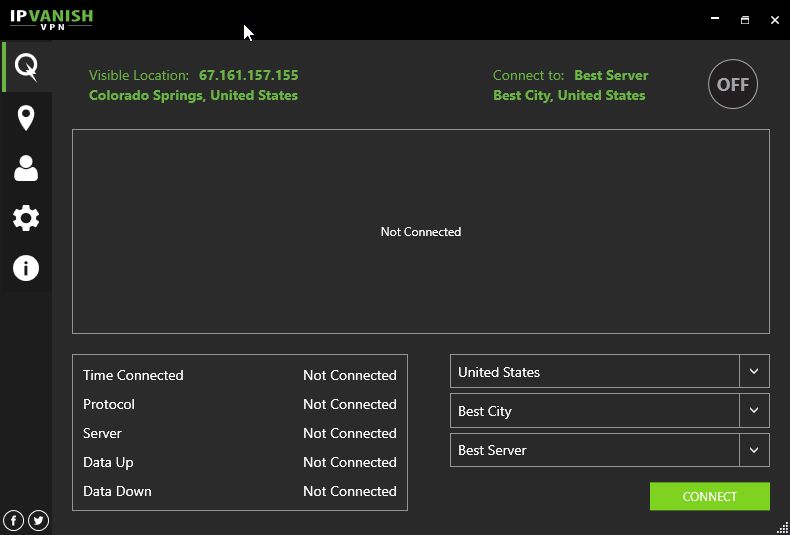
First, open up IPVanish. Your screen should look something like this:
Before connecting on the bottom right, click the Gear icon on the left and then the Connection tab.
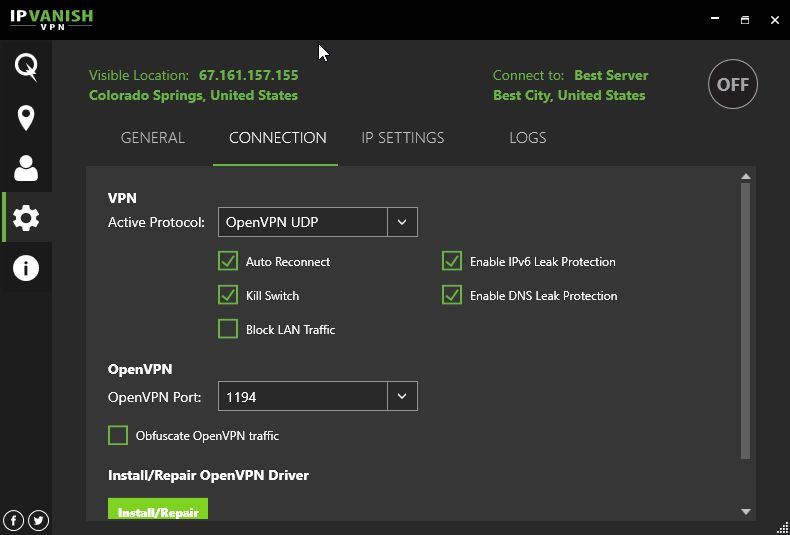
After verifying that your settings match ours, return to your main screen and then click “Connect.” (Note that enabling Kill Switch will disable all non-VPN internet traffic on your device, enhancing your security.)
Now, open your browser of choice and use your VPN provider’s IP-check tool to verify that your VPN connection is working properly and that there are no DNS or IP leaks. Once confirmed, you can proceed to launch Tor.
First, go ahead and download Tor Browser from the official Tor Project website if you don’t already have it. Once you’ve downloaded and installed it, open Tor Browser from wherever you saved it.

Click the “Connect” button within Tor Browser to connect to the Tor network.
Congratulations! You’re now using Tor with a VPN successfully. Be sure to do all of your most important browsing on the Tor Browser – save content streaming or downloads for your raw VPN connection (if possible) to maximize your performance.
IPVanish offers a 7-day money back guarantee which means you have a week to test it risk-free. Please note that Addictive Tips readers can save a massive 60% here on the IPVanish annual plan, taking the monthly price down to only $4.87/mo.
Using Tor with a VPN: Other Provider Options
Method 1: VPN-to-Tor
Any VPN-to-Tor implementation should work in pretty much the same way as the IPVanish tutorial. Just be sure that you have Kill Switch enabled and you aren’t prone to DNS/IPv6 leaks. Once you have those settings enabled, simply connect to your VPN provider of choice, verify they’re working properly and connect to Tor. If you’re still comparing services, these CyberGhost trial details can help you test another option before committing. Using Tor with a VPN this way is the most straightforward approach for most users.
Method 2: Tor-to-VPN
A PORTAL router requires one of the supported routers listed on this page and OpenWRT. Verify that your hardware is compatible before going through their setup tutorial. Once you’ve verified that this is the case, this is a one-and-done solution that you don’t need to think about after you’ve already enabled it.
Whonix can be used on your pre-existing computer, but will also require you download and install VirtualBox. Follow tutorials for both, and within your Whonix VM, install and run your VPN software the same way you would normally on your desktop.
Before going down this route, it’s important to understand its real limitations. When you route VPN traffic over Tor, your VPN provider does not see your home IP address — but that is not the same as being invisible to them. The provider can still log your account credentials, the payment method you used to sign up, connection timestamps, and the fact that your traffic is arriving from a Tor exit node.
A determined investigator could use that billing and account metadata to identify you, regardless of the routing order. This method is also advanced, not widely supported by mainstream VPN providers, noticeably slower due to Tor’s latency, and unnecessary for most everyday use cases. Only pursue it if you have a specific, well-understood reason to obscure your Tor exit traffic from a destination service, and you have fully vetted your VPN provider’s logging and payment practices.
When a Bridge Is Better Than Using Tor with a VPN
Many people reach for a VPN when they find that Tor is blocked or that their ISP can detect Tor connections. In a lot of those situations, a Tor bridge is actually the more appropriate — and simpler — solution. Bridges are unlisted Tor relays that are harder for ISPs and network operators to identify and block. They are built directly into Tor Browser and require no additional software or subscription.
Here is a straightforward decision guide to help you choose the right tool for your situation:
- Use standard Tor Browser if your goal is general private browsing and Tor is accessible on your network. No VPN or bridge is needed for typical privacy use.
- Use a Tor bridge if Tor is censored, blocked, or throttled on your network or in your country. In Tor Browser, go to Connection Settings and select a built-in bridge type such as obfs4 or Snowflake. This is the Tor Project’s recommended first step for users in restrictive environments.
- Consider Tor over VPN (VPN-to-Tor) only if you specifically need to prevent your ISP from knowing you use Tor at all, and you are comfortable placing trust in a verified no-logs VPN provider. Understand that this shifts — rather than eliminates — risk.
The key takeaway is that VPNs and bridges solve different problems. Bridges address access and censorship at the network level without introducing a third-party provider into the trust chain. A VPN adds a commercial service that you must trust not to log or expose your data. For most users in censored regions, trying a bridge first is the right call before adding the complexity and cost of a VPN.
Conclusion
And that’s it! We hope this tutorial helped you learn how to use Tor with a VPN and implement your connections effectively, or at least answered any questions you may have had about the two networking implementations and why they might be used together. Feel free to sound off in the comments below if you need any assistance!
If you need a VPN for a short while when traveling for example, you can get our top ranked VPN free of charge. NordVPN includes a 30-day money-back guarantee. You will need to pay for the subscription, that’s a fact, but it allows full access for 30 days and then you cancel for a full refund. Their no-questions-asked cancellation policy lives up to its name.

