Is Crunchyroll Down? Here’s How to Fix It
Is Crunchyroll down? If you’re having trouble streaming, know that you’re not alone; Crunchyroll sometimes runs into issues that can interrupt your streams. Whether it’s a loading error, a frozen screen, or the app just refusing to open, these hiccups can be frustrating and make you wonder if Crunchyroll is down right now.
In the U.S., Crunchyroll is the go-to spot for anime fans. It offers everything from classic series to brand-new releases, plus extras like OVAs, Asian dramas, and even mobile games through its Game Vault. It’s also popular globally, with tons of users accessing it daily, including many who connect from outside the US using VPNs to get around regional blocks.
Still, like any major streaming service, Crunchyroll can sometimes be down or experience technical issues, and that’s what we’re here to help you troubleshoot and understand.
Editor's Pick September 2026


Is Crunchyroll Down? Why It Happens
Wondering why Crunchyroll is down? There are many reasons why Crunchyroll may stop working or fail to load properly, including:
- Limited bandwidth or local internet connection issues
- Server outages or site-wide technical problems
- Interference caused by ad blockers
- Incorrect or conflicting VPN settings
- Problems with DNS servers
- Firewall or antivirus blocking Crunchyroll’s services
We will guide you through these common causes step-by-step, helping you find out if Crunchyroll is down for everyone or just you.
What Kind of Crunchyroll Problem Are You Seeing?
Not all Crunchyroll problems are the same, and knowing your exact symptom is the fastest way to find the right fix. Here is a quick symptom guide to point you in the right direction before you start troubleshooting.
App Not Loading or Black Screen
If the Crunchyroll app opens to a black screen or refuses to load at all, try these steps:
- Force-close the app and reopen it
- Restart your device
- Clear the app cache (see Step 6 for instructions)
- Check the Crunchyroll status page to rule out a service-wide outage
Login or Sign-In Failures
If you can reach the Crunchyroll site or app but cannot sign in, the issue is likely account- or session-related rather than a full outage:
- Clear your browser cookies or app cache, then try again
- Disable any VPN or proxy and attempt to log in on your actual network
- Log out of all other devices via Settings > Device Management
- Check DownDetector to see if others are reporting login issues specifically
Buffering or Slow Playback
Constant buffering usually points to a network or bandwidth problem rather than Crunchyroll being fully down:
- Pause other downloads or streams on your network
- Restart your router and modem
- Switch from Wi-Fi to a wired Ethernet connection if possible
- Try a different DNS server such as Google DNS (8.8.8.8) or Cloudflare (1.1.1.1)
Poor Video Quality
If video is playing but looks blurry or keeps dropping resolution, this is almost always a bandwidth issue:
- Manually lower the video quality in the player settings
- Test on mobile data to see if your home network is the bottleneck
- Close other browser tabs and background apps consuming bandwidth
Server Connection Errors
If you see explicit error messages about server connections or timeouts, check for a confirmed outage first, then:
- Disable your antivirus or firewall temporarily to test whether it is blocking Crunchyroll
- Switch browsers or try the Crunchyroll app instead of the website
- Change your DNS settings
Missing Titles or Episodes
If a specific show or episode has disappeared, this is almost never a sign that Crunchyroll is down. It is most likely a licensing or regional availability issue:
- Check whether the title is available in your country on the Crunchyroll website
- Disable any active VPN and recheck — an unexpected IP location can hide content
- Search the Crunchyroll help center for licensing announcements related to the title
What to Do When You Think Crunchyroll Is Down
- Troubleshoot your internet connection
- Log out of other devices
- Check the Crunchyroll server status
- Disable ad blockers
- Disable your antivirus or firewall
- Clear your browsing data
- Check your VPN settings
- Change your DNS settings
- Reset the Crunchyroll app
- Reinstall the Crunchyroll app
- Contact Crunchyroll support
1. Troubleshoot Your Internet Connection
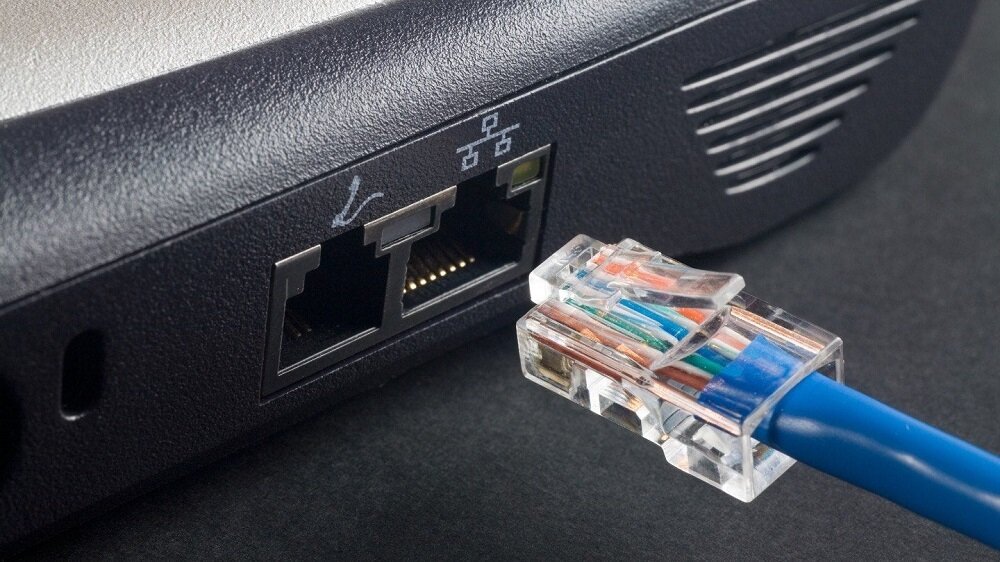
Before concluding that Crunchyroll is down, the first step is to verify your internet connection. Check that your Wi-Fi signal is stable or your Ethernet cable is securely plugged in. Sometimes, local network issues are the real culprit behind Crunchyroll not loading.
Public or work networks may have restrictive firewalls that block Crunchyroll streaming. Try switching to a different network or use a mobile hotspot if possible to see if the issue persists.
Also, keep in mind your bandwidth may be limited if multiple devices are streaming simultaneously. Pausing other streams or downloads can help improve Crunchyroll playback.
Quick Tip: Refresh the page or restart the Crunchyroll app to re-establish a connection before moving on.
2. Log Out of Other Devices
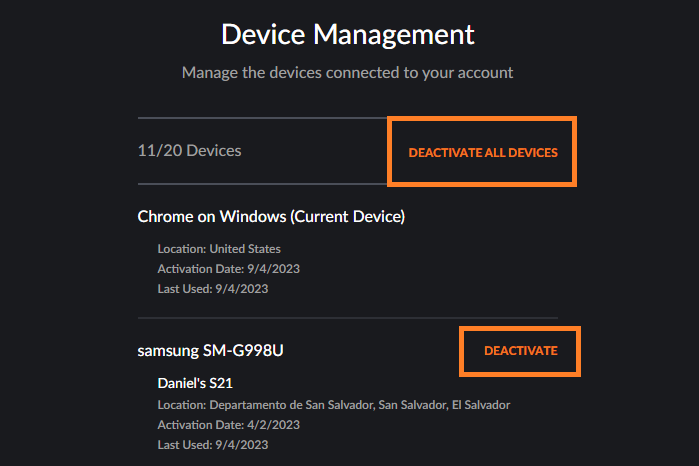
Is Crunchyroll down for you because of too many active sessions? If your account is logged in on several devices, especially across regions or with VPNs, it may cause playback errors.
Go to Settings > Device Management on your Crunchyroll account and sign out of all devices. Then log back in only on the device you want to use. Your plan limits simultaneous streams as follows:
- Fan Plan: 1 device
- Mega Fan Plan: 4 devices
- Ultimate Fan Plan: 6 devices
Try Another Browser, Device, or Network
One of the fastest ways to figure out whether Crunchyroll is actually down — or whether the problem is specific to your setup — is to test it somewhere else. This isolation step can save you a lot of unnecessary troubleshooting.
Test in a Different Browser
If you normally use Chrome, try Firefox, Safari, or Edge. If Crunchyroll loads fine in the second browser but not the first, the problem is browser-specific — likely a rogue extension, corrupted cache, or browser setting. In that case, focus your troubleshooting on that browser rather than assuming a service outage.
Test on a Different Device
Try Crunchyroll on your phone if it is failing on your TV, or on your laptop if it is failing on your console. If it works on one device but not another, the issue is device-specific — such as an outdated app, a software bug, or a platform-level problem on that device. This is especially common with smart TVs, Xbox, Android TV boxes, and older mobile devices.
Test on a Different Network
Switch from your home Wi-Fi to your phone’s mobile data hotspot and try loading Crunchyroll again. If it works on mobile data but not on your home Wi-Fi, the problem is local — likely your router, your ISP, or your DNS settings — not Crunchyroll’s servers. This tells you to focus on your network rather than waiting for Crunchyroll to fix anything on their end.
3. Check the Crunchyroll Server Status
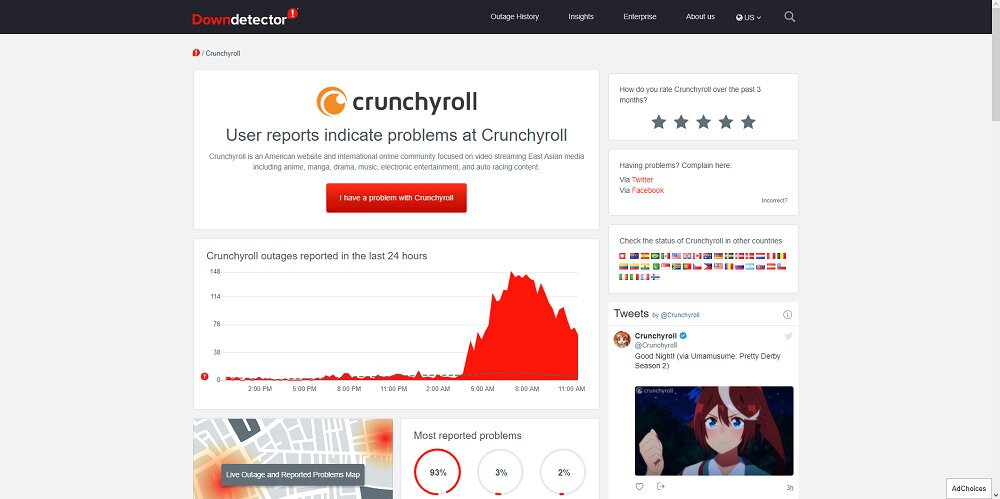
To confirm if Crunchyroll is down for everyone, check real-time server status websites like DownDetector. Crunchyroll also maintains its own status page at status.crunchyroll.com.
However, checking status pages is not just a yes-or-no question. Crunchyroll can appear fully operational while only certain components or specific regions are experiencing problems. Here is how to get a clearer picture:
- Check Crunchyroll’s official status page at status.crunchyroll.com first. This will confirm whether Crunchyroll has acknowledged any active incidents affecting their infrastructure.
- Compare with DownDetector’s live spike chart and issue categories. DownDetector breaks reports down into buckets such as video streaming, app problems, server connection, login, and slow performance. A spike in one category — for example, login failures only — tells you this is a partial issue, not a full outage.
- Look at recent user reports and the DownDetector heat map to see whether problems are concentrated in a specific country, city, or platform. If reports are clustered in one region or only on the mobile app, the problem may not affect you at all — or may require a different fix than a full outage would.
The key insight here is that a partial or regional outage is common. Crunchyroll’s website might load perfectly while the Android app fails, or streaming might be broken in one country while working everywhere else. Always match the reported issue type to your own symptom before deciding whether to wait or keep troubleshooting locally.
If servers are down or experiencing issues, your only option is to wait until the Crunchyroll team resolves the problem.
4. Disable Ad Blockers
Sometimes, Crunchyroll may appear down or fail to load because ad blockers are preventing ads that generate revenue for the service from loading properly. This is common for free-tier users who see ads during shows.
If you use an ad blocker, try disabling it or whitelisting Crunchyroll to see if that fixes the streaming problem.
For example, in Google Chrome, you can disable your ad blocker by typing chrome://extensions in the address bar and toggling off the extension.
Note: Also check for video player extensions that might interfere with Crunchyroll.
5. Disable Your Antivirus or Firewall Temporarily
Your antivirus or firewall might mistakenly block Crunchyroll’s content or servers. Temporarily disabling these security tools while streaming Crunchyroll may resolve playback issues.
Remember to enable your antivirus and firewall again after you finish watching to keep your system protected.
6. Clear Your Browsing Data
Corrupted or outdated browser cache and cookies can cause Crunchyroll to fail loading properly. Clearing your browsing data might help if Crunchyroll seems down only in your browser.
Remember to backup saved passwords before clearing data. In Google Chrome, press Ctrl + Shift + Del, select all boxes, choose “All time” as the time range, and clear the data. Then restart your browser.
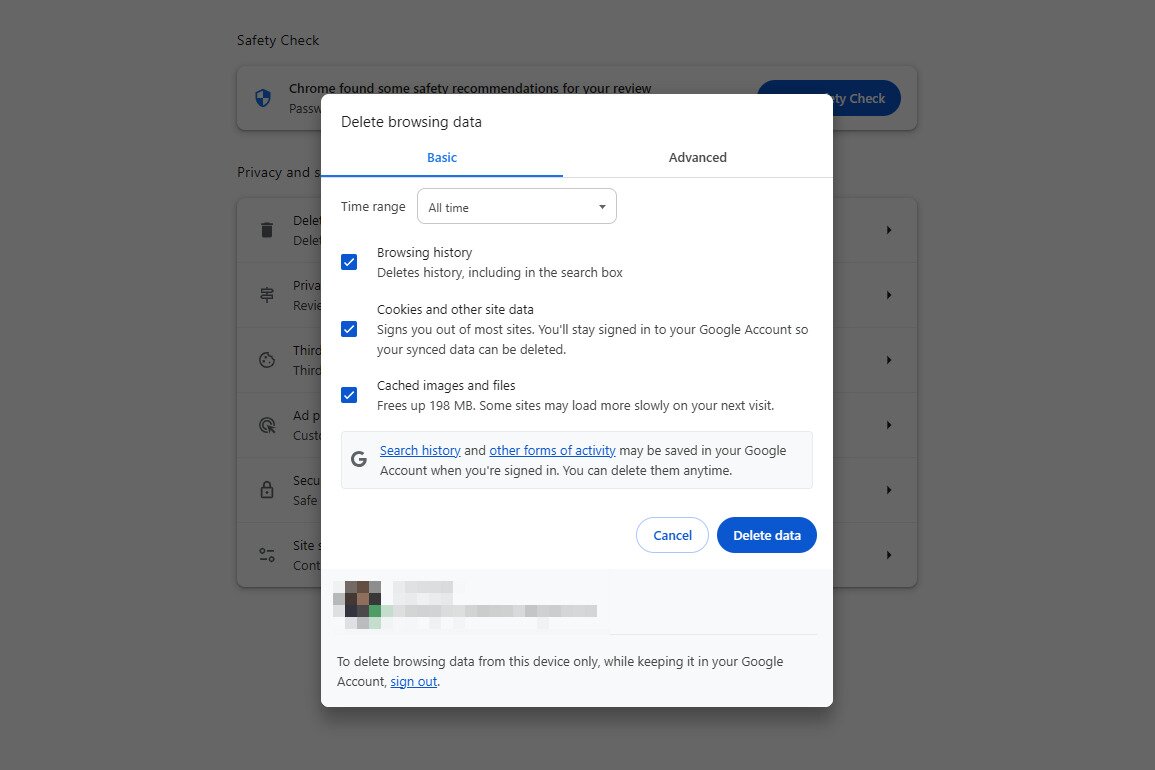
Keep in mind that the browser steps above only help if you are using Crunchyroll on the web. If you use the Crunchyroll app on a phone, tablet, TV, or console, you need device-specific steps instead.
Clear Cache on Android
Go to Settings > Apps > Crunchyroll > Storage > Clear Cache. This removes temporary files without affecting your account. If the problem persists, tap Clear Data as well — note that this will sign you out of the app, so have your login details ready before you do it.
Clear Cache on iPhone or iPad
iOS does not offer a standalone cache-clear button for individual apps. The equivalent fix is to force-close the Crunchyroll app by swiping it away in the app switcher, then reopen it. If that does not help, go to Settings > General > iPhone Storage > Crunchyroll and tap Delete App, then reinstall it from the App Store.
Clear Cache on Smart TVs and Consoles
Most smart TV platforms (such as Samsung, LG, Roku, and Fire TV) and gaming consoles (PlayStation, Xbox) do not provide a separate cache-clear button for individual apps. The practical equivalent is to force-close the Crunchyroll app, perform a full power restart of the device (unplug from power for 30 seconds if possible), and relaunch the app. If issues continue, uninstall and reinstall the Crunchyroll app from your device’s app store — this is the most reliable cache reset available on these platforms.
7. Check Your VPN Settings
Crunchyroll is available in many countries, but catalog availability varies by region. If you are using a VPN, proxy, or have recently changed your IP address, that can trigger loading errors, sign-in failures, or playback problems — even if the Crunchyroll service itself is running perfectly.
Start by disabling your VPN entirely and testing Crunchyroll on your normal network connection. This is the quickest way to confirm whether the VPN is the cause. If Crunchyroll works with the VPN off, the issue is your VPN configuration rather than a service outage.
If you need to use a VPN for privacy reasons, reconnect to a server in your actual country or the nearest supported region rather than routing through a location that does not match your Crunchyroll account’s registered region. After switching VPN servers, clear your browser cookies or app cache to ensure Crunchyroll picks up the new location cleanly.
Also worth noting: if a specific show or episode appears to be missing, this is almost always a content licensing issue tied to your region rather than a sign that Crunchyroll is down. Availability genuinely differs by country, and a VPN that places you in an unexpected location can hide content you would otherwise have access to.
8. Change Your DNS Settings
Your default DNS servers may cause connectivity issues with Crunchyroll. Changing to a public DNS like Google DNS (8.8.8.8 and 8.8.4.4) or Cloudflare (1.1.1.1 and 1.0.0.1) might improve connection stability and resolve streaming problems.
Follow the steps to change DNS in your Windows Control Panel as shown below:
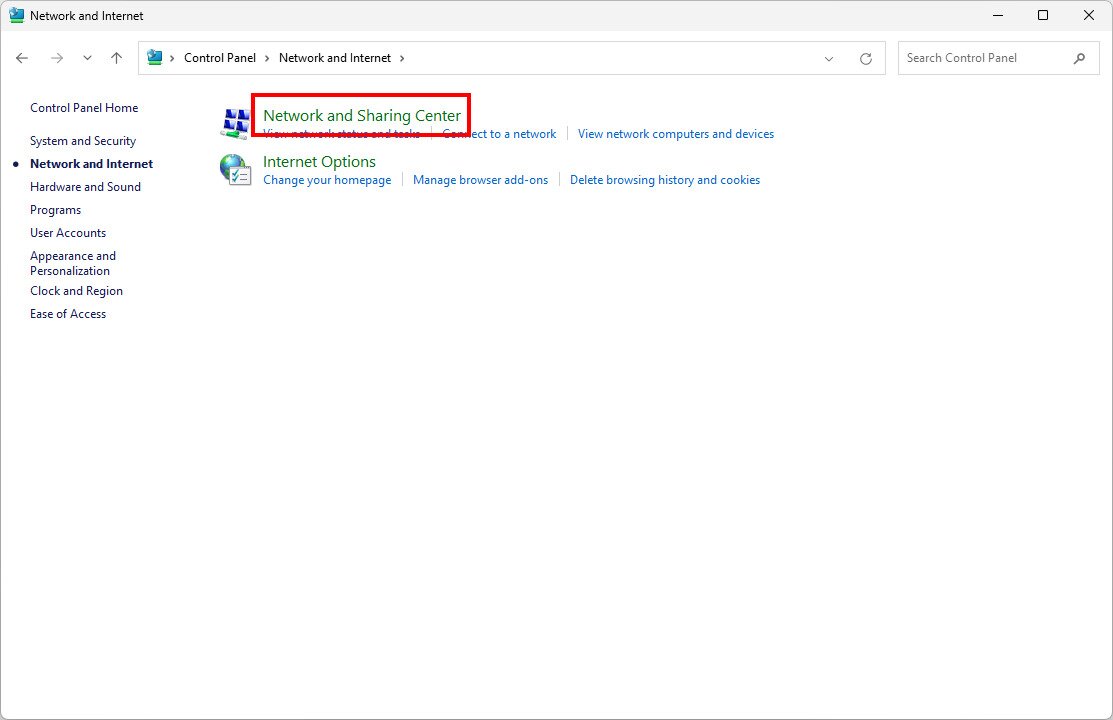
Remember to save your changes and flush your DNS cache to apply.
9. Reset the Crunchyroll App
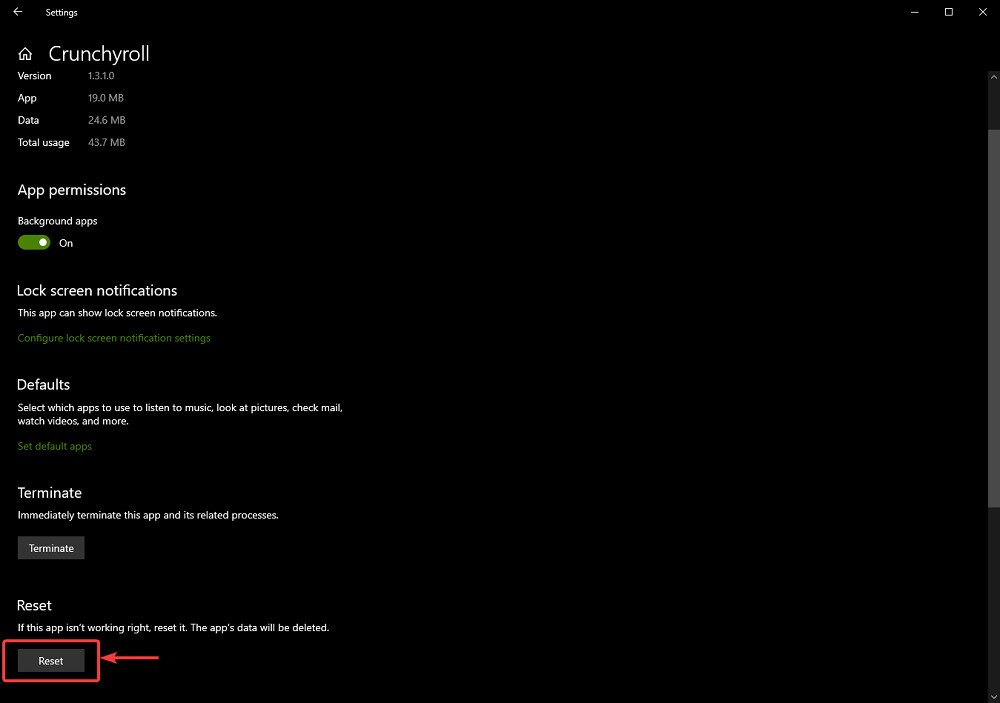
If you use the Crunchyroll app from the Microsoft Store and it’s acting up, resetting the app can fix playback issues that make it seem like Crunchyroll is down.
- Open Settings with Win + i.
- Go to Apps > Installed apps.
- Find Crunchyroll and select the three dots.
- Choose Advanced options.
- Scroll down and click Reset.
10. Reinstall the Crunchyroll App
If resetting doesn’t fix the problem, uninstall and reinstall the Crunchyroll app to ensure you have the latest version free of bugs.
- Open Settings with Windows Key + i.
- Navigate to Apps > Installed apps.
- Locate Crunchyroll and click the three dots.
- Select Uninstall.
- Reinstall the app from the Microsoft Store and test if it works.
11. Contact Crunchyroll Support
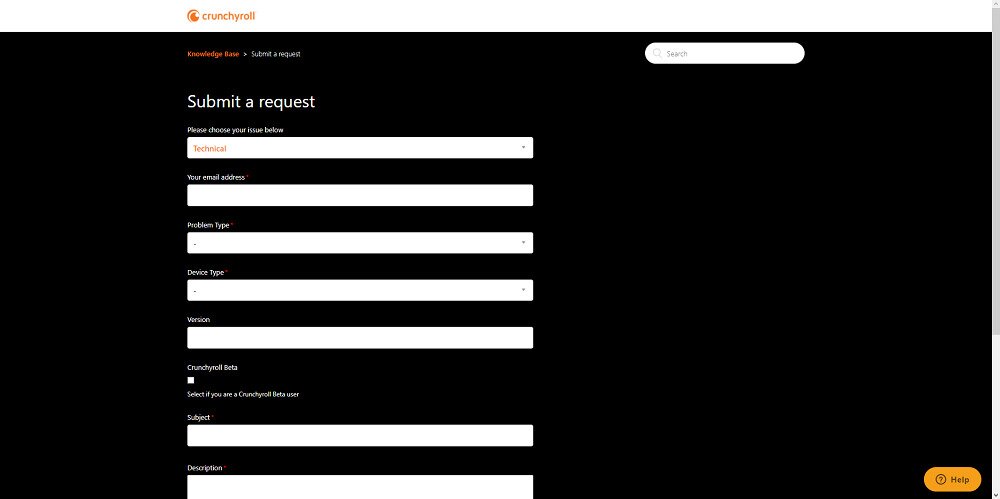
If none of these solutions fix your problem and you’re still wondering, “Is Crunchyroll down?”, it might be time to reach out to Crunchyroll Support. Provide them with as many details as possible to get personalized help.
Why Supporting Crunchyroll and Creators Matters
When Crunchyroll is down or not working, it can be tempting to seek unofficial streams or downloads. But using legitimate services helps support the creators and studios who produce the anime and content we all love.
Piracy sites don’t pay the artists or developers, which threatens the future of anime production. Supporting Crunchyroll ensures more shows, better quality, and a healthier industry.
Waiting out temporary outages or issues is part of supporting the ecosystem. So, next time you ask, “Is Crunchyroll down?”, remember that patience helps keep the content coming.
Crunchyroll Not Working? Final Thoughts
By following this guide, you should be able to diagnose why Crunchyroll is down or not working on your device and find solutions to get back to streaming your favorite anime.
Is Crunchyroll down for you right now? Facing other issues with Crunchyroll not loading or playback problems? Let us know in the comments below!
Don't miss this great deal