How To Find Contacts On Instagram How To Find Contacts On Instagram

If you’ve ever wondered how to find contacts on Instagram, you’re not alone. With everyone being on Instagram nowadays, it’s no surprise that people want to extend their reach to even wider pools of people and communities.
Whether you’re setting up a new account or just want to find more people to follow, the essential first step would be finding your phone contacts on Instagram.
Continue reading to find out more.
1. How to Find Contacts on Instagram via Contacts Syncing
Finding your contacts on the Instagram app can be easily done on mobile devices. Just follow these steps to sync your phone contacts with the Instagram app:
1. Open Instagram on your mobile device and sign in if necessary.

2. Tap on your profile picture at the bottom right of your screen.

3. Tap on the three lines icon (☰) on the top right of your screen.

4. Tap on Settings and privacy.

5. Tap on Accounts Center.

6. Tap on Your information and permissions.

7. Tap on Upload contacts and enable the toggle to sync your contacts. You can also reach contact syncing via Profile > Discover People / Follow and invite friends > Connect contacts.

8. Allow Instagram to access your contacts when prompted.

9. Tap on Allow when your device’s system asks for your permission.

Note: Menu labels can vary slightly by iPhone/Android app version. If you don’t see Upload contacts, look for Connect contacts or Discover People as you navigate through the menus.
If you change your mind about having your contacts synced with Instagram, you can turn off contact syncing by toggling off the option in the same menu. However, it’s important to understand that this only stops future uploads — it does not automatically remove contacts you’ve already uploaded to Instagram. To delete previously synced contacts, go to Accounts Center > Your information and permissions > Upload contacts, then select the option to manage or delete your uploaded contacts. Keep in mind that removal may take some time to fully process.
2. How to Find Contacts on Instagram via Discover People
Another way of syncing your phone contacts would be using the Discover People option. Here’s how to do it this way:
1. Navigate to the Instagram app on your mobile device, and make sure you’re signed in.

2. Head to your profile by tapping on your profile picture at the bottom right of the screen.
3. Tap on the Discover People button (with the person and plus sign icon) next to Share Profile.

4. Here, you can see people who are suggested to you by Instagram algorithms. Tap on See All.

5. Next, tap on the Connect button next to Connect Contacts.

6. Tap on Allow Access when prompted by the app.
7. Also allow access to contacts prompted by the device system.
It is important to note that Instagram does not directly show you all the synced contacts’ Instagram accounts but may suggest them to you. According to Instagram’s official Help Center, contact syncing is designed to help you discover people you may know rather than display a complete list of matched accounts.
If you can’t seem to find a certain person that you have their phone number, this might be because they haven’t linked their phone number to their Instagram account.
Why your contacts aren’t showing on Instagram
Synced your contacts but not seeing the people you expected? This is one of the most common questions after setting up contact syncing, and it’s worth understanding why it happens.
Instagram does not give you a browsable list of every contact match. Instead, it uses your synced contacts behind the scenes to generate account suggestions — the people you see under “Suggested for you” or in Discover People. If someone doesn’t appear there, here are the most likely reasons:
– They don’t have an Instagram account. If your contact hasn’t signed up, there’s nothing to match.
– They didn’t use that phone number or email on Instagram. Instagram can only match contacts to accounts where the person registered with or added that same number or email address.
– Their discoverability settings prevent suggestions. Users can limit whether others can find them through contacts, so their account may exist but simply won’t surface as a suggestion.
If syncing worked but you’re still not seeing expected results, try these practical checks:
– Confirm phone contact permission is enabled. On iPhone, go to Settings > Privacy & Security > Contacts and make sure Instagram is set to allow access. On Android, go to Settings > Apps > Instagram > Permissions > Contacts.
– Give it some time. Newly synced contacts don’t always generate suggestions instantly. Wait a little while, then check Discover People again.
– Update the Instagram app. An outdated version can cause syncing issues. Check the App Store or Google Play for any pending updates.
– Re-sync your contacts. Try turning contact syncing off, waiting a moment, and then turning it back on to trigger a fresh upload.
Can you find someone on Instagram by phone number?
The short answer is: not directly. Instagram’s search bar does not support reverse phone-number lookups — typing a phone number into the search field won’t pull up someone’s profile.
The workable method is contact syncing. When you sync your phone contacts (as described in the sections above), Instagram checks whether any of those contacts signed up using that phone number. If they did, their account may appear as a suggested person for you to follow. It’s an indirect match rather than an instant search result.
If contact syncing doesn’t surface the person you’re looking for, here are reliable fallback methods:
– Search by username. If you know any part of their Instagram handle, the search bar is the fastest route.
– Search by full name. Instagram’s search returns results by display name as well as username.
– Check mutual followers. If you share a mutual connection, browse that person’s followers or following list to find who you’re looking for.
– Connect via Facebook. If you’re connected on Facebook, linking your Facebook account to Instagram (see the section below) can surface friends who are also on Instagram.
How to find my Facebook friends on Instagram?
Since Instagram and Facebook are both owned by Meta, the former social platform encourages you to find your Facebook friends on it and connect to them. You can do this by following these steps:
1. Head over to the Instagram app on your mobile device and sign in if needed.
2. Go to your profile page by tapping on your profile picture, located at the bottom right of your screen.
3. Open the Discover People panel by tapping on its icon next to Share Profile.
4. Tap on the See All option at the top right of the panel.
5. Tap on Connect next to Connect to Facebook.

6. If you have the Facebook app on your device and you’re already signed in via that app, you will see your Facebook account. Tap on Continue.

7. Tap on Yes, Finish Adding to connect your Facebook account.

8. You can sync your name and photo or skip this step by tapping on Not Now.

If you don’t have a Facebook account logged in on your device, you can log in, and you will see your account visible at step 9.

Using search to find contacts on Instagram
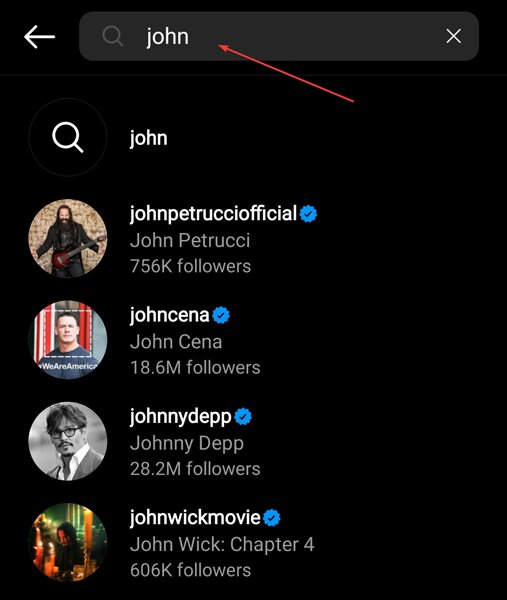
The easiest way to find contacts on Instagram is to use the search bar on the app or web version. Similar techniques can be used on other platforms, such as learning how to find creators on OnlyFans. On your mobile device, follow these steps:
1. Launch the Instagram app on your mobile device.
2. Tap on the magnifying glass icon at the bottom of the screen.
3. Select the Search bar by tapping on it.

4. Type the username or name of the person you wish to connect to and explore in the results!
Summary
Instagram has a user-friendly interface that makes it straightforward to find contacts on Instagram. Thanks to this feature, you can easily find your friends and contacts using the Contact Sync option in Instagram’s Settings or the Search option.
If you’re an Instagram web version user, unfortunately, it is not possible to sync your contacts. However, you can search for people you know using the search bar at the top of the Instagram web page or by exploring the Suggestions For You tab on the right side of the page.
Lastly, to manage the contacts on the Instagram app, all you need to do is go to Settings and choose Manage Contacts.