Sportsurge – Watch Live Sports Streams Online Free
Sportsurge net is a popular online platform that provides free live-streaming links for a wide range of sports events. It’s a hub for sports enthusiasts in over 150 countries to watch their favorite games, matches, and tournaments from various leagues and competitions around the world, including the NBA, NFL, NHL, MMA, NCAA, and more.
The Sportsurge platform actually started out on Reddit, where links to watch live sports online were aggregated from various places, but sharing those links ended in 2019 when Reddit banned such content, citing copyright issues.
Nevertheless, sports streaming lives on through Sportsurge, allowing fans to conveniently find reliable streams without the need for paid subscriptions or cable TV. It’s gained popularity due to its user-friendly interface, high-quality streams, and the ability to connect fans from different countries and backgrounds through their shared passion for sports—hence the name, Sportsurge!
Editor's Pick September 2026


Table of contents
How to Use Sportsurge Net?
Sportsurge net is a free website, not an app, so it works from anywhere you can open a web browser, including your computer or phone. There’s also Chromecast support for Sportsurge, so you can stream sports on your TV, too.
So how do you do it? There’s no need to sign up to stream sports once you access Sportsurge net; just follow these steps:
- Visit the Sportsurge website. Important: Sportsurge domains change frequently, and no single URL is permanent. Some previously well-known domains have been seized by law enforcement — for example, sportsurge.ws currently displays a seizure notice. Active mirrors may redirect to different TLDs at any time; search results currently point to addresses such as sportsurge.ir and mysportsurge.ws, among others. Always do a quick search for the current working mirror before you try to access the site, and do not assume any one URL will continue to work.
- Find your favorite game from the list and wait for it to start, or look for a stream that says LIVE if you want to watch live sports.

- Select the free event to be taken to a list of live streams for that particular game.
- Choose one of the stream links. If you want an ad free experience, look for the number of ads off to the right.

- If you see a button that says something like Click Here to Watch, then select it, otherwise the stream will start immediately.

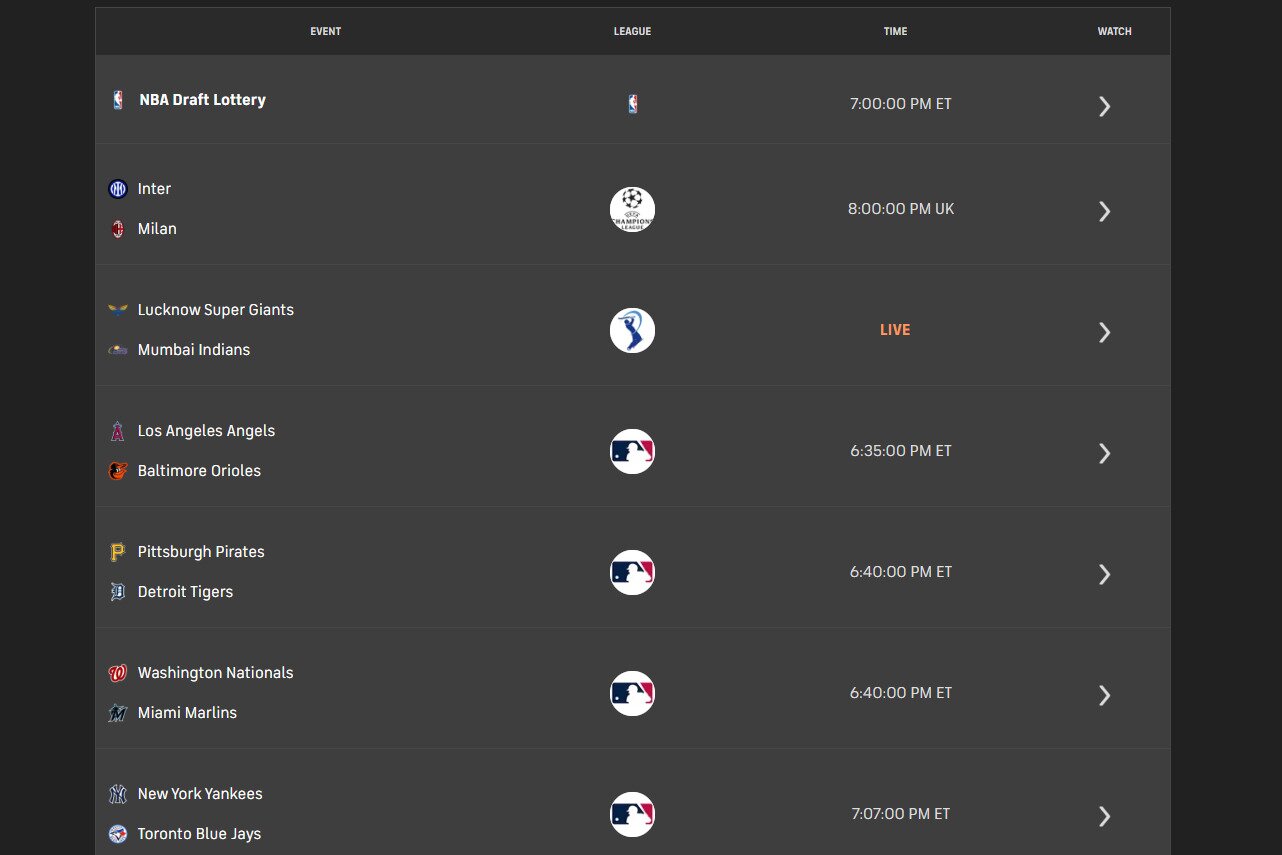
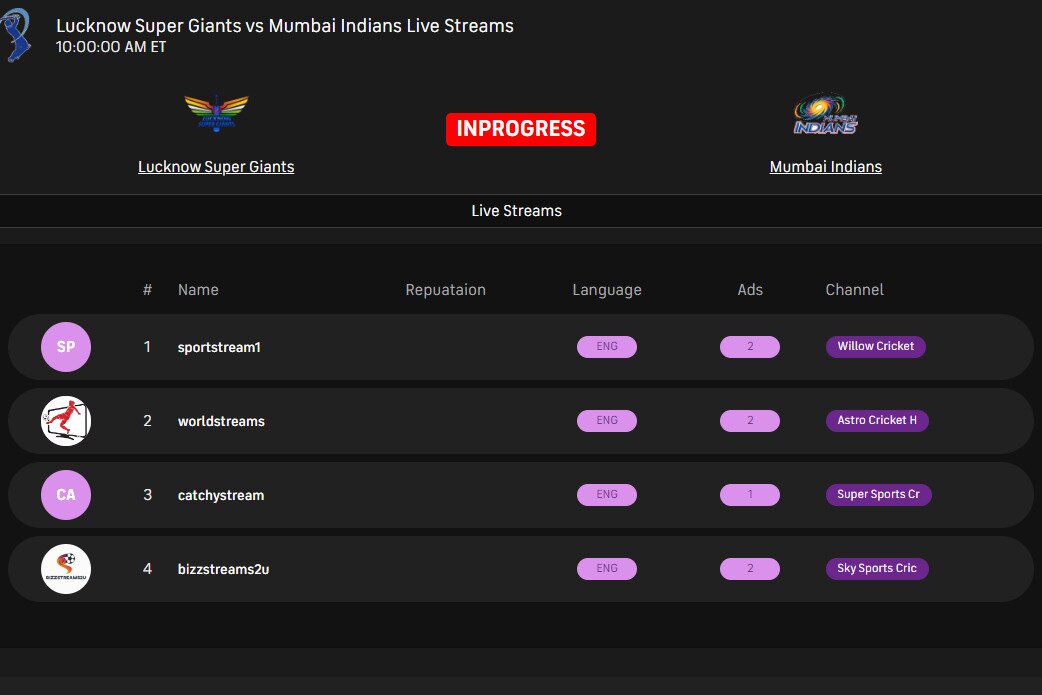

If you want sports streaming on your TV with Sportsurge net, just visit the final stream page (Step 5) and then cast the page to your Chromecast! It’s that easy to watch live sports online through your big screen.
Whether it’s baseball, cricket, football, or some other sport, you can stream all your favorite games through the Sportsurge web app, including Formula 1 live streams. Platforms like Sportsurge are especially popular during major international tournaments, making it easy to watch World Cup matches and other global sporting events from anywhere in the world.
- Stream soccer
- Stream NBA
- Stream NHL
- Stream MLB
- Stream Formula 1
- Stream MMA
- Stream NFL
- Stream boxing
- Stream XFL
- Stream cricket
- Stream NCAA
- Stream CFB
Is There an Official Sportsurge App?
When you search for “Sportsurge” in app stores or on Google, you will likely encounter multiple Android app listings using the Sportsurge name. It is important to understand that these apps are not the same thing as the browser-based link-aggregator experience described in this article — they are separate, third-party products that happen to share the name.
Most Sportsurge-branded app listings claim to offer live scores, fixtures, standings, match previews and highlights, and broadcasting details for a range of sports. Many also include disclaimers stating that they do not host or stream copyrighted content directly. In practice, this means the apps function more as sports information and schedule tools than as direct streaming platforms in the way the Sportsurge website operates.
Before installing any app using the Sportsurge name, there are some safety considerations worth knowing. Play Store listings for these apps show varying data-safety disclosures. Some collect device identifiers, and the encryption and data-deletion policies listed are inconsistent across different listings. You should treat any “Sportsurge” app as an unaffiliated third-party product, carefully review the permissions it requests before installation, and consider whether the data it collects is something you are comfortable sharing. When in doubt, the browser-based approach described above requires no app installation at all.
Safety Precautions When Using Sportsurge Net
When using Sportsurge net or any other online streaming platform, it’s essential to take necessary safety precautions to protect your device, personal data, and online identity. Here are some important measures to consider:
Importance of Using a VPN
Using a Virtual Private Network (VPN) is crucial when accessing Sportsurge net or any other online streaming platform. A VPN creates a secure and encrypted connection between your device and the internet, masking your IP address and location. This helps to protect you from potential cyber threats, such as hacking, malware, and data breaches.
By using a VPN, you can also avoid geo-restrictions and access content that may be blocked in your region—for example, Star Sports via VPN, or review this Eurosport VPN comparison if you need help choosing a provider. Additionally, a VPN can help to prevent your internet service provider (ISP) from throttling your connection or monitoring your online activities. When choosing a VPN, look for a reputable provider that offers strong encryption, a no-logs policy, and fast connection speeds.
Installing Ad-Blockers
Ad-blockers are software programs that block unwanted ads and malware from loading on your device. When using Sportsurge net, ad-blockers can help to prevent pop-up ads, banners, and other types of malicious content from appearing on your screen. Ad-blockers can also help to improve your browsing experience by reducing page load times and preventing annoying ads from interrupting your streaming sessions.
However, it’s essential to note that some ad-blockers may not be compatible with all devices or browsers, so be sure to choose a reputable ad-blocker that is compatible with your device and browser. Additionally, some streaming platforms may require you to disable ad-blockers to access their content, so be sure to check the platform’s terms of use before installing an ad-blocker.
Ensuring Up-to-Date Antivirus Software
Having up-to-date antivirus software is vital when using Sportsurge net or any other online streaming platform. Antivirus software helps to protect your device from malware, viruses, and other types of cyber threats that can compromise your personal data and device security. When using Sportsurge net, make sure that your antivirus software is updated with the latest virus definitions and security patches.
This will help to prevent malware and other types of cyber threats from infecting your device and compromising your personal data. Additionally, consider installing anti-malware software that can detect and remove malicious programs from your device. By taking these precautions, you can enjoy a safe and secure streaming experience on Sportsurge net and other online platforms. Regularly scan your device for malware and update your antivirus software to ensure that you have the latest protection against emerging threats.
Legal Implications of Using Sportsurge Net
When using Sportsurge net or any other online streaming platform, it’s essential to understand the legal implications of accessing and streaming copyrighted content. Here are some important considerations:
Copyright Considerations
Sportsurge net may provide access to copyrighted content, such as live sports events, TV shows, and movies, without obtaining the necessary licenses or permissions from the copyright holders. This can raise concerns about copyright infringement, as the platform may be distributing copyrighted material without the owner’s consent.
As a user, it’s essential to be aware of the potential copyright implications of using Sportsurge net and to understand that accessing copyrighted content without permission may be a violation of copyright law. Copyright holders may take legal action against individuals who infringe on their rights, so it’s crucial to be mindful of the potential consequences.
Regional Restrictions
Sportsurge net may also be subject to regional restrictions, which can limit access to certain content based on the user’s geographical location. These restrictions can be imposed by copyright holders, sports leagues, or other entities that own the rights to the content. When using Sportsurge net, you may encounter regional restrictions that block access to certain content, and attempting to circumvent these restrictions may be a violation of the platform’s terms of use and copyright law. It’s essential to respect these regional restrictions and to only access content that is available in your region.
Potential Consequences
Using Sportsurge net or any other online streaming platform to access copyrighted content without permission can have potential consequences. These consequences can include, but are not limited to:
- Copyright infringement lawsuits: Copyright holders may take legal action against individuals who infringe on their rights, which can result in significant fines and penalties.
- ISP throttling: Internet service providers may throttle or slow down your internet connection if they detect copyright infringement or other suspicious activity.
- Device malware: Malware and other types of cyber threats can infect your device when accessing copyrighted content from untrusted sources.
- Account suspension: Sportsurge net or other streaming platforms may suspend or terminate your account if they detect copyright infringement or other terms of use violations.
It’s essential to be aware of these potential consequences and to take steps to protect yourself and your device when using online streaming platforms. This can include using a VPN, installing ad-blockers, and ensuring that your antivirus software is up-to-date.
By understanding the legal implications of using Sportsurge net and taking steps to protect yourself, you can enjoy a safe and secure streaming experience while also respecting the rights of copyright holders. It’s essential to be mindful of the potential consequences of copyright infringement and to only access content that is available through legitimate and licensed channels.
User Experience and Reliability
When using Sportsurge net or any other online streaming platform, the user experience and reliability are crucial factors to consider. A smooth and seamless experience can make all the difference in enjoying your favorite sports and events. Here are some key aspects to consider:
Interface and Navigation
The interface and navigation of Sportsurge net are designed to provide a user-friendly experience. The platform features a clean and intuitive layout, making it easy to find and access your favorite sports and events. The homepage typically displays a list of upcoming events, and users can browse through various categories, such as football, basketball, and tennis, to find specific matches or leagues. The search function is also available, allowing users to quickly find what they’re looking for. However, the interface can be cluttered with ads, which may slow down the loading time and affect the overall user experience.
Stream Quality and Buffering
The stream quality on Sportsurge net can vary depending on the source and availability of the stream. Some streams may be of high quality, with clear video and audio, while others may be of lower quality, with pixelation, lag, or buffering issues. Buffering can be frustrating, especially during live events, and may occur due to a slow internet connection, high traffic, or issues with the stream itself.
Sportsurge net may not have control over the quality of the streams, as they often rely on third-party providers. However, the platform may offer features like adjustable video quality, which can help mitigate buffering issues.
Reliability of Third-Party Links
Sportsurge net often relies on third-party links to provide access to sports streams. The reliability of these links can be a concern, as they may be subject to change or removal at any time. Some links may be broken, while others may lead to malicious websites or contain malware. Users should exercise caution when clicking on links, especially if they are unfamiliar with the source.
Sportsurge net may not be responsible for the content or safety of these links, and users should be aware of the potential risks. To minimize these risks, users can take precautions like using a VPN, installing ad-blockers, and keeping their antivirus software up-to-date.
In addition to these factors, users should also be aware of the potential for downtime or maintenance on the platform, which can affect the availability of streams. Sportsurge net may experience technical issues, such as server crashes or maintenance, which can impact the user experience. By being aware of these potential issues, users can plan accordingly and explore alternative options if needed. Overall, the user experience and reliability of Sportsurge net can vary, and users should be prepared for potential issues and take steps to mitigate them.
What Are the Alternatives to Sportsurge Net to Stream Sports?
Sportsurge net has one of the widest variety of sports you can watch today, but it’s not the only service out there that you can use if you love sports. Below is a list of other sites like Sportsurge that lets you watch live sports online from any device, like your desktop PC or mobile phone.
VIPLeague
Want to watch darts or horse racing? You can get those sport stream links here, plus, like Sportsurge, others like American football, fighting, moto GP, and more.
Pros: Unique sports, chat with other watchers, filter to show just live games.
Cons: Unnecessary and annoying popup ads when you click nearly any part of the page.
Crackstreams.me
If you like to direct message other people watching sports with you, this site has a Discord server link for just that. There are several thousand members.
Pros: Free from banner ads, huge variety.
Cons: Annoying popups.
BuffStream.io
Prefer to pick your sport stream by channel? Unlike Sportsurge, this web app lets you open an ESPN live TV stream, or FOX, BTN, CBS, SEC, ACC, etc.
Pros: Browse for a stream by channel, free from ads.
Cons: Odd site design, annoying popups.
720pStream
Use this live streaming service if Sportsurge net isn’t working. You might find unique links that let you watch your favorite game despite these other sport sites not working.
Pros: Attractive, easy-to-use website, chat with other people who are watching.
Cons: Fewer sport streams than other sites, lots of popups.
Overall, these Sportsurge alternatives are great options, but they don’t exceed the quality that Sportsurge net offers. For example, there are fewer popups and ads at Sportsurge net. Also, you can rate links poorly if they don’t work, which helps keep the site updated with high-quality links. If you’re looking for more options, check out our comprehensive guide to free sports streaming sites that offer a variety of ways to watch your favorite games online.
Official and Legal Streaming Alternatives
If you’re looking for official and legal ways to stream your favorite sports, there are several alternatives to consider. These platforms offer high-quality streaming, exclusive content, and a range of sports to choose from. Here are a few options:
ESPN+
ESPN+ is a popular streaming service that offers a wide range of sports content, including exclusive MLB, NHL, and MLS games, as well as original programming and documentaries. With ESPN+, you can stream live events, access exclusive content, and get personalized recommendations based on your interests. ESPN+ is available as a standalone service or as part of the ESPN app, and it’s a great option for fans who want to stay up-to-date with their favorite sports teams and players.
FuboTV
FuboTV is a streaming service that specializes in live sports, with a focus on soccer, NFL, MLB, and NHL games. It offers a range of channels, including sports networks like NFL Network, MLB Network, and NBA TV, as well as news and entertainment channels. FuboTV also includes features like cloud DVR, allowing you to record games and events to watch later, and a user-friendly interface that makes it easy to find what you’re looking for. With FuboTV, you can stream live sports to your TV, computer, or mobile device, making it a great option for sports fans who want to watch their favorite teams and players in action.
DAZN
DAZN is a global sports streaming service that offers a wide range of sports content, including boxing, MMA, and soccer. It’s known for its exclusive events, such as fight nights and championships, and its affordable pricing makes it a great option for fans who want to access high-quality sports content without breaking the bank.
DAZN also includes features like multi-game viewing, allowing you to watch multiple games at the same time, and a range of original programming and documentaries. With DAZN, you can stream live sports to your TV, computer, or mobile device, and it’s available in many countries around the world, making it a great option for international sports fans.
Accessing Sportsurge Net on Various Devices
To access Sportsurge net, you can use a variety of devices, making it easy to stay up-to-date with your favorite sports and events from anywhere. The following devices are supported:
PCs and Laptops
You can access Sportsurge net directly from your computer by visiting the website in any modern desktop browser, such as Chrome, Firefox, Edge, or Safari. No software installation is required. Here is how to get started:
- Open your preferred browser and search for the current active Sportsurge mirror (see the domain status note in the How to Use section above, as URLs change regularly).
- Install a browser-based ad blocker before you visit, as pop-up ads are common on the site and some can redirect to unwanted pages.
- Navigate to your sport, select the event, and choose a stream link. The stream will play in your browser window.
- For the best experience, use a wired internet connection or a strong Wi-Fi signal to reduce buffering.
Smartphones and Tablets
Sportsurge works on both Android and iOS devices through your phone’s or tablet’s mobile browser — no app download is needed to use the website itself. Follow these steps:
- Open Chrome, Safari, Firefox, or another mobile browser on your device.
- Search for the current working Sportsurge mirror and navigate to the site.
- Browse for your game, select a stream link, and the stream will load within the browser or in a compatible video player app on your device.
- If pop-ups are a problem, consider using a browser with built-in ad blocking, such as Brave, for a cleaner mobile experience.
Keep in mind that some stream embeds may not play correctly in all mobile browsers due to codec or autoplay restrictions. If one stream link does not load, try a different one from the list.
Streaming Devices (e.g., Fire TV, Roku)
There is no guaranteed native Sportsurge app available for Fire TV or Roku through their official app stores, so you will need to use a browser-based approach or cast from another device. Here are your main options:
Smart TV built-in browser: Many Smart TVs include a built-in web browser (such as Samsung Internet or the browser on LG webOS TVs). You can navigate to the current Sportsurge mirror directly from there. Be aware that Smart TV browsers often struggle with pop-up redirects and may not support all video player formats, so results can be inconsistent. Have a second stream link ready in case the first one does not load.
Casting from Chrome on a desktop: Once you have reached the final stream page (Step 5 in the How to Use section), click the three-dot menu in Chrome and select Cast. Choose your Chromecast or Chromecast-enabled TV from the list. Casting works best from the final stream page itself, not from the Sportsurge home page, because you need the video to be actively playing in your browser tab before casting it to the screen.
Screen mirroring from a phone: On Android, use the Cast or Screen Mirror function in your quick settings to mirror your phone’s display to a compatible TV or streaming stick. On iPhone or iPad, use AirPlay to mirror to an Apple TV or AirPlay-compatible TV. As with desktop casting, navigate to the final stream page on your phone first, then initiate the mirror. Note that some stream embeds may block casting; if that happens, try a different stream link from the list.
Sideloading a browser on Fire TV: On a Fire TV Stick, you can install the Silk browser (available in the Amazon App Store) and use it to visit the Sportsurge site directly on your TV. The experience is similar to a Smart TV browser — functional but potentially slow on pop-up-heavy pages, so an ad blocker installed within the browser is recommended if the option is available.