Why No-Logs VPNs Matter in 2025
If you’re searching for the best no log VPN, you’re already thinking about online privacy the right way. Virtual private networks (VPNs) are an effective way to encrypt your browsing activity and hide your location from third parties, giving you stronger online privacy. One crucial part of this protection is using a no-logs VPN.
These VPNs hide your internet traffic from your ISP and most outside parties aside from your VPN provider. A best no log VPN won’t store this information, keeping only what’s essential for operating the service. On the other hand, VPNs that do keep logs can sell this information to third parties or even turn it over to authorities, putting your privacy at risk.
Here we will discuss why a strict no-logs policy matters and which VPNs we recommend to protect your privacy to the fullest.
What is a No-Logs VPN?

A no-logs policy refers to a VPN provider’s data retention practices. Every VPN provider must keep a small amount of information, such as billing details and encrypted login credentials, but they should never store anything that identifies your browsing activity.
One major reason that users want a no-logs policy is the possibility of legal authorities requesting identifying data from their VPN provider. In many jurisdictions, the provider must comply, and if logs exist, this completely undermines your privacy. Of course, the simplest solution is not breaking the law in the first place, but some users still prefer this extra layer of protection.
Another risk of your VPN provider keeping logs is hacking. If a provider suffers a breach, that data can be exposed. If nothing identifiable is stored, nothing can be stolen—and the user is safe. For users who want to take privacy even further, services like identity removal review can help remove personal information from data broker sites, complementing the protection a best no log VPN provides.
Lastly, some shady VPNs, especially free services, quietly sell your data to third parties without your knowledge, usually for marketing or advertising purposes. This is one of the main reasons we rarely recommend a free VPN for privacy, though there are a few reputable exceptions.
Activity Logs vs Connection Logs
Even VPNs with no-logs policies keep some form of limited data. Understanding the differences can help you choose wisely:
- Connection logs: These include information such as the date you connected and the duration of your session, how much data was transferred, which VPN servers were used, and the incoming and outgoing IP addresses. You want to find a provider that keeps no connection logs or only the bare minimum needed for operations.
- Activity/usage logs: Include files downloaded, apps used, and specific websites visited. You want a VPN that keeps none of these.
- Full logs: Store all identifying information and directly tie your activity back to you. These are common in workplace settings, where privacy isn’t expected.
- Minimal logs: Temporary logs may be used by your VPN provider for troubleshooting or performance metrics. Customer data, such as payment details, are typically kept permanently. To stay more anonymous, many privacy-focused users choose crypto payments for additional anonymity.
Why a No-Logs Policy Is Essential for User Privacy

Many people choose VPNs to stay anonymous, avoid tracking, reduce exposure to cyberattacks, and prevent targeted advertising. Selecting the best no log VPN is one of the most effective steps you can take to protect your online privacy.
So, why does it matter whether your VPN keeps logs?
There are a few reasons. For one, providers that store logs can sell your data to third parties. This is extremely common with free VPNs and directly undermines your privacy.
Another issue is legal requests. Many countries require companies to hand over user data if asked. If logs exist, the provider may have no choice.
In 2016, IPVanish’s parent company (Highwinds Network Group) received a summons for records from the US Department of Homeland Security. They were forced to turn over logs related to a child abuse investigation. The suspect was thankfully caught, but IPVanish had claimed to be a no-logs VPN, so the company had misled its customers.
IPVanish later changed hands, and the new owners have asserted their commitment to user privacy by adopting a stricter no-logs policy, and undergoing third-party audits to verify compliance. Still, the incident damaged its reputation.
The company then changed ownership, fully aware of their now tarnished reputation. They have also undergone third-party audits to prove their claims of no-logs are accurate, which they seem to be, helping give current customers some peace of mind.
The point is simple: privacy claims are only as trustworthy as a provider’s data-retention practices. IPVanish is not the only provider that has faced scrutiny over false no-logs claims. When evaluating providers, it’s important to verify Urban VPN no-logs claims and those of any other service through independent audits and transparent privacy policies.
It goes without saying, you don’t want to be doing anything illegal, but privacy-focused users should still be aware of which providers have been less than honest about their data practices.
Key Features to Look for in the Best No Log VPN

So how do you find a verified no-logs VPN provider? We’ve got you.
Here are the must-have features when choosing a platform:
- Independent audits: Third-party audits verify whether the provider actually keeps no identifiable logs. Choose VPNs that undergo regular, transparent audits and make the results available.
- A clear, official no-logs policy: This should be easy to find, easy to read, and explicitly stated.
- Strong encryption: Even with no logs, the provider should still use secure encryption to protect your data from interception or breaches.
- Diverse server locations: More servers mean better anonymity, easier region-switching, and more difficulty for trackers.
- Fast speeds: VPN speed can make or break your online experience. A no-logs VPN should also be fast enough for streaming, gaming, and everyday browsing.
- Responsive support: Ideally 24/7 availability.
- Multiple VPN protocols: Options such as OpenVPN, IKEv2, and WireGuard let you balance speed and security.
How to Evaluate No-Logs Claims: Audits, Jurisdiction, and Data Retention

Before we give you some quick tips on evaluating factors like data retention and VPN legality, it’s important we talk about provider jurisdiction, what that really means, and the broader RESTRICT Act impact on VPN users.
The 5, 9, and 14 eyes alliances are existing agreements between several countries to share intelligence with each other, as necessary. These agreements can involve sharing browsing data, IP logs, communication metadata, and other forms of surveillance.
VPN providers must follow the laws of the country in which they operate. If required to hand over user data, they must comply. That’s why, for privacy-focused users, it’s important to choose a provider based outside these jurisdictions and stay informed about broader RESTRICT Act VPN concerns. Though some non-14-Eyes countries also have poor privacy laws, doing your research is still important.
At the same time, a true no-logs policy means there is nothing meaningful to hand over. Even if the provider is based in a high-surveillance country, compliance is irrelevant if the data doesn’t exist. For this reason, a VPN located in a surveillance-based country isn’t necessarily a deal breaker, so long as they genuinely aren’t keeping information that could come back to bite you. When searching for the best no log VPN, prioritizing providers with verified audit histories is always the safest approach.
To sum up, you can evaluate a no-logs VPN as follows:
- Review recent third-party audits: This is one of the strongest indicators of trustworthiness.
- Check provider jurisdiction: This is one of the strongest indicators of trustworthiness.
- Read the official privacy policy: Every VPN stores a little data. The real question is whether anything sensitive is retained. Being informed helps you understand what you’re agreeing to. Here is NordVPN’s official privacy policy, if you want to get an idea of what it entails.
What to Look for in a Privacy Policy: A Verification Checklist
A privacy policy is only useful if you know what to look for. Many VPNs use vague “no-logs” language in marketing materials while quietly retaining data categories that could still identify you. When you read through any VPN’s privacy policy, check specifically whether the provider stores or processes any of the following:
- Source IP addresses: Your real IP address at the time of connection. This is the single most identifying piece of data a VPN could retain.
- Connection timestamps: The date and time you connected or disconnected. Even without your IP, timestamps can help correlate your activity with other data sources.
- Bandwidth and data usage: How much data you transferred in a session. Some providers retain this for capacity planning.
- DNS queries: The domain names you looked up while connected. A VPN that routes your DNS traffic but logs those queries is not truly private.
- Device identifiers: Device names, hardware IDs, or operating system details tied to your account.
- Crash analytics and diagnostic data: App crash reports can contain session metadata, device details, and network information depending on how they are implemented.
- Third-party analytics: Some VPN apps embed analytics SDKs that phone home with usage data. Check whether the privacy policy mentions third-party data sharing.
- Payment data: Credit card details and billing addresses are standard, but some providers link payment records to session history. Paying with cryptocurrency or cash (where supported) limits this exposure.
- Aggregated usage metrics: Even “anonymized” aggregate statistics — such as which servers are most used or peak usage hours — can sometimes be re-identified. Ask whether aggregated data is ever tied back to accounts.
- Device logs: Some providers collect device-level logs for troubleshooting purposes, which can include app version, connection errors, and system information. These should be opt-in and clearly disclosed.
Beyond the data categories themselves, look for two additional signals of genuine transparency. First, check whether the provider publishes regular transparency reports listing the number and type of legal requests received, and how many resulted in any data being produced. A provider that has received requests but had nothing to hand over is demonstrating its no-logs policy under real-world conditions — far more convincing than a policy document alone. Second, look for any documented real-world cases where authorities requested data and received nothing useful, such as server seizures that produced no actionable information. Those incidents are the gold standard for validating a no-logs claim.
Best No Log VPN Picks in 2025 (Comparison Table)
To save you time, we’ve put together a comparison table showing which best no log VPN providers have independent audits, their jurisdictions, and other key privacy details.
| VPN | NordVPN | Surfshark | ExpressVPN | Proton VPN | CyberGhost |
| No-Logs Policy | Yes | Yes | Yes | Yes | Yes |
| Audit Status | Verified multiple times, most recently in 2025 | Verified in the past and in 2025 | Verified multiple times, most recently in 2024 | Verified yearly, including 2025 | Verified in 2022 and 2024 |
| Jurisdiction | Panama | Netherlands | British Virgin Islands | Switzerland | Romania |
| Speed | 89.11 Mbps | 87.25 Mbps | 87.48 Mbps | 86.07 Mbps | 89.53 Mbps |
| Servers & Locations | 8,400+ VPN servers in 167+ locations | 4,500+ servers in 100+ global locations | Approx. 3,000 in 105 global locations | 16,755 servers in 127 locations | Unknown number of servers in 100+ locations |
| Streaming & Torrenting Support | Yes | Yes | Yes | Yes | Yes |
| Free Trial | 30-day money-back guarantee | 30-day money-back guarantee | 30-day money-back guarantee | Free plan, 30-day money-back guarantee | 45-day money-back guarantee |
| Customer Support | Email and live chat | Email and live chat | Live chat | Email and live chat | Email and live chat |
NordVPN — Best Overall No-Logs VPN
NordVPN earns the top spot because it consistently balances strong privacy credentials with everyday usability. Its no-logs policy has been independently verified multiple times by Deloitte, with the most recent audit completed in 2025, confirming that NordVPN retains no connection timestamps, IP addresses, bandwidth data, or browsing activity. The service operates out of Panama, a jurisdiction with no mandatory data retention laws and no intelligence-sharing agreements with the 5/9/14 Eyes alliances. NordVPN runs its entire server network on RAM-only, diskless infrastructure, meaning no data is ever written to a physical hard drive and everything is wiped automatically on reboot. Cryptocurrency payment is accepted, and you can pay with cash via certain resellers for additional anonymity.
Best use case: Best overall — strong privacy infrastructure, fast speeds, and excellent streaming support in one package.
Honest limitation: NordVPN is a large commercial product owned by Nord Security, which may not appeal to users who prefer smaller, more privacy-specialist providers. Its feature set is broad, which adds some complexity for users who only need a simple no-logs connection.
Surfshark — Best Budget No-Logs VPN
Surfshark makes the list because it offers a genuinely strong no-logs policy at a price that undercuts most competitors, while allowing unlimited simultaneous device connections. Its no-logs claims have been audited by Deloitte, most recently in 2025. Surfshark operates from the Netherlands and runs RAM-only servers across its network, so session data is never persisted to disk. Cryptocurrency payment is supported for users who prefer not to link a credit card to their account.
Best use case: Best budget option — ideal for households or anyone connecting multiple devices who doesn’t want to pay a premium.
Honest limitation: The Netherlands falls within the 9-Eyes intelligence-sharing alliance. While a genuine no-logs policy means there is nothing useful to share, privacy purists who prefer a completely outside-the-Eyes jurisdiction may prefer NordVPN or ExpressVPN instead.
ExpressVPN — Best No-Logs VPN for Streaming
ExpressVPN is one of the most thoroughly audited VPNs available. Its no-logs policy has been verified by multiple independent firms including Cure53 and KPMG. What sets ExpressVPN apart on the technical side is its proprietary TrustedServer technology: every server in its network runs entirely on RAM, with no data written to hard drives. The operating system and all software are loaded fresh from a read-only image on every reboot, so retained data is architecturally impossible under normal operation. ExpressVPN is headquartered in the British Virgin Islands, outside all major surveillance alliances. Cryptocurrency payment is accepted.
Best use case: Best for streaming — consistently unblocks the widest range of geo-restricted platforms and delivers reliable speeds across its global server network.
Honest limitation: ExpressVPN is one of the more expensive options on this list. It is also owned by Kape Technologies, a company that also owns CyberGhost and Private Internet Access, which some privacy researchers flag as a concentration of VPN ownership worth being aware of.
Proton VPN — Best Free No-Logs VPN Option
Proton VPN is the only provider on this list with a genuinely usable free tier that carries the same no-logs protections as its paid plans. Based in Switzerland — one of the world’s strongest privacy jurisdictions, outside the Eyes alliances — Proton VPN undergoes annual independent audits by SEC Consult, with the most recent completed in 2025. Its apps are fully open-source, meaning anyone can review the code for data collection. Paid plans support anonymous sign-up using just an email address, and cryptocurrency payment is available. Proton VPN’s infrastructure is increasingly migrating to diskless servers.
Best use case: Best free option and best for privacy purists — particularly for users who want open-source, audited software backed by a provably privacy-focused organization (the same team behind ProtonMail).
Honest limitation: The free tier is limited to slower speeds and a smaller server selection. Users who need fast streaming or P2P support will need to upgrade to a paid plan.
CyberGhost — Best No-Logs VPN for Beginners
CyberGhost makes privacy accessible to users who find VPNs intimidating. Its apps are designed for simplicity, with clearly labeled server categories for streaming, torrenting, and general privacy. It is based in Romania, outside the 14-Eyes alliance, and has been independently audited for its no-logs policy in 2022 and 2024. CyberGhost also publishes quarterly transparency reports, which give a concrete look at the legal requests it receives — and how frequently it has had nothing to produce. Cryptocurrency payment is accepted.
Best use case: Best for beginners — the most approachable interface on this list, with one of the most generous money-back guarantees (45 days).
Honest limitation: Like ExpressVPN, CyberGhost is owned by Kape Technologies. Its audit cadence is also less frequent than NordVPN or Proton VPN, which some privacy-focused readers may view as a gap.
Mullvad — Best No-Logs VPN for Anonymous Sign-Up
If anonymous sign-up is your top priority, Mullvad deserves serious consideration. Unlike every other provider on this list, Mullvad requires no email address, name, or personal information to create an account — you receive a randomly generated account number, and that is it. Mullvad accepts cash sent by post, as well as cryptocurrency, making it the most payment-anonymous option available. Its no-logs policy has been audited by Cure53, and the service runs RAM-only servers across its network. Mullvad is based in Sweden, which is a 14-Eyes country, but its architecture is specifically designed so that nothing meaningful can be produced even under a legal order — a position it demonstrated when Swedish authorities seized servers in 2023 and obtained no useful data.
Best use case: Best for maximum anonymity — the go-to choice for users who want to sign up without providing any personal information and who prioritize privacy over streaming features.
Honest limitation: Mullvad does not support streaming-optimized servers and has limited customer support compared to larger commercial providers. Its Sweden jurisdiction within the 14-Eyes alliance may also give some users pause, even though its technical architecture addresses this concern in practice.
Why RAM-Only Servers Matter for a No-Logs VPN
A published no-logs policy is an important starting point, but it is ultimately a promise — and promises can be broken by human error, server misconfigurations, or legal compulsion if data exists somewhere on disk. RAM-only (also called diskless) server infrastructure is the technical layer that makes a no-logs policy structurally enforced rather than simply stated.
Here is how it works: traditional VPN servers store their operating system, software, and any generated data on physical hard drives. If a server is seized by authorities, or if a breach occurs, anything written to that drive can potentially be recovered — including session data, temporary files, or logs that were supposed to be deleted. RAM-only servers change this equation entirely. All data is held in volatile memory (RAM), which requires a constant power supply to retain its contents. When the server is rebooted or powered off, every byte in memory is wiped. There is no persistent storage to seize, image, or forensically recover.
ExpressVPN introduced its TrustedServer technology specifically to address this problem. Every server in the ExpressVPN network runs its full software stack — operating system included — from a read-only RAM image. Nothing is written to disk, and every reboot returns the server to a clean, known-good state. NordVPN similarly operates its entire network on diskless infrastructure, a fact confirmed by independent auditors and referenced in coverage by security publications. The practical implication is significant: even if authorities compel a provider or physically seize hardware, there is nothing stored on the servers to hand over.
When evaluating whether a VPN’s RAM-only claim is credible, look for three things. First, confirm that the provider’s entire network — not just some servers or specialty servers — runs on RAM-only infrastructure. A partial rollout still leaves gaps. Second, check whether the RAM-only architecture has been independently audited. A provider that claims diskless operation but has never had that claim verified by a third party is asking you to take a significant amount on faith. Third, review whether the apps themselves are engineered to avoid writing activity or connection data to disk on the client side as well, not just on the server side.
RAM-only infrastructure is increasingly becoming the baseline expectation for serious no-logs providers. If a VPN cannot confirm that its server network is diskless — or has never had that architecture audited — that is worth weighing when you compare its no-logs claims against providers who can demonstrate it.
How to Choose the Right No Log VPN for Your Needs
Here’s a quick step-by-step guide to choosing the best no log VPN for privacy and other needs:
- Determine what you’ll use it for most. Are you looking for a VPN for torrenting? Do you need multiple supported VPN protocols?
- Look for good baseline features like lots of VPN server locations, great customer support, and a free trial/money-back guarantee.
- Check jurisdiction locations and verify when the provider was last audited by an independent entity for no-logs.
- Look into any past incidents where user data was surrendered.
- Review their privacy policy in detail
- Check user reviews on forums like Reddit for complaints about privacy issues or other red flags.
- Choose the best fit and test it with a free trial if available.
How to Use a No-Logs VPN: Quick Start Guide
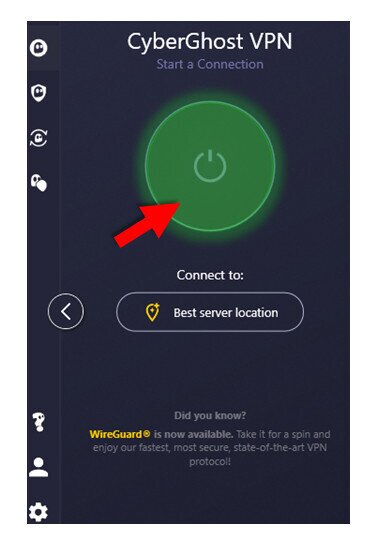
Once you’ve identified the best no log VPN for your situation, getting started is straightforward. Here’s a quick guide:
- Choose your provider using the tips in this guide.
- Purchase your subscription plan.
- Download the VPN from the official site or app store.
- Install the application.
- Review and accept privacy agreements if prompted.
- Log into your new VPN account.
- Select a server or region from your dashboard and activate your encrypted connection.
Frequently Asked Questions (FAQ)
What does “no-logs” mean on a VPN?
This means the VPN provider doesn’t keep records of your online activity such as IP addresses, browsing history, or session details beyond the minimal requirements for billing and account troubleshooting.
Which VPNs have a verified no-logs policy?
Many mainstream VPN providers have a verified no-logs policy. Always check the audit reports for confirmation of their policies. Some recommended no-logs VPNs include NordVPN, Surfshark, Proton VPN, and ExpressVPN. These all have great features and track records for privacy, as well as a free trial or money-back guarantee included.
Are no-log VPNs legal?
In most countries, yes. Only extremely restrictive countries like North Korea, Belarus, Iran, and Iraq prohibit no-logs VPNs, and using one in those regions can have legal consequences.
Is NordVPN a true no-logs VPN?
There is no 100% no-logs VPN, but NordVPN has undergone multiple third-party audits confirming its no-logs claims, verifying that they keep only minimal operational data needed to run your account.
How can I verify a VPN’s no-logs claims?
Your best bet is to read the third-party audit report thoroughly. If access to this information requires an account, try the service’s free trial or money-back guarantee.
Does a no-logs VPN keep me completely anonymous?
No technology can guarantee complete anonymity, but VPNs do make a significant difference. Logging into accounts, cookies, tracking scripts, or government surveillance could still identify you.
Can I use a no-logs VPN for streaming and torrenting?
Yes. Look for providers that have fast speeds, reliable up-times, and support for torrenting. You’ll also want a wide range of servers to choose from, so you can find the best connections and access more geo-restricted content.
What should I look for when choosing a no-logs VPN?
Look for recent, verified third-party audits and do some research to see if the provider has turned over user data to authorities in the past. The best no log VPN options will always have a clear, publicly available audit history.
Do no-logs VPNs affect speed or performance?
All VPNs slightly decrease speed and performance, whether they keep logs or not. If you choose a solid provider, however, the effect should be barely noticeable.
Is a free VPN ever truly no-logs?
No. All VPNs, free or not, keep limited user data for things like billing and login credentials, so it’s impossible to be 100% log-free. However, many VPNs are committed to their no logs policy, only keeping the bare minimum of user data required for operations. For free VPN providers, selling your data to third parties is fairly common. However, if they have been properly audited and have a strong reputation for privacy, you may be all right.

