Urban VPN Review 2026: Is This Free VPN Safe and Legit?
This Urban VPN review covers everything you need to know before relying on this service. Urban VPN shows up a lot when people look for free VPNs. It’s a simple VPN service with apps for desktop, mobile, and browsers that can be used to unblock sites for free. Because of that, it gets a lot of attention, plus a lot of questions about how safe or legitimate it actually is.
This Urban VPN review takes a closer look at what the service offers and what’s worth knowing before you rely on this free VPN.
Key Features of Urban VPN
Urban VPN keeps things pretty simple. Most of what it offers is built around quick access and completely free use, so you don’t get the extensive features of a premium VPN, but the basics are still there, which might be all you’re really after anyway.
These are the top features to know about in this Urban VPN review:
- Completely free plan: This is the VPN’s main pull. Its website confirms that the VPN is “100% free.” While there is a premium plan that costs if you want extra server access, the regular servers are free and no registration is required.
- Unlimited bandwidth: Many free VPNs limit how much data you can use while connected to a server, but Urban VPN does not. Upload or download as much data as you like without getting kicked off. Know, however, that dedicated “fast servers” are not available to free users.
- Large server network: Urban VPN’s network currently includes 600+ servers (with some sources citing as many as 632) spread across 80+ countries, including France, Canada, Argentina, Belgium, and Switzerland. It’s worth noting that dedicated servers are primarily tied to the paid premium tier — free users access the broader network but do not get the same guaranteed, company-owned infrastructure that premium subscribers use.
How Urban VPN Works (Free P2P vs Premium Servers)
Before you install Urban VPN, there’s one architectural detail you should understand clearly, because it affects your speed, your privacy, and potentially your legal exposure: Urban VPN’s free product is built on a peer-to-peer (P2P) model, not a traditional network of company-owned VPN servers.
Here’s what that means in practice. When you connect to Urban VPN for free, your internet traffic is routed through other users’ devices rather than through dedicated servers operated solely by Urban VPN. The flip side of this arrangement is equally important: your own device can act as an exit node for other users’ traffic. In other words, other people on the Urban VPN network may be routing their browsing activity through your IP address without you realizing it.
This design has several real consequences:
- Speed and reliability: Because your connection depends on other users’ devices rather than optimized servers, speeds are unpredictable. The quality of your connection at any given moment depends on whoever is acting as your peer.
- Bandwidth usage: Your device’s bandwidth is consumed not only by your own browsing but potentially by serving as a relay for others. This can affect your data usage and slow down your home network.
- Legal exposure: If another user routes illegal or policy-violating traffic through your IP address, that activity is associated with your connection from the outside world. This is a genuine risk that multiple independent security reviewers have flagged as a reason to avoid the free tier.
Urban VPN’s premium tier moves away from the pure P2P model by adding access to dedicated servers, which offers more consistent speeds and removes the exit-node risk tied to the free plan. However, even competitor testing of the premium product notes that P2P elements remain part of the service model. If the risks above concern you, the free plan in particular is not a suitable fit.
Platform Compatibility: Where Can You Use Urban VPN?
Like most VPNs, Urban VPN works on most major devices, and setup is pretty simple no matter where you’re using it. Here’s where it’s supported:
- Windows: Full desktop app with free, unlimited use for all Windows versions.
- Mac: A macOS version is available, but updates tend to lag behind Windows.
- Android: Mobile app in the Play Store, with both free and premium options.
- iOS: iPhone/iPad app with similar free/premium limits as Android.
- Chrome: VPN extension for Chrome that gives you fast IP switching.
- Edge: Extension with the same functionality.
How to Download and Install Urban VPN
Find your platform below, and then follow along to learn how to install this VPN app on a PC, Android, etc. See how to use a VPN for more help.
Desktop (Windows / macOS)
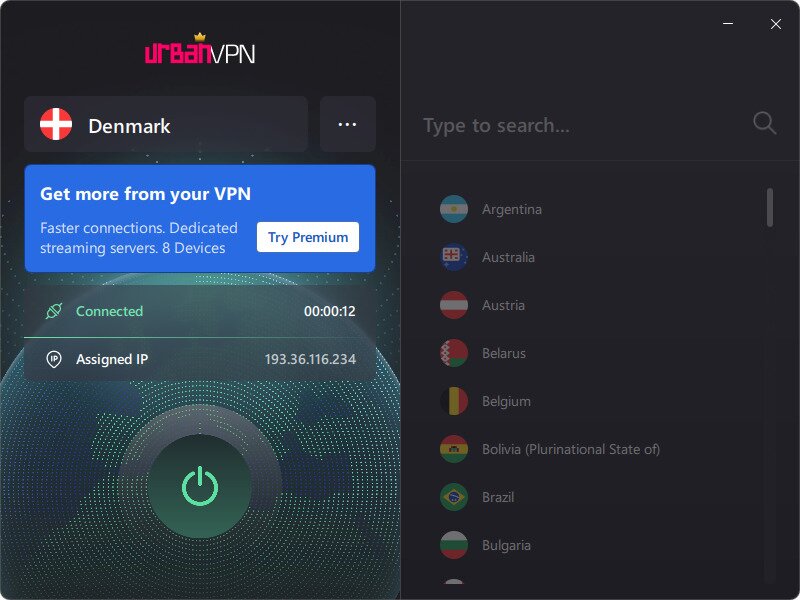
Follow these steps to use Urban VPN on your computer:
- Download and open the install from the Windows or Mac download page.
- Open the app and choose the server location you want.
- Click power button to toggle the VPN on.
Mobile (Android / iOS)
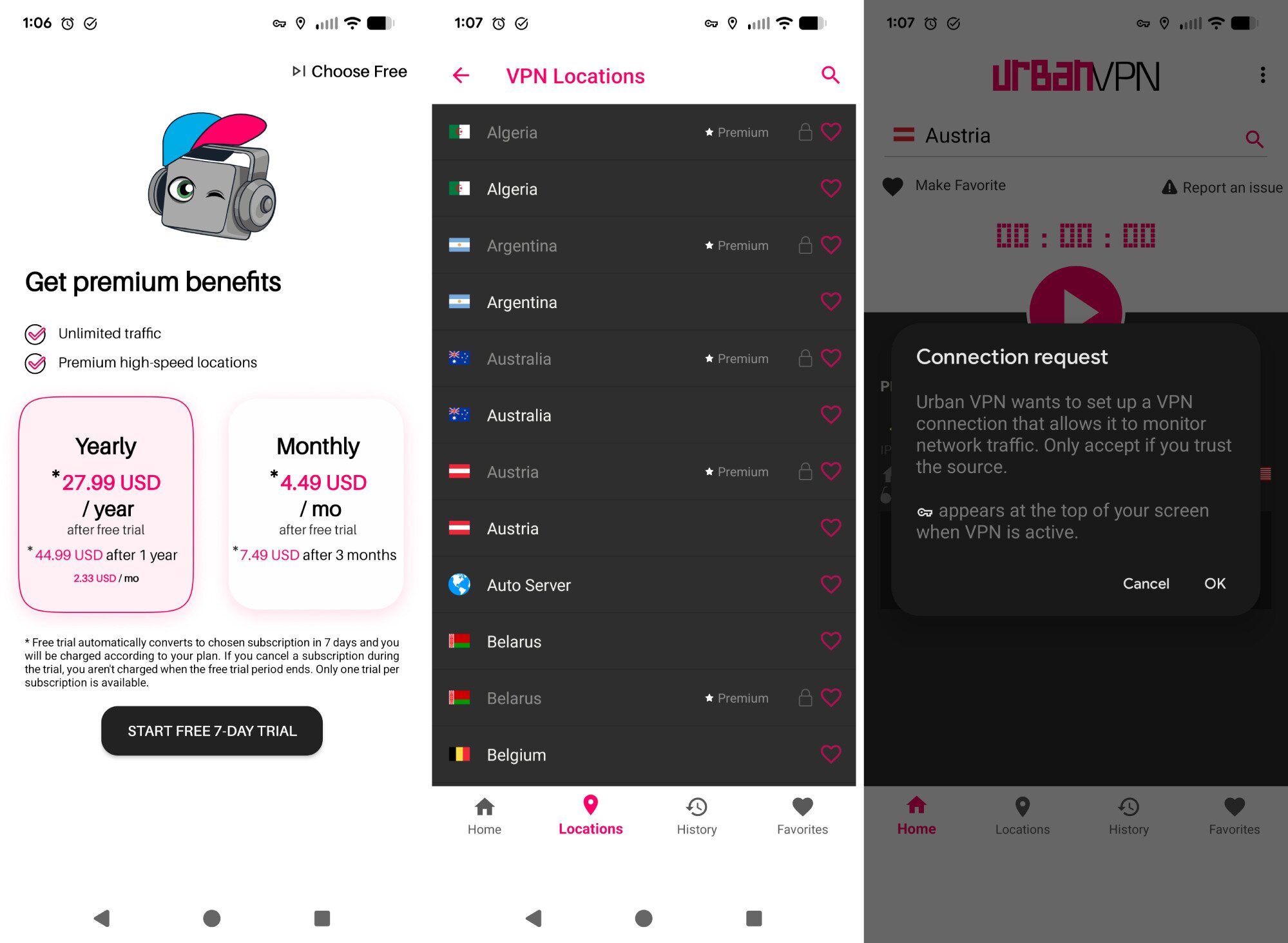
Here’s how to install Urban VPN on a phone or tablet:
- Install Urban VPN from the Google Play Store (Android) or Apple App Store (iOS).
- Open the app and select Choose Free on Android, or pick a premium option on either platform.
- Grant any required permissions.
- Select a server from the Locations tab.
- Tap OK to connect to the server.
Browser (Chrome, Edge)
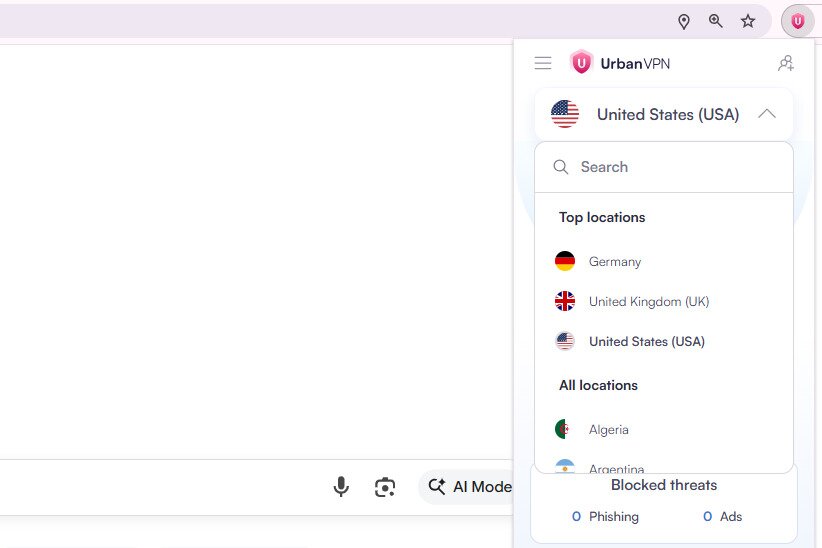
If you just want VPN protection in your browser, follow these steps:
- Install the extension for your browser (Chrome Web Store or Edge Add-ons).
- Select the Urban VPN extension icon next to the address bar.
- Pick a server location to connect.
Tip: Did you know there are also VPN web browsers?
Urban VPN Pricing: Is It Really Free?
Urban VPN is mainly known for being a completely free VPN. If you’re using it on Windows, macOS, Chrome, or Edge, you don’t have to pay anything to get unlimited bandwidth or switch between the available server locations. This is one of the biggest reasons the service is so widely downloaded.
The mobile apps work a bit differently. On Android and iOS, Urban VPN offers an optional Premium subscription that adds more server locations and supports multiple devices under one plan. Pricing varies by how long you subscribe, with the lowest rate reaching just above $2 per month if you commit to two years upfront, while a standard month-to-month option costs $9.56. The paid tier is primarily meant for people who want more reliable performance or access to the full list of premium servers.
Even with the mobile upgrade, the core experience remains free. If you’re only planning to use Urban VPN on a computer or through a browser extension, you won’t run into any paywalls.
Try Urban VPN: If you want to get started, you can download Urban VPN for free on desktop or install the mobile app and decide later if Premium is worth it.
Urban VPN Review: Safety, Privacy, and Legitimacy
As is the case with any VPN, using Urban VPN means more than just hiding your IP. It also means trusting the company with your data, since everything you do on the internet while connected to the service is routed through their servers.
It’s crucial, therefore, to know that what you get with this Urban VPN review isn’t the same picture as with a well-known paid VPN.
What Urban VPN does (or claims to do)
- Uses encryption and a tunneling protocol (OpenVPN) on its desktop and extension clients, which offers a basic but important layer of protection against eavesdropping.
- It offers leak protection features. DNS and IPv6 leak protection are designed to prevent your real IP address from being exposed when you browse the web.
- With its free option, you don’t have to commit any of your money to try it out, which can be an appeal if you just need basic privacy.
Major red flags in this Urban VPN review
- Urban VPN logs a lot of data. According to reviewers, the service collects users’ IP addresses, browsing history, cookie IDs and other unique identifiers, and tracks which pages you visit while connected to its service.
- The language in the privacy policy is vague and leaves a lot of room for data usage. The company may store collected data “as long as it remains necessary,” but doesn’t clearly define how long that may be.
- It might share data with third-party partners or service providers for advertising or analytics purposes.
- Unlike some of the more popular and well-known VPN providers, this one hasn’t been audited by independent third-party security firms, which means there’s no external verification that what they claim about logging or data handling actually holds up.
- Because of the logging and its base in the US, there’s always a possibility that your data could be handed over to authorities if requested.
- Multiple independent VPN review articles and security reviewers caution against trusting Urban VPN, claiming that it’s unsafe and does not protect your anonymity.
What the Mobile App Actually Discloses
The official app-store listing for Urban VPN’s Android app provides specific privacy disclosures that go beyond what the privacy policy alone reveals, and they matter if you’re deciding whether to install it on your phone.
According to the Google Play Store listing, the app may collect location data, web browsing data, and device or other IDs. It also requests Accessibility permission, which Urban VPN uses to collect visited URLs as part of its safe-browsing feature — meaning the app can read the addresses of every page you visit in your browser while the permission is active. The listing states that data is encrypted in transit, which is a baseline standard, but it also states that collected data cannot be deleted by the user.
That last point is significant. Most reputable VPNs give users some avenue to request data deletion. The fact that Urban VPN’s own app-store listing explicitly says this isn’t possible is a meaningful red flag, particularly for anyone installing it on a device they also use for work, banking, or anything sensitive. These are not inferences drawn from reading between the lines of a policy — they are disclosures Urban VPN itself has made through official channels, and they should factor directly into your install decision.
Expert Warnings About Urban VPN
Security reviews tend to come down hard on Urban VPN. One summary says it’s “one of the worst VPNs for staying anonymous online” because of intrusive logging and data sharing practices.
After testing the service, some reviewers concluded that there are “significant security and privacy risks” as well as “the potential for legal liability from other users using your IP address.”
Others say that, despite the encryption, Urban VPN fails to meet the basic expectations that most people have for VPNs, due to no independent audits, a lack of a transparent no-log guarantee, and no strong privacy guarantees. This Urban VPN review echoes those concerns — the service simply doesn’t hold up under scrutiny when privacy is a priority.
What That Means If You Decide to Use It
If you decide to take the risk and use Urban VPN anyway, despite all of these comments, you’ll likely be disappointed, especially if you go into it expecting any regular degree of anonymity or protection from data harvesting.
While Urban VPN does provide a quick IP address change and encryption benefits, which might be all you care about, logging, data sharing, and a general lack of accountability undermine the privacy benefits for many users.
If your threat model is low (i.e., you only want to bypass a geographic block or hide your IP address from trackers), then Urban VPN might be fine. But if you’re serious about your online privacy, you should treat this VPN more like a minimal, use-it-sometimes-for-specific-tasks type of tool. Not a full VPN solution like you’ll get with NordVPN, ExpressVPN, or Surfshark.
User Experience and Support
Many people who use Urban VPN say it’s easy to install and simple to get it running. That seems to be the most consistent positive across reviews. One reviewer said: Urban VPN offers “free access without limits” and installs fast, letting you “start browsing right after installation.”
Ease of use is a clear draw for many users, but once you dig into how it performs in real life, opinions start to split. Based on recent expert reviews and user feedback, the actual experience tends to suffer from everything from speed fluctuations and unreliable connections to weak support coverage.
Here’s what people tend to like:
- Quick installation and setup, with no mandatory signup or payment needed to get started.
- It’s often decent for light browsing or occasional use, like bypassing a website block. As one Reddit user said, the VPN is “fine for basic tasks” like using public Wi-Fi or accessing Netflix libraries in different countries.
- Some people report that, at least sometimes, switching servers works and you get an IP change without any hiccups.
Here’s what people tend to complain about:
- Many reviewers say Urban VPN’s speed is inconsistent. One 2025 review noted that the service “suffers from speed issues,” especially on long-distance connections.
- Streaming and torrenting often don’t work for some people. Independent tests found that the VPN was detected by streaming services and would buffer repeatedly or become totally unable to connect to certain platforms.
- Reliability problems is a fairly common complaint. Users mention issues with dropped connections, difficulty accessing some servers, and lag.
- Customer support is another red mark left by some Urban VPN users, likely because there are zero mentions of ‘support’ or ‘contact’ anywhere on the company’s home page.
Speed: Inconsistent, Especially Over Long Distances
Urban VPN’s speed performance is one of its most common complaints, and the P2P architecture explained above is the core reason. Because free connections route through other users’ devices, you have no control over or insight into the quality of the peer you’re connected to at any given moment. Nearby connections — for example, connecting to a server in your own country — can be serviceable for basic browsing. Long-distance connections, however, are consistently slow in testing, with speeds dropping sharply enough to make even standard web browsing feel sluggish. Speed.org and vpnMentor testing both describe the performance as hit-or-miss, with no reliable baseline you can count on from session to session.
Streaming: Major Services Detect and Block It
Urban VPN is not a reliable streaming VPN. Independent testing found that major platforms including Netflix detect Urban VPN and either block access or serve a proxy error rather than the library you’re trying to reach. Even when a connection initially works, the speed instability described above means buffering is a frequent problem. If unblocking a specific streaming service is your primary reason for wanting a VPN, Urban VPN is unlikely to deliver that consistently, and there are far better free options — Proton VPN’s free tier, for example, is more reliable for this use case.
Gaming: Not Recommended
Gaming over any VPN requires low latency and a stable connection — two things Urban VPN cannot reliably provide. The combination of P2P routing, inconsistent peer quality, and frequent speed drops translates directly into lag spikes and connection instability during gameplay. If you’re trying to reduce ping, access a game server in a different region, or simply maintain a stable connection while playing online, Urban VPN is a poor choice. The unpredictability alone makes it unsuitable for this use case.
Torrenting: Unsupported and Too Risky to Recommend
Urban VPN is not a suitable VPN for torrenting. There are two separate problems here. First, Urban VPN does not explicitly support P2P file sharing, and its terms do not carve out protections for torrent users. Second, and more importantly, the free tier’s P2P exit-node model means your IP address can be seen by other users as the origin of their traffic — including any traffic that may attract legal attention. Combining that exposure with the logging practices described in the privacy section makes torrenting over Urban VPN a genuinely risky proposition. Any VPN used for torrenting should have a verified no-logs policy and explicit P2P support; Urban VPN has neither.
Pros and Cons of Urban VPN
A few highlights make Urban VPN appealing for incredibly lightweight use, but most people will run into the same privacy and reliability issues pretty quickly if it’s used for any significant amount of time.
Pros:
- Free on desktop with no data limits
- Simple setup and one-click connections
- Lots of server locations
- Works on all major platforms
- Good for changing your IP address quickly
Cons:
- Privacy and data-logging concerns
- Unreliable speeds
- Frequent connection drops and inconsistent reliability
- Poor support options
- Mobile version pushes paid plans aggressively
Urban VPN Alternatives
One of the best free VPNs you can get is Proton VPN. Its free tier gives you unlimited data, no ads, and a strict no-logs policy. This one uses strong encryption and its apps are open-source and independently audited, which are rare guarantees for a free service.
Another decent option is Windscribe. It doesn’t offer unlimited data (just 10 GB), but it’s among the more generous free plans and supports servers in 10 countries, good speed, and support for essential VPN features like encryption and a kill switch (on platforms that support it).
Another free VPN we like to recommend is PrivadoVPN. This Windscribe alternative also gives out 10 GB of free data every month, offers 24/7 support, and falls under Swiss privacy laws. Apps are available for a wide variety of devices, so it will probably work wherever you need it. Any of these alternatives addresses the core concerns raised in this Urban VPN review — particularly around privacy and logging.
Urban VPN Review: Should You Use It?
Our Urban VPN review concludes that it works best as a quick VPN tool. We don’t recommend using it for your 24/7 VPN. It’s clear that the service appeals to people who just want a fast way to switch IP addresses, unblock a site, or peek at a different streaming library for a few minutes. For that kind of short-term situation, Urban VPN is fine. It’s simple to use, doesn’t require payment, and is easy to turn on without creating an account.
The bigger issues show up as soon as you expect more from it. Urban VPN has ongoing complaints about slow and inconsistent speeds, disconnects, servers that don’t always work as advertised, and very limited support. More importantly, serious VPN safety and privacy concerns come from its data-collection practices and the P2P network model, which can expose you to risks you wouldn’t see with a traditional VPN.
These problems make Urban VPN a poor fit for anything sensitive or long-term.
If you’re trying to stream or game for hours, are looking for a VPN for torrenting, or rely on a VPN for privacy or anonymity, Urban VPN is not a good match. The performance won’t hold up, and the privacy trade-offs are simply too big. But if all you need is a quick IP change to grab access to a blocked website or check a region-specific service, it can do that job without costing you anything.
If you want a safer and more dependable free VPN alternative, Proton VPN is the best place to start. Its free option offers stronger privacy protections, better legitimacy, more consistent speeds, and a far superior security model than what this Urban VPN review found. Plus, you can actually get support if you need it.
FAQ: Urban VPN Review
Is Urban VPN legit?
It’s a real VPN service, but its privacy practices raise enough concerns that many security experts don’t recommend it for anything sensitive.
Is Urban VPN really free?
It’s totally free for desktop and browsers. The mobile apps have an optional paid tier that unlocks more servers and features.
How does Urban VPN make money?
It relies on its premium subscriptions and uses a P2P system where users share bandwidth with each other. Its privacy policy also allows data sharing with partners, which likely brings in additional income.
Is Urban VPN safe to use?
It’s safe for low-stakes tasks like changing your IP address, but it’s not suitable for any tasks that demand privacy. The logging practices make it risky for anything sensitive.
What platforms does Urban VPN support?
Windows, macOS, Android, iOS, and browser extensions for Chrome and Edge.
How do I install Urban VPN on my device?
Download the desktop app from the company’s website, install the mobile app from your device’s app store, or add the browser extension from your web browser’s add-on store.
Does Urban VPN keep logs of my activity?
Urban VPN claims not to log browsing activity, but its privacy policy allows collecting IP addresses, device identifiers, and other data. Independent reviewers classify it as a risky option if you care about privacy.
How fast is Urban VPN?
Speed varies a lot. Connections often slow down, especially when routed through distant peers, making it unreliable for buffer-free streaming or gaming.
What are the main features of Urban VPN?
Free tier, many server locations, quick setup, and simple apps.
Are there better alternatives to Urban VPN?
Proton VPN’s free plan is the safest and most reliable free VPN. Paid options like ExpressVPN and NordVPN also offer free trials with far better privacy and performance.
