What Does RCS Message Mean? Explained Simply
You might be familiar with SMS and MMS, but what does RCS message mean? These initialisms relate to the technology behind sending texts to other phones. RCS is a newer and more advanced option, offering features like read receipts, longer texts, high-resolution photos and videos, group chats, and more.
In this article, we break down this not-so-new technology to help you understand what does RCS message mean and if it’s something you should use. If you encounter any issues with RCS, don’t worry—you can always disable RCS chats. Standard texts will still be available, so there’s no rush to make a decision anytime soon.
What Does RCS Message Mean and How Does It Work?

RCS, or Rich Communication Services, is like the cool cousin of regular text messaging. It’s an upgraded version that turns your plain old SMS (short message service) into a more feature-packed and interactive experience. So what does RCS message mean in practical terms? It means richer, faster, and more expressive conversations right inside your default messaging app.
Imagine your usual texting, but with some extra features you’re probably already used to if you use modern texting apps like WhatsApp, where extras such as WhatsApp chat wallpaper options help make conversations feel more personal. With RCS, you can send high-resolution pictures and videos without losing quality, just like when you share them on social media. Plus, you can see when the other person is typing, so no more wondering if they got your message.
RCS upgrades group chats, too, into a sort of mini social network. RCS lets you add and remove people easily, see if they’ve read your messages, and even share your location in real-time. Additionally, RCS expands the limit of your text messages. Whether it’s a one-on-one conversation or a group message, RCS increases the old 160-character limit by a factor of 50, to a whopping 8,000 characters.
Emojis and stickers become more lively in RCS. Instead of static images, you can send animated stickers that express your feelings better.
The cool part? You don’t need a special app for RCS—it works right in your default messaging app on your smartphone. However, both you and your friend need to have RCS-compatible devices and be on a network that supports it.
RCS availability depends on four things: your phone, the messaging app you use, your carrier, and your region. On Android, RCS is commonly available through Google Messages or another supported default messaging app — but it’s not guaranteed on every device or network. On iPhone, RCS requires iOS 18 or later, plus a carrier that supports RCS. If you’re unsure whether your carrier supports it, contact your provider directly.
RCS sends messages over your mobile data connection or Wi-Fi rather than through traditional cellular text channels. This means it generally uses your normal data plan rather than counting against a per-message SMS allowance, though carrier terms can vary.
Importantly, both you and the person you’re messaging need to have RCS enabled for RCS features to appear in the conversation. If either side doesn’t support RCS — or if you’re temporarily out of data coverage — many messaging apps can automatically fall back to SMS or MMS, so your message still gets through. This fallback behavior is also why some conversations show RCS features while others don’t.
In a nutshell, RCS gives traditional texting a makeover. It’s faster, fancier, and way more fun. Understanding what does RCS message mean helps you make the most of these modern communication features.
What is RCS chat?
RCS chat is what Google calls its version of RCS. It supports all the typical RCS features, but with the inclusion of end-to-end encryption. This means RCS chats, at least Google’s version, is more secure than other forms. RCS chats are turned on by default in the Google Messages app. The app lets you disable certain features, like read receipts and typing indicators.
You can read more about Google’s implementation of RCS in their RCS chats by Google FAQ.
How to Turn off RCS Chat
You can disable RCS chats to revert to SMS at any time. Here’s how it works in the Google Messages app on Android:
- Tap your profile image at the top right of the app.
- Select Messages settings from the menu.
- Choose RCS chats.
- At the top, next to Turn on RCS chats, tap the toggle.
- Pick Turn off from the prompt.
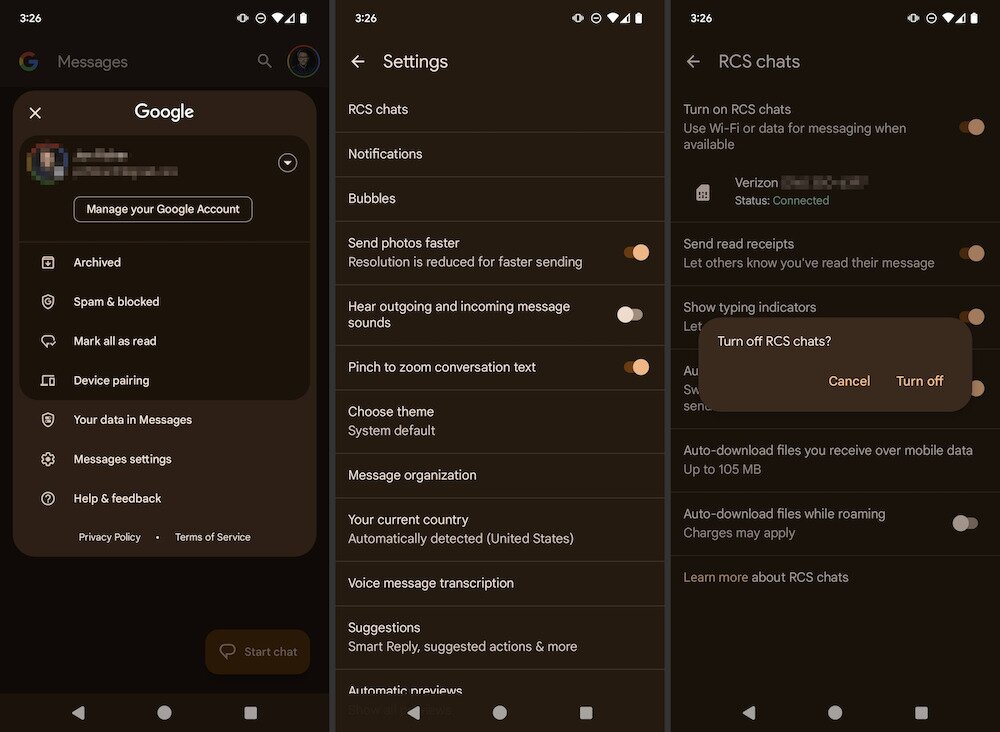
For iPhones, you can enable or disable RCS with these steps:
- Go to your iPhone’s settings.
- Scroll down to Apps.
- Go to Messages.
- Tap RCS Messaging. You can toggle it on or off from here.
Advantages of RCS Messaging: What Does RCS Message Mean for Your Texts?
RCS messaging offers several advantages over traditional Short Message Service (SMS), bringing a more dynamic and engaging communication experience. One key advantage is the ability to send multimedia content seamlessly. Unlike SMS, RCS lets you share high-quality photos, videos, and audio clips directly within the messaging app.
Another notable benefit of RCS is the read receipts feature, which informs you when messages have been seen by the recipient. SMS lacks this functionality, leaving senders in the dark about whether their messages have been viewed. This real-time feedback in RCS helps you stay informed and fosters more transparent communication.
Additionally, RCS supports typing indicators, indicating when the other person is composing a response. This feature adds a touch of immediacy to conversations, making them feel more like real-time exchanges.
Once you understand what does RCS message mean, it becomes clear why RCS messaging improves upon SMS by enabling multimedia sharing, read receipts, and typing indicators. These enhancements make communication more vibrant, responsive, and enjoyable, offering a modernized and feature-rich alternative to traditional texting.
RCS vs SMS Message
As you’ve now learned, RCS is quite a bit different from SMS. Understanding what does RCS message mean in comparison to SMS and iMessage is especially useful now that iPhone supports RCS — it’s worth knowing how all three stack up. Below is a breakdown of RCS, SMS/MMS, and iMessage side by side.
| Feature | RCS | SMS/MMS | iMessage |
| Content Type | Rich multimedia (images, videos, GIFs, stickers, etc.) and read receipts | SMS: plain text only; MMS: basic images and video at limited quality | Rich multimedia (images, videos, GIFs, stickers, etc.) |
| Message Length | Up to 8,000 characters | SMS: 160 characters per message; MMS: varies | No practical character limit |
| Delivery Speed | Faster delivery, especially for larger files | Generally quick, but may experience delays during peak times | Fast delivery over data or Wi-Fi |
| Read Receipts | Supported | Not supported | Supported (when enabled by recipient) |
| Typing Indicators | Supported | Not supported | Supported |
| Group Messaging | Enhanced group chat features, including real-time typing indicators | Basic group messaging | Full group chat features within Apple ecosystem |
| Works Cross-Platform | Yes — Android and iPhone (iOS 18+) | Yes — universally supported across all mobile devices | No — Apple devices only (iPhone, iPad, Mac) |
| Transport | Mobile data or Wi-Fi | Cellular text channels (SMS uses same channels as voice calls) | Wi-Fi or mobile data |
| Interactivity | Supports interactive elements, such as suggested replies | Static text, no interactive features | Reactions, apps, and interactive elements within Apple ecosystem |
| Cost | Uses mobile data or Wi-Fi; typically part of your data plan rather than a per-message charge, though carrier terms can vary | Generally included in standard texting plans; no additional data charges | Free over Wi-Fi or data; no per-message charge |
| Security | Encryption is not universal and depends on the implementation and carrier. Google Messages supports end-to-end encryption (E2EE) for RCS chats between Google Messages users. On iPhone, encrypted RCS depends on carrier support and may not be active in every conversation. If no encryption indicator is shown, your carrier or service provider may still be able to access message contents in transit. | Not end-to-end encrypted; carriers can access message content | End-to-end encrypted between Apple devices |
| When Recipient Doesn’t Support It | Falls back to SMS/MMS if the app supports it | Delivered as SMS/MMS on all devices | Falls back to SMS/MMS (shown as a green bubble on iPhone) |
| Device Compatibility | Requires compatible devices and carrier support; not universally available | Universally supported across all mobile devices, including really old and modern devices | Apple devices only |
| Global Standard | Adoption varies by region and carrier; not a global standard yet | Widely adopted globally as a standard messaging service | Available globally but limited to Apple ecosystem |
How to Tell if a Message Is RCS, SMS/MMS, or iMessage
Not sure what kind of message you’re actually sending or receiving? Knowing what does RCS message mean in practice can help you identify which messaging type is active. Here are the visible signs to look for in each messaging type.
In Google Messages on Android, RCS conversations show typing indicators, read receipts, and sent/delivered/read status icons beneath your messages. The compose field may also display the word “RCS” to confirm the conversation is running over Rich Communication Services.
On iPhone, iMessage conversations appear in blue bubbles, while RCS and SMS/MMS messages appear in green bubbles. When RCS is active with a compatible contact and carrier, you’ll see read receipts and typing indicators in green-bubble threads — similar to what you’d expect from iMessage. If those RCS indicators are absent in a green-bubble conversation, the message is likely traveling as standard SMS/MMS instead.
If those RCS indicators — typing dots, read receipts, or the “RCS” label — disappear mid-conversation, it likely means the message fell back to SMS/MMS. This can happen if either party loses data connectivity, switches to a device without RCS support, or if your carrier temporarily can’t route the message via RCS.
What Does RCS Message Mean for Businesses?

While the average text message user will certainly appreciate all of the features that RCS brings to the table, businesses in particular should pay attention to these strengths. Most of us already get text messages from the occasional business or services we use, but this will make those texts a lot more meaningful from a marketing perspective. Here’s how:
- Better engagement: High resolution videos and interactive questions and answers can be embedded within the actual text thread, instead of requiring links. This means it’s easier for the customer to watch or participate in content, which makes it more likely they’ll do so.
- Branding verification: Businesses can obtain verified colored themes, brand names, logos and icons, etc. This makes them more official looking and more identifiable to the person receiving their messages.
- More advanced interactions: Embedded maps, coupons that can be scanned, image carousels, unsubscribe/re-subscribe options are just some examples of interactive components that will further draw in customers
- Business analytics: One of the greatest strengths of RCS for businesses is the analytic data. For instance, the businesses sending the RCS message will get information on things like read rates, open rates and other real-time marketing data that can influence business strategies
So what does RCS message mean for everyday users and customers? You can probably expect to see a lot more text-based marketing headed your way. The RCS marketing industry is projected to explode in the coming years, especially now that Apple has made this service available on iPhones, which has vastly expanded the user base.
As of this writing, businesses are still only just beginning to implement this service, but it has the potential to be one of the biggest ways businesses reach their customers.
This may be good, or bad, for the everyday user who could get annoyed with the possible bombardment of marketing texts. Most of us get a bit irritated when bothered out of the blue for no reason. However, if there are services and products you’re genuinely interested in, it’s a great way to find out about sales, sign-up deals, and other communications that you could actually want to know. For everyone else, there’s still the unsubscribe or block option, and if you want more control over social app chats too, you can block TikTok messages. You may need to be doing that a lot more before you know it.
Frequently Asked Questions
Why does it say RCS in my text messages?
If it says “RCS” in your messages, it means your phone is using Rich Communication Services, a modern messaging protocol that enhances standard texting with features like read receipts, typing indicators, high-res images, and Wi-Fi messaging. It usually shows up when you’re messaging someone else who also has RCS enabled.
What’s the difference between SMS and RCS messaging?
SMS (Short Message Service) is the traditional text messaging system — it’s simple, limited to 160 characters per message, and doesn’t support features like media sharing or typing indicators.
RCS (Rich Communication Services) is the next-generation messaging standard that works over mobile data or Wi-Fi and supports modern features like:
Read receipts
Typing indicators
Group chats
Sending high-res images and videos
Think of RCS like texting upgraded to be more like iMessage or WhatsApp.
How do I change from RCS to SMS?
To switch back to SMS, follow these steps (varies slightly by Android model):
Open the Messages app.
Tap the three dots (menu) > Settings.
Go to Chat features.
Toggle “Enable chat features” off — this disables RCS and reverts to SMS/MMS.
After turning it off, your messages will send as SMS or MMS, depending on content and connectivity.
How do I get rid of RCS in texting?
To disable RCS completely:
Open the Messages app.
Tap the menu (three dots) > Settings > Chat features.
Turn off “Enable chat features”.
If you’re switching phones, especially to iPhone, make sure to turn off RCS before switching, or go to your carrier’s or Google’s RCS deactivation page to unregister your number.