ChatCrypt Secure Chat With Military-Grade Encryption
Have you ever wondered how safe your online conversations are from eavesdropping? Admittedly, no one likes their online communication to be monitored by some secret surveillance program like PRISM, unless they are blissfully indifferent to their own privacy. What we’ve been doing the day, what we are planning on doing, where we’re headed next, and even some sensitive financial information is all part of what we regularly communicate with one another on the internet, all without knowing that someone maybe spying on us without our knowledge.
ChatCrypt secure chat is an online chat service that may change a few rules around. The web app allows you to create encrypted chatrooms using a layered security architecture: connections run over WebSocket with TLS, an additional encrypted server layer uses ECDH key exchange and AES-256, and messages during the key exchange phase are RSA-signed. End-to-end member-to-member encryption is handled using ECDH combined with ChaCha20-Poly1305. Importantly, the channel password never leaves your browser, usernames are only transmitted inside the end-to-end encrypted layer, and the channel name is sent to the server only as an SHA-256 hash rather than in plain text. Participants join chatrooms via a shared secret password. Read on for more details.
How ChatCrypt Secure Chat Works
Before diving into the interface, it helps to understand what that technical stack actually means for you as a user. Here is the plain-English version of ChatCrypt’s security model:
- The room name and password generate your encryption keys. When every participant enters the same room name and password, their browsers independently derive matching encryption keys. This is what allows group members to read each other’s messages — and why anyone with the wrong password simply sees unreadable ciphertext.
- TLS protects the connection between your browser and the ChatCrypt site. This is the same layer of protection you get when visiting any HTTPS website. It prevents your internet provider or a network eavesdropper from intercepting the data in transit to the server.
- End-to-end encryption protects your message contents from ChatCrypt itself. Because encryption and decryption happen inside your browser, the ChatCrypt server never sees the plaintext of your messages — only encrypted data it cannot read.
- Your password never leaves your browser. The room password is used locally to derive keys and is not transmitted to the server in readable form. ChatCrypt cannot see it, and it is not stored anywhere on their end.
- Your security is only as strong as how you share the room secret. If you send the room name and password to another person over an unencrypted channel — an ordinary SMS, for example — that sharing step becomes the weakest link, not ChatCrypt itself. Share room credentials through a channel you already trust.
Getting started with ChatCrypt is pretty simple; head over to its website via the link provided at the end of the post. Once there, you are presented with an easily understandable interface carrying a Chat Room login section at the center. The webpage also gives you a detailed explanation about ChatCrypt’s inner workings in order to get you acquainted with it. Furthermore, it also offers webmasters to embed ChatCrypt in their own websites using an HTML embed code.
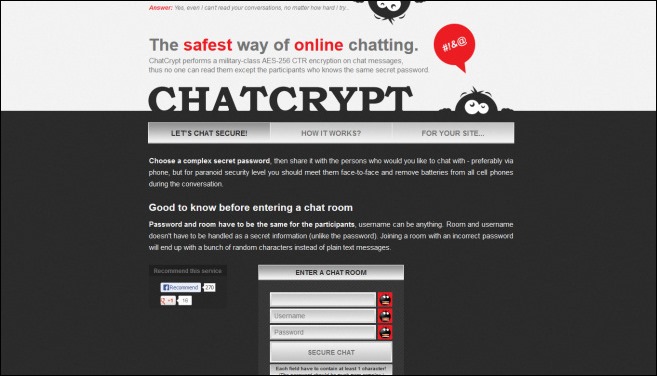
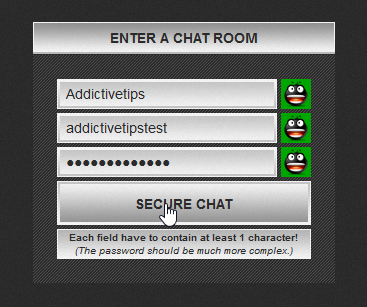
To create your chat session, look for the ENTER A CHAT ROOM section on home page, specify the name of your chat room, and choose a username and password that will be used to share the same chat room with the other participants. No account, registration, or email address is required at any point — you simply fill in the three fields and connect.
In order to let anyone join in, you will need to provide them with the exact chat room name and the exact same password you chose; all participants must use both the same room name and the same password to communicate with each other. If someone enters the correct room name but a different password, they will not be able to exchange messages with your group — the encryption keys simply will not match. The username — which acts as the identity of each participant — will be different for each chat room member, of course.
Messages are exchanged in real time rather than queued or held; if you send a message while another participant is offline, they will not receive it later. The ChatCrypt secure chat service is intentionally minimal, built around secure text chat rather than a broad feature set, so do not expect file transfers or voice calling.
If you also use other chat platforms, adjusting Discord avatar settings, learning to use formatted Discord text, reviewing options for Telegram account removal, or enabling disappearing WhatsApp messages can similarly help you manage how you communicate and how your identity appears online. After specifying the required details, click the Secure Chat button to enter the main chat area.
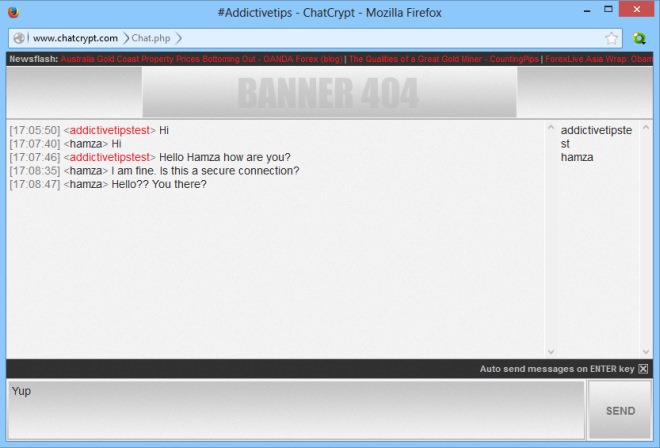
ChatCrypt secure chat opens up the user-created chat room in a separate window, which also looks quite plain and simple. It contains an input field at the bottom for typing your chat messages. The right side of UI carries the list of members in the chatroom, while the sent messages appear in the main section. Sadly, ChatCrypt lacks any file sharing or voice chat features but considering the nature of the application, there isn’t much else to complain about, as it works exactly as advertised.
Embedding ChatCrypt on Your Website
One of ChatCrypt’s more distinctive features — and one that competitors frequently highlight — is the ability to embed a live chat room directly into any webpage using a simple HTML snippet. This is worth understanding properly before you decide whether it fits your use case.
Who this is for. The embed option is most useful for blog owners who want to offer readers a place to chat, small communities or project teams running an internal page, and anyone who wants to attach a private text chat to an existing site without installing a plugin or paying for a SaaS tool. Because ChatCrypt requires no accounts, your visitors can drop in and start chatting immediately once they have the room credentials.
How to implement it. ChatCrypt provides a ready-made HTML embed code on its website. The basic flow is: copy the embed snippet from ChatCrypt, paste it into the HTML of the page where you want the chat to appear, decide on a room name and password for that embed, and test access by opening the page in a browser and entering those credentials. Any visitor who knows the room name and password will be able to join the embedded session.
Limitations to know before you use it. The embedded chat carries the same constraints as the standard interface — it is text only, with no file sharing and no voice or video. Visitors still need the exact room name and password to participate, so you will need to distribute those credentials somehow (on the page itself, via email, or through another channel). Critically, embedding the chat widget on a publicly accessible page does not make the room itself anonymous or harder to find — it simply means anyone who visits that URL and has the credentials can join. If your goal is a private session, make sure the page itself is appropriately access-controlled, or distribute the credentials carefully rather than posting them openly alongside the embed.
What ChatCrypt Secure Chat Stores vs. What It Doesn’t
It is worth being precise about what ChatCrypt actually retains, because “no chat logs” does not mean “no data at all.” On the message side, ChatCrypt requires no accounts and maintains no user database. Real-time chat messages are described by the service as not being queued or stored — once a session ends, the conversation is gone. There are no cloud-based chat logs to subpoena or breach.
That said, the picture is different at the website level. ChatCrypt’s own privacy policy states that the web server keeps log files containing IP addresses, date and time of visits, referring pages, and browser type. Those server logs are retained for 90 days. The site also uses Google Analytics and third-party advertising services, and data associated with those services may be stored for up to 12 months.
The practical takeaway: the content of your encrypted messages is not stored, but your visit to the ChatCrypt website is logged like any other website visit. If that distinction matters for your threat model — for example, if you need to conceal that you used the service at all, not just what you said — you should factor in those web-level logs.
Encrypted chat is not the same as anonymous chat. This is an important distinction. ChatCrypt does an honest job of keeping message contents private, but it does not hide the fact that you used the service, who you connected from, or when. Here is a quick breakdown to make that concrete:
What ChatCrypt does not store: the plaintext content of any chat message, user accounts or profiles, persistent message history, or your room password (which never leaves your browser).
What is logged at the web level: your IP address, the date and time of your visit, the referring page and browser type (via standard server logs retained for 90 days), and behavioral data collected by Google Analytics and third-party ad services (retained for up to 12 months).
What this means in practice: for most users — people who want a quick, private text conversation without creating accounts or leaving a chat log — ChatCrypt delivers exactly what it promises. For users with a higher-stakes threat model who need to conceal their identity or even the fact that they communicated, additional tools such as a trusted VPN or Tor would be necessary supplements, not replacements.
Concrete safety guidance for everyday use:
- Do not reuse a username that identifies you elsewhere online. ChatCrypt does not require a real name, so take advantage of that.
- Do not share the room password over an insecure channel. If you send it by unencrypted email or SMS, that exchange becomes the weakest link in the whole setup.
- Avoid discussing highly sensitive information if you cannot fully trust the code delivered by the service. ChatCrypt runs as a browser-delivered web app, which means you are placing a degree of trust in the service operator not to alter the JavaScript that handles encryption on the client side.
- Treat ChatCrypt as a private text chat tool rather than a full anonymity solution. It protects what you say; it does not hide that you said it or where you connected from.
To sum it up, ChatCrypt secure chat is a well-designed tool for keeping the contents of a conversation end-to-end encrypted and out of any stored chat log. For most users who want a quick, account-free, encrypted text session, it delivers on that promise.
However, it is not anonymous in an absolute sense: as noted above, the service’s own privacy policy confirms that server logs including IP addresses are kept for 90 days and that third-party analytics and advertising services are in use on the website. Additionally, because ChatCrypt runs as a browser-delivered web application, users are placing some degree of trust in the code delivered by the service and in the service operator itself — a consideration worth keeping in mind for high-stakes communications. You can start using ChatCrypt secure chat for free by visiting the link provided below.
