Stay Safe: Fake VPN Services Are Trying To Scam You
Online privacy has never been more important — or more complicated. With ISPs, data brokers, and advertisers all competing for your browsing data, more people than ever are turning to VPN services to protect themselves. And wherever demand spikes, scammers follow.
VPN services have been around for years but they’re now widely regarded as an essential tool for everyday privacy — much like having antivirus software. With so many people actively shopping for a VPN, it was only a matter of time before bad actors tried to exploit that demand.
Fake VPN services are cropping up and they are more than just shady websites. These fake VPN services are pretending to be affiliated with popular platforms, and they’re showing up as apps, browser extensions, sideloaded APKs, and inbox scams. Here’s how to keep yourself safe.
MySafeVPN: A Fake VPN Service Targeting PLEX Users
A fake VPN service targets you through your email. It knows that you have a subscription, paid or otherwise, to a popular online service. It pretends to be affiliated with this service that you have been using for years.
Think of it like this; you love and own Apple products for years. You suddenly get a legit looking email saying Apple is now offering a VPN service. You probably don’t recall the company making an official announcement but the email will look real. The only problem is, it’s a fake. This has already happened to Plex users.
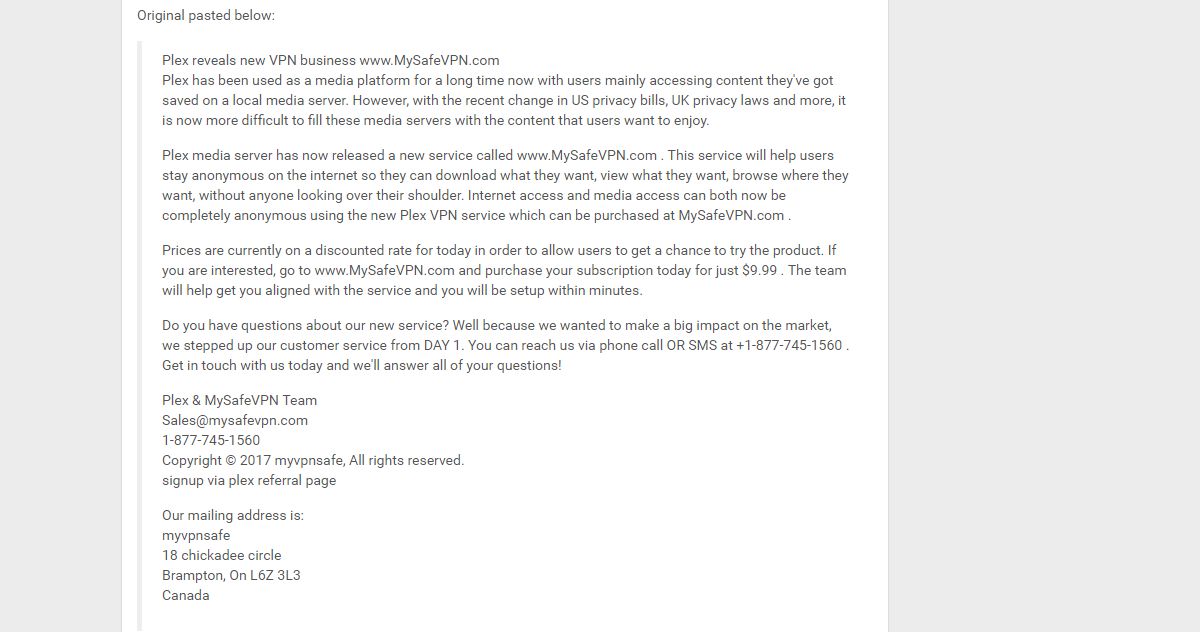
Plex is an incredibly popular media server. If you own a Chromecast, chances are you use Plex. The email in question pretended to be a VPN service that Plex had launched. It offered a discounted rate to Plex users to reel them in. The email also included a ‘referral’ link for Plex users so they could avail the service.
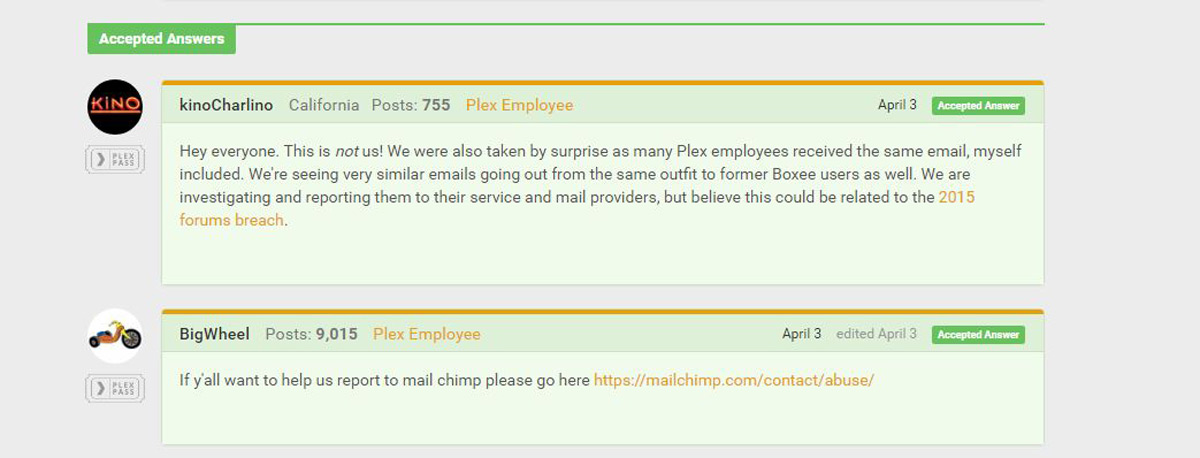
It was a scam. The user who received the email posted it in Plex’s online forums where a company employee identified it as a scam. Vice did a feature on it, and the service in question has since disappeared. The bottom line is; fake VPN services like this are actively targeting everyday users.
The MySafeVPN case is now a historical example, but the threat has not gone away — it has evolved. More recent cases show fake VPNs operating through browser extensions and sideloaded mobile apps. GhostPoster and Free VPN Forever on Firefox were flagged for suspicious behavior. The FreeVPN.One Chrome extension quietly gained dangerous new permissions after updates, with allegations it captured screenshots of users’ activity. On Android, apps bundled with fake VPN functionality — such as versions of Mobdro Pro IP TV — have been used to deliver banking malware. The delivery methods change; the intent remains the same.
RELATED READING: If you’d like to know which are the best VPNs for Plex – we have a section dedicated to that.
Fake VPNs Aren’t Just Scam Emails
Email phishing like the Plex case above is just one delivery method. Today, fake VPNs reach users through several channels, and each one requires a different kind of vigilance.
Lookalike Websites
Scammers register domains that closely mimic real VPN providers — swapping a letter, adding a hyphen, or using a different top-level domain. A user searching for a VPN deal or clicking an ad could land on one of these sites without noticing the difference. Always check the exact spelling of the domain in the address bar before entering any payment or account information, and navigate directly to the provider’s official site rather than clicking links from ads or search results.
Fake Mobile Apps
Both the Google Play Store and the Apple App Store have hosted fraudulent VPN apps at various points, but the risk is especially high outside official stores. Verify the exact developer or company name listed on the app store page — it should match the provider’s official website. Confirm the number of reviews and the app’s history. If something feels off, it probably is.
Malicious Browser Extensions
Browser extension stores have lower barriers to entry than mobile app stores, making them a common vector for fake VPNs. Extensions can silently request broad permissions — including access to all browsing activity — and some have been found to log traffic, inject ads, or capture screenshots. Only install VPN extensions listed directly by a known, verified provider, and scrutinize the permissions the extension requests before clicking install.
Sideloaded APK Files
On Android, users sometimes download APK files directly — bypassing the Play Store entirely. Scammers exploit this by distributing trojanized VPN apps through forums, Telegram channels, or third-party download sites. These files can contain spyware, banking trojans, or botnet software disguised as a legitimate VPN. Never install an APK from a source you cannot independently verify as the official developer.
Brand-Impersonation Downloads
Some fake VPNs impersonate well-known brands — using stolen logos, copied UI design, and near-identical naming. Before downloading any VPN software, confirm the listed developer identity matches the company’s official website, cross-reference the download link against the provider’s real domain, and look for independent security or press coverage of that specific product.
The Red Flags of Fake VPN Services
The Plex team and MySafeVPN have both signed off on the email. It wasn’t your usual scam where a Nigerian prince tries to ship you some gold. This email is somewhat professional. There was a website, a proper physical address for the company, and a phone number. Vice did a good bit of digging to get to the bottom of who was behind this email but the average user isn’t likely to go that far.

You will have an email in your inbox and you will have to decide if this is legit or not. Here are a few red flags to watch for in these fake VPN services.
No Official Announcement
Look for a link to an official product/service announcement in the email. In the above email, MySafeVPN does not link to an official product announcement from Plex. It is highly unlikely that a company, big or small, wouldn’t announce a new product on their blog. If Plex, or any other company for that matter, were to introduce a new service, they would announce it to get the current user base on board. A targeted email asking you to sign up for the service isn’t going to be the first you hear of it.
Companies that announce new products will begin marketing months before the launch. They will write about it extensively, add banners to their official website, and maybe even push a little ad or two via their apps. If nothing else, there is at least going to be some activity on social media. If none of that preceded the email you received, it’s likely a scam.
Suspicious Launch Timing and Verification Gaps
A VPN service that appeared overnight or can’t be verified through independent sources deserves extra scrutiny — but age alone is not a reliable test. A scam can be years old and still active, and a legitimate provider can launch quickly or be rebranded from an existing product. The more useful question is not “how long has this been around?” but “can I verify who is behind it?”
Look for a named developer or company with a traceable ownership history. Confirm the official domain against press coverage or app store listings. Check whether a credible privacy policy exists and names the jurisdiction the company operates under. Look for independent security audits or coverage by reputable tech publications. A service that is genuinely new can still pass these checks; a fake one almost never will.
No Real Product Offering
According to the email for this fake VPN service, you’re getting a discount for joining early. It tells you how much you have to pay. What it doesn’t tell you is what it is you’re buying; how many connections are you getting, is there a bandwidth limit, does the VPN block ads, is this for your desktop or your phone, or both. The email doesn’t touch on any of that.
There is no link to a proper product page where you can check out the different plans on offer. More importantly, the email doesn’t say if the $9.99 subscription is for one month, three months, or an entire year.
Compare The Language
Online services send you emails every now and then. Sometimes they offer you coupons, sometimes they try and nudge you to upgrade your plan. If you receive an email telling you Netflix has just started a new VPN service, compare the language of the email with that of the previous ones. You will see a distinct difference. It’s also a good idea to compare the email layout. Scammers behind fake VPN services don’t have the best resources at their disposal, and they rarely have time to replicate the look of an official email perfectly.
What’s The Risk of Fake VPN Services
Money
The obvious risk of signing up for fake VPN services is financial. If you think the service is legit, you will subscribe to it. Whether or not you actually get a VPN is a different story. The scammers might take your money and disappear. If they’re ambitious, they’ll send you an app or a link to set things up. This will, in turn, infect your system or just take it hostage.
Sensitive Data
A fake VPN service can be the age-old phishing scam. If you visit the link provided in the email and sign in using, for example, your Google account, your password might be stolen. If you’ve used the same password for different accounts, you will be at greater risk. Your credit card information might be stolen as well.
Technical Threats You May Not See Coming
The financial and credential risks are the most visible, but the deeper technical dangers are often worse. A fake VPN may provide no encryption at all — routing your traffic in plain text while convincing you it is protected. Some are designed to log and sell your full browsing history to data brokers. Others inject ads or tracking scripts directly into web pages you visit.
More aggressive examples steal browser cookies and saved credentials, giving attackers access to accounts you are already signed into. Some have been found to capture screenshots of active sessions, install spyware in the background, or deliver banking trojans capable of intercepting financial transactions. In the most serious cases, the installed software quietly enrolls your device into a botnet, using your bandwidth and processing power for purposes you will never see.
The core danger of a fake VPN is not just that you paid for something useless. It is that you actively routed all of your sensitive internet traffic — banking, email, work accounts — through software controlled by someone with hostile intentions.
What To Do If You’ve Installed a Fake VPN
If you suspect you have installed a fake VPN — whether as an app, a browser extension, or a downloaded file — act quickly. The steps below apply regardless of the platform.
- Disconnect from the internet immediately. This limits any ongoing data transmission from the malicious software.
- Uninstall the VPN app or remove the browser extension. On mobile, also clear any associated app data. On desktop, check for any companion processes or startup entries.
- Revoke any permissions it requested. Check your device’s privacy settings and remove access to contacts, location, camera, microphone, or storage that the app was granted.
- Run a full malware scan using a trusted, well-reviewed security tool before reconnecting to the internet.
- Change your passwords — starting with email, banking, and any account you accessed while the fake VPN was active. Use a strong, unique password for each.
- Enable two-factor authentication on every account that supports it, especially email and financial accounts.
- Sign out of all active sessions on your important accounts so any stolen session cookies are invalidated.
- Monitor your bank and card activity closely for the next several weeks. Set up transaction alerts if your bank offers them.
- Contact your bank or card issuer if you entered any payment details through the fake VPN’s website or app. Request a card replacement if necessary.
- Only reinstall a VPN once the device is confirmed clean. Choose a provider with a verified track record, independent audits, and a transparent privacy policy.
How To Stay Safe From Fake VPN Services
If you’re new to all this, it’s best to pick a trustworthy VPN service — one that has been around for a few years and that people can vouch for. As for these scams, it’s safe to say they’re getting smarter and more varied. For every countermeasure against scams, there are ten new ways to scam people. The less tech-savvy a person is, the more likely they are to fall victim to fake VPN services.
Before installing any VPN — whether from an email, an ad, an app store, or a recommendation — run through this practical trust checklist:
- Verify the official app-store presence. Is the app listed on the Google Play Store or Apple App Store under the provider’s real, verified developer account? A web search result or an ad link is not a substitute for the official listing.
- Confirm the exact developer or company identity. The name shown in the app store, browser extension store, or download page should match the company listed on the provider’s official website. Mismatches — including slight spelling differences — are a serious red flag.
- Look for a real privacy policy and logging disclosure. A legitimate VPN provider will clearly state what data it collects (ideally none), how long it retains it, and under what legal jurisdiction. Vague or missing policies are a warning sign.
- Check for transparent ownership and jurisdiction. Who actually runs this service? Is the company named, with a verifiable corporate registration? Anonymously operated services with no traceable ownership are difficult to trust.
- Look for independent audits or credible third-party reviews. Reputable VPN providers often commission independent security audits of their no-log claims and infrastructure. Coverage by established tech publications — not just affiliate review sites — is also a positive signal.
- Scrutinize permission requests. A VPN app has no legitimate reason to access your contacts, SMS messages, camera, or microphone. Browser extensions should not request access to all data on all websites unless the VPN functionality genuinely requires it. Overly broad permissions are a major warning sign.
- Watch for sudden permission changes after updates. Some malicious apps start with modest permissions and quietly request expanded access after gaining an install base. Review app permissions after every update.
- Be very skeptical of “completely free, unlimited, no ads” claims. Running a VPN infrastructure costs money. If a service offers unlimited bandwidth with no subscription fee and no advertising, ask yourself how it sustains itself. The answer is often that your data is the product.
- Check for an official announcement by the service. Going back to the email that started it all, if Plex really were starting a new VPN service, there would’ve been an announcement on the official blog.
- Check social media for product announcements by the company.
- Check the email address the email was sent from.
- Google it. We’re not kidding. Just Google if Hulu is indeed starting a space program and you’ve actually been selected to head the mission to Mars, or is it just scammers trying to get your personal information. New products, especially by large companies, are covered extensively in the news. If nothing else, there will be some reviews.
- Due diligence; in the age of brick and mortar stores there was a thing called ‘buyer beware’. It was up to a buyer to determine whether what they were buying was real, authentic, and without defects. Contact customer support or email them. Learn what it is you’re paying for. Verify whether or not the service is what it claims to be.
If you need a VPN for a short while when traveling for example, you can get our top ranked VPN free of charge. NordVPN includes a 30-day money-back guarantee. You will need to pay for the subscription, that’s a fact, but it allows full access for 30 days and then you cancel for a full refund. Their no-questions-asked cancellation policy lives up to its name.

