Does ExpressVPN Work With The American Netflix?
The sad fact is that most VPNs don’t work with Netflix, leading many to question whether ExpressVPN Netflix compatibility is real or just marketing hype. We’ll explore this topic in depth in today’s guide, teaching you about how Netflix detects VPN and proxy users to enforce geo-blocks.

Netflix certainly needs no introduction as it seems like everyone knows this immensely popular streaming service. It’s no surprise since the service is available in 190 countries. Nevertheless, it’s the American Netflix that’s the one everyone wants to watch. Unfortunately, the American Netflix only allows connections from the USA.
Virtual Private Networks have been advertised for a while as an excellent means of bypassing that type of geographic restriction. But it seems like Netflix has gotten better than ever at detecting and blocking connections from VPNs. Nowadays, not all VPNs will let you connect to Netflix. If you’re an ExpressVPN user or you’re thinking of subscribing to the service, you’re probably asking yourself: “Does ExpressVPN work with the American Netflix?“
In this article, we’ll do our best to answer this burning question. We’ll start off with a general introduction to Netflix and discuss its history. We’ll also mention Netflix Originals, TV shows and movies produced by Netflix. We will then discuss the why and how of the service’s geo-blocking efforts. Next, we’ll tell you how Virtual Private Networks can help you bypass most geographic restrictions; why they don’t always work with Netflix; and how Netflix manages to block connections coming from VPNs. Finally, we’ll finish our discussion with a short review of the ExpressVPN service (or, check out our full-length ExpressVPN review), one of the few that do work with American Netflix.
How to Watch Netflix with ExpressVPN in 3 Steps
If you’re here for a quick setup, here’s all you need to do to start streaming with ExpressVPN right now:
- Sign up and install ExpressVPN. Head to the ExpressVPN website, choose a plan, and download the app for your device. ExpressVPN has native apps for Windows, Mac, iPhone, Android, Fire TV, and Apple TV, plus router firmware and a Smart DNS option (called MediaStreamer) for smart TVs, gaming consoles, and any device that can’t run a VPN app directly.
- Connect to a server in the country whose Netflix catalog you want. Open the app, tap the location picker, and choose a server in your target country — for example, select a US server to access American Netflix. If you’re after a specific library such as UK, Canada, Japan, or Australia, connect to a server in that country instead. ExpressVPN’s Lightway protocol is recommended for streaming because it delivers the fastest, most stable connections.
- Open Netflix and confirm the library. Launch Netflix in your browser or app. To verify you’re seeing the right regional catalog, search for a title you know is exclusive to that country — for example, search for a US-only show to confirm you’ve landed on American Netflix. If the library looks wrong, try a different server in the same country (see the troubleshooting section below).
Quick device notes: On Windows and Mac, use the desktop app or browser extension. On iPhone and Android, the ExpressVPN mobile app connects in seconds. On Fire TV and Apple TV, install the dedicated ExpressVPN app directly from the app store. For smart TVs and consoles that don’t support VPN apps, use ExpressVPN’s MediaStreamer Smart DNS or install ExpressVPN on your router to cover every device on your home network at once.
Netflix In A Nutshell
Netflix was founded in 1997 by Reed Hastings and Marc Randolph. What the pair had in mind back then was only an online DVD rental business. By 2005 the service had more than 4 million users and was flourishing. In 2007, after 10 years of renting DVDs throughout the US, Netflix introduced its streaming service. This was the start of a new era where users could watch movies and TV shows instantly on their computer — no need to go to the video store or wait for the rented DVD to be shipped.
In the following few years, Netflix entered partnerships with television set, game console, and media player manufacturers to stream its online content directly to their platforms. Users now had other options than just watching Netflix on their computers.
Netflix’s growth never stopped. It is still growing today and it is available on virtually every smart TV, media player, major game console, Android and iOS smartphone and tablet, making it easy to watch Netflix on Shield and other popular streaming devices. Although no official figures have been released, it is believed that Netflix has now close to 120 million users worldwide. And this number still keeps increasing, with Netflix now reaching users in 190 some countries.
About Netflix Originals
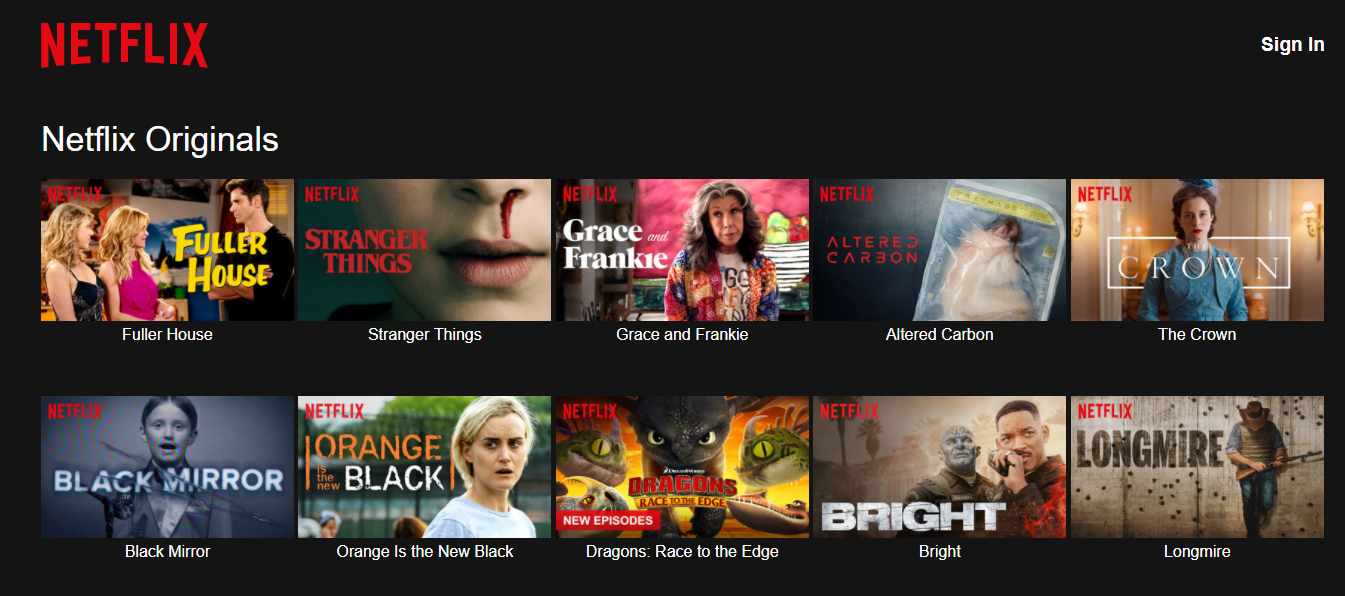
Netflix is in constant evolution and its managers are always trying to renew the offering. Since 2013, Netflix is also a content producer of the Netflix Originals, as they are called. These are TV shows or movies produced–or co-produced–by Netflix. Most titles are available solely on Netflix, though some are available on broadcast TV.
Netflix Original shows are often highly regarded and some of them are amongst the most popular TV shows. Riverdale, airing on the CW, Orange is the new black, Stranger Things, The Crown, Arrested Development, and Marvel superhero series Jessica Jones, Daredevil, The Punisher, Iron Fist, Luke Cage and Defenders are only a few examples to give you an idea of the general quality and popularity of the Netflix Originals.
Accessing The American Netflix From Outside The USA
Netflix often has to enforce some form of distribution restrictions. For instance, the producer of a movie might have already entered an exclusive distribution deal in a specific region and would therefore not allow Netflix to distribute it in that region.
Think of the NBC show The Big Bang Theory, for example. It’s not available on Netflix in the US but it is on some European versions of the service. This might not be the best example, though, as the American and Japanese Netflix are usually the ones with the most content. This particular show is one of many exceptions. Likewise, some Netflix original content is often available in some markets on broadcast TV through distribution agreements that forbid Netflix from making it available in these markets. Riverdale is a good example of a Netflix Original that is not available but is broadcast on The CW.
To enforce these restrictions, Netflix primarily uses a technique called geo-blocking. It ensures that users can only access their local service. A user in the US, for example, can only access the American version of Netflix while one in Canada can access the Canadian version but not the American one.
As a consequence of these distribution restrictions, what’s available on Netflix varies from region to region. Some content might not be available on your local Netflix while it is in the next country, which is why guides to watching Harry Potter on Netflix abroad are so useful, as are guides that explain how to watch Netflix in South Africa. The American Netflix is the one that’s the most sought after, the one many non-US users would like to watch.
But this geo-blocking can also become an issue for some US residents. Are you, for example, a US citizen traveling abroad? You can’t watch your Netflix. At least, not until you find a way to bypass the geographic blocking. This is precisely why ExpressVPN Netflix usage has become so popular among travelers and expats alike.
How Geo-blocking Is Accomplished
Geo-blocking is almost always accomplished by allowing or denying traffic based on source IP address. An IP address is a unique identifier assigned to every computer connected to the Internet. It is used to route data to and from different Internet-connected computers. Any request you send to Netflix’s servers is marked with your IP address. This is what we refer to as the source IP address. You can think of the source IP address as the return address on an envelope — this is how Netflix’s servers will know where to send the video stream you requested.
Like with postal addresses, there is a direct correlation between IP addresses and physical location. Netflix deduces the user’s location by cross-referencing your IP address with a database of locations and addresses, and blocks requests it finds to be originating from an unauthorized location.
How A VPN Can Help You Access Netflix
The primary and original use of VPNs was to provide added security and privacy and allow remote access to corporate networks. As a side effect of their mode of operation, they can help you connect to Netflix from anywhere in the world, enable Crunchyroll access abroad, unblock Freevee with VPN, or even unblock ChatGPT in Italy when regional restrictions get in the way. Here’s how:
A VPN builds a virtual tunnel between a device running a VPN client and a VPN server in a remote location. All data in and out of the client device is forced through the tunnel after being encrypted with strong algorithms that make it virtually impossible to crack. When data from the client device arrives at the VPN server, it is decrypted before being sent out on the Internet.
This is how the VPN helps you access Netflix. When the decrypted data leaves the VPN server, its source IP address is no longer that of your device but, instead, that of the VPN server. Netflix, therefore, will “think” that the client device is located wherever the VPN server is. The same mechanism also underpins Austrian IP routing when you need an IP from a different country. In summary, accessing the American Netflix from outside the US should just require that you connect to a VPN server located in the US. Unfortunately, it doesn’t always work.
Netflix’s VPN Detection And Blocking
Netflix goes to great lengths to protect its content licensing agreements and seeks to block connections coming from VPN servers. Through some type of ongoing reverse-engineering, Netflix manages to learn the IP addresses of as many VPN servers as possible and logs them into a database. They know a lot of VPN server IP addresses and their number keeps increasing.
To avoid being detected by Netflix as a VPN user, you need to carefully pick your VPN provider. And even then, there’s no guarantee that Netflix won’t eventually learn their IP addresses and block them. The top providers use various techniques — for example, using virtual IP addresses that are constantly changing on their servers — to try to prevent that from happening. According to Netflix’s own support documentation, the service actively enforces these geo-restrictions to comply with its content licensing agreements.
ExpressVPN – Does ExpressVPN Netflix Unblocking Really Work?
ExpressVPN is best known for its strong encryption protocols, the blazing speeds of its servers, and its huge worldwide network spanning 105 countries. The short answer is yes — ExpressVPN Netflix access works reliably, making it one of the most trusted solutions for streaming American content abroad. The provider is headquartered in the British Virgin Islands, a country with no data retention laws.
As the company points out, any request for user information would have to be issued by a local court, and the company’s network is designed so that it cannot match users to IP addresses. And as pointed out by a company spokesperson, the British Virgin Islands are not part of the 14 Eyes intelligence alliance.
To go beyond a simple yes or no, here is what our testing found across major Netflix libraries (tested in 2025):
- US Netflix: Unblocked consistently. HD and 4K streaming confirmed stable. Not every US server works — if one fails, switching to another in the same city typically resolves it. The New York and Los Angeles server clusters performed best in our tests.
- UK Netflix: Unblocked. Full HD streaming with no buffering. UK-exclusive content including BBC co-productions was accessible.
- Canada Netflix: Unblocked. Good HD performance. Canada has a unique catalog that differs meaningfully from the US library.
- Japan Netflix: Unblocked. Anime and Japanese originals loaded without issue. Speeds were slightly lower due to distance but remained sufficient for HD playback.
- Australia Netflix: Unblocked. HD streaming confirmed. Australian-exclusive titles were accessible without error.
Important caveat: Not every ExpressVPN server in a given country will unblock Netflix at any given time. Netflix continuously works to detect and block VPN IP addresses. If you see a proxy/VPN error or find that Netflix is showing only Originals (a common sign that your IP has been flagged), simply disconnect, choose a different server in the same country, and reconnect. For the fastest connection when streaming, select a server using the Lightway protocol — ExpressVPN’s own speed-focused protocol that is optimized for streaming and low latency.
Read our full ExpressVPN review.
- Unblocking Netflix, iPlayer, Hulu, Amazon Prime
- 3,000+ super fast servers
- Supports ALL devices
- No logs for personal data
- 24/7 Customer Service.
- Power-users configuration options.
Main Features Of ExpressVPN For Netflix Users
ExpressVPN supports multiple protocols, including its own proprietary Lightway protocol, which is the recommended choice for streaming. Lightway is built for speed and stability — it connects faster than OpenVPN and maintains a strong connection even when switching networks, making it ideal for uninterrupted Netflix sessions. The service also supports OpenVPN with 256-bit AES and perfect forward secrecy. Furthermore, its 4,096-bit DHE-RSA keys are protected by an SHA-512 hashing algorithm. For extra peace of mind, the service has a Network Lock feature which will block all internet traffic in the unlikely event that the VPN connection drops. These features make ExpressVPN Netflix streaming both secure and uninterrupted.
ExpressVPN operates under a strict no-logs policy — the provider does not record your browsing activity, connection timestamps, session duration, DNS queries, or IP addresses used during a session. This policy has been independently audited by third-party security firms, giving it meaningful credibility beyond marketing claims. The no-logs architecture is a core part of why ExpressVPN is trusted by privacy-conscious users worldwide.
The ExpressVPN subscription grants access to up to 8 devices simultaneously. Clients are available for Windows, MacOS, and Linux and there are apps for Android and iOS. If you’d rather protect your whole house from a single point, routers preloaded with ExpressVPN software are available, thanks to a partnership with FlashRouters. If you prefer, you can also follow ExpressVPN’s instructions and install the software on a router yourself.
Plans And Pricing
ExpressVPN only has one plan but there are three different pricing tiers. The different prices are based on the length of your engagement. You can opt to pay $12.95 on a monthly basis. For better value, the annual plan brings the effective monthly cost down significantly — current promotions typically offer around 49% off plus extra months free, making the annual plan the most cost-effective option for regular streamers. Pricing and promotional offers do change periodically, so check the ExpressVPN website for the latest deal.

And if you’re on the lookout for some special deals, chances are you can get an even better pricing on the yearly package. Given how reliably ExpressVPN Netflix unblocking performs, the annual plan represents excellent value for regular streamers.
The ExpressVPN Desktop Client
The simplicity of the desktop client application will most probably strike you. The basic user interface has a big “power” button right in the middle of the window. By default, clicking the button launches the VPN and connects you to the best available server. This is what ExpressVPN refers to as a “Smart Location.”
If you prefer to select a location — and you might when trying to use ExpressVPN Netflix access or need US state streaming access — you click the Choose Location button. It is at the bottom right of the ExpressVPN window. This opens a secondary window where you can pick a country and, optionally, a specific city within the selected country.

The client application also has a few options that can be accessed by clicking the menu button — the three horizontal bars — at the top left. You can, for instance, set the client application to launch automatically when Windows starts. You can also opt to have the client automatically connect to your last-used server when it is launched.
One last feature of the client that is worth mentioning is the availability of browser extensions for Google Chrome and Mozilla Firefox. The extensions don’t do much more than let you connect and disconnect the VPN directly from your browser, but they can also be set to automatically connect the VPN whenever the browser starts. This might be a better option than the auto-connection feature of the stand-alone client. And finally, there’s an option — enabled by default — to block WebRTC in your browser. WebRTC, if you didn’t know, is a potentially dangerous API that websites can use to communicate with your browser.
FULL GUIDE: WebRTC Leaks Vulnerability SOLVED for All Browsers
What to Do If ExpressVPN Isn’t Working with Netflix
Even with one of the best VPNs for Netflix, you’ll occasionally run into a blocked server. The most common symptoms are a proxy/VPN error message from Netflix (“You seem to be using an unblocker or proxy”) or a situation where Netflix loads but only shows Originals — a telltale sign that your IP has been flagged and Netflix is serving you a restricted, region-neutral catalog. Here’s the sequence of fixes to try, in order:
- Switch to a different server in the same country. This is the fix that works most often. Not every server in a country will be blocked — simply disconnect, open the server list, choose another city or location within the same country, and reconnect. In the ExpressVPN app, you can browse servers by country and try multiple options.
- Change the protocol to Lightway. In the ExpressVPN app, go to Settings → Protocol and select Lightway. This is ExpressVPN’s fastest and most streaming-optimized protocol and can sometimes bypass detection that affects other protocols.
- Fully quit and reopen the Netflix app or browser. After switching servers, close Netflix completely — don’t just minimize it. On mobile, force-close the app. On a browser, close the tab and open a fresh one. Then reload Netflix.
- Clear browser cookies and cache. If you’re watching Netflix in a browser, your previous session data (including location signals) can linger even after a server switch. Clear cookies and cache, then reload Netflix and sign in again.
- Sign out of Netflix and sign back in. Signing out clears the active session token associated with your previous IP. After signing back in over your new VPN connection, Netflix will reassign your session to the new server location.
- Confirm your VPN IP matches the intended country. Visit a site like whatismyip.com while connected to ExpressVPN and verify that the displayed IP address and country match the server location you selected. If they don’t match, the VPN connection may not be routing correctly.
- Run DNS and WebRTC leak checks. Even with a VPN active, your real location can leak through DNS or WebRTC. Use a tool like dnsleaktest.com to confirm your DNS requests are going through ExpressVPN’s servers, and verify that WebRTC blocking is enabled in the ExpressVPN browser extension settings.
- Restart your device and router. A full restart clears cached network settings, DNS entries, and stale connection states that can interfere with VPN routing. After restarting, reconnect to ExpressVPN before opening Netflix.
- Contact ExpressVPN live chat if the issue persists. ExpressVPN offers 24/7 live chat support. Their team monitors which servers are working with Netflix in real time and can point you directly to a server that is currently unblocking your target region — saving you the trial and error.
Working through this list in order resolves the vast majority of ExpressVPN Netflix issues without any advanced technical knowledge required.
In Summary: ExpressVPN Netflix Is A Winning Combination
ExpressVPN is most certainly one of the best options to unblock and access the American Netflix from anywhere in the world. Whether it works because Netflix hasn’t yet learned the IP addresses of the US ExpressVPN servers or because of some stealth techniques used by ExpressVPN is irrelevant. What’s important is that ExpressVPN Netflix access works, and it lets you stream American content from anywhere on the globe.
If you need a VPN for a short while when traveling for example, you can get our top ranked VPN free of charge. NordVPN includes a 30-day money-back guarantee. You will need to pay for the subscription, that’s a fact, but it allows full access for 30 days and then you cancel for a full refund. Their no-questions-asked cancellation policy lives up to its name.

