Best VPN Router in 2026: Top Picks for Home & Office, Setup Guide, and Expert Reviews
Virtual private networks (VPNs) can be a powerful way to protect your privacy, especially when combined with your home router. They encrypt your browsing activity, keeping your location and online behavior private. Running a VPN on your router enhances overall network security, which is helpful for remote work, protecting household devices, and accessing geo-blocked content such as Netflix libraries in other regions. Whatever your purpose, the best VPN router lets you protect and encrypt multiple devices at once.
Below you’ll find the best VPN routers available in 2026, along with their pros, cons, pricing, and setup guidance.
Quick Comparison Table: Best VPN Routers at a Glance
In a hurry? here’s a quick comparison table of the routers we’ll discuss and what they offer:
| Model | Best For | Key Features | VPN Compatibility | Price | User Rating |
| Aircove | ExpressVPN users looking for a built-in VPN | Instant protection for every device, automatic updates, kill switch | ExpressVPN | $189.90 | 4.0 |
| ASUS RT-AX88U PRO | Large homes, multi-device support | Coverage up to 2,700 sq. ft., multiple VPN tunnels, mobile tethering | OpenVPN, WireGuard | $284.51 | 4.2 |
| NETGEAR Nighthawk | Wi-Fi 7 power users | Up to 12 Gbps, built-in security, automatic updates | OpenVPN configs | $399.99 | 4.3 |
| TP-Link Archer | Best value | Multi-Link Operation, 4K-QAM, smart-assistant compatible | OpenVPN, PPTP, L2TP/IPsec | $179.99 | 4.5 |
| GL.iNet | Budget choice | Wi-Fi 6, high device limit | OpenVPN, WireGuard | $149.99 | 4.6 |
Top Best VPN Router Picks for 2026 (Expert Reviews)
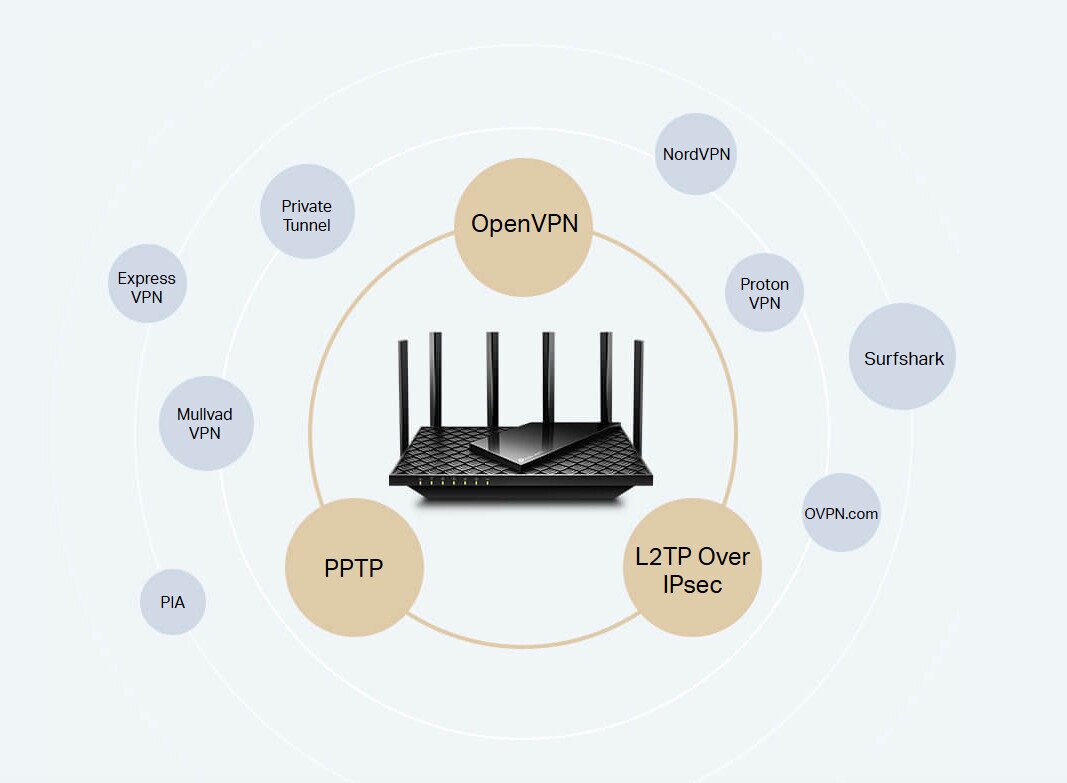
Now that we’ve given you our general overview, here are our top picks for the best VPN router in each category, where we break down premium features, gaming support, and other must-haves we think you’ll love.
Aircove Wi-Fi 6 VPN Router
Pros:
- Up to 5 VPN locations at once
- Parental controls
- Ad and tracker blocking
- Developed by ExpressVPN
- 30-day free trial for new ExpressVPN users
Cons:
- Limited VPN compatibility
- Coverage capped at 1,600 sq. ft.
Best Usage Scenario: Users wanting a best VPN router with a built-in VPN (ExpressVPN)
VPN compatibility: ExpressVPN
Price: $189.90
Aircove is an ExpressVPN exclusive router designed specifically for this service. It’s affordably priced, intuitive, and ships with ExpressVPN’s software pre-installed, making setup quick. You can group devices, apply parental controls, enable the kill switch, and rely on automatic updates. Wi-Fi sharing without entering a password is another useful touch.
Aircove supports dozens of devices and includes adapters for the US, EU, UK, and AU. Note that the link provided is for the US/Canada model; users in other regions should make sure they select the correct version.
ASUS RT-AX88U PRO
Pros:
- Speeds up to 6000 Mbps
- Gbps WAN/LAN ports with link aggregation
- Dual 2.5G ports
- Mobile Game Mode for low-lag gaming
- AiMesh technology to expand coverage
- Simultaneous connections to multiple VPN tunnels
Cons:
- Expensive
- Poor customer service
- Some users report slower performance at times
Best Usage Scenario: Wi-Fi 6 users needing wide coverage
VPN compatibility: OpenVPN, WireGuard, PPTP, L2TP
Price: $284.51
One of our favorite features of this best VPN router from ASUS is the option to pair it with their exclusive RangeBoost Plus to extend overall coverage to a generous 2,700 square feet. For many users, that’s more than enough to cover their entire house.
Mobile gamers will appreciate the Mobile Game Mode, which helps reduce latency and lag. Additionally, the option to use USB 4G LTE and 5G mobile tethering is great for alleviating internet outages. Parents can also set detailed age-based controls.
Most users experience strong speeds and reliable coverage, though the price is higher than some alternatives. Still, you get a lot for your money and the router supports a broad range of VPN connection types, including PPTP, L2TP, WireGuard, and OpenVPN.
NETGEAR Nighthawk
Pros:
- Speeds up to 12 Gbps for real-time gaming
- Great for 4K/8K streaming
- Enhanced built-in security tools
- Automatic firmware updates
- Coverage up to 3,000 sq. feet
- Supports up to 120 devices
Cons:
- Very expensive
- Some users report connection issues
Best Usage Scenario: Wi-Fi 7 users
VPN compatibility: OpenVPN configuration files
Price: $399.89
NETGEAR’s Nighthawk is a strong contender for the best VPN router for power users who want high-performance hardware that can handle anything you throw at it. Setup is simple through the Nighthawk app, and free customer support is available if you need help with installation or optimization.
Its speed makes it excellent for real-time gaming, remote work, and 4K/8K streaming with minimal buffering. The router includes 1 x 2.5 Gig and 3 x 1 Gig Ethernet LAN ports for fast wired connections. With coverage up to 3,000 sq. ft., it’s one of the broadest options in this guide. Overall, Nighthawk is extremely fast, highly capable, and ideal for users needing wide coverage and maximum speed.
TP-Link Archer
Pros:
- Covers up to 2,400 sq. ft
- Supports up to 90 devices
- 4K-QAM
- Wi-Fi 7
- 6.5 Gbps total bandwidth
- Compatible with EasyMesh range extenders
- 1x 2.5 Gbps WAN/LAN port, 1x 2.5 Gbps LAN port, 3x 1 Gbps LAN ports
- Committed to CISA’s Secure-by-Design pledge
Cons:
- Setup can be tricky
- No WireGuard support
Best Usage Scenario: Best bang for your buck
VPN compatibility: OpenVPN, PPTP, and L2TP Over IPsec (compatible with Surfshark, PIA, NordVPN, ExpressVPN, and more)
Price: $179.99
This Wi-Fi 7 router is one of the best VPN router options for value-conscious buyers. It provides wide coverage, stable connectivity, and multi-link operation. Supporting up to 90 devices, it delivers many of the same capabilities as premium routers like the Nighthawk but at less than half the cost.
The Archer easily handles 4K/8K streaming, VR/AR, gaming, and video conferencing with ease. It’s also compatible with most major VPN providers thanks to OpenVPN, PPTP, and L2TP/IPsec support. The main drawback of this device is that setup may be slightly confusing, but thankfully TP-Link’s free customer service is available to guide you.
GL.iNet
Pros:
- Supports over 86 devices
- 8-stream Wi-Fi 6 technology
- 4K streaming
- Works with AdGuard Home for ad and tracking blocking
- Quad-core 2GHz processor
- Very affordable
Cons:
- Not as fast or powerful as premium routers
Best Usage Scenario: Budget-conscious users
VPN compatibility: OpenVPN and WireGuard (compatible with 30+ VPN providers)
Price: $149.99
As of writing, GL.iNet has the highest customer ratings of any of the routers on our list. Why? Because you get great functionality paired with a very fair price. It’s fast enough for gaming, conference calls, and 4K streaming, and includes built-in ad blocking when used with AdGuard Home. For budget shoppers searching for the best VPN router under $150, this is a top pick.
Users appreciate its strong signal strength, high device capacity, and overall build. With WireGuard, your speeds can reach up to 900Mbps, with around 880 on OpenVPN. What’s more, standard features like WPA3, Dual-Ethernet WAN, and OpenWrt come pre-installed. For most users, GL.iNet offers more than enough capability at a low cost.
Key Features to Consider When Choosing the Best VPN Router

There are many features worth evaluating before choosing a VPN router. Here are the essentials:
- Easy setup: VPN configuration can be simple or frustrating. Choose a router with clear instructions and reliable support.
- Built-in VPN: While this is a nice-to-have, it can make your life easier if you have one already pre-configured with a VPN.
- Enhanced security: Many routers will come with built-in security features to further protect your devices and network for a safer browsing experience.
- Compatibility: Choose a router that supports your VPN or its required protocols.
- Wi-Fi coverage: If you live in a large space, the bigger the coverage area, the better
- Device limits: Most routers have multiple devices that can be simultaneously connected, but connection limits vary across models.
- Speed: You’ll want a router with minimal lag, especially if you’re gaming or streaming media.
- Advanced settings: Features like split tunneling, guest networks, parental controls, and kill switches add flexibility. The more the merrier!
Beyond these basics, we recommend treating your router purchase as a pre-purchase compatibility checklist. Getting this wrong is one of the most common causes of buyer frustration in this category, so work through each of these points before you buy:
- VPN client vs. VPN server support: Many routers — especially ISP-supplied gateways and budget models — only include a VPN server feature, which lets other devices connect into your network remotely. That is the opposite of what you need. You specifically want a router that supports VPN client mode, meaning the router itself connects outbound to your VPN provider’s servers and tunnels all your traffic through it.
- Supported protocols: Check which VPN protocols the router actually supports in its firmware. OpenVPN is the most broadly available, but WireGuard support is increasingly important for speed and efficiency. L2TP/IPsec is common on mid-range routers but is considered less secure by most modern standards. Some newer proprietary protocols — such as NordVPN’s NordLynx or ExpressVPN’s Lightway — are generally not available on standard router firmware at all.
- VPN provider configuration file support: Even if your router supports OpenVPN in principle, confirm that your specific VPN provider actually publishes router configuration files for that protocol and your router model. Most major providers do, but it is worth verifying before you buy.
- Stock firmware vs. custom firmware requirement: Some routers support VPN client mode straight out of the box. Others require you to install custom firmware such as Asuswrt-Merlin (for compatible ASUS models), OpenWrt, DD-WRT, or Tomato before VPN client features become available. Know which category your target router falls into before purchasing.
- CPU and encryption throughput — not just headline Wi-Fi speed: A router’s advertised Wi-Fi speed (e.g., “Wi-Fi 7, 12 Gbps”) refers to theoretical wireless capacity, not VPN performance. Encrypting and decrypting VPN traffic is CPU-intensive. A router with a weak processor may only sustain 50–100 Mbps of encrypted throughput even if its Wi-Fi spec is much higher. Look for routers with dedicated hardware encryption acceleration or higher-clock multi-core processors if VPN speed is a priority.
Important note on protocol support: Some VPN providers’ most advanced or proprietary protocols are not compatible with standard router firmware and may never be. If you rely on a specific protocol for performance or security reasons, verify router compatibility with your VPN provider’s support documentation before making a purchase decision.
VPN Router Usage Scenarios: Home, Office, Gaming & Remote Work
A best VPN router purchase can serve many different needs. Here’s when you may want to use one and why.
Remote Work
If you work remotely, using a VPN router can increase your privacy and security. You can protect your work data, gain remote access to servers in different regions, and protect sensitive information, such as client or financial data.
This is even more important if you must adhere to certain privacy laws for regulatory compliance. TP-Link Archer is a particularly strong fit for home offices due to its security-oriented design.
Home Network
To keep your home network secure, a best VPN router is a great solution. Not only will it help protect you, but it also unlocks access to geo-restricted content that would otherwise be unavailable, such as Netflix libraries in other countries.
Many routers also have parental controls and security tools, so you can fine-tune your settings accordingly. This can even include guest Wi-Fi access. The ASUS RT-AX88U PRO is particularly well suited for home use for these reasons.
Unlimited Connections
Many VPN services limit simultaneous devices to around 10 connections, which can be frustrating if you want to protect your entire home network. Using a VPN router can increase this protection significantly.
Many routers support 80–100 devices, and your VPN counts the router as a single connection. This lets you use your VPN without hitting device limits and also prevents the battery drain you’d get from running a VPN on every individual device.
Gaming
Online gamers can also enjoy the benefits of a VPN router by connecting to servers that decrease latency, avoid DDoS attacks, and allow access to geo-restricted games and servers.
Using a VPN while gaming also helps you avoid bandwidth throttling that can slow you down. If you’re specifically comparing Warzone router VPNs or looking for a Call of Duty VPN, the NETGEAR Nighthawk is especially well-suited for gamers who want maximum speed.
Best Travel VPN Routers and When to Use One
Most of this guide focuses on protecting your home or office network, but one of the most common real-world reasons people search for a VPN router is travel. Hotels, vacation rentals, dorms, co-working spaces, and temporary work setups all involve connecting to networks you do not control — and that is exactly where a compact travel VPN router earns its keep.
A travel router is a small, portable device that connects to a hotel’s Wi-Fi or a wired ethernet port and creates its own private Wi-Fi network for all your devices. When you run a VPN on that travel router, everything you connect — your laptop, phone, tablet, smart TV — gets protected automatically, without needing to configure the VPN on each device individually.
When a travel router is the better choice
- You frequently stay in hotels, Airbnbs, or dorms and want consistent VPN protection without relying on each property’s network security
- You do not want to replace your home router or touch your main network setup
- You want to use a travel router as a dedicated VPN gateway for only a subset of devices at home — for example, a smart TV or a gaming console — while keeping the rest of your network on a regular connection
- You need a simple secondary router that sits between your main router and a specific device or group of devices
Tradeoffs to expect with a travel router
- Shorter wireless range: Travel routers are designed for rooms, not entire homes. Do not expect whole-house coverage from a device the size of a deck of cards.
- Fewer ports: Most travel routers have one or two ethernet ports, which is usually sufficient for travel but limiting for a full home setup.
- Lower throughput: Because travel routers use smaller processors, VPN-encrypted throughput will be lower than a full-size home router. For most travel use cases — browsing, streaming, video calls — this is rarely a problem.
A strong travel VPN router pick: GL.iNet travel models
GL.iNet is one of the most respected names in the travel router category. Models like the GL.iNet Slate AX (GL-AXT1800) run OpenWrt out of the box and support both OpenVPN and WireGuard natively, making them compatible with virtually every major VPN provider. They are small enough to slip into a laptop bag, include a battery-friendly design for hotel rooms with limited outlets, and are straightforward to configure even for users who are not deeply technical.
The GL.iNet GL-MT6000 featured in our main roundup above is a full-size home router, but GL.iNet’s travel lineup — including the Slate AX and the Beryl AX — offer the same excellent VPN compatibility in a much more portable form factor. If your main goal is reliable VPN protection on the road, a GL.iNet travel model is one of the smartest and most cost-effective ways to get it.
For ASUS fans, the ASUS ZenWiFi Pro series also includes travel-friendly options that support Asuswrt-Merlin firmware, giving you access to advanced VPN client features in a smaller package.
VPN Router Setup Methods: Built-In Support vs. Custom Firmware vs. Preconfigured Routers vs. Dedicated Gateway
Before you follow any step-by-step setup guide, it helps to understand which setup path applies to your situation. Not all routers expose a VPN client menu in their admin panel — in fact, many do not. The right approach depends entirely on the router you own or plan to buy. Here are the four main ways people get VPN protection at the router level.
1. Router with native VPN client support
Best for: Users who want a straightforward setup without replacing firmware or buying a specialty device.
Some routers — particularly higher-end ASUS, TP-Link, and GL.iNet models — include a VPN client section directly in their stock admin panel. You log in, navigate to the VPN settings, upload your provider’s configuration file or enter your credentials, and you are done. This is the simplest path if your router supports it.
Pros: No firmware modifications required; supported by the manufacturer; relatively easy to set up.
Cons: Not all routers have this feature — ISP-supplied gateways and many budget routers either lack VPN client support entirely or only offer VPN server mode, which is a different thing entirely. Always check your router’s spec sheet before assuming this option is available.
2. Preconfigured VPN router
Best for: Beginners who want zero-hassle setup and do not mind being tied to a specific VPN provider.
Some VPN providers sell or recommend routers that come with their software already installed and configured. The ExpressVPN Aircove is the clearest example — it ships with ExpressVPN’s firmware pre-loaded, and you simply log in with your ExpressVPN account to activate protection. No configuration files, no manual protocol selection.
Pros: Fastest time-to-protection; minimal technical knowledge required; often includes provider-specific features like device grouping and kill switch.
Cons: Locks you into one VPN provider; switching providers means buying a new router or reflashing firmware.
3. Custom-firmware router (OpenWrt, DD-WRT, Tomato, or Asuswrt-Merlin)
Best for: Power users who want maximum control, protocol flexibility, and features that stock firmware does not offer.
If your router does not support VPN client mode in its stock firmware, you may be able to install third-party firmware to unlock that capability. Asuswrt-Merlin is a popular option for compatible ASUS routers and adds robust VPN client support without dramatically changing the user interface. OpenWrt, DD-WRT, and Tomato are more advanced alternatives that work on a wider range of hardware but require more technical comfort to configure correctly.
Pros: Unlocks VPN client features on routers that lack them natively; often adds WireGuard, policy-based routing, and other advanced options; large community support base.
Cons: Flashing custom firmware can void your warranty and, if done incorrectly, brick your device; setup is significantly more complex; not every router model is supported.
4. Separate VPN gateway or secondary router
Best for: Users who do not want to replace or modify their main router but still want VPN protection for some or all of their devices.
Rather than replacing your primary router, you can place a second VPN-capable router between your main router and specific devices. This secondary router handles the VPN tunnel while your primary router continues operating normally. A GL.iNet travel router works very well for this purpose — it can sit on your desk connected to your main router via ethernet, create its own Wi-Fi network, and route everything through a VPN without touching your home network’s main settings.
Pros: Does not require replacing or modifying your existing main router; lets you selectively route only certain devices through the VPN; easy to experiment with and remove if needed.
Cons: Adds a device to your network and a potential extra hop in your connection; throughput is limited by the secondary router’s processor; requires some basic network configuration to set up correctly.
How to Set Up a VPN on Your Best VPN Router (Step-by-Step Guide)
The process for configuring a VPN on a router depends on the VPN provider and hardware. For instance, advanced settings take more preparation when compared to the straightforward setup of pre-configured options.
The setup steps are usually similar across VPNs and routers, but if you’re unsure, check your provider’s or router brand’s official instructions. Most offer free support that can walk you through the process.
Compatibility checkpoint — do this before anything else: Not every router can be configured as a VPN client through its admin panel. Before following the steps below, confirm that your router supports VPN client mode in its stock firmware. Check your router’s manual or the manufacturer’s support page and look specifically for “VPN client” support — not just “VPN” in general, since many routers only include a VPN server feature. If your router does not support VPN client mode in stock firmware, you will need to choose a different path: install Asuswrt-Merlin or OpenWrt/DD-WRT/Tomato custom firmware (if your model is supported), purchase a preconfigured VPN router, or add a separate VPN gateway device. ISP-supplied gateways and many budget routers either have no VPN client capability at all or expose only VPN server settings — in those cases, the steps below will not apply until you address the firmware or hardware situation first.
While these instructions may vary depending on your setup, here’s a good place to start for routers that do support native VPN client mode:
- Choose a VPN compatible with your router (or vice versa)
- Open your web browser and enter your router’s IP address to access the admin or management page.
- If your router has native VPN client support in its stock firmware, locate the VPN client section in your settings — it is typically found under Advanced, Security, or Network. Note that this menu only exists on routers with genuine VPN client support. If you do not see a VPN client option (as opposed to a VPN server option), your router’s stock firmware likely does not support this feature, and you will need to revisit the setup method options described in the section above before continuing.
- From here, follow your VPN provider’s setup instructions, which usually involve entering firmware details and your VPN credentials into the router’s control panel.
- Activate the VPN and enter your login details if prompted.
- Test the connection to confirm your VPN is working by checking whether your real IP address is hidden. You can use a site like https://whatismyipaddress.com/ to verify this.
A few things to note. Many routers now include apps that walk you through the setup process, which makes things much simpler. Pre-configured models are even easier, such as the Aircove, which takes far less time and effort to get running. Here are ExpressVPN’s official Aircove setup instructions.
If you want to optimize your best VPN router’s performance, choosing the right VPN protocol makes a significant difference. WireGuard is widely regarded as one of the fastest and most efficient VPN protocols available today, and many modern routers support it natively.
You can also try the following tips to get the most out of your setup:
- Choosing a more efficient VPN protocol, such as WireGuard
- Using UDP instead of TCP, if available
- Reducing the number of VPN clients connected
- Disabling extra services that you’re not using, such as parental controls
- Keeping your firmware updated
- Using wired Ethernet when possible
- Testing different VPN server locations
- Choosing a router with strong enough hardware
Because VPN router setup can get complex, here are configuration guides from several major VPN providers to help you along the way:
Buying Guide: How to Choose the Best VPN Router for Your Needs
We’ve already provided a comparison chart and router recommendations, but here are the main factors to remember when choosing your final best VPN router:
- Best value: Value isn’t only about price. It’s also about how much performance and functionality you get for what you spend.
- Provider compatibility: The more protocols your VPN supports, the more router options you’ll have.
- Technical skill: Pre-configured routers are the most user-friendly. More advanced users can take advantage of deeper settings and optimizations.
- Usage: Match the router to your needs. For example, if you want to stream 8K content, choose a router designed to handle it.
When in doubt, user reviews are your best friend. Having real-life examples often reveal issues or advantages that can help shed light where spec sheets can’t. Consider looking into reputable retailers like Amazon or Best Buy to find reviews on specific router brands and models.
Frequently Asked Questions (FAQ)
What is a VPN router and how does it work?
A VPN router directs and guides your network information, transmissions and web interactions. With the VPN in use, these kinds of interactions are encrypted and secured, keeping all of the connected devices relatively protected from prying eyes and malicious actors.
Which router has built-in VPN support?
The Aircove has the strongest built-in VPN support since it is pre-configured for ExpressVPN and ready to use out of the box.
3.Is it better to use a VPN on my router or individual devices?
That really depends on your needs. Routers are handy because they can cover your entire home network from a single point, negating the need to individually activate a VPN on each device. However, if you’re away from your router a lot of the time, you won’t be protected unless you use a VPN on your mobile devices as well.
4. Are VPN routers good for gaming and streaming?
They can be. VPN routers help prevent DDoS attacks and reduce bandwidth throttling while gaming. VPNs can add slight slowdown when streaming, but a strong router and good VPN provider make it barely noticeable. They also let you access geo-restricted content.
How do I set up a VPN on my router?
You’ll need to enter your VPN settings into your router’s control panel. The router and/or VPN provider should have instructions to do this. Pre-configured routers usually have apps and streamlined guides to make the process easier.
Can I use any VPN provider with my router?
You’ll need to choose one that is compatible with your VPN provider and their supported protocols. However, for the more tech savvy, custom firmware can be installed as a workaround if needed.
Do VPN routers slow down internet speed?
Yes, some slowdown is normal, but fast routers paired with strong VPN services minimize the impact.
Are there affordable VPN router options for home use?
Yes, the GL.iNet router, for instance, is a strong budget-friendly choice. Just make sure you don’t skimp on features to save a few bucks, or you won’t find the router nearly as useful.
What features should I look for in a VPN router for remote work?
Look for good VPN protocol support and compatibility, such as WireGuard and OpenVPN, features like split tunneling and kill switch, Wi-Fi 6 or higher, and robust hardware with good CPU encryption performance.
Can I connect multiple devices to a VPN router?
Yes! Many routers support dozens of devices, which is especially helpful when your VPN limits simultaneous connections. The router counts as one device, but it protects everything connected to it.
Conclusion
Choosing the best VPN router lets you secure your entire home network and all connected devices from a single point. It’s an effective way to expand the benefits of your VPN across your whole household. If you want to explore further, here’s our guide explaining what a VPN router is.

