Acronis True Image 2026: Download, Features, Pricing & Full Review
Security software tools keep your computer in top shape. For example, malware protection programs stop bad actors from infiltrating your network, and virus removal tools clean your PC if it is already infected.
However, you shouldn’t disregard data backup solutions like Acronis True Image. Cloud backup tools like this one are essential for saving your files to a safe location in case of corrupt disks, malware infections, or other events that lead to data loss.

What is Acronis True Image?
Acronis True Image is a powerful application that offers a complete backup solution for Windows and Mac. You can use it to back up your operating system as well as custom files and folders.
Furthermore, the program comes packed with extra tools. For instance, you can create bootable disks to use on your computer in case it won’t run anymore due to OS errors, cyberattacks, or infections due to the lack of malware protection.
Acronis True Image Download
Log in to your Acronis account to get the latest version. The company explains how to do that here.
There are older editions of Acronis True Image available for download, too, which you can check out on the official website. A few of the archived versions are still accessible through these links if you need them:
- (https://dl.acronis.com/u/AcronisTrueImage2021.exe) Download Acronis True Image 2021
- (https://download.acronis.com/AcronisTrueImage2020.exe) Download Acronis True Image 2020
- (https://dl.acronis.com/u/AcronisTrueImage2019.exe) Download Acronis True Image 2019
- (https://dl.acronis.com/u/AcronisTrueImage2018.exe) Download Acronis True Image 2018

Setting up this backup application is a breeze since you just have to click a button and Acronis will do the rest. When starting up True Image for the first time, you can specify a serial number if you purchased a license.
Is Acronis True Image free?
No, Acronis True Image isn’t free. But you can start a free trial by creating an Acronis account on the spot. Just keep in mind that some features are locked during the free trial.
True Image Plans and Prices
Three Acronis True Image subscription options are available. These options share many of the same features. For example:
- Protects up to 5 computers and unlimited mobile devices
- Works on Windows and macOS
- Can be licensed for a year at a time
- Support full image backups, disk cloning, file- and folder-level backups, incremental and differential backups, and scheduling.
Here’s a quick look at how they differ to help you decide which one you need:
- Essentials: No cloud backup and only a trial of malware protection and CPU load balancing
- Advanced: 50 GB of cloud storage with options to increase to 500 GB, identity protection, the option to set cloud backup to run only on certain Wi-Fi networks, and remote data management
- Premium: 1 TB of cloud storage expandable to 10 TB and more privacy features (electronic signatures and blockchain notarization)
Essentials is the least expensive option, while Premium is nearly double the price of the Advanced subscription. For a full look at plans and prices, check out the True Image comparison chart.
True Image Pros & Cons
This Acronis software has been around for a long time. We looked through numerous user reviews and took the app for a spin ourselves to compile this list of the good and the bad:
Pros:
- Full-disk backups and specific file/folder backups
- Protects against ransomware during backups
- Reliable active drive cloning and restore tools
- Supports both local and cloud backups
- Schedule time-based and event-based backups
Cons:
- Backups can be slow, especially with large drives
- System restores sometimes take longer than expected
- Uses noticeable system resources in the background
- The UI feels overcluttered with features
- Subscription prices keep rising over time
How to Use Acronis True Image
To create a backup job, here’s what you have to do:
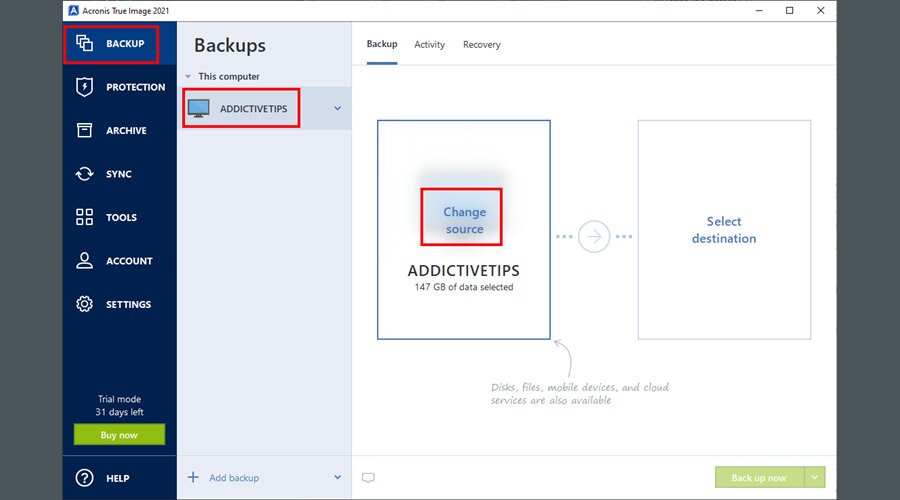
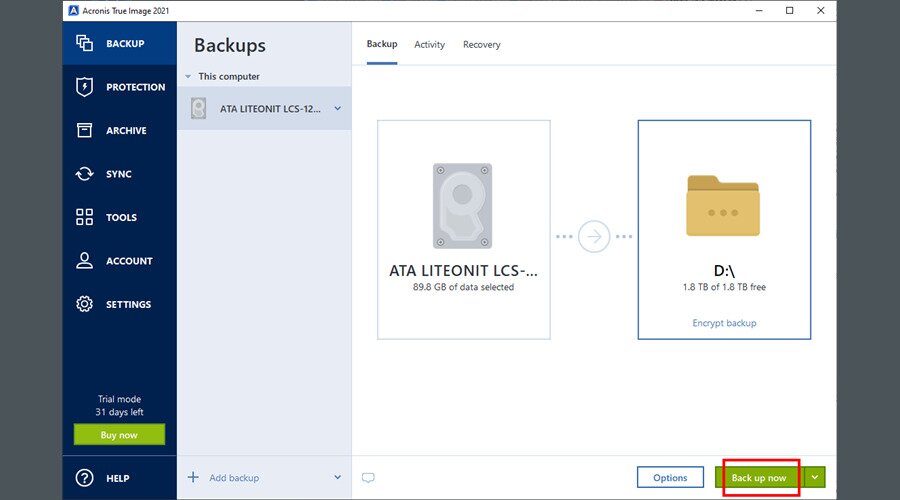
- Select Backup, choose your computer, and click Change source

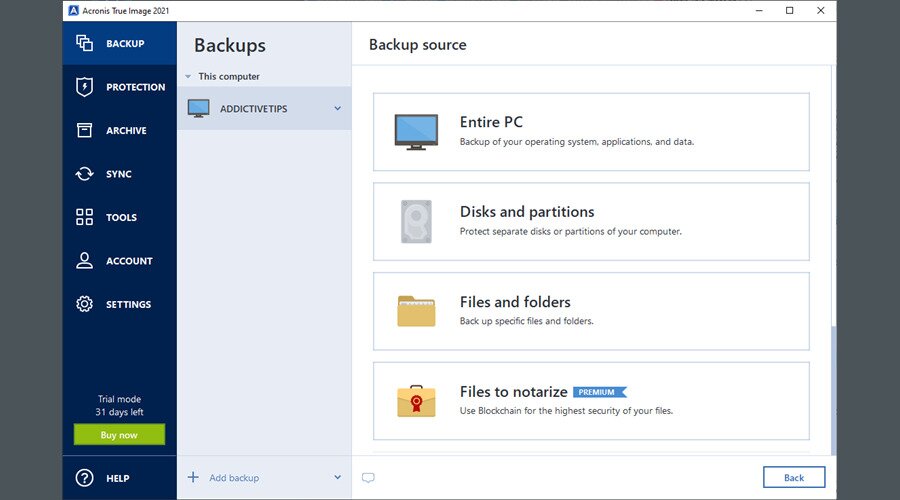
- Pick the backup source from Entire PC, Disk and partitions, or Files and folders

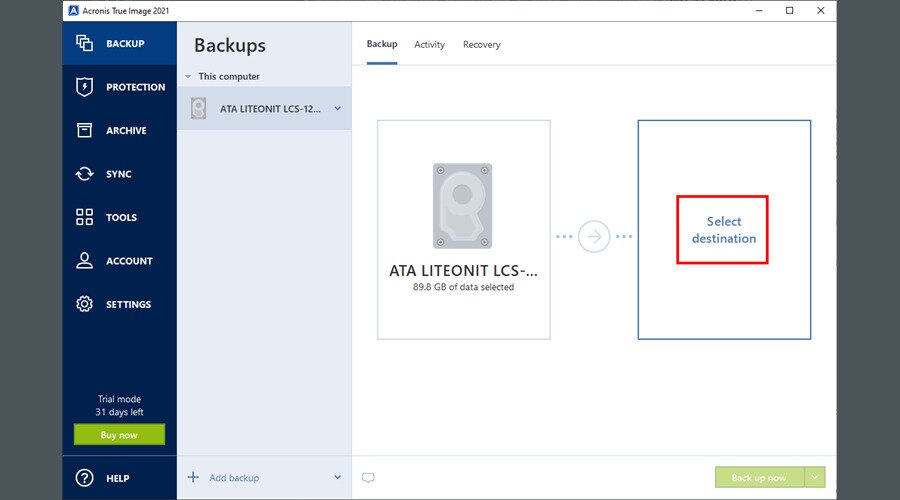
- Return to the main menu and click Select destination

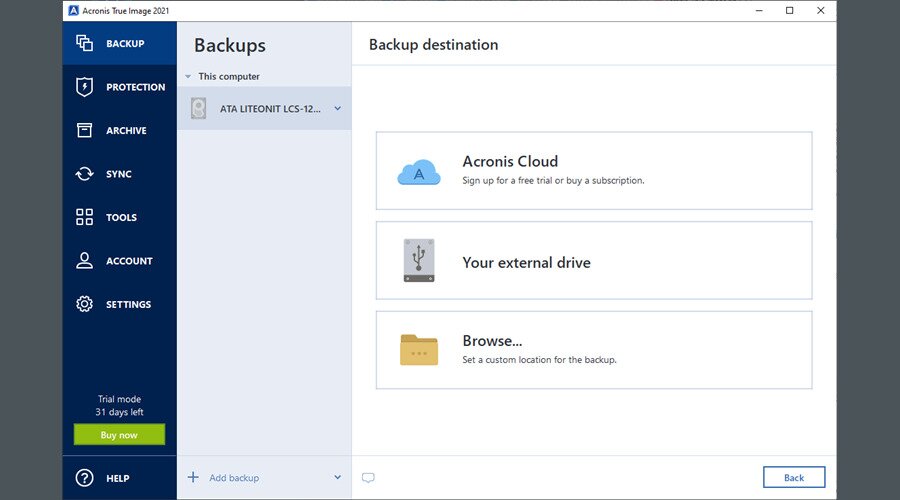
- Choose the backup destination from Acronis Cloud (online/cloud backup), Your external drive, or Browse if you want to indicate a custom location (local computer, FTP or NAS connection)

- Once returned to the Acronis True Image main window, click Back up now

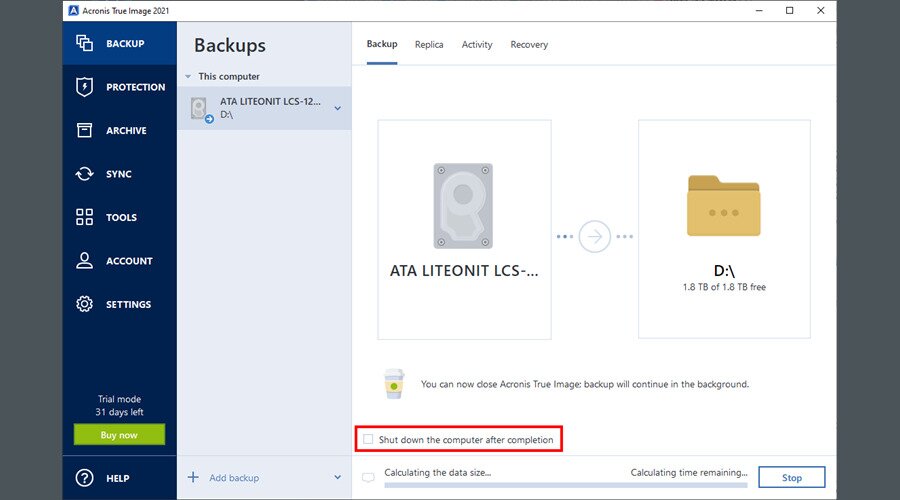
- Wait until the backup job is over. If it takes too long and you have to leave, select Shut down the computer after completion

Functionality
It’s also possible to update an existing backup by adding new data. You can create a backup duplicate and save it to your Acronis Cloud account, review your past activities, and easily restore data by simply selecting a backup.
Malware and Ransomware Protection
True Image’s functionality doesn’t stop here. In addition to backup and restore features, it comes with a Protection module that prevents unauthorized processes from deleting your files.
It’s an excellent measure against malware agents who attempt to hijack your PC by erasing all data. It’s effective against ransomware attacks, illicit crypto-mining, and Zoom injection attacks.
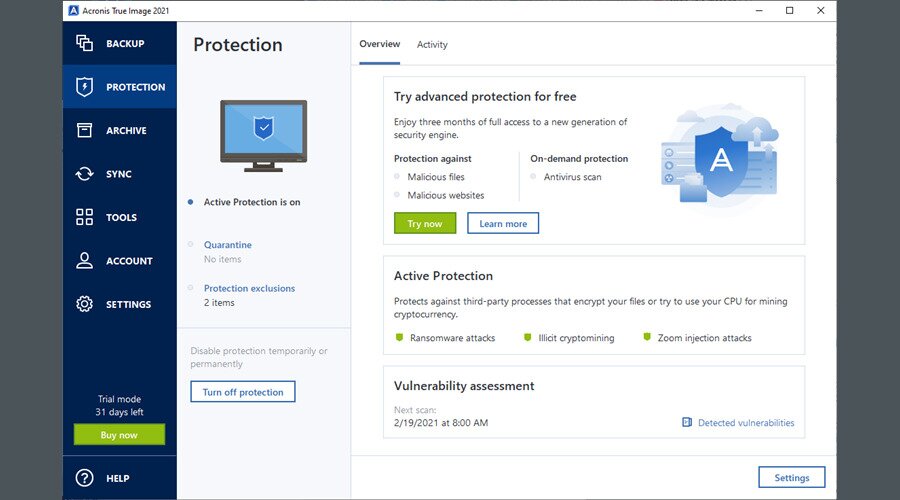
One way Acronis True Image protects your files is with its Active Protection technology, which watches how programs behave and looks for signs of malware and ransomware in real time.
If a threat tries to encrypt or alter your files, the system flags and blocks it before it can do any harm.
Other Features
You can free up disk space by moving large or old files from your computer to an external disk or to your Acronis Cloud account.
Furthermore, True Image has a sync feature that updates your files and folders between your PC and Acronis Cloud, or between any two PCs where True Image is installed.
More features are available in the Tools section, where you can clone entire disks, create rescue bootable media to boot your PC without an OS (which is useful if you’re missing malware protection), or set up a temporary sandbox to safely test applications using Try & Decide.
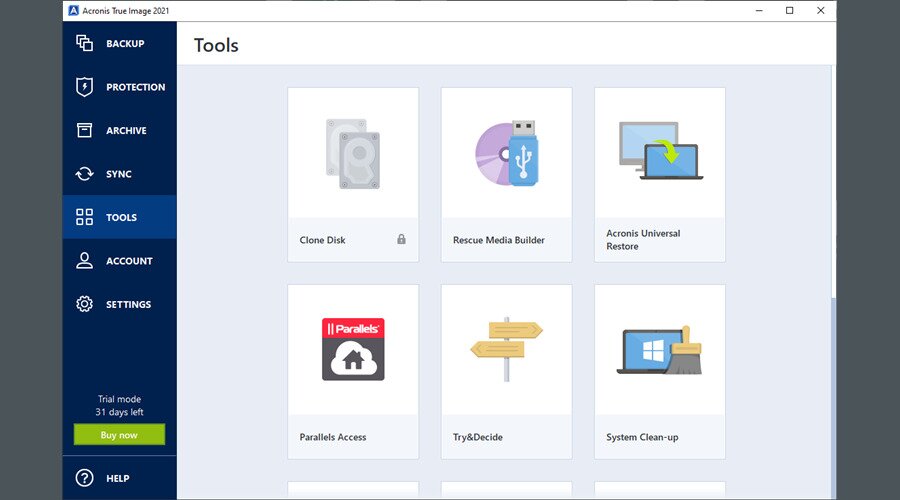
You can also make room on your hard disk by cleaning Windows using the System Clean-up feature. Meanwhile, old drives can be wiped clean using Acronis Driver Cleanser, in order to make sure that deleted data can’t be recovered with specialized software like Piriform’s Recuva.
Data and Security
Acronis supports end-to-end encryption for cloud backups and local backups. So, all your backed-up data is protected all the time, both when it’s being stored and transmitted. This ensures that your files aren’t viewable by anyone unless they have the proper credentials.
Mobile Backups
Most of us have a smartphone or tablet that we might use even more than a computer, making mobile backups all the more important. Fortunately, True Image can back up mobile devices running iOS (17 or later) and Android (11 or later).
The company’s mobile app can securely back up your photos, videos, contacts, calendars, reminders, and other files (options depend on your device) over Wi-Fi to a connected computer or your Acronis Cloud account.
Of course, this data can also always be restored when switching devices or recovering lost data.
Acronis True Image Specs
| Windows support | Windows 11, Windows 10 |
| macOS support | Tahoe 26, Sequoia 15, Sonoma 14, Ventura 13, Monterey 12 |
| Mobile support | iOS 17+, Android 11+ |
| Backup types | Full image, file-level, incremental, differential |
| Encryption | AES-128, AES-192, AES-256 |
| Cloud & local | Backups to Acronis Cloud or local drives |
| Recovery options | Full restore, individual file restore |
| Cloning | Active disk cloning supported |
Backup Browser and Boot Drive Performance
The backup browser lets you explore and restore individual files from full-disk backups so that you can avoid having to restore the entire image. It’s a smart option if you know exactly what you want to recover.
True Image also includes tools to create bootable rescue media so that you can recover a whole system even if the primary OS fails. As for performance, you can expect that to vary based on things like hardware speed, but the interface is super straightforward to use.
Acronis True Image vs. Arcserve ShadowProtect SPX
Arcserve ShadowProtect SPX is another solution for protecting your data. While Acronis True Image combines backup with active malware and ransomware protection, which is ideal for personal and small-office uses, Arcserve’s app focuses on traditional backup and disaster recovery and lacks the security layer that True Image provides. Both, however, do support full image backups and restores.
Conclusion
Acronis True Image is a terrific backup solution with a surprisingly rich set of options and configuration settings.
You can use it to back up every bit of important information on your hard drive without any issues. It’s fast, easy to use, and has an intuitive interface.
You should consider Acronis True Image if you’re looking for a long-term data backup application for your workstation, especially if you must regularly use it as a data protection method.
Frequently Asked Questions
What is Acronis True Image used for?
It creates full system and file backups for recovery after crashes or data loss.
Does Acronis True Image include ransomware protection?
Yes. It actively monitors for ransomware and restores affected files from backups.
Is Acronis True Image good for SSD backups?
Yes. Just like with traditional HDDs, it supports SSDs, including fast imaging and disk cloning.
Can Acronis True Image back up to the cloud and local drives?
Yes. It supports local drives, network storage, and Acronis Cloud.
Does Acronis True Image work on both Windows and macOS?
Yes. It supports current versions of Windows and macOS.
