Understand Root Certificates and Their Importance
If you’ve never had root certificates explained to you before, the topic can seem daunting at face value. In today’s guide, we’ll cover all the key points of the encryption process you need to know in order to make safer decisions online. Additionally, we’ll cover the best VPNs to help enhance your Internet security.
Encryption has a simple role in the digital world: wrap data in a cloak of security so only the intended recipient can read it. The process is a lot like creating a key and a lockbox for every piece of information that leaves your computer. The cryptography behind the process is incredibly complex, as is the process used to initiate the exchange and verify keys. After all, creating an unbreakable lock doesn’t do you much good if anyone can get ahold of the key.
This is where certificates come into play. These tiny files are a fundamental part of public key cryptography used by browsers and HTTPS sites to validate certain types of encryption. In other words, certificates ensure everyone is who they claim to be, preventing malicious hackers and invasive third parties from stepping in and spying on your activity.
Take your cybersecurity into your own hands with these powerful VPNs:
- NordVPN – Most Secure VPN – NordVPN is the “kitchen sink” provider, with ever relevant privacy provisions under the sun. Guarantee ready access to the free and open Internet with the world’s most trusted VPN.
- Surfshark – An affordable VPN that doesn’t skimp on encryption or performance.
- ExpressVPN – Super-fast provider ideal for unblocking Netflix streams without buffering.
- IPVanish – The torrenter’s delight; allows for fast, secure downloads anywhere in the world.
Root certificates sit at the heart of the entire certificate system to make sure they operate as intended. It’s an intricate world with a lot of jargon to wade through, but knowing how root certificates work can give you a much better understanding of how the internet operates on a day to day basis. Keep reading for a guide on root certificates and their role in online privacy and security.
Public and Private Key Cryptography
Before we can jump into root certificates, there are a few general cryptography terms you should get familiar with. Symmetric and asymmetric encryption are two methods of securing data that involve generating keys that unlock a very specific encryption code. Each method does things slightly different. For our purposes, public key encryption is the most important.
Public Key Encryption (asymmetric) – Two mathematically matching keys are generated: a public key and a private key. Anything encrypted using one key can only be decrypted by the other. The same key can’t even decrypt the data it previously encrypted.
Private Key Encryption (symmetric) – Two identical private keys are generated the moment data is encrypted. Anyone with either of these keys can encrypt and decrypt data secured by the other key.
Asymmetric encryption serves two distinct purposes, and it’s important to understand each one clearly. For confidentiality, a sender encrypts data using the recipient’s public key. Only the recipient’s matching private key can decrypt it — so even if the message is intercepted in transit, no one else can read it.
For authenticity, the process works in the opposite direction: the sender signs data using their own private key, and anyone with the sender’s public key can verify that signature and confirm the data genuinely came from that sender and hasn’t been tampered with. This second use — digital signatures — is the foundation of how certificates and the entire web trust system work. When a Certificate Authority signs a certificate, it is doing exactly this: vouching for the identity of the certificate holder using its own private key, so that anyone with the CA’s public key can verify the signature independently.
Encryption and HTTPS
With the two types of encryption out of the way, let’s move to the web’s version of private communication, HTTPS. The “S” added to the end of HTTP stands for “secure”, you probably recognize it from the little lock icon that often appears in your browser’s URL box. In practice HTTPS is simply standard HTTP (Hyper Text Transfer Protocol) with TLS (Transport Layer Security) encryption layered on top. It basically ensures standard internet traffic can’t be read by third parties, and it uses encryption and certificates to accomplish this.
When you visit a website that uses HTTPS, a TLS handshake takes place between your browser and the server. The server presents its TLS certificate, which contains the server’s public key along with identifying information. Your browser then validates that certificate by checking the digital signature on it and tracing the chain of trust all the way back to a root certificate it already trusts. If that chain is valid and the certificate hasn’t expired or been revoked, the browser accepts the server’s identity.
Once the server’s identity is confirmed, the browser and server use a key exchange process to negotiate a set of temporary, symmetric session keys. All of the actual web traffic — the pages, images, form data, and everything else — is then encrypted and decrypted using those short-lived session keys, not the server’s certificate key pair directly. This design means that even if someone recorded the encrypted traffic, they couldn’t decrypt it later just by obtaining the server’s private key, a property known as forward secrecy in modern TLS configurations.
The only problem with this portion of the process is that there’s no way to tell if the owners of the keys are who they claim to be without a trusted third party. Anyone could theoretically present a public key and masquerade as your favorite HTTPS site, which isn’t secure at all. This is where certificates and Certificate Authorities come into play.
RELATED READING: What is DNS Hijacking, Explained: How to Stop DNS Hijacking?
About Root Certificates and Certificate Authorities
Certificates are a bit like passports or a driver’s license for encrypted data. Each one is issued by a trusted Certificate Authority (CA), which allows them to be verified and given out to only legitimate parties. The process of getting and utilizing a certificate for an HTTPS website looks something like this:
- The site owner generates a public and private key pair locally on their own server. The private key never leaves their possession.
- The site owner creates a Certificate Signing Request (CSR) — a file containing their public key and domain information — and submits the CSR to a Certificate Authority.
- The CA validates domain control and, depending on the certificate type, may also verify organization details. The CA does not generate the site’s key pair and should never possess the website’s private key.
- Once validation passes, the CA signs the certificate with its own private key, cryptographically binding the site’s public key to the verified domain identity.
- The signed certificate is returned to the site owner, who installs it on their server alongside their private key.
- The website is secured with HTTPS and will send the certificate (containing the public key) to browsers that initiate a TLS connection.
With certificates in play, the process of connecting to an HTTPS site now has an extra step. Your browser requests data from an HTTPS site. The site responds and sends over its certificate. Your browser checks the certificate’s digital signature to make sure it was signed by a trusted Certificate Authority and is valid. If it is, the TLS handshake continues and a secure session is established, with all data being encrypted both ways using the negotiated session keys. Understanding how root certificates anchor this entire chain of trust is essential to grasping why the system works as reliably as it does.
Root Certificates
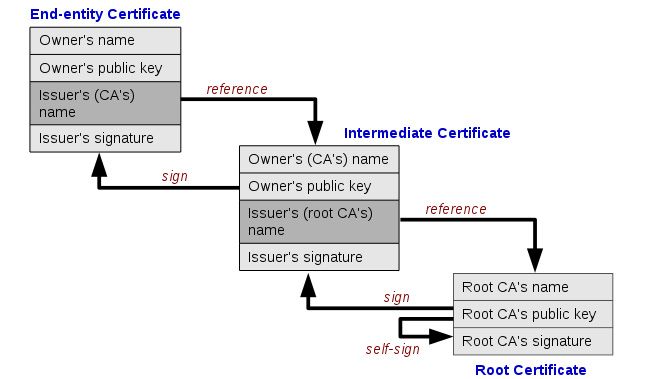
Certificates are granted to HTTPS websites through Certificate Authorities in a sort of tree like structure. Each verification extends out to create new certificates but also references the certificate that came before it. All of these can be traced back to a core certificate that originated the signing process. This is known as a root certificate, and they form the root that ensures the entire validation chain can be trusted.
An example is probably in order. Let’s say you want to start your own website that uses HTTPS. You contact a Certificate Authority and request a certificate. They verify you are who you claim to be, collect a small payment, and issue your keys. This CA isn’t a root certificate authority, however. The certificate you were given was issued by another CA. That CA’s certificate was in turn issued by another CA, and so on. Eventually the issuing party can be traced back to a root certificate, making the rest intermediate certificates that form a verification chain.
There are hundreds of Certificate Authorities in operation around the world who distribute certificates to a variety of businesses. Root certificates are incredibly important, though, which is why they’re usually only released by operating system developers like Microsoft and Apple and a few browser developers such as Mozilla and Opera. You can learn more about how root certificates are managed and distributed by reviewing Mozilla’s official root certificate policy, which outlines the strict requirements CAs must meet to be trusted.
Self-Signed Roots, Intermediate CAs, and Cross-Signing
Three concepts come up repeatedly when reading about root certificates, and understanding them will make everything else in this topic click into place.
Root certificates are self-signed. Unlike every other certificate in the chain — which carries a signature from the CA above it — a root certificate is signed by itself. There is no higher authority to vouch for it. Instead, trust is established by a deliberate human decision: operating system and browser vendors review each CA’s security practices and, if they pass, manually add that CA’s root certificate to their trust store. That act of inclusion is the origin of trust for the entire chain beneath it.
Intermediate CAs exist to protect the root private key. If a CA used its root key to sign every website certificate directly, that root key would need to be brought online and used constantly — dramatically increasing the risk of compromise. Instead, CAs use their root key to sign one or more intermediate CA certificates, then keep the root key heavily protected or entirely offline. The intermediates do the day-to-day work of issuing certificates to websites. If an intermediate is ever compromised, it can be revoked and replaced without touching the root.
Cross-signing creates alternate trust paths. Sometimes a CA will have its intermediate or even its root signed by a different, older root that is already widely trusted. This creates two valid paths to trust the same certificate — one through the new root and one through the old. Let’s Encrypt illustrates this well: its ISRG Root X1 is trusted directly by modern devices, but for years Let’s Encrypt also maintained a cross-signature from IdenTrust’s DST Root CA X3 so that older Android devices (which didn’t yet trust ISRG Root X1) could still validate Let’s Encrypt certificates.
Today, Let’s Encrypt also operates ISRG Root X2 for newer elliptic-curve based chains. The result is that a single Let’s Encrypt certificate may have multiple valid verification paths depending on which trust store a device is using.
What Do Root Certificates Look Like?
Certificates are files just like any other. They’re incredibly small, no more than a few KB in size, which makes them easy and fast to transfer between servers and any kind of connected device. You’ll actually find a few on your local operating system by searching for the .crt extension. However, the more important place root certificates live is inside your operating system’s or browser’s trust store — a curated list of pre-approved root certificates that ships with your OS or browser and is updated automatically through software updates.
On Windows, you can inspect your trusted root certificates by opening the Microsoft Management Console (MMC): press Win + R, type mmc, and press Enter. Go to File > Add/Remove Snap-in, select Certificates, and choose Computer account. Once loaded, navigate to Trusted Root Certification Authorities > Certificates to see every root your system trusts. On macOS, open Keychain Access (found in Applications > Utilities), then select System Roots in the left-hand sidebar to browse the same list.
Major browsers like Chrome and Firefox maintain their own root programs in addition to, or instead of, the OS store. Microsoft, Apple, Mozilla, and Google each run a root program that audits CAs and determines which roots ship with their products.
One important caution: do not delete or distrust root certificates casually. Removing a root can break secure websites, enterprise applications, driver signing verification, and automatic software updates — often in ways that are not immediately obvious and can be difficult to reverse. If you encounter a root certificate you don’t recognize, research it before taking any action.
Opening a root certificate in a text editor shows a block of randomized numbers and letters generated by a complex cryptography algorithm. This is the cipher key which unlocks matching encryption created using the paired private key. The file doesn’t make a lot of sense to human eyes, but when a root certificate goes to work, it accomplishes a lot.
RELATED: Vishing Explained: What Is Voice Call Phishing and How to Protect Yourself
Fake Root Certificates and False CAs
The purpose of the certificates system is to add a layer of trust to the key swapping process. If a website or a software developer’s identity can be proven, the transaction is safe to carry out. Problems do arise in the verification system, however. Fake root certificates have been known to exist, and at least one CA has been discovered issuing fake certificates. Most of these are generated from government level maneuvers carried out in secret, though individual hackers are also capable of compromising the system.
From an end user’s perspective, there’s very little we can do to prevent fake root certificates from causing harm. The best protection is to watch the websites we’re using and avoid them if they seem a little suspicious. It’s entirely up to the certificate authorities to detect and remove false sources when and if they arise. There are ways to remove root certificates from your own operating system, but it’s generally considered a fruitless action that causes more harm than good.
Staying Safe with a VPN
Although the burden of security with root certificates is largely up to CAs, users do have a few tools that can help stabilize other parts of the internet. Virtual private networks are one of the more commonly used methods of encrypting and anonymizing online traffic. With a VPN you’ll fend off a variety of man-in-the-middle attacks that target local internet service providers as well as users whose data isn’t encrypted. It’s a base level form of privacy, but it’s remarkably effective. If you want to better understand the risks these services are designed to mitigate, it helps to learn about common VPN attack vectors.
VPNs are easy to use and offer a wide variety of features that extend well beyond online anonymity and security. For starters, you’ll be able to change your virtual location to access geo-restricted videos from other countries, protect your mobile devices from harmful public Wi-Fi connections, bypass censorship blocks, defeat ISP throttling, and even hide your traffic from ISPs and mass surveillance efforts. All you have to do is choose a reliable VPN, run the software, and you’re good to go.
Below are a few recommended VPN services that place a high priority on privacy and security. Try any one of them and you’ll see just how straightforward and powerful a good VPN can be.
1. NordVPN

NordVPN is a well-known and highly respected VPN. The company has an absolutely massive network of servers, over 5,200 in 60 different countries, which could be the largest in the entire VPN marketplace. This gives you an impressive variety of options when you need to select an out of country connection for video streaming or bypassing censorship blocks. NordVPN’s entire server network is also incredibly fast, and you gain access to that speed without sacrificing an ounce of privacy or security.
A few of NordVPN’s best features:
- Strong privacy features allow open access to the internet even in censorship-heavy countries like China.
- Zero-logging policy that covers everything from traffic to bandwidth, IP addresses, and timestamps.
- Unique double encryption servers that wrap data in 2048-bit SSL encryption.
- An excellent VPN with reliable and fast access to Netflix.
Read our full NordVPN review.
- Highly affordable plans
- No bandwidth caps
- No IP/DNS leaks found
- Strict zero logs policy on both traffic and metadata
- 30-day money back guarantee.
- They can take 30 days to process refunds.
2. Surfshark

Surfshark offers only the most modern privacy provisions in an affordable package. Unblock sites and dodge surveillance via OpenVPN, IKEv2/IPSec, WireGuard connections, secured by unbreakable 256-AES-GCM encryption. There are over 800 servers total in 50 countries, with options for static IP addresses and even multi-hop routing. CleanWeb anti-malware protects you from poor browsing habits, while a solid logging policy guarantees your anonymity.
Surfshark comes complete with these advanced features:
- RAM-only server network incapable of storing logs of your activity.
- Unlimited simultaneous connections to protect all your devices.
- Zero caps on bandwidth, restrictions on traffic type, or server switching.
- NoBorders anti-censorship method that can break China’s Great Firewall.
- Every server optimized for unblocking Netflix, BBC iPlayer, Hulu, and more
- Diskless server network ensures you leave no trace behind
- DNS leak and kill switch protection keep your defenses up even when your connection drops
- Logging policy independently audited and verified
- Responsive customer support available 24/7.
- Growing network doesn’t have same coverage as more mature VPNs
- Apps may be too simplistic for power users.
Read our full Surfshark review.
3. ExpressVPN

ExpressVPN is all about speed. The company runs a large network of over 3,000 servers in 94 different countries, providing users with convenient access to lag-free connections no matter where they’re located. Each of these servers delivers incredible speeds all throughout the day, even during times of peak use or high user load. Best of all, you can check a server’s latency and speed score from within ExpressVPN’s software and change locations instantly, ensuring you always find the fastest connection possible.
Other features that we love about ExpressVPN:
- Easy to use custom apps for Windows, Mac, Linux, iOS, and more.
- Reliable access Netflix, even when other VPNs are blocked.
- Unlimited bandwidth, no speed caps, and no throttling.
- DNS leak protection and an automatic kill switch.
- Great for bypassing censorship in countries like China.
Read our full ExpressVPN review.
- Unblocks Netflix and other streaming sites
- Super fast, reliable connection
- OpenVPN, IPSec & IKEv2 Encryption
- No logs for personal data
- Live chat support available.
- Limited configuration options
- Power-users configuration options.
4. IPVanish

IPVanish is a great VPN for anyone who wants to remain invisible online. It starts with strong 256-bit AES encryption for all of your data, wrapping everything in an unbreakable shell that keeps it hidden as it travels through your ISP. That encryption is backed up with an incredible zero-logging policy on all traffic that passes through IPVanish’s servers. The network itself is over 850 nodes strong, covering 60 different countries with over 40,000 IP addresses to use. Every time you connect to IPVanish you leave your personal identity behind, making the entire internet as open and safe as possible.
IPVanish also comes with the following features:
- Fast and easy to use software for PC, laptops, smartphones, Chromebooks, and tablets.
- Unlimited bandwidth, no speed caps, and no restrictions on P2P or torrent traffic.
- Secure, fast, and anonymous downloads ideal for torrent and Kodi users.
- Perfect for bypassing censorship filters and accessing blocked content.
Read our full IPVanish review.
If you need a VPN for a short while when traveling for example, you can get our top ranked VPN free of charge. NordVPN includes a 30-day money-back guarantee. You will need to pay for the subscription, that’s a fact, but it allows full access for 30 days and then you cancel for a full refund. Their no-questions-asked cancellation policy lives up to its name.

