Need Netflix Unblocked at School: Try These Easy Steps
Most schools don’t unblock Netflix on their networks, which is a shame, given the vast amount of educational content available for students and faculty alike. Don’t worry, though, as there are ways to get Netflix unblocked at school. It’s surprisingly easy (all you have to do is install the right VPN). We review the best providers for accessing Netflix in school below!
Editor's Pick December 2025

Netflix is one of the most influential services for streaming content. With over 300 million subscribers as of late 2025, the service is used by 5% of internet users worldwide. Unfortunately, Netflix is often blocked on school premises, with many academic institutions believing that on-campus internet should be restricted for educational purposes only. However, there are still ways to get Netflix unblocked at school — and below, we’ll be discussing just that.
We’ll explain how a VPN service can help beat censorship blocks, IP bans, and more. Furthermore, we’ll specify what features to look out for, and give you some of our top VPN recommendations with readers-only special deals.
Why do some schools block you from watching Netflix?
When examining how to get Netflix unblocked at school, the first natural question to examine is why the content is blocked in the first place. There are actually several reasons why you might not be able to unblock Netflix at school. For one, schools want to make sure that students are focusing on their studies and not getting distracted by movies and TV shows during class. It’s easy to get sucked into a binge-watching session on Netflix, Facebook, Hulu, etc., which can take away from learning and doing schoolwork.
Secondly, the bandwidth required for streaming can slow down the network, which makes it less effective for educational purposes, like online lessons and research. Plus, not all content on Netflix is suitable for all ages, and it’s difficult for schools to monitor what every student is watching. By blocking Netflix, they can help ensure that students aren’t accessing content that might not be age-appropriate.
While these are valid reasons for institutions to restrict access to certain platforms, we understand that you may still want to get Netflix unblocked responsibly during your spare time.
How to Get Netflix Unblocked at School (And Watch What You Want)
The following are the best methods students can use to unblock Netflix on a school network:
- VPNs (free or paid): These encrypt your connection so that the school’s network admins can’t understand what you’re doing, and thus can’t easily know that they should block Netflix from your device. Paid plans cost, but free plans often have severe data or server limitations.
- Mobile hotspot: This is great if you have fast and unlimited mobile data. Using your phone’s cellular data bypasses the school’s Wi-Fi entirely, making it impossible to block Netflix.
- Special browsers (like Tor): These can route all your internet traffic through several relays to avoid blocks, but they’re often a bit too slow for a great streaming experience.
- Google Translate URL trick: This will load Netflix through Google’s translation page to sometimes bypass simple filters.
- Web proxies: Like a VPN, these can sometimes unblock Netflix, although many might be too slow to stream HD Netflix videos reliably.
A VPN will help you overcome your school’s firewall and grant you access to Netflix in several ways. Firstly, strong security features will allow you to bypass the firewall itself. Encryption protocols like SSTP are fully equipped to pierce through even the toughest firewalls, including the Great Firewall of China. In other words, you will be able to access Netflix as though you were sitting in the comfort of your home. A VPN’s ability to bypass censorship blocks will grant you access to any website restricted or blacklisted on campus.
- NordVPN 🏆 Best Netflix Unblocker – NordVPN makes short work of most schools’ network restrictions, allowing you to securely and anonymously unblock Netflix, YouTube, TikTok, or whatever else you want.
- Surfshark – Every server just works to unblock Netflix, share a single subscription among unlimited devices.
- ExpressVPN – Built for speed and smooth streams. One-button interface.
- CyberGhost – Special profile tailored to unblocking restricted streaming sites.
- PrivateVPN – Lightweight software. Highly secure self-owned server network.
- AdGuard – VPN with Ad-blocking, anti-malware, IP spoofing, and more.
Comparing the Best VPN Workarounds for School Networks
- 24/7 Live Chat
- 24/7 Live Chat
- 24/7 Live Chat
- 24/7 Live Chat
- 24/7 Live Chat
- Netflix,
- Disney+,
- Amazon Prime,
- iPlayer,
- YouTube,
- Hulu
- Netflix,
- Disney+,
- Amazon Prime,
- iPlayer,
- YouTube,
- Hulu
- Netflix,
- Disney+,
- Amazon Prime,
- iPlayer
- Netflix,
- Disney+,
- Amazon Prime,
- iPlayer,
- YouTube,
- Hulu
- Netflix,
- Disney+,
- Amazon Prime,
- iPlayer,
- YouTube,
- Hulu
Netflix is always on the lookout for IP addresses that are generated by VPN providers. This means that your average free subscription won’t work as well for this monumental task.
Below, we cover the best VPN services for overcoming school firewalls to get Netflix unblocked while providing you with a smooth, speedy streaming experience:
1. NordVPN


- Very large server fleet
- No IP/DNS leaks found
- Extra-secure Double VPN for data encryption
- 30-day money-back guarantee
- Some of the fastest VPN speeds on the market
- Renewal cost is high
- Some advanced tools and features limited to higher tiers
NordVPN is our top choice for users wanting to bypass Netflix restrictions. With a proxy server network of more than 5,800 servers in 59 countries, you can easily get an IP address from any country. This will allow you to unblock Netflix (almost any catalog) even if your school’s firewall blocks access on campus.
NordVPN also has different specialty servers that aid in overcoming firewalls. These include obfuscated servers (which hide the fact that you are using a VPN) and double VPN (which adds an extra layer of encryption to your connection). Speed, bandwidth, and server switching are all unlimited, so you will never experience a slowdown or interruption while using Netflix.
NordVPN’s service also majorly focuses on security. The provider uses the nearly unbreakable 256-bit AES encryption. Encryption protocols include OpenVPN’s UDP and TCP as well as lightning-fast L2TP. In addition, NordVPN’s zero-logging policy is one of the most complete in the industry; it does not store logs on anything. These advanced security features make NordVPN one of the most reliable services for bypassing VPN blocks, even on university premises with tough firewalls.
Read our full NordVPN review.
2. Surfshark


- Every server is a specialty server
- Simple, clean app interface makes constant security a given
- No logging of IPs, bandwidth, or traffic
- Get help any time of day via email, phone, or live chat
- Basic tier still has tons of tools and functionality
- Fewer servers than competitors like NordVPN
- Expensive renewal prices
Surfshark’s only been around a couple of years now, but they’ve raced to the fore as one of the best ways to unblock Netflix on any network. Your school’s Wi-Fi restrictions won’t know what to do with Surfshark’s obfuscated traffic, which comes standard on every one of their 800+ servers. What’s more, no more picking around for the right server and settings to beat Netflix’s VPN ban; they all work.
In total, Surfshark can reliably get Netflix unblocked for 14 international libraries. That number is expected to grow along with its server network, which furthers its reach constantly. We love how snappy and responsive they are, allowing for buffer-free streams even on highly restrictive school networks.
And with modern encryption and protocols (usually OpenVPN or IKEv2/IPSec paired with a 256-bit cipher), you get the best network penetration while remaining utterly anonymous.
3. ExpressVPN


- Fastest servers we have tested
- Torrenting/P2P allowed
- Keeps no logs of personal data
- Top-tier customer support (24/7 live chat)
- More expensive than some competitors
- Simultaneous device connections require a higher-priced plan
ExpressVPN delivers one of the fastest connections on the web.
Whether you are streaming from school or your home, you will not experience delays or speed caps while connected. One of the main reasons for this is that ExpressVPN has an impressive proxy server network of 3,000+ nodes in 94 countries – a massive span that equips users with tons of connection options. Additionally, the provider offers unlimited bandwidth with all subscriptions and places no speed caps.
There are dedicated apps available for Windows, Mac, Android, iPhone, Chrome, Apple TV, and many more devices.
In addition to its speed, ExpressVPN is one of the most secure services available. With 256-bit AES encryption, it would take a supercomputer millions of years to crack, which makes it ideal for getting Netflix unblocked. The no-logging policy ensures that no logs on traffic, DNS requests, IP addresses, or browsing history, are stored. This will make you virtually untraceable online, whether it’s from your ISP, school network, or the government. Additional security features include a DNS leak test and an automatic kill switch, both of which will ensure that your connection is never unencrypted and, in turn, unsafe.
Read our full ExpressVPN review.
4. CyberGhost


- SPECIAL OFFER: 79%OFF
- Special profile designed for torrenting privately
- Jurisdiction in Romania
- Strict no-logs policy
- 45-day money-back guarantee
- Some streaming sites cannot be unblocked
CyberGhost is one of our top recommendations due to its combination of advanced features and ease of use. Unlike many other services, CyberGhost requires no complicated setup – upon launch, you can choose from 6 pre-configured profiles depending on your needs. These include surf anonymously and unblock streaming, both of which are good for bypassing firewall blocks and unblocking Netflix. Extra customization toggles include “extra speed” and “block online tracking”. This protects your privacy and gives your connection a speed boost. CyberGhost allows you to establish 5 simultaneous connections, so you can stream Netflix unblocked at school, whether you are browsing from your computer, mobile phone, or tablet.
In terms of security, CyberGhost offers some of the strongest features on the market. The military-grade 256-bit AES encryption keeps you protected online, and with encryption protocols like UDP and TCP, the speed will not be affected. With a server network of 6,000+ servers in 87 countries, you can get any IP address you want. In addition, the no-logging policy is one of the best we’ve seen, covering almost everything, from IP addresses to timestamps. It doesn’t even store your email address. Finally, the automatic kill switch and DNS leak protection ensure that your Netflix connection is shut off if the VPN connection drops. This protects your school from knowing that you are trying to access the streaming service at school.
Read our full CyberGhost review.
5. PrivateVPN


PrivateVPN, as suggested by the name, is one of the most secure services on the market. 2048-bit AES-256 encryption keeps your personal information tightly locked down. In addition, PrivateVPN’s solid no-logging policy covers everything that could aid a third party (including your school) in keeping track of your activities online. These features will allow you to bypass Netflix blockers, keep your data secure, and overcome any school’s firewall. PrivateVPN’s service is available for all major systems, including smartphones, PCs, and tablets; this will allow you to enjoy Netflix, no matter what device you are browsing from.
PrivateVPN may not have the biggest network on the market (150 nodes in some 60 countries), but it does offer servers specially configured to unblock specific streaming sites. And yes, this includes Netflix, making PrivateVPN a purpose-built solution to unblocking your favorite shows and movies, even in school. What’s more, there are no restrictions on bandwidth or speed caps. This ensures buffer-free streams each time you connect. All in all, streaming Netflix from any location, including your school campus, will be a breeze with PrivateVPN.
Read our full PrivateVPN review.
6. AdGuard VPN
AdGuard VPN emerges as a fresh contender in the VPN domain, delivering a seamless online experience.
Whether you’re browsing from a café or your living room, AdGuard ensures consistent connectivity without hiccups. A significant factor behind this is AdGuard’s robust server infrastructure, boasting over 1,000 servers across 65 locations, providing users with a plethora of connection choices. Plus, with its competitive pricing and a commendable free plan, AdGuard ensures you get value without compromising on speed or security.
Dedicated applications are available for various platforms, ensuring a wide range of devices are covered.
Beyond its user-friendly interface, AdGuard stands tall in the security department. With its advanced encryption and the default kill switch feature, users can trust their online activities remain private. The company’s commitment to not logging any user data further solidifies its stance on privacy. This means your online footprint remains invisible, be it from ISPs, regional restrictions, or prying eyes. Get AdGuard VPN, and experience a blend of speed, security, and simplicity.
Read our full AdGuard VPN review or try our exclusive AdGuard Promo Code for 83% Off : “addictivetips83”
7. PureVPN


PureVPN is one of our top choices for getting Netflix unblocked due to its diverse set of features and low price. To start with, they’ve got a network consisting of nodes in 140+ countries. This will give you the ability to get virtually any IP address you might want and, in turn, unlock most of the world’s unique Netflix catalogs. PureVPN also has dedicated streaming servers that promise lightning-fast connections with no buffering or delays. Plus, you get unlimited bandwidth, proxy server switching, and zero speed caps.
PureVPN uses 256-bit AES encryption, which is all-but impossible to crack. Encryption protocols include OpenVPN’s fast UDP and TCP, and an even faster L2TP/IPSec, ideal for streaming Netflix content even on slower connections. Additionally, PureVPN offers the proprietary Ozone feature, which adds even more security to the service and protects your identity at all times. Finally, PureVPN employs a tough no-logging policy that ensures none of your data is stored in the provider’s database.
Read our full PureVPN review.
What Is the Best Free VPN for Netflix?
If you don’t want to pay for a VPN to unblock Netflix at school, or use a free VPN trial, consider a truly free VPN service. You must be careful when using these because plenty of them are malicious programs disguised as VPNs.
These are the safest free Netflix unblockers that we recommend:
- Proton VPN’s free option gives you truly unlimited data, so you won’t have to worry that you’ll hit a cap partway through watching something (which is a concern when streaming). It comes from a well-known, privacy-first company and doesn’t show ads or log your activity. What’s the trade-off? Since it’s the free tier, you can only connect to a handful of server locations, and you might have to reconnect a few times before finding one that will unblock Netflix.
- Windscribe Free will give you 10 GB of data per month, which is enough to watch a few movies or several hours of lower-resolution TV shows. Servers are available across 10 countries.
- If you need another 10 GB to get Netflix unblocked at school, give PrivadoVPN a shot. This company has a zero-log policy, so it’s private, and you can pick from 13 free server locations, which should be enough to find one that can stream your favorite shows and movies.
- TunnelBear is one of the easier free VPNs to set up and use, but the free plan will limit you to just 2 GB of data per month, which isn’t a lot for streaming Netflix. We recommend using this one as a last-ditch effort, after exhausting the above options.
Why Does Netflix Restrict Content?
Netflix doesn’t show the same shows and movies everywhere because it licenses its content based on the country the person is streaming from. For example, a movie might be available in the US but not in the UK because Netflix doesn’t have the rights there.
But when you travel or use a connection that looks like it’s coming from another country (i.e., when you use a VPN to beat geoblocking), Netflix adjusts what you can see based on that location.
Step-by-Step: How to Use a VPN to Watch Netflix at School
In addition to overcoming website blocks, a VPN will grant you relatively consistent access to virtually any country’s Netflix catalog, no matter where you are physically located.
With a quality VPN, you can mask your real IP address, connect to a foreign server of choice, and access any country’s catalog as long as the VPN provider has servers in said location. This is a major-added benefit of using a VPN to bypass a school firewall.
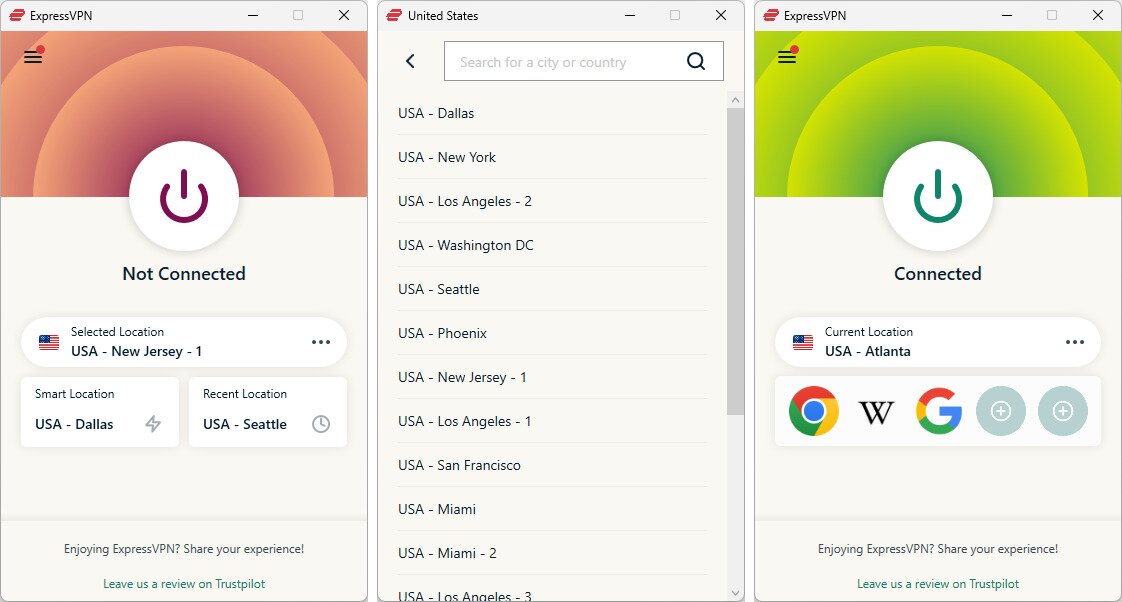
Here’s an example of how to get Netflix unblocked for school with a VPN:
- Install the VPN software on your computer. To watch Netflix on a school Chromebook, you’ll need to pick a VPN provider that has an app on the Google Play Store (most do).
- Open the VPN app and select a server from the list.
- Switch the VPN on. There’s usually a power button you can click to make this happen.
- If the VPN doesn’t make Netflix unblocked, try a different server or switch to a proxy server.
How Does a VPN Unblock Netflix?
The process is simple; the virtual private network obfuscates your real location because it routes all of your internet activity through other servers.
This means your school’s network can’t see what sites you’re visiting — it just sees encrypted data going to and from the VPN server. This usually bypasses most school network restrictions and allows you to get Netflix unblocked at School.
How to Watch Netflix on a School Computer
Using a computer supplied by your school adds a layer of complexity that can’t necessarily be addressed with a VPN. That’s because most schools lock these devices down with firewalls and other filtering software that make installing apps (like VPNs) and accessing certain sites (like proxies) nearly impossible.
If your computer doesn’t let you install a VPN, using your phone as a hotspot is the next best option. Open Netflix in a regular web browser to see if it will load using your mobile network.
That will work if Netflix is blocked due to network-based restrictions. However, if the computer itself is responsible for identifying when you’re on a streaming site and blocks it at that level, your next best option is to load up a portable version of the web browser, such as portable Chrome.
Note: Try your best to avoid attempting to bypass device-level restrictions, and never try to disable your computer’s security software. This will most likely violate your school’s policies and get the device flagged.
Tips for Chromebook users
- Switch to the Netflix app – Some school Chromebooks let you install Android apps from the Google Play Store. If so, install the official Netflix app and try logging in. This method sometimes works even if the browser version is blocked.
- Try the Chrome extensions – Many popular VPN providers offer browser extensions for their services. This is a great way to get around blocks if you cannot download apps on your school device.
- Use “Guest Mode” – Switch your Chromebook to Guest Mode and try accessing Netflix from there. Guest Mode sometimes bypasses some school filters.
Tips for iPad (and iOS) users
- Try the Netflix app – Switching to the app, instead of watching through your browser, can sometimes help you to avoid detection (be sure to check if the app is pre-installed or available via the self-service portal).
- Go through Safari – Sometimes, private browsing mode in Safari (or Chrome) helps bypass simple web filters. Open a private tab, go to Netflix, and see if it works.
- Mirror your screen – If you have another device (like a phone) that can access Netflix, you can use AirPlay or screen mirroring to watch on your iPad’s screen.
If nothing works to unlock Netflix at school, the most reliable option is often to just use a personal device instead of a school-issued one. Bring your tablet if you need to, or just use your smartphone with your hotspot.
How to choose the best VPN for streaming in School
The last thing you want is to get into trouble or waste your money on a service that can’t provide you with a safe and user-friendly way to make Netflix unblocked at school. Be on the lookout for these key features before you make your final decision:
- Location coverage: Having access to a VPN service with servers in many countries can help you access content that is restricted to a certain region. Moreover, a wider location coverage will increase the chance of accessing servers near your location for lower latency and higher connection speed.
- Performance and reliability: The performance and reliability of the VPN service are among the most critical factors in getting Netflix unblocked at school. Streaming content, especially high-quality content, requires a reliable and fast connection.
- Security and Privacy Measures: You shouldn’t use any VPN services that can endanger your privacy. To protect your connection from snooping and other threats, ensure your VPN is equipped with strong AES-256 encryption, a Kill Switch feature, IP leak protection, and more.
- Compatibility: To have the freedom to watch Netflix unblocked on any device, such as different kinds of phones, laptops, tablets, and more, you should find a VPN service that is compatible with popular devices and operating systems. Some VPNs even offer browser extensions that make using them easier and more accessible.
The Legal and Ethical Boundaries of Streaming Access Tools
From piercing through firewalls to violating licensing agreements, you are probably wondering whether using a VPN is legal. Despite Netflix’s efforts to block this kind of private network access, using a VPN to bypass this block is not illegal.
What you should know: Using a VPN to access Netflix is in violation of the user agreement. However, it is highly unlikely that your account would get suspended over this. In most cases, users get a “proxy error” message stating that you must reconnect before proceeding to the website. With one of our recommended providers, this is unlikely to happen, but it is probably the worst consequence you stand to face.

When it comes to school premises, VPNs are not illegal, either. Some schools may have strict consequences for bypassing network restrictions, however, so make sure you exercise due diligence in reading up on your institution’s rules and assessing the risks involved accordingly. As a good rule of thumb, it is also advisable to refrain from downloading suspicious files and exercising general online security best practices.
RELATED: PureVPN not Working with Netflix? Try These Alternatives
How to Get Netflix Unblocked Without a VPN
If you don’t want to use a VPN service for some reason, there are other methods that will make Netflix unblocked at school. However, these methods are usually less reliable than VPNs, and you may not be able to use them in every situation.
To find out how to watch Netflix on a school computer without using a VPN, check out these methods:
1. Use your Personal Hotspot
If Netflix is blocked by your school network, you can take advantage of your mobile’s personal hotspot feature to share your mobile data plan with other devices. Here are the simple steps to do this:
- Turn on your Mobile Data option on your phone.
- Enable the Personal Hotspot on your mobile phone.
- Now go to the device that you want to watch Netflix on and connect it to your Mobile Personal Hotspot.
This method uses mobile data and since streaming Netflix uses lots of data, we don’t recommend it to somebody with a limited data plan.
2. Tor browser
Tor Browser is a free browser that lets users access the internet without restriction. To use Tor Browser and make Netflix Unblocked at school, follow these steps:
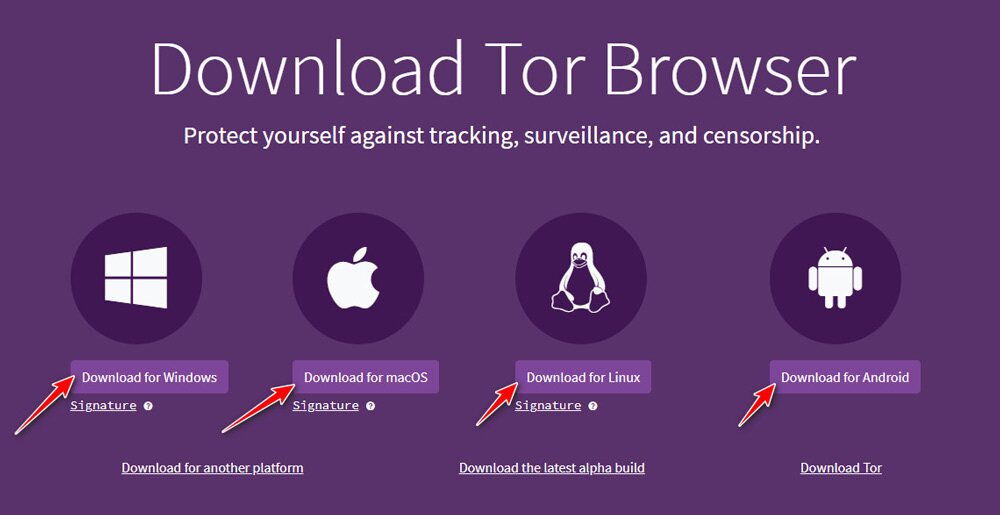
- Visit the official website of Tor Browser.
- Tor Browser is available on Windows, macOS, Linux, and Android. Click on the Download button of your preferred version.
- Install the browser on your device before going to school because the Tor Browser website might be blocked at school.
- Enter Netflix’s website address in the search bar, and the browser will route the traffic through different servers to unblock it for you. Note that the Tor Browser can be slow, and it may not be enough for high-quality Netflix streaming.
3. Google Translate trick
There is an unexpected trick to make Netflix unblocked at school no VPN, and it involves using Google Translate. Here are the steps:
- Open Google Translate in your preferred browser.
- In the left box, pick a language that is not English as the source language, such as Spanish.
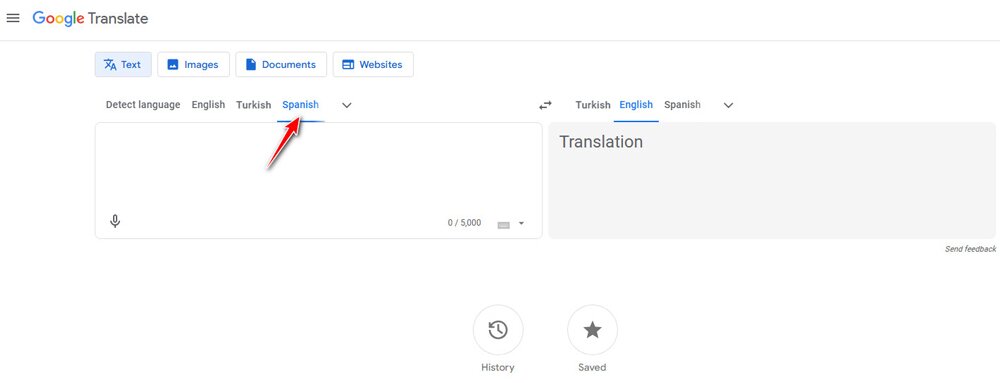
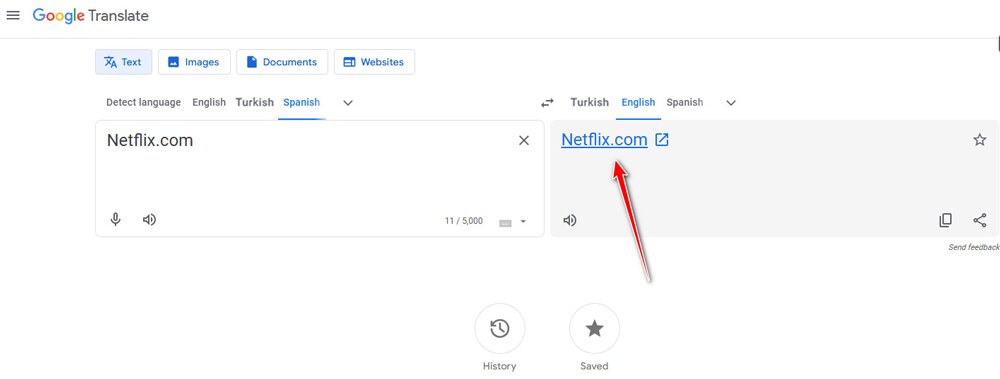
- Enter Netflix.com in the left box.
- Now, Google Translate will offer you a link on the right text box. Click on it to visit the website without restriction.
4. Use a web proxy
There are many proxy services out there, both free and paid, that can help you get rid of blocked websites like Netflix in your school. You can utilize a web-based proxy or set one up on your PC.
Proxy services offer an IP address and port number that you can use in your device’s proxy settings. This way, your traffic will pass through the proxy provider’s servers and then reach out to the destination website, which results in staying anonymous and unblocking the restrictions.
There are some proxy services that offer browser extensions. So, it’s as easy as installing an extension on your browser, activating it, and typing “Netflix.com” in the address bar. Free proxies usually can’t handle high-quality streaming, and you may need to subscribe to a paid proxy service to have the best experience.
5. Try a remote access program
A remote computer control tool lets you access your home computer from your phone, tablet, or another computer. AnyDesk and Chrome Remote Desktop are really good options for streaming Netflix from your home computer while at school (or anywhere, really).
This is actually similar to a VPN because you’re using Netflix from your home network instead of your school’s, but many of these tools are totally free and don’t require you to deal with servers.
The Bottom Line: How to Stream More Without Breaking the Rules
Now you know how to bypass your school’s firewall to unblock Netflix, and which VPN providers have strong enough features for the task. Not only will you be able to unblock Netflix, but you can also enjoy the myriad of other benefits that come with using a VPN service. Leave us comments on what you are going to use your VPN for below!
Frequently Asked Questions
Can I use a free VPN to unblock Netflix?
Yes. While there are free VPNs available, we don’t recommend using most of them (check our list above for recommendations). They’re often riddled with ads and will sell your browsing habits to make up for the fact that you’re not paying them. Stick to one of the VPNs we recommend above; most are free during the trial period.
What are the best VPNs to unblock Netflix at school?
Surfshark, NordVPN, ExpressVPN, and AdGuard are a few examples of VPNs that have the potential to unblock Netflix at school.
Is it legal to use a VPN with Netflix at school?
Government legality isn’t the issue when using a VPN for unblocking Netflix at school. Instead, you should be more aware of the school’s policies. Bypassing network security like that could land you in some trouble with your school.
Can I watch Netflix unblocked at school without a VPN?
A VPN is your best bet, but there are other ways. A remote access program lets you use your home computer from your school computer, enabling remote Netflix streaming via your home’s internet. Or, use your phone’s mobile hotspot feature to disconnect from the restrictions set by your school’s internet.
What if nothing works?
If none of these solutions are working for you and you cannot approach the IT department for help, we suggest taking a brief look at Netflix’s troubleshooting page. This database is filled with handy solutions to common problems, which may be able to assist you in a pinch.
If you need a VPN for a short while when traveling for example, you can get our top ranked VPN free of charge. NordVPN includes a 30-day money-back guarantee. You will need to pay for the subscription, that’s a fact, but it allows full access for 30 days and then you cancel for a full refund. Their no-questions-asked cancellation policy lives up to its name.


l like netflix okay