Top VPNs for StreamLord: Fast, Private Streaming Access
The search for the best VPNs for StreamLord stops here. Our top 5 VPNs unblock StreamLord movies and TV series in just minutes. We’ll show you how to download, install, and configure your VPN to watch your favorite content while keeping your connection secure and private.
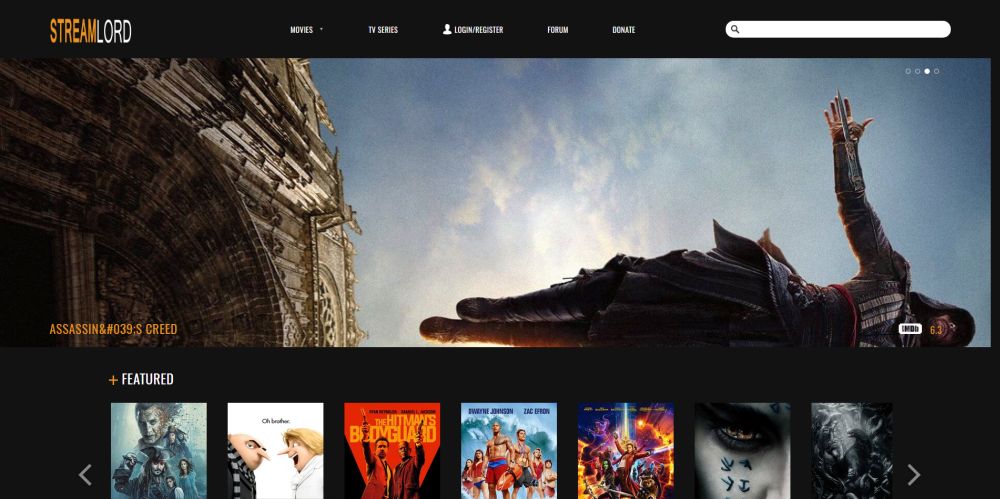
Finding reliable sources for high-quality movies and TV shows is a tough order to fill. Not only do many sites disappear without any warning, but those that manage to stick around often charge high fees or have region locks in place to stop certain viewers from streaming. One site that consistently ignores those trends is StreamLord. Using the best VPNs for StreamLord ensures you can access its full library safely and privately, no matter where you are.
For fast, secure access to your favorite StreamLord streams, use these VPNs:
- NordVPN – Best Streaming VPN – NordVPN is the most singularly capable VPN in the industry, easily unblocking StreamLord while completely hiding your traffic from your ISP.
- Surfshark – No bandwidth caps, no restrictions on traffic type, and unlimited simultaneous connections make this a great bet for streaming.
- ExpressVPN – Need more power for HD streams? Try one of the fastest VPN networks on the market.
- IPVanish – The classic choice for streamers and torrenters looking to hide their activity online.
- PureVPN – A catch-all cybersecurity solution with incredible spoofing utility.
- VyprVPN – Even the world’s toughest government censorship can’t stop this VPN from tunneling through.
The service features thousands of HD movies and TV series available to watch with just a few clicks. Getting started is as easy as visiting the website and finding your film, but before you start streaming you’ll want to take a few precautions to keep your activity safe and private.
Editor's Pick November 2026

Comparison Of The Best VPNs For StreamLord
- 24/7 Live Chat
- 24/7 Live Chat
- 24/7 Live Chat
- 24/7 Live Chat
- Yes
- Netflix,
- Disney+,
- Amazon Prime,
- iPlayer,
- YouTube,
- Hulu
- Netflix,
- Disney+,
- Amazon Prime,
- iPlayer,
- YouTube,
- Hulu
- Netflix,
- Disney+,
- Amazon Prime,
- iPlayer
- Netflix,
- Disney+,
- Amazon Prime,
- iPlayer,
- YouTube,
- Hulu
- Netflix,
- Disney+,
- Amazon Prime,
- iPlayer,
- YouTube,
- Hulu
Evaluating the Best VPNs for StreamLord
Watching movies through StreamLord can raise some red flags with third parties such as your local internet service provider. ISPs are known to log user activity, share it with authorities, and even throttle connection speeds. To keep yourself safe from those hazards you’ll want to use one of the best VPNs for StreamLord each time you stream.
VPNs turn ordinary internet traffic into encrypted data that’s both sent and received through a private tunnel. Your activity can’t be tracked and your identity can’t be seen, which makes streaming movies a lot safer. Whether you want to watch StreamLord content, enjoy Hotstar streaming without blocks, stream Crunchyroll anywhere, stream TikTok anywhere, or unblock Showtime with VPN, choosing a VPN that delivers the right combination of speed and security is a complicated task. We’ve made things easier by providing a few recommendations below, and if you’re still comparing services, the CyberGhost special offer, our CyberGhost trial instructions, and our guide to VPNs for sports channels may also be worth a look. Each was chosen based on the following criteria, so you know you’ll get the best VPNs for StreamLord movie watching experience possible.
- Logging policy – Online privacy simply doesn’t exist if your VPN keeps detailed traffic logs. Storing data makes it possible for government agencies to obtain copies and match activity to user accounts, destroying any hope of anonymity in the process. If no logs are kept, however, your data can never be used against you.
- Reputation – It can be tough to measure a VPN’s reputation, but it’s one of the most important factors in choosing a reliable service. If you can’t trust the VPN to keep your data secure, what’s the point? Our recommended services below have been in business for years and have a large base of customers who can attest to each VPN’s reliability.
- Security features – Not all VPNs are the same. Some have added security features or even exclusive configurations that provide increased privacy. At the very least a VPN should include DNS leak protection and an automatic kill switch to keep your identity hidden. We put a high priority on VPNs that go the extra mile to keep your data secure.
- Jurisdiction – The country of registration matters when selecting a VPN. Depending on local laws VPN may be required to keep data logs and share information with government agencies, all without notifying users. The best VPNs for StreamLord are based in countries with no mandatory data retention regulations.
- Payment methods – For an added layer of anonymity, try paying for your VPN using a cryptocurrency such as bitcoin. Using a credit card or PayPal account associates your name with the account, but if you choose a digital coin, no such information will be available.
- Streaming speed – Raw speed matters enormously for buffer-free playback. HD streaming on StreamLord typically requires a sustained 5–8 Mbps connection, while 4K content demands closer to 25 Mbps. A VPN always adds some overhead, so we favor services that consistently deliver fast real-world speeds even after the encryption penalty is factored in.
- Server proximity – Connecting to a server geographically close to your actual location almost always produces lower latency and faster throughput than routing your traffic halfway around the world. For StreamLord specifically, we recommend starting with the nearest available server before experimenting with more distant locations.
- Device compatibility – A great VPN for StreamLord should work on every screen you watch on: Windows, Mac, iPhone, Android, Android TV, Amazon Fire TV, Apple TV (tvOS), and ideally on a router for smart TVs and consoles that don’t support VPN apps natively.
- Simultaneous connections – If you stream on more than one device or share a subscription with family members, the number of devices you can connect at once matters. We note each provider’s current limit so you can choose accordingly.
- Free vs. paid – Free VPNs almost universally impose bandwidth caps, speed throttling, or data limits that make sustained streaming impractical. Every provider recommended below is a paid service, which is the only realistic option for uninterrupted HD or 4K playback on StreamLord.
How we tested
To build this list of the best VPNs for StreamLord, we ran each VPN through a consistent set of checks. Speed tests were performed using servers in multiple regions to measure real-world download performance before and after connecting, with streaming-specific thresholds (5–8 Mbps for HD, 25 Mbps for 4K) used as benchmarks. We checked each app for DNS and WebRTC leaks using standard leak-test tools to confirm that no identifying information escaped the tunnel.
Buffering behavior was evaluated by loading StreamLord streams at HD quality and monitoring playback stability over a sustained session. Finally, we confirmed native app availability across Windows, Mac, iPhone, Android, Android TV, Fire TV, Apple TV, and router firmware to assess true cross-device compatibility.
CHECK OUT: Best Bitcoin alternatives
1. NordVPN — One of the Best VPNs for StreamLord


- SPECIAL OFFER: 2-yr plan (70% off – link below)
- Most VPN servers with different IP addresses
- 2,048-bit SSL keys and DNS leak protection
- Based in Panama
- 24/7 Live Chat
- They can take 30 days to process refunds
NordVPN’s most impressive feature is its massive network of servers. The list is constantly growing, and as of 2026 it stands at 7,000+ servers in 118 different countries — easily one of the largest networks in the industry and a major advantage when you need a fast, nearby connection for buffer-free StreamLord playback. NordVPN puts many of these servers to interesting uses by providing features like faster P2P downloads and double encryption, all you have to do is connect and enjoy.
The proprietary NordLynx protocol, built on WireGuard, delivers noticeably faster speeds than older protocols without sacrificing security — a meaningful benefit when you’re streaming in HD or 4K on StreamLord.
NordVPN’s zero-logging policy is also incredible. It covers everything from bandwidth to traffic, time stamps, and even IP addresses, one of the most comprehensive around. This creates a perfect shield of privacy for all of your online activities, including movie streams through StreamLord. 256-bit AES encryption provides the backbone for this security, and features like an automatic kill switch and DNS leak protection keep you safe even if something goes wrong.
More of NordVPN’s best features include an array of unique server offerings with features such as onion routing, dedicated IP addresses, and DDoS protection. NordVPN supports up to 10 simultaneous device connections and offers native apps for Windows, Mac, Linux, Android, iOS, Android TV, Amazon Fire TV, and Apple TV (tvOS), plus router support for devices that lack a native app. You also get steady access to Netflix streams even when other VPNs are blocked, and NordVPN unlimited streaming with no restrictions on P2P or torrent traffic. NordVPN is consistently ranked among the best VPNs for StreamLord thanks to this combination of speed, security, and reliability.
Read our full NordVPN review.
2. Surfshark


- Reliably unblocks Netflix US, UK, Japan, and more
- Unlimited server switching
- Zero restrictions on simultaneous connections, apps available on every major device
- VPN home jurisdiction in British Virgin Islands is ideal for privacy
- Support staff manned by actual human beings 24/7
- Server network is not nearly as expansive as major competitors
- Relatively young VPN still has to prove itself trustworthy over the long haul
Surfshark has grown into one of the most full-featured VPNs on the market, and it’s a hugely popular choice for anyone looking to dodge ISP tracking, throttling, and site blocking. Their core offering comes in the form of 256-bit AES-GCM encryption used in concert with modern tunneling protocols including WireGuard, OpenVPN, and IKEv2/IPSec — with WireGuard being the recommended choice for streaming thanks to its lower latency. These provisions alone would be enough to confound most ISPs, but there’s more.
Surfshark operates a network of 3,200+ servers in 100 countries, and each server comes standard with obfuscation support, which completely hides your VPN traffic. So you can watch StreamLord under an encrypted connection, but all your ISP will see is nondescript traffic that doesn’t even look like it came from a VPN. One of Surfshark’s standout advantages for households is its unlimited simultaneous connections policy — there is no device cap, which means your entire family can stream at the same time on a single subscription. Native apps are available for Android TV, Amazon Fire TV, and Apple TV (tvOS) in addition to Windows, Mac, Linux, Android, and iOS, and router support extends coverage to every device in your home.
Surfshark is also one of the best VPNs for StreamLord due to fast network speeds as well as its lightweight apps. All your processing power and bandwidth goes to your UHD movies — not trying to power a bloated VPN client. Zero logging, a kill switch, and ad-blocking make a great package that much better.
3. ExpressVPN


- SPECIAL OFFER: 3 months free (49% off – link below)
- 3,000+ super fast servers
- No DNS/IP leaks found
- No logging policy well enforced
- Customer Service (24/7 Chat)
- Power-users configuration options
ExpressVPN has a well-deserved reputation for two things: incredible speeds and user-friendly software. The service’s custom apps work on all modern platforms and devices, everything from Windows, Mac, and Linux to Android and iOS smartphones and tablets, as well as Android TV, Amazon Fire TV, and a dedicated native app for Apple TV (tvOS) — making it one of the best VPNs for StreamLord if you watch on a big-screen television. Once you’ve installed and signed in, getting the fastest connection is as easy as tapping the big “on” button.
ExpressVPN’s proprietary Lightway protocol delivers WireGuard-class speeds with excellent reliability, and it’s the protocol we recommend for HD and 4K streaming. Router firmware support is also available, which lets you protect smart TVs, gaming consoles, and any other device that can’t install a VPN app directly. You can connect up to 8 devices simultaneously.
Fast downloads are the second big selling point for the ExpressVPN experience. The company has a network of over 3,000 servers in 105 different countries, all offering low-lag connections to cities around the world. A built-in speed test lets you take a closer look at the performance of each server, just in case you’re not getting the fastest downloads possible.
You also get privacy benefits such as strong 256-bit AES encryption backed by a zero-logging policy on all traffic, DNS requests, and IP addresses. DNS leak protection and an easy to use automatic kill switch provide an extra layer of privacy to ensure none of your personal information ever leaves your device. These qualities make ExpressVPN one of the best VPNs for StreamLord when HD streaming speed is your top priority.
ExpressVPN features at a glance include a robust array of custom security protocols for safer connections in places like Russia and China; zero restrictions on bandwidth, P2P network downloads, or torrent traffic; and reliable access to Netflix streams through the website. ExpressVPN also accepts bitcoin payments for truly anonymous subscriptions.
Read our full ExpressVPN review.
4. IPVanish


IPVanish is built around the idea of total online anonymity. The service provides this by combining a wide server network with excellent security practices, all designed to keep you safe while you surf and stream. Digital security starts with 256-bit AES encryption on all data, cryptography that’s virtually unbreakable. IPVanish backs this with a zero-traffic logging privacy policy, as well.
DNS leak protection and an automatic kill switch lock down your identity, and if you’re concerned about censorship blocks, IPVanish comes with an array of port and protocol options — including WireGuard — for top quality privacy at any time. It’s a strong contender among the best VPNs for StreamLord for users who want comprehensive anonymity with unlimited simultaneous connections, meaning you can protect every device in your home under one subscription.
The IPVanish network spans 2,400+ servers across 90+ locations worldwide. A combined pool of shared IP addresses builds better anonymity from the ground up, and with an IP shuffling feature you can continuously change your virtual IP for even more security. IPVanish offers native apps for Android TV and Amazon Fire TV, making it a particularly solid pick if StreamLord is a living-room activity for you. You can take advantage of this privacy with StreamLord or any other video streaming service, all thanks to unlimited bandwidth, no speed throttling, and unrestricted access to P2P networks and torrent downloads.
Best IPVanish features at a glance:
- Tons of servers with strong, fast, and reliable connections, perfect for streaming high-quality videos.
- Download TV shows and movies through P2P or BitTorrent with full anonymity.
- Custom software for Windows, Mac, Linux, iOS, Android, Android TV, and Amazon Fire TV.
- Private access to add-ons and streaming content through Kodi.
Read our full IPVanish review.
5. PureVPN


PureVPN wants to be more than just a VPN service. The company’s custom software includes a host of unique extras that go beyond the basic encryption and private tunnel features. If you’re streaming movies on StreamLord, for example, you can set PureVPN to optimize everything for speed, prioritizing faster servers and dialing down on the extra encryption settings. If you need privacy above all else, one click can turn on ad-blocking software, malicious website filters, and even anti-virus protection, all without sacrificing a connection to a fast and private server. WireGuard is now supported alongside OpenVPN and IKEv2, giving you a modern, low-latency protocol option for smoother streaming.
PureVPN operates a network of 6,500+ servers in 78+ countries, all owned and managed in-house. This is an important feature for boosting your privacy, as it prevents third parties from gaining access to data. A zero-logging policy on all traffic backs this up nicely, as do DNS leak protection, an automatic kill switch, and 256-bit AES encryption on all information. PureVPN allows up to 10 simultaneous connections, and its apps make it easy to access all of these features on Windows, Mac, Linux, Android, iOS, and browser extensions for Chrome, Safari, and Firefox.
PureVPN’s best features include:
- Custom apps for a wide variety of platforms, including Windows, Mac, Linux, Android, iOS, and even Chrome, Safari, and Firefox extensions.
- No restrictions on torrent or P2P traffic, no speed caps, and unlimited bandwidth for all users.
- Optional advanced anti-virus protection, web filters, and anti-phishing features.
- Unlimited server switching and 10 simultaneous connections.
Read our full PureVPN review.
6. VyprVPN


Privacy is VyprVPN’s biggest feature. The company behind the service owns and operates its entire server network of 700+ nodes in 60+ countries. This means outside parties never have access to their hardware. VyprVPN handles all upgrades and maintenance, creating a thoroughly private environment for the entire network. Strengthening your security are things like a zero-logging policy on traffic and DNS requests, an automatic kill switch and DNS leak protection, and 256-bit AES encryption for all data on all devices. VyprVPN also supports WireGuard, giving streamers a fast, modern protocol option alongside its other offerings, and allows up to 30 simultaneous connections.
Chameleon is one of VyprVPN’s most unique services. The exclusive protocol takes encrypted data packets and wraps their metadata in an extra layer of encryption. This process defeats deep packet inspection (DPI) used by ISPs and governments to spy on user activity. In other words, Chameleon busts through the toughest censorship firewalls and keeps even the most vigilant third parties at bay. All you have to do is choose the protocol and start streaming — it’s that easy.
Some of VyprVPN’s best features include:
- Chameleon protocol helps defeat tough censorship blocks and maintain anonymity.
- Smart, customizable apps for desktops, laptops, and mobile devices.
- Unlimited bandwidth and no restrictions on P2P or torrent traffic.
- An incredible self-owned network of private servers.
Read our full VyprVPN review.
How to Set Up and Use the Best VPNs for StreamLord
Setting up a VPN for StreamLord is straightforward, but the order of steps matters — especially if you want to avoid any gaps in your privacy before playback begins. Follow the steps below to get up and running quickly on any device.
- Sign up and install the VPN app. Choose one of the recommended VPNs above, create your account on the provider’s website, and download the native app for your device — Windows, Mac, Android, iOS, Android TV, Fire TV, or Apple TV. All six providers listed here have apps that take only a few minutes to install.
- Enable the kill switch and DNS leak protection before connecting. Open the VPN app’s settings and confirm that both the kill switch and DNS leak protection are turned on. The kill switch cuts your internet connection if the VPN drops unexpectedly, preventing your real IP address from being exposed mid-stream. DNS leak protection ensures your DNS queries don’t slip outside the encrypted tunnel.
- Connect to the nearest fast server first. As a starting point, select a server in your own country or the country geographically closest to you. Nearby servers almost always deliver the lowest latency and highest throughput. For HD streaming you need roughly 5–8 Mbps sustained, and for 4K you need around 25 Mbps — both are easily achievable on a local server with any of the best VPNs for StreamLord on this list.
- Open StreamLord in your browser and start playback. With the VPN connected, navigate to the StreamLord website in your preferred browser and begin playing your chosen movie or TV episode. You should experience smooth, buffer-free playback if your underlying internet connection meets the speed thresholds above.
- If buffering starts, switch servers or protocols. If playback stutters or the stream drops in quality, try connecting to a different server in the same region — server load varies throughout the day. You can also switch to a faster protocol: NordLynx (NordVPN), Lightway (ExpressVPN), or WireGuard (Surfshark, IPVanish, PureVPN, VyprVPN) all deliver lower latency than older OpenVPN connections and often resolve buffering issues immediately.
- Watching on a TV? Use a native app or router. If you want to stream StreamLord on a smart TV, Amazon Fire Stick, Android TV box, or Apple TV, check whether your chosen VPN offers a native app for that device — NordVPN, Surfshark, ExpressVPN, and IPVanish all do. If your TV doesn’t support a VPN app directly, install the VPN on your router instead. This routes every device on your home network through the VPN automatically, including smart TVs, gaming consoles, and streaming sticks.
Troubleshooting slow playback or site errors
If StreamLord loads slowly or throws an error after connecting to the VPN, try these quick fixes:
- Try a different server. Busy servers degrade performance. Most VPN apps show server load or have a “fastest server” option — use it.
- Switch protocols. If you’re on OpenVPN, switching to WireGuard or a proprietary fast protocol (NordLynx, Lightway) often solves speed problems instantly.
- Clear your browser cache and cookies. Cached location data can sometimes interfere with accessing geo-restricted content even when your VPN is active.
- Check for DNS leaks. Run a quick test at a DNS leak-check site to confirm your real IP isn’t leaking. If it is, toggle the DNS leak protection setting off and back on, or reconnect to the VPN.
- Disable browser extensions temporarily. Some ad-blockers or privacy extensions can conflict with streaming sites. Disable them one at a time to identify the culprit, then re-enable the rest.
How Does StreamLord Work? A Guide for Best VPNs for StreamLord Users
StreamLord is extremely easy to use. Once you have your VPN up and running, all you have to do is visit their website. The home page shows off some of the more popular movies and TV shows for the week, and if you want to start watching one of them just give the banner a quick click. The top of the screen has a search bar along with the two main categories you’ll use:
- Movies – Browse by genre, including everything from animation to thrillers, romance, horror, sci-fi, westerns, and documentaries.
- TV series – Browse by newest releases, alphabetically, or by overall rating.
Signing up for an account with StreamLord offers basic watch list and community features, including a discussion forum. You can also contribute to the site by uploading subtitles for shows that lack them. Donating to StreamLord lets you download videos in mp4 format, request TV shows and movies to be added, and experience the site without any kind of advertisements.
StreamLord’s selection of films and shows isn’t exhaustive. The site focuses on high-quality content, popular releases, and reliable stream sources, letting you watch shows without encountering dead links or rough videos. In other words, you exchange quantity for quality, something most users would do in an instant. Pairing StreamLord with one of the best VPNs for StreamLord ensures you get that quality content without any privacy concerns.
Is StreamLord Safe to Use?
Like many websites, StreamLord uses advertisements, cookies, and other tracking software to monitor user activity and monetize the site. Most of these are more annoying than unsafe, but you can encounter intrusive ads or privacy-invading scripts from time to time. We visited StreamLord both with and without our ad- and tracker-blocking software enabled. The site was surprisingly safe even without the extensions turned on, though we always recommend leaving them enabled just in case.
RELATED READING: Top browser extensions to keep you safe
StreamLord is a relatively safe experience with easy access to in-browser movie streams. You should always take basic precautions to keep your data and your PC secure, however. Follow the tips below to go the extra mile.
- Keep your VPN active – You should never use a site or service like StreamLord without one of the best VPNs for StreamLord. VPNs keep your stream private and your identity a secret. Without it, your ISP may track your activity and throttle your download speeds.
- Use an ad-blocking extension – StreamLord deploys some unusual ads, including link redirects and some intrusive banners. An ad-blocker such as uBlock Origin will keep you safe from these annoying and potentially harmful features. If you want to support the site, make a donation and the ads will disappear.
- Install a tracker blocker – Certain scripts and site add-ons can track your activity from website to website, even after closing your browser. To keep your identity secure, install Privacy Badger on your favorite browser to shut down the trackers automatically.
- Use anti-virus software – Most operating systems come with anti-virus software pre-installed. While we didn’t encounter any virus or malware content on StreamLord, keeping your scanner active is one of the best ways to keep your PC safe.
Reach Out to Us
What has your experience been like using StreamLord? Did our guide on the best VPNs for StreamLord help you out? Know a hidden gem available on the site you think everyone should watch? Let the world know in the comments below.
If you need a VPN for a short while when traveling for example, you can get our top ranked VPN free of charge. NordVPN includes a 30-day money-back guarantee. You will need to pay for the subscription, that’s a fact, but it allows full access for 30 days and then you cancel for a full refund. Their no-questions-asked cancellation policy lives up to its name.

