Best Popcorn Time VPN Options in 2026 – How to Unblock Popcorn Time
Popcorn Time is an amazing way to watch movies online, but it is blocked in many regions worldwide unless you use a VPN. Finding the best Popcorn Time VPN is essential — not just any provider will do. You need an app that will unblock Popcorn Time while preserving your connection speeds for fast, buffer-free streams. In this guide, we review and offer comparisons of the top best Popcorn Time VPN options for unblocked movie streaming below.

Securely unblock Popcorn Time anywhere in the world with these VPNs:
- NordVPN – Best Streaming Site Unblocker – NordVPN is the most trusted way to get past geoblocks and access your favorite Popcorn Time streams securely, anywhere in the world.
- Surfshark – A lightweight, intuitive VPN that just works to beat geoblocks.
- ExpressVPN – Practically built for streaming thanks to a robust encrypted network worldwide.
- PureVPN – Site unblocking, anti-malware, encryption–PureVPN offers it all and more.
- IPVanish – The classic solution to blocked streaming sites; fast, private streams at a good price.
- VyprVPN – Self-owned servers and unique encryption protocols make this an incredible secure choice for unblocking Popcorn Time anywhere.
What is Popcorn Time?
When it comes to ease of use and movie availability, it’s tough to beat Popcorn Time. The free, open source, multi-platform software leverages the power of torrents to provide fast access to all the streaming content you can imagine. TV shows and movies are at your fingertips, packaged in a slick Netflix-like interface that’s extremely easy to browse through.
Do you need the best Popcorn Time VPN to watch safely?
Popcorn Time’s reputation has attracted plenty of negative attention. The legality of the software is constantly under dispute, and some countries have gone so far as to block the service entirely. Using Popcorn Time has become risky or even impossible in many countries, forcing users to turn to VPNs to regain access and reclaim their privacy.
Here is why the risk is more specific than it might seem: Popcorn Time works by using P2P (peer-to-peer) torrenting technology under the hood. Every time you stream a title, your real IP address is visible to every other peer in that torrent swarm. That includes other users, monitoring firms hired by copyright holders, and potentially your own ISP. Your ISP can see that you are generating torrent traffic, which can lead to bandwidth throttling, warning letters, or in some countries, DMCA notices and account termination. A VPN solves this by encrypting your traffic and replacing your real IP address with one belonging to the VPN server, hiding your activity from the ISP and making your IP unreadable to peers in the swarm.
That said, a VPN has real limitations you should understand before relying on it. A VPN does not make streaming copyrighted content legal — it only reduces the visibility of your activity. It also does not protect you from malicious forks of Popcorn Time, infected installers, phishing sites that mimic the official project, or bundled malware in shady builds. For those threats, you need good antivirus software and careful attention to where you download Popcorn Time from. A VPN and an antivirus together cover more of the threat surface than either one alone.
No matter your location or the local laws, using a VPN while you stream content through Popcorn Time is a simple and easy way to unblock movies while staying anonymous.
We’ve done the research and came up with the best Popcorn Time VPN options that are super fast and protect your privacy while watching your favourite TV shows or movies. And if you needed any, we also included reasons why you should use a VPN with Popcorn Time.
DISCLOSURE: AddictiveTips does not condone or encourage any violation of copyright restrictions. Please consider the law, victims, and risks of piracy before using an app like Popcorn Time.
Editor's Pick November 2026

What makes the best Popcorn Time VPN for streaming?
Finding the best Popcorn Time VPN can be a tricky task. Speed is important, as streaming videos uses up a lot of bandwidth and even the slightest drop can cause stuttering. Some VPNs provide speed boosts by skimping on encryption and privacy measures, a practice that just won’t work for Popcorn Time. We weighed privacy practices against speed tests to find the VPN providers best suited for video streaming on Popcorn Time, hands down.
- Download speeds. You can’t watch a movie if you can’t download it. Popcorn Time leverages the power of torrents to pull data from a cloud of users across the web, but if your VPN can’t handle the traffic, you’re out of luck. Speed results will vary depending on your location as well as the location of the VPN server you’re connected to. We found the VPN providers with the best overall speed scores so you won’t have to wait to start the stream on Popcorn Time.
- Bandwidth limitations. Some VPN providers put caps on the amount you can download each month, often throttling speeds once you reach a certain point. Unlimited transfers are a must for using Popcorn Time, and all of the VPNs below are free from traffic limitations of any kind.
- File restrictions. Many VPNs forbid certain types of files from passing through their network, with P2P connections and torrent files sitting at the top of the list. Without torrent traffic Popcorn Time is practically useless, so we made sure our VPN selections never restrict what you can download, especially when it comes to torrents.
- Simultaneous connection. Popcorn Time is available for a number of operating systems, including Windows, Mac, Linux, Android, and iOS. Using the software on these devices along with a VPN normally wouldn’t be a problem, but if you use too many at once, issues could arise, as VPNs restrict the number of devices that can connect at any given time. To make sure everyone can watch movies when they want, we favored VPNs with high simultaneous connection numbers or alternative options to extend the default range.
- Privacy features and logging policy. Privacy is extremely important in a VPN, especially when it comes to logging. VPNs cater to this by adopting a zero-logging policy, making it nearly impossible for third parties to access collected data since none of it exists. Having features like an automatic kill switch and DNS leak protection to cut off accidental unsecured connections are also must-haves for Popcorn Time users.
- Platform availability. If you can install Popcorn Time on an operating system, you should be able to install your VPN on the same device, plain and simple.
Comparison of the Best Popcorn Time VPN Options
Best overall VPNs for smooth, secure Popcorn Time streams
We did the research for you and below you have the best Popcorn Time VPN options for fast, private streaming:
1. NordVPN
NordVPN does something interesting with its servers to deliver fast speeds. Instead of distributing general purpose machines that handle all of the network’s traffic, servers are tuned to handle certain types of transfers more efficiently. There are servers optimized for P2P and torrent downloads, for example, which makes using Popcorn Time surprisingly fast on the NordVPN network. NordLynx — NordVPN’s implementation of the WireGuard protocol — delivers some of the fastest speeds we have tested across any VPN service, making it especially strong for streaming and torrenting.
Alongside server specialization, NordVPN also features unlimited bandwidth, no traffic caps, a verified zero-logging policy, and no restrictions on torrent or P2P traffic. The network spans thousands of servers across dozens of countries, offering excellent global coverage. There’s also NordVPN’s signature double encryption to ensure data remains safe, plus Meshnet for advanced routing needs.
Safety features in NordVPN’s software include DNS leak protection as well as an automatic kill switch. Most VPN providers reserve these extras for Mac and Windows users, but NordVPN adds support for iOS devices as well, making it one of the more secure mobile VPNs around. NordVPN supports connections on multiple devices simultaneously across all major platforms. For anyone searching for the best Popcorn Time VPN, NordVPN is a top contender.
Read our full NordVPN review.
2. Surfshark
Every VPN works to boost your privacy, but Surfshark seems to specialize at unblocking what has been censored or restricted. And best yet, it doesn’t take a ton of technical knowledge to operate effectively.
Available on every major device, Surfshark’s apps are streamlined and self-explanatory, with simple options to switch between their 4,500+ servers across 100+ countries. Similarly, you can get a static IP to bypass VPN detection that many streaming services use (including Netflix), or elect for multi-hop routing when privacy is paramount.
No matter what you choose, you get the same unbreakable 256-AES-GCM cryptography to hide your activity and identity online. Popcorn Time streams are smooth and buffer-free thanks to Surfshark’s advanced tunneling protocols (OpenVPN, WireGuard, IKEv2/IPSec).
And, you can securely stream on every single device you own thanks to Surfshark’s unlimited simultaneous connections and unlimited bandwidth. It’s all backed by one of the industry’s best logging policies, making Surfshark a strong pick as a best Popcorn Time VPN.
3. ExpressVPN
Speed is something ExpressVPN specializes in. As a provider, ExpressVPN has some of the fastest speed test results around, scoring high for servers located in large cities as well as many mid-sized towns. In all, there are over 3,000 global servers in 94 countries, so even if you do get a sluggish connection it’s highly likely you can find a faster one with a little experimentation.
ExpressVPN also doesn’t limit bandwidth, doesn’t block torrent or P2P traffic, and has a strict zero-logging policy to keep your privacy a top priority. These qualities make it one of the best Popcorn Time VPN choices available today. ExpressVPN supports multiple simultaneous device connections, so you can protect your entire household without needing separate subscriptions.
A definite standout feature for ExpressVPN is built-in speed tests for the Windows, Mac, and Android versions of the software. If your Popcorn Time downloads are on the slow side, simply access the menu and run a quick speed test to see if it’s the VPN or the file you’re streaming. If it’s the former, switch servers, run the test again, then resume once you’ve found a fast connection.
Zero-logging is a high priority for ExpressVPN. The provider also delivers DNS leak protection built into its custom software along with the Network Lock Kill Switch to ensure data never leaves your Windows or Mac device unencrypted.
Read our full ExpressVPN review.
4. PureVPN


PureVPN aims for extensibility with its network of servers. 180 locations are represented, spanning 141 countries with over 2,000 servers to choose from. While most VPN users think of this level of variety as censorship workarounds, Popcorn Time users looking for boosts in speed can use it to find a fast connection any time of day. PureVPN also lets you test those speed scores directly from the website.
PureVPN pairs this large network with unlimited data, ISP throttling workarounds, simultaneous connections for up to five devices, and a great zero-logging policy. The company also encrypts traffic with 256-bit AES and comes with a kill switch for Windows and Mac to prevent data leaks.
PureVPN plans come with a 7-day money back guarantee. Try it out, see if the speed scores keep your streams smooth and uninterrupted.
Read our full PureVPN review.
5. IPVanish
Known for its lightweight software and impressive region lock dodging capabilities, IPVanish stands as a strong candidate for Popcorn Time use thanks to high speed test scores and uncompromised security. The service offers 1,300 servers in over 60 countries, all with 256-bit AES encryption and an independently audited no-logs policy. Unlimited bandwidth, unlimited simultaneous device connections on all plans, and no restrictions on torrent or P2P traffic make it an excellent choice for movie streams on every device you own.
As with all VPNs, speed tests for IPVanish vary depending on location, but some of the results are simply amazing. Cities like Chicago, Los Angeles, and Toronto consistently score in the 55-60 Mbps range, numbers even local service providers would be proud of. Many other cities average at around half that, which still hits slightly higher than most VPN services.
Privacy features with IPVanish include a verified zero-logging policy and secondary DNS IPs assigned to prevent leaks. There’s also an automatic kill switch built into the Mac and Windows version of the IPVanish client, providing even more privacy protection.
Read our full IPVanish review.
6. VyprVPN
VyprVPN ranks in the top fastest VPN services on a regular basis, delivering connections above the 50 Mbps benchmark to a number of major cities and beyond. They achieve this by owning and operating their entire network, all 700 servers in 70+ locations. Both the hardware and the software is optimized for speed, and the results are clear from the first time you connect.
Rounding out its Popcorn Time friendly offerings, VyprVPN features unlimited bandwidth, no blocked file types or restrictions on torrent traffic, a no logging policy, and clever routing technology that helps bypass sluggish networks for a consistently snappy connection.
VyprVPN’s built-in kill switch has a few more customizable features than most VPN providers, giving it a slight edge on the competition. And even though the feature isn’t advertised, there’s also DNS leak protection included in both the Windows and Mac versions of the software.
Read our full VyprVPN review.
How to use Popcorn Time with a VPN safely
If you are ready to use Popcorn Time with a VPN, following a consistent setup routine is the best way to make sure your real IP address is never exposed. Here is a step-by-step process that covers the essentials:
- Choose a VPN that explicitly supports P2P and torrent traffic. Not every VPN allows torrenting on its network. All of the providers recommended above permit P2P traffic, but if you use a different VPN, confirm this in its documentation before proceeding.
- Install the VPN app first, before opening Popcorn Time. Get the VPN fully set up on your device and log in before you touch Popcorn Time. This keeps the correct order of operations clear every time you sit down to watch.
- Enable the kill switch and DNS/IP leak protection. In your VPN app’s settings, turn on the kill switch — this cuts your internet connection if the VPN drops unexpectedly, preventing your real IP from leaking to the swarm. Also confirm that DNS leak protection is active.
- Connect to a nearby P2P-optimized server. Choose a server in your country or a neighboring one for the best speeds. If your VPN labels certain servers as P2P-optimized (NordVPN does this, for example), prefer those. Use WireGuard, NordLynx, or OpenVPN as your protocol — these offer the best balance of speed and security for torrenting.
- Verify your IP and DNS location have changed. Before opening Popcorn Time, visit a site such as ipleak.net or dnsleaktest.com and confirm that the IP address shown matches your VPN server location, not your real home location. If your real IP appears anywhere on that page, disconnect, check your kill switch settings, and try again.
- Only then open Popcorn Time. Once the leak test is clean, launch Popcorn Time and begin your stream. Your traffic is now encrypted and your real IP is masked from peers in the torrent swarm.
- Close Popcorn Time before disconnecting the VPN. When you are done watching, close Popcorn Time fully before turning off the VPN. Reversing this order can briefly expose your IP as the torrent client winds down its peer connections.
Troubleshooting tip: If playback is buffering or stalling, the first thing to try is switching to a closer server rather than changing any other settings. Distance to the server is the single biggest factor in VPN speed, and a closer server will almost always produce a noticeable improvement before you need to experiment with protocols or encryption settings.
Which version of Popcorn Time should you be using?
Popcorn Time had a rocky start, but its initial release caught everyone’s attention. Users flocked to the software for easy and fast video streams, giving it an enormous boost in popularity shortly after launch. Corporations and governments eventually caught wind of this and stepped in to shut down or block the software in many countries. To avoid any legal battles, the original Popcorn Time developers quietly disappeared.
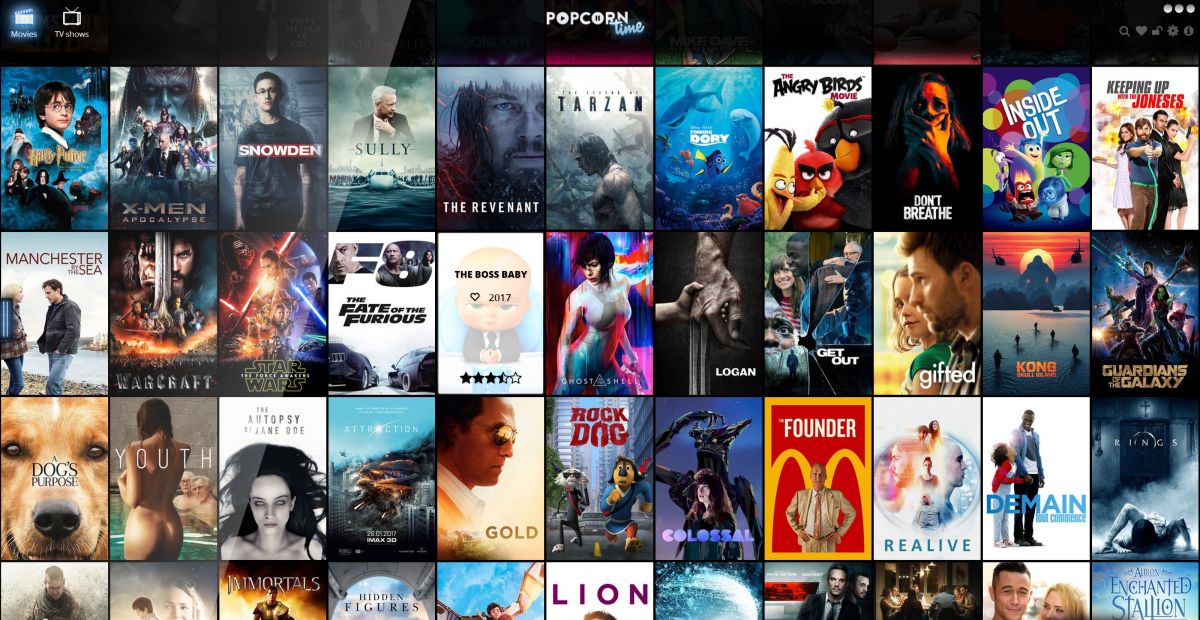
Fortunately for the community, Popcorn Time was free and open source software. Other developers forked the code and made their own versions of Popcorn Time, releasing a swarm of clones in the following months and years. Some of those forks became safe and feature-rich alternatives, but others were as dangerous as a virus or malware.
Important update: the original Popcorn Time project was shut down in 2022. No fork or domain currently carries any verified official status. The landscape of Popcorn Time clones is fragmented and largely unmaintained, and a significant number of lookalike domains and abandoned builds remain online. Some of these carry malware, unsafe trackers, or bundled software you did not agree to install. Treating any Popcorn Time download as automatically safe is no longer reasonable.
If you still choose to use a fork, apply this short verification checklist before downloading anything:
- Check maintainer activity. Find the project’s repository and confirm that commits, issues, and releases have been updated recently. An abandoned repo with no activity in a year or more is a significant risk signal.
- Verify signatures or hashes if available. Some builds publish checksums or code signatures. Verify these against the installer you download before running it.
- Scan the installer before running it. Upload the file to a service such as VirusTotal before executing it on your device.
- Avoid any build that bundles a VPN or extra software. Legitimate open source media players do not need to bundle their own VPN. Any installer that pushes additional software during setup is a red flag.
If no current fork can be verified to your satisfaction, you are better served by legal and actively maintained alternatives. Stremio offers a similar content discovery interface with add-on support. Kodi is a well-maintained open source media center. Plex covers both local libraries and free ad-supported streaming. For fully legal, no-cost streaming, Tubi and Crackle offer large catalogs without any of the legal or safety risks associated with Popcorn Time forks.
FURTHER READING: How to Prevent Netflix from Blocking Your VPN
Doesn’t Popcorn Time include a VPN?
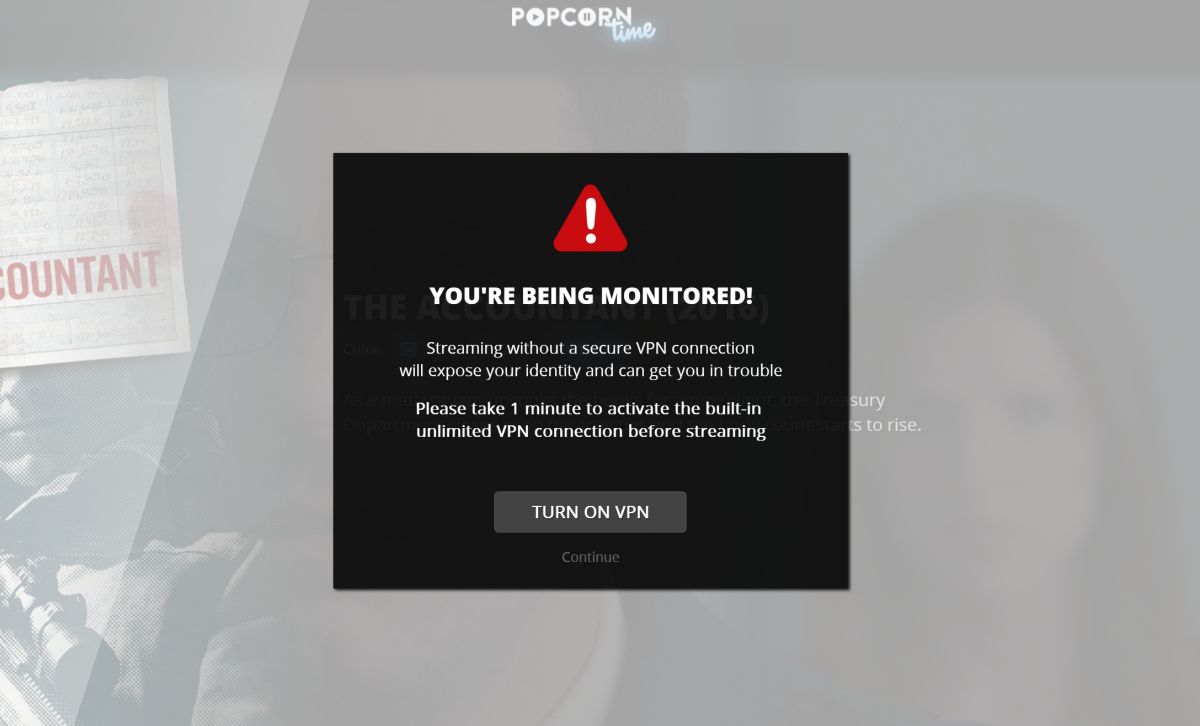
One fork of the original Popcorn Time software announced a partnership with a virtual private network provider to bundle free VPN service with every download. Whoever used this version of Popcorn Time would automatically be protected from censorship and geo-blocking, all without downloading separate software or signing up for a VPN service. This Popcorn Time VPN bundle sounded like a smart leap forward, but in reality, it was a step back.
There is a serious downside to the built in VPN – lack of privacy
The company behind the free Popcorn Time VPN states quite clearly that it keeps logs of all user activity, one of the most immediate signs of an unsafe VPN service. Information is encrypted, but because it’s stored it can lead to third-party seizure, especially since Popcorn Time traffic is under higher scrutiny. The thought of a free built-in Popcorn Time VPN service is nice, and it does help step around geo-blocking in most countries, but in practice, you actually give up some of your privacy. Stick with the best Popcorn Time VPN you can find — a reliable, paid service paired with a verified, actively maintained version of Popcorn Time or a legal alternative.
RELATED: How to Watch Popcorn Time on Chromecast
Avoid free VPNs for Popcorn Time streaming
Picking an affordable, safe Popcorn Time VPN provider that suits all of your browsing and streaming needs can take some time. It’s tempting to use one of the many free VPN solutions advertised on banners and websites around the web, but as many VPN users are aware, this is a dangerous idea.
It costs money to operate a virtual private network. A business that offers free service has to recuperate costs some other way. The most common methods of doing this involves injecting ads into user’s connections, skimping on encryption, or even selling the very user data they promised to protect. Free VPNs tend to be sluggish and aren’t guaranteed to offer any privacy or anonymity, making them extremely poor choices for use with Popcorn Time. The best Popcorn Time VPN options are always paid services with transparent privacy policies.
How to fix Popcorn Time VPN slowdown
VPNs provide a vital service to modern internet users, but that added encryption and anonymity comes at the cost of speed. VPN services are notoriously slower than local ISPs, often dropping by 10-20% for the top tier providers or double that for bad connections. It’s a frustration every user has to deal with, but there are some workarounds for your Popcorn Time VPN that can help.
VPN Workaround 1: Switch VPN servers
VPN connection speed is directly related to the distance between your location and the server you’re connected to. The farther your data has to travel, the longer it takes, it’s that simple. If you aren’t getting a fast enough stream from that VPN server on the other side of the globe, switch to one closer by, see if that improves the numbers.
VPN Workaround 2: Set new encryption levels
Encrypting data takes time, and it also increases the size of the packets that travel through your connection. Most encryption processes add 20-50% to the overall size of each packet, serious numbers that add up for basic web browsing tasks, let alone streaming movies. To combat this, some VPN providers allow you to decrease the level of encryption active on your connection. If your stream is sluggish, try lowering the encryption.
VPN Workaround 3: Check your own connection
The VPN might not be at fault for your slow speeds. ISPs often throttle certain ports, resulting in narrower bandwidth whenever your VPN software is active. Most good VPN apps let you change ports and protocols to work around this. Security software such as firewalls and antivirus programs can also cause a slow connection speed, as will using Wi-Fi instead of a wired connection.
Our Final Thoughts on the Best Popcorn Time VPN
There you have it: our definitive list of the best Popcorn Time VPN options to unblock and stream content securely. We’ve discussed the risks of watching videos online without encryption, plus how to compensate for the inevitable slowdown that comes with Popcorn Time VPN protection. Whether you choose NordVPN, Surfshark, or any of the other top picks on this list, using the best Popcorn Time VPN will keep your streams fast, private, and uninterrupted.
What content will you watch with Popcorn Time? Let us know in the comments below.
If you need a VPN for a short while when traveling for example, you can get our top ranked VPN free of charge. NordVPN includes a 30-day money-back guarantee. You will need to pay for the subscription, that’s a fact, but it allows full access for 30 days and then you cancel for a full refund. Their no-questions-asked cancellation policy lives up to its name.

