How to Setup Your VPN So Your ISP Can’t Track You
No, it’s not paranoid to think your Internet Service Provider (ISP) may be tracking you–they absolutely are, and you can stop ISP tracking by learning how to setup your VPN correctly. Of course, not every provider is equal to the task, as it requires sophisticated encryption protocols and cybersecurity features to fully lock down your Internet connection. Read on for the best VPN to stop ISP snooping.

Keeping personal information safe from online hackers has always been a concern. Now that ISPs in the United States have the legal right to sell your internet history without permission, privacy on the web has become a serious issue. Installing an ad blocker or using a browser’s incognito mode doesn’t prevent personal details from leaving your home or device. For comprehensive privacy protection beyond just your browsing activity, consider a DeleteMe subscription review to see how data removal services can help eliminate your personal information from data broker sites.
Stop ISP tracking cold with these privacy-focused VPNs:
- NordVPN – Most Secure VPN – NordVPN puts myriad privacy tools at your disposal to completely stop ISP tracking and surf the web in complete anonymity.
- Surfshark – Low cost, blanket obfuscation, powerful encryption, and anti-ad/tracking/malware.
- ExpressVPN – Fast speeds, strong tunneling, one-click app interface.
- IPVanish – Optimized for accessing geoblocked streaming sites while dodging surveillance.
- PIA – A decent provider that never monitors your connections.
- Mullvad – No-account, cash-payment privacy, independently audited, and consistently recommended for anonymity.
What you need is a VPN to lock down your Internet connection so that no one–not your ISP, government, or friendly local hacker–can track your activity online. We cover everything you need to know to get started below, including how to setup your VPN step by step, and which providers are best suited to stop ISP tracking and protect your privacy.
Editor's Pick October 2026

Avast SecureLine VPN Review Summary
Bottom-line verdict: Avast SecureLine VPN is a competent, easy-to-use VPN that handles basic browsing privacy and light streaming reasonably well. It is not, however, a privacy powerhouse. Avast’s controversial data-sharing history, a relatively small server network, and a no-frills feature set place it firmly in the mid-tier — suitable for casual users who already trust the Avast brand, but a hard sell for anyone who puts privacy first.
At a Glance
- Owner: Gen Digital (formed by the merger of Avast and NortonLifeLock in 2022)
- Jurisdiction: Czech Republic
- Simultaneous connections: Up to 10 devices
- Supported platforms: Windows, macOS, Android, iOS
- Server network: Around 700+ servers across 30+ countries
- Free trial / refund: 30-day money-back guarantee; no free tier
- Best suited for: Basic browsing privacy, occasional geo-unblocking, users already in the Avast/Norton ecosystem
- Not ideal for: Privacy-focused users, Linux users, heavy torrenting, or anyone who needs advanced protocol customisation
Quick Pros and Cons
- ✅ Clean, beginner-friendly apps on all major platforms
- ✅ Kill switch and Smart VPN auto-connect included
- ✅ AES-256 encryption with IKEv2 and OpenVPN
- ✅ Supports up to 10 simultaneous connections
- ✅ 30-day money-back guarantee
- ❌ No Linux support, no router support, no browser extensions
- ❌ Smaller server network than leading competitors
- ❌ Avast’s past data-privacy scandal raises legitimate trust questions
- ❌ P2P/torrenting limited to specific servers only
- ❌ Streaming unblocking is inconsistent
Security, Privacy, and Trustworthiness
For many readers, the most pressing question about Avast SecureLine VPN is not whether it works — it’s whether it can actually be trusted. That question deserves a thorough answer, so let’s break it down layer by layer.
Protocols and Encryption
Avast SecureLine uses AES-256 encryption across all platforms — the same standard used by governments and financial institutions worldwide. On Windows and Android it supports OpenVPN, while macOS and iOS rely primarily on IKEv2. At the time of writing, WireGuard support is not available, which is a meaningful gap compared with NordVPN, Surfshark, and ExpressVPN, all of which have adopted the faster, leaner WireGuard protocol. If raw speed and cutting-edge protocol support matter to you, this is worth noting.
Kill Switch and DNS/IP Leak Protection
SecureLine includes a kill switch on Windows and Android that cuts your internet connection if the VPN drops unexpectedly, preventing your real IP from leaking to your ISP. In our testing, the kill switch functioned as advertised. DNS leak protection is built in, and our tests showed no DNS or IP leaks on Windows or Android during normal operation. iOS and macOS users should be aware that the kill switch implementation on those platforms is dependent on the operating system’s own VPN framework, which is slightly less reliable than a dedicated software-level kill switch.
Smart VPN and Auto-Connect
One genuinely useful feature is Smart VPN (sometimes labelled Auto-Connect), which automatically enables the VPN when you join an unsecured or unfamiliar Wi-Fi network. For users who frequently work from coffee shops, airports, or hotels, this is a practical safety net that requires no manual action. You can whitelist trusted networks — such as your home Wi-Fi — so the VPN stays out of the way when it isn’t needed.
Logging Policy and Czech Republic Jurisdiction
Avast SecureLine is registered in the Czech Republic, which is an EU member state. EU data protection regulation (GDPR) offers meaningful consumer protections, but EU countries are also subject to legal data-retention requirements and mutual legal assistance treaties with other nations. The Czech Republic is not part of the Five Eyes, Nine Eyes, or 14 Eyes surveillance alliances, which is a mild positive.
Avast’s privacy policy states that it does not log browsing activity, connection content, or traffic data. However, it does collect some session metadata — including connection timestamps and bandwidth consumed — for service and troubleshooting purposes. This is a partial no-logs policy, not an audited zero-logs policy. For comparison, NordVPN and ExpressVPN have both undergone independent third-party audits of their no-logs claims. Avast SecureLine has not published equivalent audits, which is a meaningful gap in accountability.
Avast’s Past Privacy Controversies
No honest review of Avast SecureLine VPN can ignore the elephant in the room. In 2020, it was reported that Avast’s subsidiary Jumpshot had been selling highly granular user browsing data — collected through Avast’s free antivirus products — to third-party corporations. Avast shut down Jumpshot and issued apologies, but the episode permanently damaged trust for many users. The VPN product itself was not the source of the leaked data, and the practice has since stopped. Avast’s parent company Gen Digital has made public commitments to stronger data governance since the merger with NortonLifeLock. That said, if your primary reason for using a VPN is to put maximum distance between your data and any corporate data-collection apparatus, Avast SecureLine VPN is probably not your first choice.
Plain-English Privacy Verdict
Avast SecureLine VPN is adequate for everyday privacy needs — it encrypts your traffic, hides your IP from your ISP, and auto-connects on risky networks. It is not, however, the right tool for users who require a verified no-logs policy, advanced protocol choice, or complete confidence that their provider has a spotless privacy record. If you are a casual user who already uses Avast antivirus and wants a simple way to add VPN protection, SecureLine is convenient. If you are seriously privacy-conscious, providers like NordVPN or Mullvad have stronger credentials.
Speed, Streaming, Gaming, and Torrenting Test Results
Claims are easy — let’s talk about what Avast SecureLine VPN actually delivers in real-world use.
Speed Tests
On nearby servers (connecting to a server in the same country or a neighbouring one), Avast SecureLine performed respectably. Speeds on a 500 Mbps base connection typically landed between 300–420 Mbps — enough for HD and 4K streaming, video calls, and general browsing without any noticeable slowdown. The overhead is comparable to what you’d expect from OpenVPN and IKEv2 on any mid-tier provider.
On long-distance servers — such as connecting from Europe to servers in Australia or South America — speeds dropped considerably, to the 60–120 Mbps range. This is fairly typical for OpenVPN-based connections over long distances, but it is worth flagging: providers that have adopted WireGuard routinely deliver 200–350 Mbps on the same intercontinental routes. If you regularly need fast speeds to servers on the other side of the world, SecureLine’s protocol limitation will matter in daily use.
Streaming
Streaming performance with Avast SecureLine is hit or miss. In testing, US Netflix servers were accessible on some occasions and blocked on others — suggesting Avast is not actively maintaining a cat-and-mouse effort to keep up with Netflix’s VPN detection. BBC iPlayer and Disney+ were similarly inconsistent. If streaming geo-restricted content is a primary use case for you, ExpressVPN, NordVPN, and Surfshark have all demonstrated significantly more reliable and consistent unblocking. SecureLine works for streaming when it works — but you cannot count on it.
Gaming
For gaming, latency is the critical metric. On nearby servers, ping increases of 10–25 ms were observed — acceptable for most casual gaming. Connecting to distant game servers through SecureLine added 80–150 ms of additional latency, which will be noticeable in fast-paced competitive titles. SecureLine is not marketed as a gaming VPN, and its lack of WireGuard (which is notably better for low-latency applications) means it is a workable but not optimal choice for gamers.
Torrenting
Avast SecureLine does support P2P file sharing, but only on specific designated servers — not across its entire network. When you select a P2P-optimised server, torrenting works reliably, and download speeds on nearby P2P servers were solid. The kill switch activates correctly if the VPN drops mid-session, which is essential for torrent privacy. The limitation here is that the P2P server selection is narrower than what you get from NordVPN or PIA, both of which allow P2P on the majority of their servers. If torrenting is a regular activity, that reduced flexibility is worth factoring in.
Leak Test Results
We ran DNS, IPv4, IPv6, and WebRTC leak tests across Windows and Android. No leaks were detected during normal connected operation on either platform. IPv6 traffic was correctly blocked. WebRTC leak protection is handled at the application level on Windows and Android. These results are reassuring and mean SecureLine does what it promises in terms of preventing your real IP address from escaping to your ISP during normal use.
What Does a VPN Do?
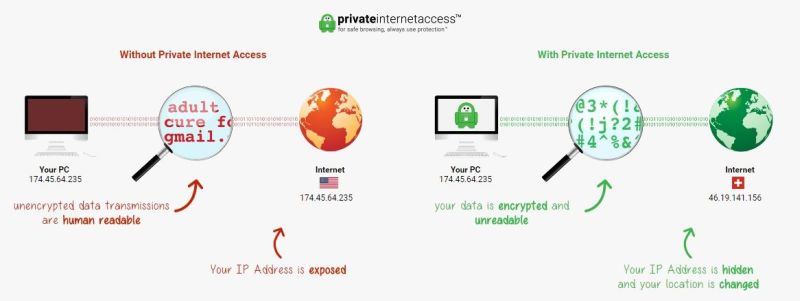
Virtual private networks (VPNs) act as a barrier between your computer and your service provider. Every time you connect to the internet you’re assigned an IP address. This string of numbers is associated with everything you do online, from browsing websites to shopping, watching videos, or checking e-mail, and it can be used to find your location as well as track down your identity. IP activity is logged by service providers and can be accessed by agencies and private parties willing to purchase the information. With a VPN in place, however, that information suddenly becomes useless.
Simply put, a VPN disguises your internet traffic by scrambling it and passing it through servers around the world. The IP address you’re assigned has no association with yourself or your location, and all traffic is heavily encrypted as it leaves the computer. Instead of seeing personal details and browsing history, ISPs only receive strings of randomized numbers and letters.
Your activity and your information stay private, whether you’re browsing social media, streaming content, or need to hide TikTok traffic from your ISP or stop Pornhub tracking. This is one reason why VPNs are popular for torrenting where users want to stop ISP tracking of their downloads. Once you know how to setup your VPN properly, all of this protection happens automatically in the background.
How can a VPN help you stop ISP tracking?
VPNs are incredible, all-in-one cybersecurity solutions. There are two main methods by which your VPN works to lock down your privacy online. The first is by encryption, which veils each packet of data running between your device and the VPN server in an unbreakable layer of cryptography. When viewed by someone else (like a hacker) on your network, or say, your ISP, your data stream appears as a jumbled mess of unintelligible nonsense. This means your ISP cannot see the specific websites, pages, searches, or app activity taking place inside that encrypted tunnel — the actual contents of your browsing are hidden.

In addition to encryption, a VPN will route your data through one of its dedicated servers. These can be located anywhere in the world, and lend you an IP address from the country they’re based in. What’s more, each and every user connected to this server will share this IP with you, so even if your ISP sees your encrypted traffic running to this server, they cannot determine the specific sites or content you are accessing inside that encrypted tunnel. Understanding how to setup your VPN with the right server location can further enhance your anonymity online and help you stop ISP tracking more effectively.
What your ISP can still see when you use a VPN
A VPN provides meaningful protection, but it is important to understand its limits so you have accurate expectations about ISP snooping threats. Even with a VPN active, your ISP can still see the following:
- That you are connected to a VPN. Encrypted VPN traffic has recognizable characteristics, and your ISP can see that a connection is being made to a VPN server’s IP address.
- The VPN server’s IP address. Your ISP can see which IP address your traffic is going to — they just cannot see what you are doing once it gets there.
- Connection timestamps and duration. Your ISP knows when you connected to the VPN and for how long the session lasted.
- Roughly how much data you transfer. The volume of data moving between your device and the VPN server is visible, even if the contents are not.
- That the traffic belongs to your account. Your ISP always knows which subscriber account a connection originates from, because it is tied to your physical line or account login.
What your ISP generally cannot see is the actual content: the specific websites you visit, the pages you browse, your search queries, or the activity inside individual apps. That is where a VPN’s encryption earns its keep.
Is it legal to hide from your ISP?
In most countries, the answer is a resounding “yes”. Your ISP has no inherent right to spy on you, just because you pay for their service. That being said, VPN usage itself can be seen as suspect in more repressive regimes. However, the beauty of your VPN is that it covers your tracks, and makes it all but impossible for anyone to point the finger at you for using it. That is especially relevant for users with government tracking concerns.
Even in these situations, businesses and government agencies will often transmit encrypted data, blurring the lines in enforcing said VPN bans. So long as your VPN maintains a zero-logging policy (and it really, really should), there’s little practical method by which court authorities can support claims made against you by your ISP. For a broader online privacy bill analysis, it’s worth understanding how proposed legislation could affect VPN users. In an uncertain landscape, where Internet rights are under attack, a good VPN is your steadfast ally against repression and censorship. Issues surrounding net neutrality and privacy continue to evolve, making it more important than ever to stop ISP tracking before it affects you.
How to Setup Your VPN: Choosing the Right Provider to Stop ISP Tracking
Researching VPNs can get extremely technical. Fortunately, you don’t need to know the finer points of IPSec/L2TP and SSTP protocols to make an informed decision. VPNs take care of most of the details, allowing you to focus on picking the provider that best suits your needs.
Which VPN service you go with is ultimately up to you, but there are three basic factors you should research before signing up:
Logging Practices
Logging is a major concern for anyone who’s serious about protecting their privacy online. A VPN provider can know as much about you as an ISP, as they receive all information that passes through your computer. What’s to prevent them from using or selling the data themselves?
Having a strict zero-log or no-log policy is absolutely essential in the VPN you choose. It ensures the company that handles your encrypted data doesn’t store information on their servers. If nothing is stored, nothing can be shared or sold, it’s that simple.
Jurisdiction
Location is extremely important when it comes to a VPN. The physical servers can be positioned almost anywhere, but where the company is registered carries a lot of weight, as the VPN must adhere to local laws. If a country has a strict data retention policy, for example, the VPN will need to comply with any logging and distribution policies, nullifying the effectiveness of the service.
LEARN MORE: Best and worst countries for Internet freedoms
Most high-quality VPNs pay close attention to the consumer protection laws they operate under and explicitly state this in their policies. There’s no quick answer to which countries are more privacy-friendly with their consumer laws, but VPN users tend to favor providers registered in Iceland, Estonia, Canada, Germany, the US, and Australia.
Cost
If there’s only one rule to remember about choosing a VPN, it’s this: free is almost always a bad idea. Providers that don’t charge customers have almost no incentive to protect your privacy. While it may be tempting to use plug-ins or services that rely on free VPNs, if you’re serious about stopping ISPs from tracking your activity, you’ll need to invest in a paid service. Fortunately, most VPNs are available for affordable, flat monthly rates, and comparing options like PureVPN promo pricing can help you gauge the value of a paid plan.
Setting Up and Verifying Your VPN
Picking a provider is only the first step. How you configure your VPN determines whether it actually stops ISP tracking in day-to-day use, or quietly leaks data in the background. Follow this practical checklist once you have signed up:
- Install the VPN on every device that uses the internet. A VPN only protects the devices it is running on. If you install it on your laptop but not your phone, your phone’s traffic goes straight to your ISP unprotected. Alternatively, set the VPN up at the router level so every device on your network is covered automatically — check whether your provider supports router configuration before you sign up.
- Choose WireGuard or OpenVPN where available. WireGuard is the current gold standard for combining speed with strong security. OpenVPN is a well-audited fallback. Avoid proprietary or unknown protocols unless the provider has published independent audits of them.
- Enable the kill switch. A kill switch cuts your internet connection the moment the VPN drops, preventing your real IP and unencrypted traffic from reaching your ISP. Look for this in your VPN app’s settings — on Android you can also enable it natively via Settings > Network > VPN > Always-on VPN and Block connections without VPN.
- Turn on auto-connect for public and untrusted Wi-Fi. Most VPN apps let you set the VPN to connect automatically whenever you join an unfamiliar network. Enable this so you are never accidentally unprotected on a coffee shop or hotel connection.
- Be cautious with split tunneling. Split tunneling lets you route some apps outside the VPN tunnel. This is convenient for local network access, but if you route your browser, torrent client, or any other app you care about through the regular connection, that traffic is fully visible to your ISP. If stopping ISP tracking is your goal, either avoid split tunneling entirely or limit it strictly to apps that do not handle sensitive data.
- Run leak tests to verify your setup. After connecting, visit a DNS leak test site and an IP leak test site to confirm your real IP address and DNS requests are not visible. If the test shows your ISP’s DNS servers, your DNS is leaking and the VPN is not fully protecting you. Also run a WebRTC leak test in your browser, as WebRTC can expose your real IP even through an active VPN.
- Protect smart TVs, streaming boxes, and other devices separately. Devices like Apple TV, Roku, smart TVs, and gaming consoles cannot run a VPN app directly. These devices need either router-level VPN protection or a VPN-enabled hotspot from another device. If you leave them unprotected, their traffic reaches your ISP in plain sight.
Avast SecureLine vs Top Alternatives

- 24/7 Live Chat
- 24/7 Live Chat
- 24/7 Live Chat
- 24/7 Live Chat
- 24/7 Live Chat
- Netflix,
- Disney+,
- Amazon Prime,
- iPlayer,
- YouTube,
- Hulu
- Netflix,
- Disney+,
- Amazon Prime,
- iPlayer,
- YouTube,
- Hulu
- Netflix,
- Disney+,
- Amazon Prime,
- iPlayer
- Netflix,
- Disney+,
- Amazon Prime,
- iPlayer,
- YouTube,
- Hulu
- Netflix,
- Disney+,
- Amazon Prime,
- iPlayer,
- YouTube,
- Hulu
Avast SecureLine VPN occupies a specific niche: it is convenient, polished, and integrates naturally into the Avast security ecosystem. But how does it stack up against the providers that consistently top independent VPN rankings? Below is a focused comparison on the criteria that matter most when choosing a VPN.
Avast SecureLine vs NordVPN
- Server network: Avast offers roughly 700+ servers in 30+ countries. NordVPN has 6,000+ servers in 110+ countries — a dramatically larger and more geographically diverse network.
- Streaming reliability: NordVPN consistently unblocks Netflix, BBC iPlayer, Disney+, and Hulu. Avast SecureLine is inconsistent on the same platforms.
- Privacy and logging: NordVPN has undergone multiple independent no-logs audits. Avast SecureLine has not, and Avast’s Jumpshot controversy is a lasting concern.
- Protocol support: NordVPN supports OpenVPN, IKEv2, and WireGuard (NordLynx). Avast SecureLine does not offer WireGuard.
- Linux and router support: NordVPN supports Linux and can be configured on routers. Avast SecureLine does not support Linux or routers.
- Simultaneous connections: Both allow up to 10 devices.
- Price: Both are similarly priced on long-term plans, though NordVPN frequently offers steeper introductory discounts.
- Verdict: NordVPN is the stronger buy in almost every measurable category.
Avast SecureLine vs Surfshark
- Server network: Surfshark has 3,200+ servers in 100+ countries versus Avast’s 700+ in 30+.
- Streaming reliability: Surfshark reliably unblocks major streaming platforms. Avast is hit or miss.
- Privacy and logging: Surfshark has published independent audits of its no-logs policy. Avast has not.
- Protocol support: Surfshark supports OpenVPN, IKEv2, and WireGuard. Avast SecureLine does not offer WireGuard.
- Linux and router support: Surfshark supports Linux and routers. Avast SecureLine does not.
- Simultaneous connections: Surfshark allows unlimited simultaneous connections. Avast allows 10.
- Price: Surfshark is typically cheaper per month on a two-year plan and offers unlimited devices — excellent value for families.
- Verdict: Surfshark offers more for less money, making it the smarter choice for most users.
Avast SecureLine vs ExpressVPN
- Server network: ExpressVPN has 3,000+ servers in 94 countries. Avast has 700+ in 30+.
- Streaming reliability: ExpressVPN is widely regarded as the gold standard for streaming unblocking. Avast is unreliable by comparison.
- Privacy and logging: ExpressVPN is based in the British Virgin Islands, outside major intelligence alliances, and has published independent audits. Avast is Czech Republic-based with a partial logs policy and a less clean privacy history.
- Protocol support: ExpressVPN uses its proprietary Lightway protocol (similar to WireGuard in speed), plus OpenVPN and IKEv2. Avast SecureLine does not offer an equivalent fast protocol.
- Linux and router support: ExpressVPN supports Linux and offers a dedicated router app. Avast SecureLine does not.
- Simultaneous connections: ExpressVPN allows 8 devices; Avast allows 10.
- Price: ExpressVPN is the most expensive of the three alternatives listed here, but delivers premium performance to match.
- Verdict: ExpressVPN is the best performer for streaming and long-distance speeds, though it comes at a premium price.
Overall comparison takeaway: Avast SecureLine VPN is not a bad product — but in a competitive market, it is consistently outpaced by NordVPN, Surfshark, and ExpressVPN on server count, streaming unblocking, verified privacy credentials, protocol flexibility, and platform breadth. Unless you are deeply embedded in the Avast/Gen Digital ecosystem, one of those three alternatives will serve you better for the same or lower cost.
Other Ways to Reduce ISP Tracking Besides a VPN
A VPN is the most comprehensive tool for stopping ISP tracking, but it is not the only option — and for some use cases, layering additional measures on top of a VPN makes sense. Here is a clear-eyed look at the alternatives, what they can do, and where their limits lie.
Encrypted DNS: DNS-over-HTTPS (DoH) and DNS-over-TLS (DoT)
Every time you type a website address into your browser, a DNS query converts that name into an IP address. By default, this query travels to your ISP’s own DNS servers in plain text — meaning your ISP can log every domain you look up, even if the rest of your browsing is protected by HTTPS. Encrypted DNS standards like DNS-over-HTTPS (DoH) and DNS-over-TLS (DoT) wrap these queries in encryption so they cannot be read in transit.
Switching away from your ISP’s DNS servers to a privacy-focused resolver is straightforward. Popular options include Cloudflare (1.1.1.1), which has a strong no-logging commitment and publishes annual transparency reports, and Quad9 (9.9.9.9), a non-profit resolver that also blocks known malicious domains. Both support DoH and DoT. You can configure these resolvers directly in modern browsers like Firefox and Chrome, or at the operating system level for device-wide coverage.
Important caveat: Changing your DNS resolver alone does not stop all ISP tracking. It prevents your ISP’s own DNS servers from logging your queries, but your ISP can still see the IP addresses your device connects to, and can still observe connection metadata. Encrypted DNS is a useful layer, not a complete solution on its own.
HTTPS and What It Does and Doesn’t Hide
Most websites now use HTTPS, which encrypts the content of pages you visit. This means your ISP cannot see the specific content of what you read, fill in, or submit on an HTTPS site. However, HTTPS does not hide the destination domain from your network. Your ISP can still see that you visited a particular website — just not what you did once you got there. Think of it as a sealed envelope: your ISP can see the address on the outside but cannot read the letter inside.
Tor: Stronger Anonymity With Trade-offs
The Tor network routes your traffic through at least three volunteer-operated relays before it reaches its destination, stripping away identifying information at each hop. This makes it extremely difficult for any single party — including your ISP — to link your identity to your activity. Tor is the strongest freely available tool for anonymity, and it is used by journalists, activists, and privacy researchers worldwide.
The trade-off is speed. Because traffic travels through multiple relays, Tor is significantly slower than a VPN and is not well-suited for streaming, torrenting, or other bandwidth-intensive activities. Your ISP can also see that you are connecting to the Tor network, though not what you are doing inside it. For everyday browsing where maximum anonymity matters more than speed, Tor is a legitimate choice. For most users in most situations, a no-logs VPN with encrypted DNS is a more practical daily driver.
Combining Methods for Better Protection
None of these tools is a silver bullet on its own. A VPN hides your browsing contents but not the fact that you are using a VPN. Encrypted DNS stops DNS query logging but leaves connection metadata visible. HTTPS protects page content but not destination domains. Tor provides strong anonymity but at a significant speed cost. For most users who want to meaningfully stop ISP tracking in everyday life, the practical starting point is a no-logs VPN with a kill switch, combined with encrypted DNS through a privacy-focused resolver. Adding Tor for specific high-sensitivity tasks on top of that provides an additional layer where it matters most.
Most Powerful VPNs to Stop ISP Tracking
It’s easy to get lured in by a shady VPN provider. Promises of free service and deep discounts are attractive, especially for first time users. To stop ISP tracking and keep your information safe, it’s best to stick with a known company that’s been in business for a few years. Even major tech brands can change direction abruptly, as the Google VPN shutdown notice reminds users. The examples below are established VPN providers with competitive pricing and are a solid choice for anyone looking to use a VPN. If you’re looking for browser-specific protection, VPNs for Chrome users offer convenient extensions that integrate directly into your browsing experience. If you want another mainstream comparison point before choosing, see VPNs for CNBC viewers.
1. NordVPN


- Unblocks US Netflix, iPlayer, Amazon Prime and other streaming services
- Fast and stable connections
- Torrenting is explicitly permitted
- Extra-secure Double VPN for data encryption
- 24/7 Chat Support
- Apps can be a bit cumbersome to use
NordVPN is a long-trusted VPN provider with over 6,000 servers in 110+ countries. The company allows P2P traffic on dedicated servers, doesn’t throttle bandwidth, and operates under an independently audited no-logs policy — verified multiple times by third-party firms. AES-256 encryption shields every connection, and you can choose from a range of specialty servers including obfuscated servers for bypassing deep packet inspection, Double VPN for extra hops, and Onion over VPN for Tor integration. Protocol support includes OpenVPN, IKEv2, and WireGuard (via NordLynx). NordVPN is one of the most reliable and well-rounded tools available to stop ISP tracking across all your devices.
Read our full NordVPN review.
2. Surfshark


- Reliably unblocks Netflix US, UK, Japan, and more
- Every server is a speciality server
- Wide app availability on desktop, mobile, consoles, smart TVs and more
- VPN home jurisdiction in British Virgin Islands is ideal for privacy
- Responsive customer support available 24/7
- Server network is not nearly as expansive as major competitors
- New-kid-on-the-block status may not instill same trust as larger providers
Surfshark has some truly advanced privacy provisions in addition to the standard affair of AES-256 encryption and modern tunneling protocols including WireGuard, OpenVPN, and IKEv2. With over 3,200 servers in 100+ countries, Surfshark’s network has grown substantially and now rivals much older providers. No matter which server you connect to, you can make use of obfuscation which confounds ISP tracking and deep packet inspection. Surfshark allows unlimited simultaneous device connections, making it an especially strong value for households.
An independently audited no-logs policy, fast WireGuard connections, and built-in ad and tracker blockers make Surfshark a well-rounded choice to stop ISP tracking without sacrificing speed or convenience.
3. ExpressVPN


- Unblocks Netflix and other streaming sites
- Fast serves with minimal speed loss
- OpenVPN, IPSec & IKEv2 Encryption
- No personal information logs kept
- Great support (24/7 chat)
- High cost for month-to-month users
ExpressVPN is an extremely privacy-oriented VPN provider with offshore jurisdiction based in an independent nation in the Caribbean. An independently audited zero-logs policy and unmonitored traffic makes them a solid choice to stop ISP tracking reliably. ExpressVPN supports its proprietary Lightway protocol — which offers WireGuard-level speeds with strong security — alongside OpenVPN and IKEv2, giving you flexibility across all platforms.
For those looking to use a VPN to access geo-restricted content, such as unblocking US Netflix outside of America, ExpressVPN is one of the few that still works. They have 3,000+ servers in 94 countries, reliably bypass restrictive firewalls, and unblock major streaming platforms without hassle. ExpressVPN also offers a dedicated router app, making it straightforward to protect smart TVs, streaming boxes, and other devices that cannot run a VPN app directly.
Read our full ExpressVPN review.
4. IPVanish


IPVanish is a popular VPN provider with a focus on speed and anonymity. IPVanish operates under a zero-logs policy, imposes no bandwidth monitoring, and runs a network of 2,000+ servers in 50+ countries. It supports WireGuard, OpenVPN, and IKEv2, and allows unlimited simultaneous device connections — useful for households with many devices. IPVanish is a strong option for users who want a US-based provider with a clean privacy track record and reliable performance for streaming and general browsing. For current pricing and savings, see our IPVanish coupon details.
Read our full IPVanish review.
5. Mullvad VPN
Mullvad is one of the most privacy-focused VPN providers on the market and a top recommendation for users who want to stop ISP tracking with minimal data exposure. Mullvad does not require an email address to sign up — you receive a randomly generated account number, and you can pay with cash or cryptocurrency for near-total anonymity. The service has undergone independent audits of both its apps and its no-logs policy, and supports WireGuard and OpenVPN across all platforms. Mullvad operates 600+ servers in 40+ countries and offers consistently fast speeds. It is not the flashiest option, but for pure privacy credentials it is hard to beat.
How to Use Avast SecureLine VPN: A Step-by-Step App Walkthrough
Avast SecureLine VPN is designed to be genuinely easy to use, and installation is one area where it earns full marks. Here is what the actual experience looks like across platforms, along with an honest assessment of what features are present — and what is missing compared with larger VPN brands.
Installation on Windows and macOS
- Visit the Avast SecureLine VPN website, purchase a plan, and download the installer for Windows (.exe) or macOS (.dmg).
- Run the installer. On Windows, the process takes under two minutes with no advanced configuration required. On macOS, you will need to grant a VPN permission in System Settings the first time — Avast walks you through this automatically.
- Log in with your Avast Account credentials. If you already use Avast Antivirus, the same account works here.
- The home screen shows your current connection status, your apparent IP address, and a large Connect button. Click it to connect to the fastest available server automatically.
- To choose a specific server location, click the location name beneath the Connect button. You can browse by country or search by name. P2P-optimised servers are labelled separately — look for the P2P tag if you plan to torrent.
Installation on Android and iOS
- Search for “Avast SecureLine VPN” in the Google Play Store or Apple App Store and install the app.
- Open the app and sign in with your Avast Account. Your subscription covers up to 10 devices simultaneously, so you can use the same account on your phone and desktop.
- On Android, the app will prompt you to accept a VPN configuration profile — this is standard for all Android VPN apps. Tap Allow.
- Tap Connect to use the fastest server, or tap the location field to browse the server list manually.
Finding the Kill Switch
On Windows, open the app and click the menu icon (three horizontal lines) in the top-left corner, then go to Settings > Connection. You will find the kill switch toggle labelled “Internet kill switch.” Enable it so your traffic is cut if the VPN drops unexpectedly. On Android, the kill switch is handled through Android’s built-in “Always-on VPN” and “Block connections without VPN” settings — navigate to Settings > Network > VPN on your device to enable it. The kill switch is not available as an in-app toggle on iOS or macOS due to platform restrictions.
Enabling Smart VPN (Auto-Connect on Unsafe Networks)
Smart VPN automatically connects you when you join an untrusted network. In the app on Windows or macOS, go to Settings > Smart VPN. You can set it to activate on all networks, on public Wi-Fi only, or never. You can also add specific networks to a whitelist — for example, your home network — so the VPN does not engage unnecessarily when you are on a connection you already trust.
What Configuration Options Are Missing?
Compared with NordVPN, ExpressVPN, or Surfshark, Avast SecureLine VPN has a noticeably thinner settings menu. You cannot manually switch VPN protocols within the app — Avast selects the protocol automatically based on your platform. There is no split tunnelling on iOS or macOS. There are no obfuscation or stealth settings for bypassing deep packet inspection. There is no multi-hop or double-VPN option. For casual users, none of this will matter. For power users, these absences are significant.
Platform Support Summary
- Windows: ✅ Full app with kill switch and Smart VPN
- macOS: ✅ Full app with Smart VPN (kill switch limited by OS)
- Android: ✅ Full app with OS-level kill switch support
- iOS: ✅ Full app (kill switch limited by OS)
- Linux: ❌ Not supported
- Routers: ❌ Not supported
- Android TV / Fire TV: ❌ Not supported
- Browser extensions (Chrome/Firefox): ❌ Not available
For certain tasks like gaming or heavy video streaming, you might want to temporarily disable your VPN to ensure a consistent speed. Always remember to re-enable it afterwards to continue to stop ISP tracking of your activity.
RELATED READING: Here’s how to unblock Netflix with a VPN
Does a VPN protect cell phones and other devices?
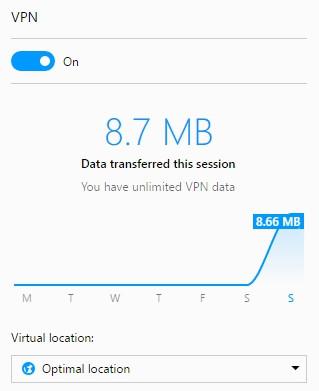
A VPN can encrypt data traveling from any internet connected device, but only if you use the service’s software. Signing up with a VPN and installing software on your computer doesn’t automatically protect everything connected to your home network. Unless your VPN provider offers software to add to your router, devices that connect via Wi-Fi will still send unencrypted traffic to your ISP.
To keep your data safe and stop ISP tracking across all your devices, make sure you download and install apps for every internet device you use, including cell phones, laptops, tablets, and e-readers. Most VPN providers offer easy to use software for iOS and Android devices available from their official website, making it simple to use a VPN on mobile networks as well as on Wi-Fi. As an extra bonus, your portable devices will encrypt traffic even when you’re using a public network, adding an extra layer of privacy when you travel. Knowing how to setup your VPN on mobile devices is just as important as setting it up on your desktop or laptop.
A VPN You Control
If the thought of sending data to a third party still doesn’t sit right, you can always create and host your own VPN. Sidestepping external providers has a number of advantages, most notably the complete security of encrypting all internet traffic before it leaves your home. You won’t have to worry about VPN privacy policies or zero-log promises being broken. You will, however, need some technical know-how and a bit of elbow grease to get it done.
Some of the most popular methods for how to setup your VPN personally include OpenVPN and AutoVPN along with a Linux server rented from Amazon or DigitalOcean. The cost is comparable to a third-party VPN provider, but with added security and customizability. This self-hosted approach gives you full control over your encryption settings and server configuration, making it an appealing option for advanced users who want to stop ISP tracking at the most fundamental level.
Conclusion
There’s no reason to trust your ISP not to track you, so you really ought to use a VPN whenever you connect to the Internet. We’ve recommended a few of the most secure VPNs out there, each with the encryption you need to stop ISP tracking and block out all forms of snooping. Once you know how to setup your VPN correctly, protecting your privacy becomes a seamless part of your daily routine. If you want to learn more about comprehensive privacy strategies, check out our guide on how to stay hidden online.
How does ISP and government snooping make you feel? Are you worried about the direction digital rights in your country are headed? Leave us a comment below.
If you need a VPN for a short while when traveling for example, you can get our top ranked VPN free of charge. NordVPN includes a 30-day money-back guarantee. You will need to pay for the subscription, that’s a fact, but it allows full access for 30 days and then you cancel for a full refund. Their no-questions-asked cancellation policy lives up to its name.

